
A Forex VPS is usually better than a home PC for running Expert Advisors and trading bots because it offers 24/7 uptime, lower latency to broker servers, and less risk from power or internet outages. A home PC can work for testing or low-frequency strategies, but a VPS is safer for unattended automated trading.
Forex VPS vs home PC: quick verdict for MT4 and MT5 users
If you searched for Forex VPS vs Home PC for Running Expert Advisors and Trading Bots, that's the real answer. Not the sales-page version. The practical one.
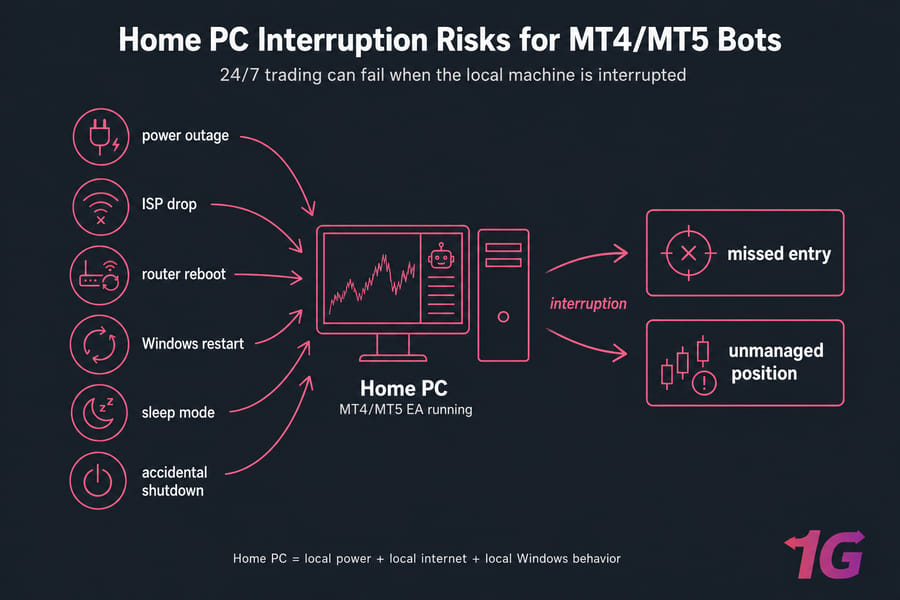
MT4 and MT5 bots can run on either setup. The question is what happens when real life gets in the way — a router reboot, Windows restart, laptop sleep mode, or a power cut at 2 a.m. I've seen traders blame an EA when the actual problem was the machine underneath it.
- Choose a home PC if you're testing, trading on demo, or running a slow strategy you actively supervise.
- Choose a VPS if your bot trades overnight, while you're away, or in latency-sensitive conditions.
- Decide based on uptime, latency, outage risk, and cost — not just raw CPU specs.
If you need background first, start with what a Forex VPS is. If you want the short answer, choose a VPS for 24/7 automation. If you want the right answer for your strategy, compare the trade-offs below.
What is a Forex VPS and how does it compare to a home computer?
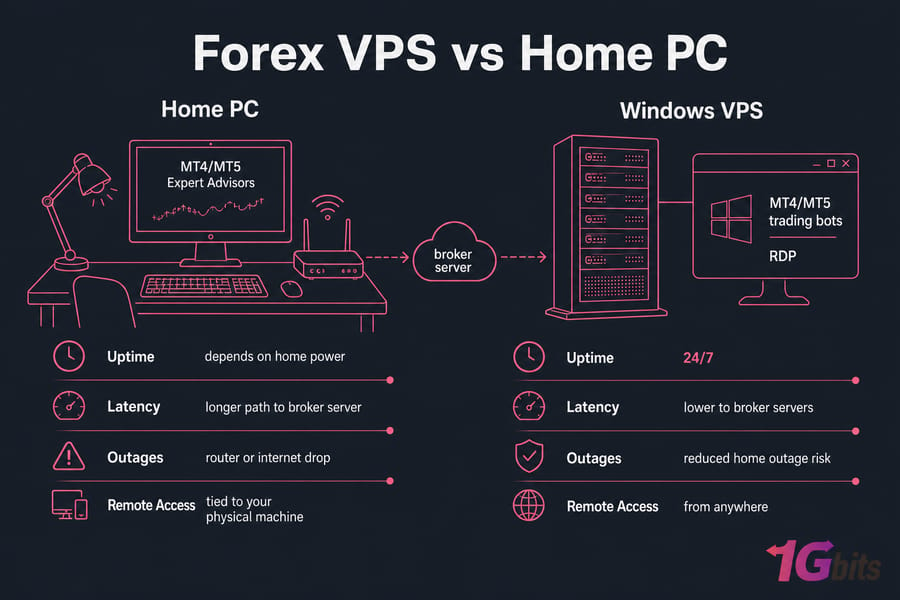
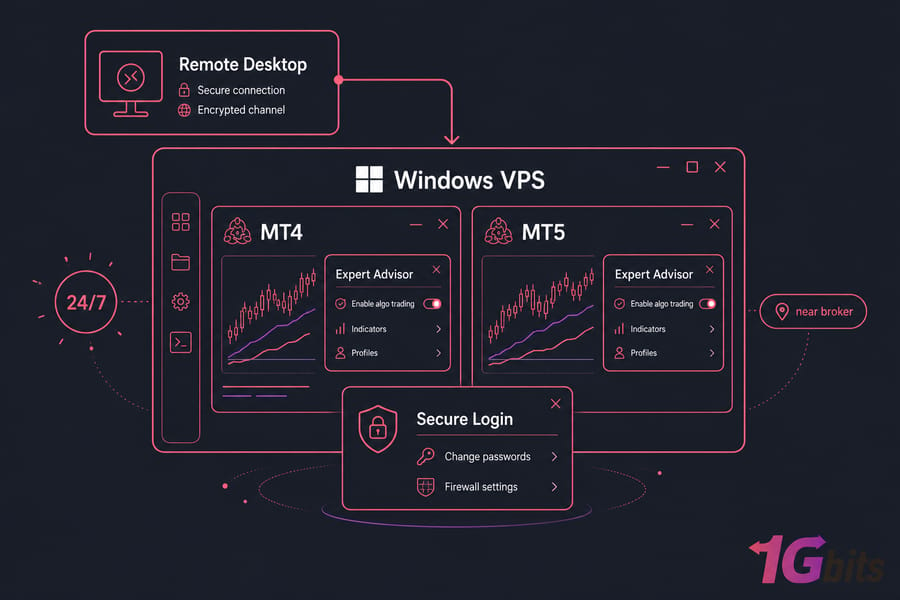
A Forex VPS is basically a remote Windows computer running in a data center. You connect to it through RDP (Remote Desktop Protocol), install your MT4 or MT5 terminal, log in, and keep your Expert Advisor running there instead of on your local machine.
A home PC setup is simpler. MetaTrader runs on the computer sitting in your house — desktop or laptop — using your own internet connection, power, router, and Windows environment.
Both setups can run trading robots. Both can host the same EA. That's the part people often miss: a VPS isn't magic. It doesn't make a weak strategy smart. It gives the strategy a steadier place to run.
The core difference is this:
- Home PC: local machine, local internet, local power, easier to access physically.
- Forex VPS: hosted machine in a data center, usually closer to the broker server, designed to stay on continuously.
So what does this actually mean in practice? A Windows VPS separates your MT4/MT5 terminal from your daily life. You can shut your laptop, travel, or lose home internet, and the VPS may still keep the bot running. That's the appeal.
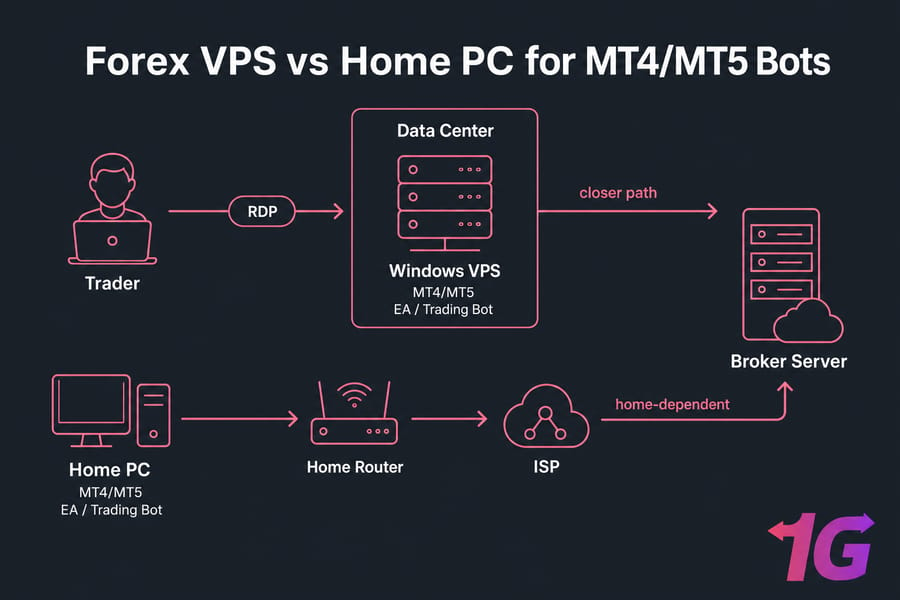
And yes, proximity matters. If your VPS is in or near the same region as your broker server, order requests usually take a shorter network path. Not always dramatically shorter, but often enough to matter for active systems.
Forex VPS vs home PC comparison table for trading bots
Here's the snapshot version. This is the section most traders need first.
| Factor | Forex VPS | Home PC | Best Choice |
| Uptime | Usually higher, built for always-on use | Depends on your device, power, and internet | Forex VPS |
| Latency to Broker | Can be lower if hosted near broker server | Depends on your ISP route and location | Forex VPS |
| Power Outage Risk | Lower in data center environments | High if your home loses power | Forex VPS |
| Internet Outage Dependency | Keeps running even if your home internet drops | Stops or disconnects if home internet fails | Forex VPS |
| Windows Updates | Still relevant, but easier to schedule and manage | Can restart during personal use or idle periods | Forex VPS |
| Remote Access | Easy through remote desktop from anywhere | Usually tied to the physical machine | Forex VPS |
| Maintenance | Some setup required, but isolated from daily PC use | Feels familiar, but you manage everything locally | Depends on user |
| Cost | Monthly hosting fee | No direct hosting bill, but hidden costs exist | Depends on use case |
| 24/7 Trading Suitability | Strong | Weak to moderate | Forex VPS |
| Multiple Terminals/Accounts | Better for several MT4/MT5 instances | Possible, but resource strain builds faster | Forex VPS |
| Security Exposure | Needs proper hardening and password hygiene | Exposed to local use, browsing, and accidental changes | Depends on discipline |
Quick takeaway? A home PC wins on familiarity and can be good enough for light use. A VPS wins on uptime, distance to the broker, remote access, and 24/7 suitability. If you're also comparing hosting types, see Forex VPS vs regular VPS.
Latency and execution speed: does a low latency Forex VPS matter?
Latency is the time it takes for data to travel between your MetaTrader terminal and the broker server. Usually you'll see it discussed as ping, measured in milliseconds.
Lower ping can help. But it doesn't matter equally for every trader.
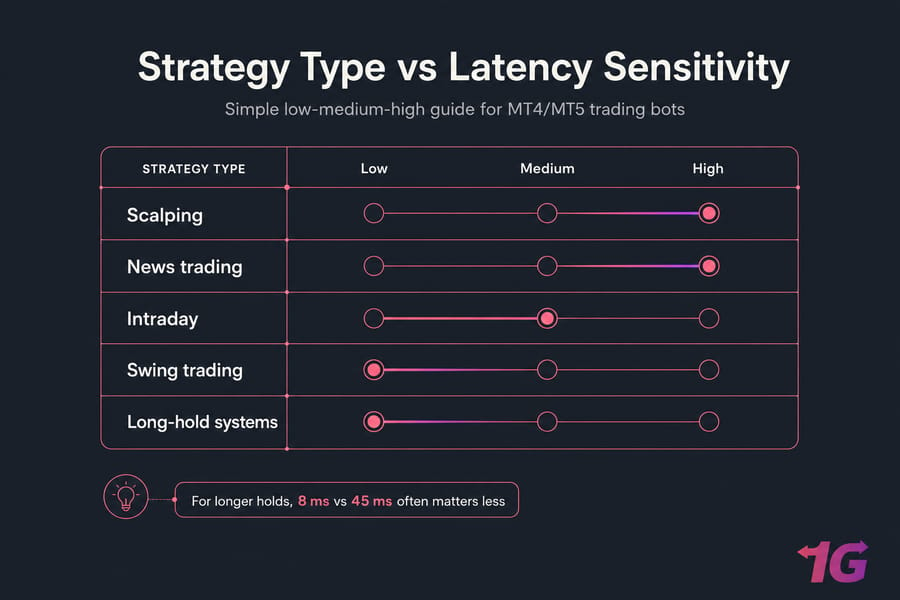
If you scalp, latency matters a lot more. Same story for news trading, short-hold intraday systems, or EAs that fire on tight conditions and need fast order transmission. A few extra hops, unstable routes, or packet loss can turn a clean entry into slippage or a missed fill.
If you swing trade, though, the picture changes. If your bot holds positions for hours or days, a difference between 8 ms and 45 ms probably won't decide the trade. Reliability may matter more than raw execution speed.
That's why I tell people to separate two questions:
- Do I need lower latency?
- Do I need stable, always-on hosting?
Sometimes the answer is both. Sometimes only the second one really matters.
Broker proximity is simple: the closer your VPS is to the broker server, the shorter the network path often is. Not guaranteed, because routing isn't perfectly geographic, but it's a good rule of thumb. Choose a VPS location close to your broker, not close to your couch.
Packet loss matters too. This gets less attention than ping, but it shouldn't. A "fast" connection with unstable routing can still cause ugly execution behavior. That's one reason a data center connection often feels more consistent than home broadband.
A VPS improves hosting conditions, not strategy quality. That's worth repeating. A bad EA on a low latency Forex VPS is still a bad EA.
If you want more depth on this piece, read why lower ping matters for Forex VPS.
Uptime and reliability: why Forex VPS uptime beats a home PC
Latency gets the headlines. Uptime is what quietly saves accounts.
Most home PC failures aren't dramatic. They’re boring. And expensive.
Your EA can stop because of a power outage, internet outage, router reset, Windows restart, sleep mode, hibernation, or someone in your house shutting the machine down. Laptops are especially risky here. Close the lid, battery dies, Windows applies updates overnight — now your MT4 or MT5 terminal isn't doing anything.
That's the real difference in live automation. A bot doesn't care that your local setup was "mostly fine." It only needs one interruption at the wrong time.
Trading-specific downtime problems usually look like this:
- missed entries because the terminal was offline
- missed exits because the EA never saw the signal
- open positions left unmanaged
- duplicate or delayed actions after reconnects
- confusion about whether the strategy failed or the infrastructure failed
In a data center, the environment is usually better built for continuity. Redundant power, stronger networking, and hardware dedicated to staying online all day are the point. Not perfection — VPS nodes can fail too — but generally a more resilient setup than a spare PC under your desk.
That's also why why VPS is used in forex trading comes back to the same theme over and over: uninterrupted access to the trading platform matters when markets move while you sleep.
If your EA trades around the clock, this decision gets easier. For 24/7 trading, a home PC becomes the weak link surprisingly fast. A quality Forex VPS hosting setup is designed for exactly that kind of unattended workload, with remote access via RDP and infrastructure tuned for always-on use.
Quick checklist: if any of these are true, you're exposed on a home PC:
- your area gets occasional power cuts
- your ISP drops briefly during the week
- you use Wi-Fi instead of a wired connection
- your trading machine doubles as your everyday computer
- you rely on a laptop
- you don't monitor Windows restart behavior
- your bot runs overnight or across multiple sessions
Cost, maintenance, and control: Forex VPS vs running bots on your own PC
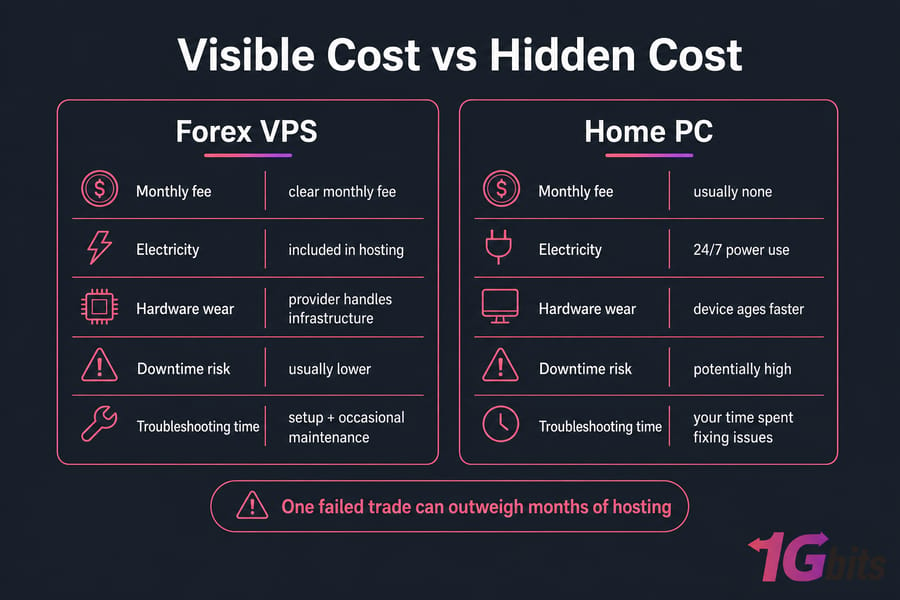
The visible VPS cost is obvious: a monthly bill. That's why many traders hesitate.
But home PC trading isn't free. It just hides the bill better.
| Cost Factor | Home PC | VPS | Notes |
| Monthly Fee | Usually none | Yes | VPS cost is clear and predictable |
| Electricity | Continuous if left on 24/7 | Included in hosting | Often overlooked at home |
| Hardware Wear | Your device ages faster | Provider handles infrastructure | Especially relevant for laptops |
| Downtime Risk | Potentially high | Usually lower | One failed trade can outweigh months of hosting |
| Your Time | Troubleshooting local issues | Setup plus occasional maintenance | Time cost is real, honestly |
A home PC feels like more control because it's physically yours. Fair enough. But that same closeness is often the problem — browsing, gaming, random software installs, user logouts, and accidental reboots all happen on personal machines.
A Windows VPS gives you separation. Trading lives in its own box. You access it remotely, you can back it up, and you can monitor it without tying it to your day-to-day computer. That's cleaner.
If you want less hands-on server work, managed hosting may appeal to you. If not, read the trade-offs in managed vs unmanaged VPS hosting. And if cost is your main concern, the smarter question isn't "Is a VPS cheaper?" but "Is my strategy exposed enough to justify it?"
When a home PC is enough for automated forex trading
Now here's the part many hosting articles skip: yes, a home PC can absolutely be enough in some cases.
It may be fine if:
- you're testing a new EA on a demo account
- you trade infrequently and if you swing trade
- you supervise positions manually at least a couple of times a day
- your bot does not depend on overnight execution
- your local power and internet are genuinely stable
- you use a desktop with proper Windows power settings, not a sleepy laptop
For a beginner testing one robot, a local PC is often the sensible first step. No extra hosting bill. Less complexity. Easier learning curve. Same goes for someone learning forex trading for beginners before going live with automation.
But be strict with yourself. "Stable enough" isn't the same as "safe for unattended trading."
Home PC readiness checklist:
- desktop machine, not laptop
- wired internet, not flaky Wi-Fi
- sleep and hibernation disabled
- Windows updates controlled
- you can keep the machine on continuously
- you don't mind monitoring trades yourself
If you're just learning how a forex trading robot works, local testing is perfectly reasonable. If your situation doesn't match most of those conditions, a VPS is usually the safer move.
When a Forex VPS is the better choice for Expert Advisors
Use a VPS if any of this sounds like your trading:
- you run bots unattended
- you trade overnight or across global sessions
- if you scalp or trade news bursts
- you run multiple EAs or several MetaTrader accounts
- you're often away from your desk
- you care about consistency for funded or challenge-style trading
This is where MT4 VPS hosting, MT5 VPS hosting, and broader VPS for trading plans make sense. You're not buying magic profits. You're removing local hardware and home connectivity from the chain.
For Expert Advisors, the best VPS setup usually means a Windows environment, enough RAM for your terminals, SSD or NVMe storage, decent CPU headroom, and a server location close to your broker. That's the practical formula.
Need 24/7 uptime for your MT4 or MT5 bot?
If your Expert Advisor trades overnight, during news events, or across multiple sessions, a home PC can become the weakest link. A low-latency Forex VPS gives your bot a more stable always-on environment with easier remote access.
Best setup by trader type: scalpers, swing traders, and bot beginners
Not every trader needs the same infrastructure. Good. That means you don't have to overbuy.
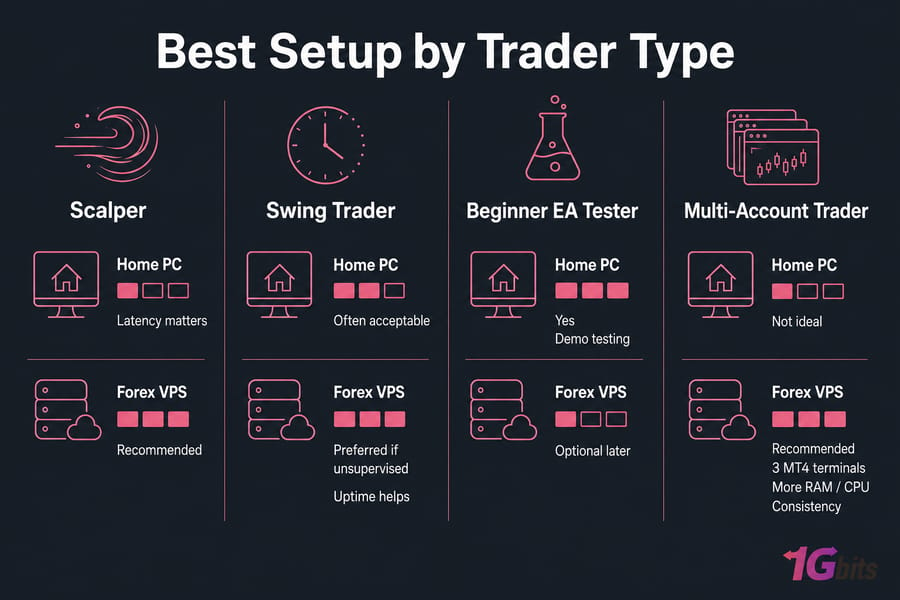
| Trader Type | Home PC? | VPS? | Why |
| Scalper trading London/NY overlap | Possible but not ideal | Strongly recommended | Latency, uptime, and broker proximity matter more |
| Swing trader checking twice daily | Often acceptable | Preferred if unsupervised | Latency matters less, but uptime still helps |
| Beginner testing one EA on demo | Yes | Optional later | Lower risk, easier setup, cheaper starting point |
| Trader running 3 MT4 terminals | Risky on average PC | Recommended | More RAM, CPU, and stability needed |
| Multi-account or funded account trader | Not ideal | Recommended | Consistency and isolation matter more |
Here's the simple if/then version:
- If you scalp, use a VPS. This is the clearest recommendation in the whole article.
- If you swing trade, a home PC may work. But once the system runs unattended, I still lean VPS.
- If you're a beginner testing an EA, start on your PC. Learn the bot before you add hosting complexity.
- If you run multiple EAs, use a VPS. Several charts and terminals chew through RAM and CPU faster than people expect.
For strategy ideas and context around forex algorithmic trading, that path is worth reading next. And if you're comparing providers, check the best Forex VPS options.
How to move MT4 or MT5 from a home PC to a Forex VPS
Moving over isn't that hard. People imagine it's a big migration. Usually it's more like setting up a second Windows machine.
- Choose a Windows VPS near your broker. Location first, then resources.
- Connect with RDP. Log in to the server like a remote desktop PC.
- Install MT4 or MT5. If needed, use this guide to download MT4 safely.
- Transfer your Expert Advisor, indicators, and profiles. Copy the exact files and folder structure carefully.
- Log in to your trading account. If you're new to that part, here's how to log in to MT4.
- Enable algo trading and test. Start on demo or with tiny live exposure first.
- Secure the server. Change passwords, review firewall settings, and follow this Forex VPS security checklist.
- Plan for restart behavior and backups. Know what happens after a reboot, and keep copies of your setup.
If you want the full walkthrough, use how to set up a VPS for forex robot trading. For MetaTrader compatibility, a Windows VPS is the usual path.
Common mistakes when choosing between a Forex VPS and home PC
These are the ones I see over and over:
- Choosing on monthly price alone. A cheap setup that misses exits isn't cheap.
- Ignoring server location. Broker distance affects latency more than many traders realize.
- Assuming home internet is stable enough. Short drops still break automation.
- Using a laptop. Sleep mode is a silent killer for bots.
- Underestimating RAM and CPU needs. Multiple charts, indicators, and EAs add up fast.
- Not securing the VPS. Windows boxes exposed to the internet need basic hygiene.
- Confusing generic specs with trading suitability. For this niche, uptime and location often beat flashy numbers.
If performance tuning becomes an issue, read about common VPS performance bottlenecks. And for safer deployment, the security checklist should be mandatory reading.
Final recommendation
Here's my honest take. For Forex VPS vs Home PC for Running Expert Advisors and Trading Bots, the home PC is fine for learning, testing, and some slow, supervised strategies. But for live unattended automation, a VPS is usually the better choice.
Scalpers: use a VPS. Swing traders: a home PC can work, but a VPS is still the safer option if the bot runs while you're away. Beginners testing one EA: start local if you want, then migrate once the system proves itself. Multi-account traders: go straight to VPS.
Choose the right setup before your bot goes live
A home PC can be enough for testing, but most traders running live automated strategies benefit from the uptime, proximity, and reliability of a dedicated Forex VPS. If you're ready to move off your local machine, 1Gbits offers Forex VPS, MT4 VPS, and MT5 VPS plans built for trading performance, with low-latency locations, remote access via RDP, Windows VPS availability, and 24/7 support. View:

Leave A Comment