
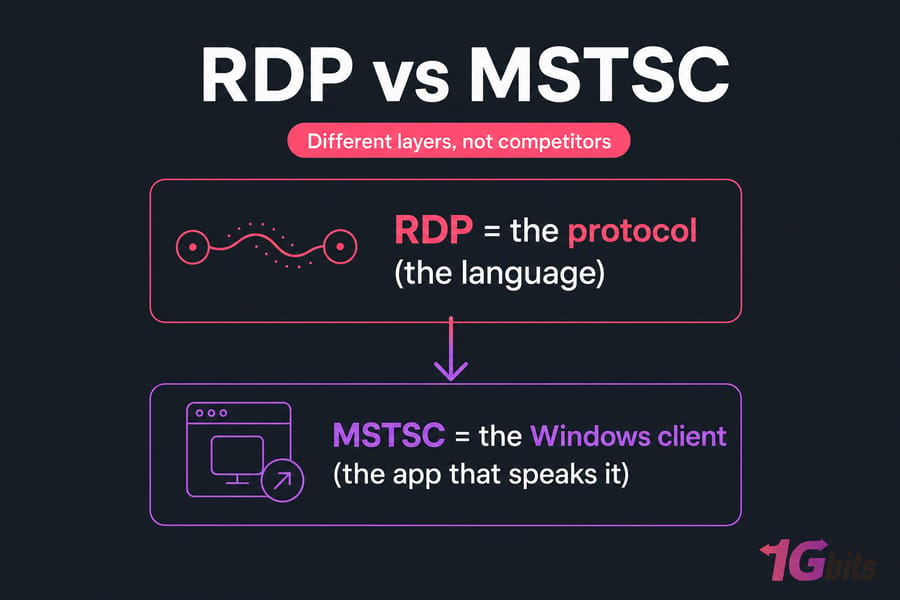
In today's interconnected world, remote access to computers and servers has become an essential aspect of many businesses. This is where technologies like Remote Desktop Protocol (RDP) and Microsoft Terminal Services Client (MSTSC) come into play. But here's the thing most articles get wrong: RDP and MSTSC aren't competing products, so asking "which is better" is like asking whether a language is better than a phone. They live on different layers of the same connection.
RDP (Remote Desktop Protocol) is Microsoft's protocol for carrying a remote session — screen, keyboard, mouse, audio — across a network. MSTSC (Microsoft Terminal Services Client, the file mstsc.exe) is the built-in Windows client application that uses RDP to connect you to a remote machine. You launch MSTSC to start an RDP session. That's the whole relationship. This guide covers how they work together, how to use MSTSC, the command-line switches worth knowing, security, cross-platform access, and the problems that trip people up.
📊 RDP vs MSTSC: Quick Comparison Table
| Attribute | RDP | MSTSC |
| What it is | A remote display protocol | A Windows RDP client application |
| Full name | Remote Desktop Protocol | Microsoft Terminal Services Client |
| Role | Transports session input and output | Starts and configures an RDP connection |
| Developer | Microsoft | Microsoft |
| Runs on | Implemented by compatible clients and hosts | Windows |
| Default port | TCP/UDP 3389 by default | Uses the destination RDP configuration |
| Cross-platform | Supported by many client/server implementations | MSTSC itself is Windows-specific |
| Security | NLA, TLS, certificates, gateway controls | Exposes connection and authentication options |
| Alternatives | Not applicable at the same layer | Windows App, FreeRDP, Remmina |
💻 What is Microsoft Terminal Services Client (MSTSC)?
.jpg)
Microsoft Terminal Services Client, commonly known as MSTSC or Remote Desktop Connection, is the app you've probably used without knowing its real name. Type mstsc into the Run box and up pops Remote Desktop Connection. The odd acronym is a leftover from the Terminal Services era — "Microsoft Terminal Services Client." MSTSC is the built-in Windows client application that uses RDP to connect you to a remote machine. It provides a graphical interface to access and control the remote computer, essentially allowing users to work on a remote system as if they were physically present in front of it.
Through its Show Options panel, MSTSC lets you tweak display resolution, audio playback, clipboard sync, local drive access, printers, smart cards, and multi-monitor spanning. Not every redirection feature works in every environment — the host and group policy can disable them.
Advantages of MSTSC
- Widely supported across different versions of Windows, ensuring compatibility and ease of use.
- Provides a seamless experience by transmitting both video and audio output from the remote machine.
- Shares local resources with the remote machine — transfer files, printers, and smart card readers between devices.
- Supports multiple monitors, allowing users to extend their desktop across multiple screens.
Disadvantages of MSTSC
- Primarily designed for Windows-based systems — not ideal for connecting to Linux servers directly.
- May not perform optimally in low-bandwidth or high-latency network environments.
🌐 What is Remote Desktop Protocol (RDP)?
.jpg)
Remote Desktop Protocol, commonly known as RDP, is a proprietary protocol developed by Microsoft for remote access to Windows-based systems. RDP is the protocol that makes remote control feel local — it carries screen updates from the host, sends your keyboard and mouse input back, and when configured, moves audio, clipboard contents, printers, and drive redirection across the wire. If you're interested in learning more about the protocol itself, take a look at our article titled "What is a Remote Desktop Protocol."
Three things worth separating in your head: the protocol itself, the host service that listens for connections, and the client software that dials in. RDP is only the middle language. By default the RDP service listens on TCP and UDP port 3389, though that can be changed. For the full picture, see our guide on the default RDP port.
Advantages of RDP
- Provides robust security features, including encryption and authentication mechanisms.
- Supports a wide range of Windows operating systems, allowing connections to various versions.
- Versatile and cross-platform — can connect to Linux servers using third-party clients.
- Known for its efficient use of network resources, suitable for low-bandwidth or high-latency connections.
Disadvantages of RDP
- Primarily designed for remote access to individual computers rather than multiple users simultaneously on desktop editions.
- Dependency on Windows — while clients exist for other platforms, full functionality is best experienced on Windows-based systems.
🔗 How RDP and MSTSC Work Together
The connection chain looks like this:
Local device → MSTSC (RDP client) → network or RD Gateway → RDP service on the remote host → your Windows session
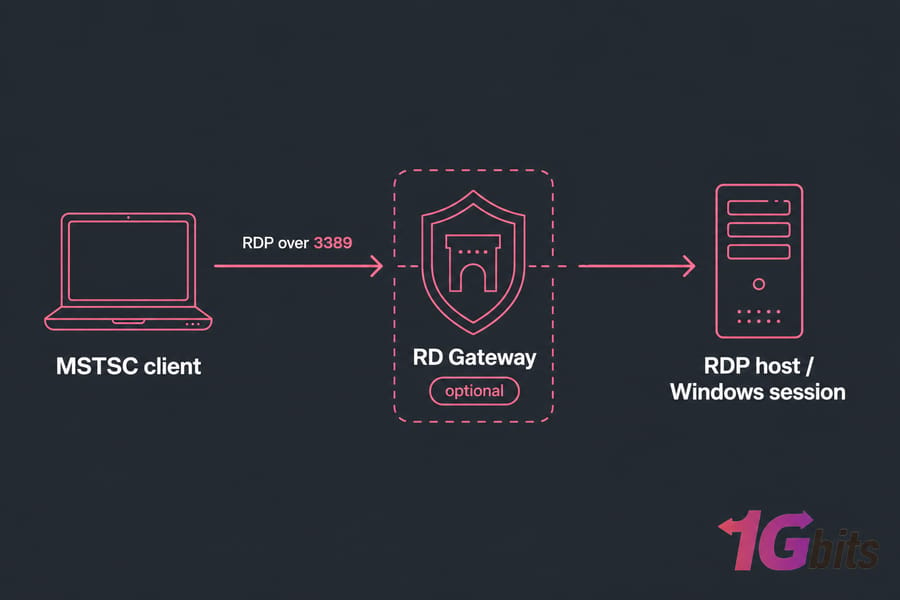
The key difference between RDP and MSTSC lies in their scope: RDP is the underlying protocol used for remote access, while MSTSC is the client software that provides the user interface for connecting to and interacting with remote machines using RDP. In simple terms, RDP is the technology that enables remote access, and MSTSC is the application that allows users to utilize this technology. You open MSTSC, type an address, and hit Connect. MSTSC speaks RDP to the host, the host authenticates you, and then it streams a live Windows session back.
🛠️ How to Open and Use MSTSC on Windows
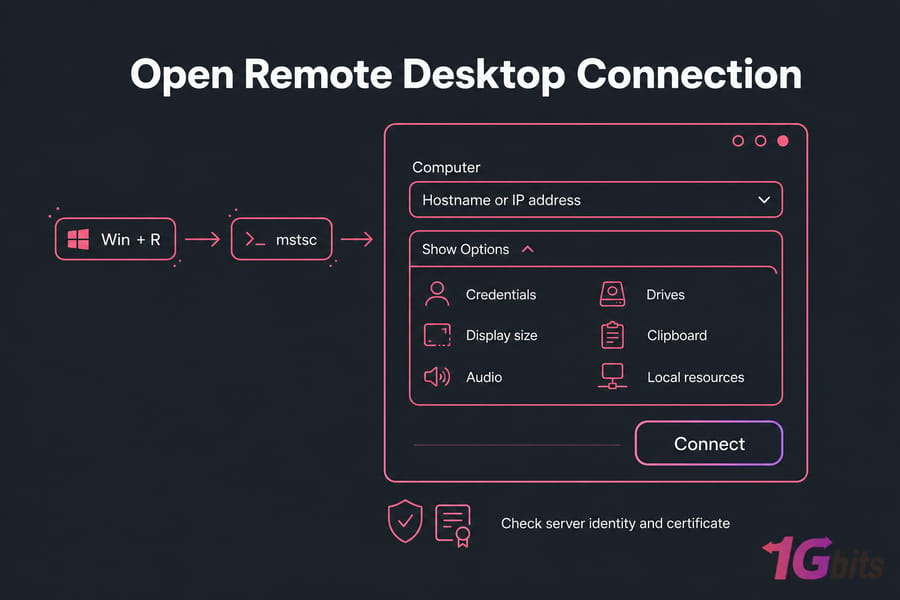
- Press
Win + R. - Type
mstscand press Enter. - Enter the remote computer's hostname or IP address.
- Click Show Options to set credentials, display size, audio, drives, clipboard, and other local resources.
- Click Connect.
- Check the server identity and certificate before you continue.
📋 Useful MSTSC Commands and Options
| Command | Purpose |
mstsc |
Opens Remote Desktop Connection |
mstsc /v:host |
Connects directly to a named host |
mstsc /f |
Starts in full-screen mode |
mstsc /multimon |
Uses multiple monitors |
mstsc /admin |
Connects for server administration |
mstsc file.rdp |
Opens a saved connection profile |
/admin connects to an administrative session on a server, but it doesn't skip credentials, permissions, or licensing. And .rdp files are just saved profiles — hostname, display settings, redirection choices — that you can double-click to reconnect.
🔒 RDP and MSTSC Security Best Practices
Let's be honest about something. RDP can be secure, but exposed or sloppily configured RDP is one of the most attacked surfaces on the internet. "Robust security out of the box" is a myth.
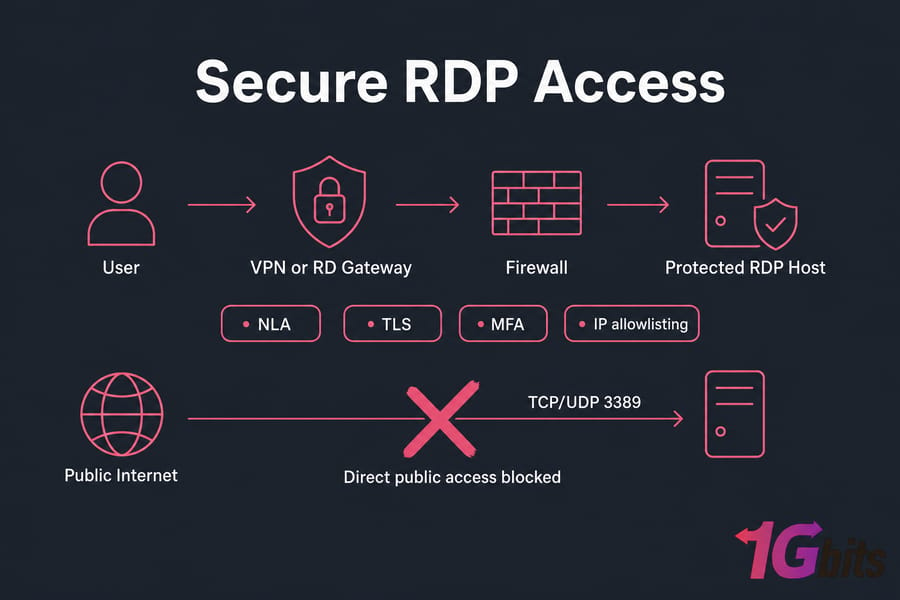
- Network Level Authentication (NLA) — forces authentication before a session even loads. Keep it on.
- TLS and certificate validation — verify the host certificate; don't blindly click through warnings.
- RD Gateway, VPN, or zero-trust access — gate RDP behind one of these instead of opening 3389 to the world.
- MFA where a compatible gateway or identity provider supports it.
- Firewall rules and IP allowlisting — limit who can even reach the port.
- Account lockout policies and brute-force monitoring.
- Patch both client and host, and disable redirection features you don't use.
Changing the RDP port cuts down commodity scanner noise, but it's defense-in-depth at best — attackers scan all ports.
🐧 Can MSTSC Connect to Linux or macOS?
Yes — with a caveat. MSTSC runs on Windows only. But it can connect to a Linux machine if that box runs a compatible RDP server like xrdp. RDP support on the host is a separate thing from where the client runs. Linux users can't run the native mstsc.exe. Instead they reach for FreeRDP or Remmina. Mac users have Microsoft's own client. We cover this in our RDP client for Linux guide. If you're deciding between protocols for Linux access, understand the difference between RDP and SSH first — they serve different purposes. For a pre-configured Linux environment with RDP access, an Ubuntu RDP server gives you a ready-to-use remote desktop without manual setup.
📝 RDP Licensing and Multiple User Sessions
Another oversimplification worth killing: "RDP only supports one user." That depends entirely on the host. Windows desktop editions (Pro, Enterprise) allow remote administration but limit interactive sessions. Windows Server with Remote Desktop Services can host many concurrent user sessions. Multi-user deployments typically need the right RDS roles plus Client Access Licenses (RDS CALs). For a deeper comparison of how these architectures differ, see our guide on RDS vs RDP.
⚠️ Common MSTSC and RDP Problems
- Remote computer can't be reached — confirm the host is on, reachable, and has Remote Desktop enabled.
- Port 3389 is blocked — check firewall rules and network reachability along the path.
- Credentials or NLA rejected — verify the username, password, and NLA compatibility on both ends.
- User isn't authorized — the account must be in the Remote Desktop Users group or equivalent.
- Certificate warnings — expected on self-signed hosts; verify identity before trusting.
- Slow or unstable session — performance depends on graphics, redirection, codec, and network quality. For tuning tips, check our guide on RDP performance optimization.
🆚 Should You Use MSTSC or Another RDP Client?
Now this is the genuine choice. Here's how to break it down:
- MSTSC — perfect for straightforward Windows-to-Windows administration. Built in and reliable.
- Windows App / Microsoft Remote Desktop — better for managed cloud resources and newer Microsoft workflows.
- Remmina or FreeRDP — when you're connecting from a Linux desktop.
- RD Gateway or VPN + RDP — for controlled business access from outside the network.
- VDI/RDS — for centralized, multi-user desktop or app delivery. See how VDI vs RDP compares for virtual desktop infrastructure.
1Gbits offers a convenient solution for businesses looking to Buy RDP Server, providing a reliable and secure platform for remote access to servers. If you're deciding between deployment models, our guide to private RDP vs shared RDP helps you pick the right level of isolation. For traders who need low-latency access to MetaTrader platforms, a dedicated Forex RDP environment keeps your trading bots online 24/7. Check our RDP service now to find the ideal solution for your remote connectivity needs.
🏁 Final Words
RDP is the protocol. MSTSC is the Windows client that uses it. There's no "winner" because they operate at different layers — you use MSTSC to open an RDP connection, full stop. The decision that actually matters is which client and which secure host architecture suit your setup. The choice depends on factors such as platform compatibility, security, and network efficiency. Assess your needs and priorities, and consult with experts to make an informed decision that aligns with your business goals and objectives.

Leave A Comment