
If you're spinning up a new VPS today and torn between Ubuntu, CentOS, and Rocky Linux, here's the short version: Ubuntu LTS is the best pick for most users, Rocky Linux is the right call if you want RHEL-style stability, and CentOS is generally not a smart choice for new VPS deployments anymore. That last one surprises a lot of people, but it shouldn't the CentOS landscape changed dramatically a few years back, and not in the direction long-time users hoped for.
I've deployed all three on production VPS instances over the years, and the differences that actually matter aren't the ones most blog posts obsess over. Forget benchmarks. The real questions are: how easy is it to find help, how predictable are updates, will your control panel cooperate, and will this OS still be reasonable to maintain in three years? Before diving into the comparison, it helps to understand what is a Linux distribution and how these three fit into the broader ecosystem.
Let's get into it.
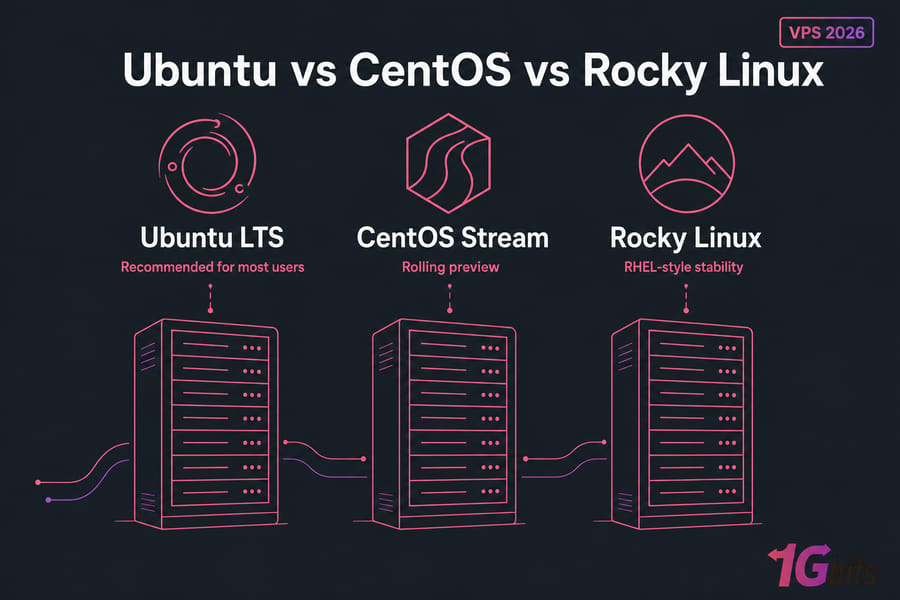
Ubuntu vs CentOS vs Rocky Linux at a glance
All three are Linux distributions you can install on a VPS, but they come from different families and serve different audiences. Ubuntu is Debian-based, maintained by Canonical, and built around predictable LTS releases. Rocky Linux is a community-driven, RHEL-compatible distro that picks up where the original CentOS left off. CentOS today means CentOS Stream — a rolling preview of what's coming to Red Hat Enterprise Linux, which is a very different beast from the CentOS Linux many admins remember. If you're new to Ubuntu specifically, our introduction to what is Ubuntu covers the essentials.
Quick verdict for most VPS users
If you're a beginner, a developer, or running a typical web stack — pick Ubuntu LTS. If you're an admin who lived in the CentOS/RHEL world and wants that same workflow without the lifecycle drama, go Rocky Linux. If you're considering a fresh CentOS install in 2026, stop and reconsider. There's almost always a better option.
Comparison table: support, stability, packages, and ease of use
| Factor | Ubuntu LTS | Rocky Linux | CentOS Stream |
| Base / Family | Debian-based | RHEL-compatible (downstream) | RHEL upstream preview |
| Package Manager | APT | DNF / YUM | DNF / YUM |
| Support Lifecycle | 5 years (10 with Pro) | ~10 years per major release | ~5 years, rolling updates |
| Beginner Friendly | Excellent | Moderate | Moderate |
| Stability Philosophy | Conservative LTS | Very conservative | Rolling, faster moving |
| Developer Tooling | Strong, modern | Solid, sometimes older | Newer than Rocky, less stable |
| Control Panel Fit | Plesk, Webmin, CyberPanel | cPanel, Plesk, Webmin | Limited cPanel support |
| Recommended for new VPS? | Yes | Yes | Generally no |
Want to dig into the broader picture before zooming into the comparison? Our overview of VPS operating systems is a good companion read, and if you're shopping commercial options, the guide to the best Linux VPS hosting covers the wider landscape.
Before we go further, you need to understand what actually happened with CentOS because that one event reshaped this whole comparison.
CentOS Stream vs Rocky Linux and why CentOS changed
For roughly a decade, CentOS Linux was the default free server distro for anyone who wanted RHEL behavior without paying Red Hat. Hosting companies loved it. cPanel built around it. Half the tutorials on the internet assumed it. Then Red Hat changed direction.
CentOS Linux end-of-life explained
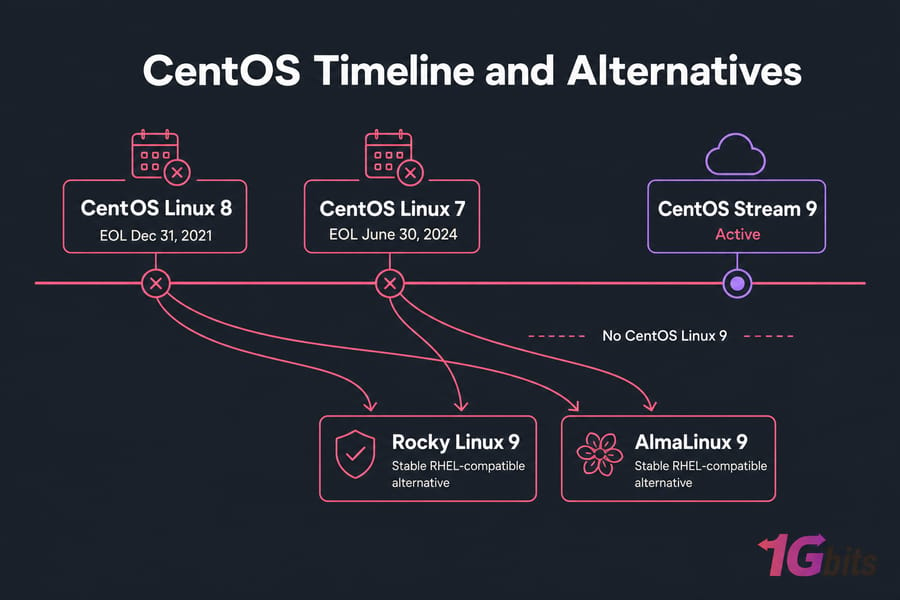
CentOS Linux 8 hit end-of-life on December 31, 2021 years earlier than originally promised. CentOS Linux 7 followed on June 30, 2024. There is no CentOS Linux 9. That's the part a lot of people miss. The "CentOS" you can install today isn't the same product. It's CentOS Stream, and the difference matters.
What CentOS Stream means for VPS users
CentOS Stream sits upstream of RHEL, not downstream. That's a fundamental shift. Old CentOS was RHEL minus the trademarks — rebuilt from RHEL sources after Red Hat shipped them. Stream is the preview branch where changes land before they go into the next RHEL minor release.
For a VPS, that means:
- Updates arrive faster, sometimes before they're battle-tested in RHEL
- Behavior is mostly stable, but not as predictable as a downstream rebuild
- Some commercial software (especially older cPanel deployments) wasn't designed for it
- It's perfectly fine for many workloads just not a drop-in CentOS replacement
Rocky Linux as the modern CentOS
Rocky Linux, founded by one of the original CentOS creators, fills the gap. It's a downstream RHEL rebuild bug-for-bug compatible, stable, and free. AlmaLinux does basically the same thing with slightly different governance. If you want a deeper dive on choosing between them, we've covered AlmaLinux vs Rocky Linux separately, and our overview of what is AlmaLinux explains its place in the post-CentOS world.
When legacy CentOS still appears in hosting environments
You'll still see CentOS 7 in the wild. Some hosts offer it. Some legacy applications were certified against it. Some teams haven't migrated yet. None of those are reasons to pick it for a fresh VPS today. They're reasons to plan a migration off it. Background reading: what is CentOS historically and how it got here.
Warning: Don't treat CentOS Linux and CentOS Stream as the same thing. They're not. The name is similar; the update model isn't.
If you're choosing a fresh VPS image today, the real practical comparison is usually Ubuntu vs Rocky Linux.
Ubuntu for VPS hosting: benefits, drawbacks, and best use cases
Ubuntu is the default I recommend to about 70% of people who ask me what to put on their VPS. Not because it's objectively superior — but because it minimizes friction, and friction is what kills server projects.
Why Ubuntu LTS is popular on VPS servers
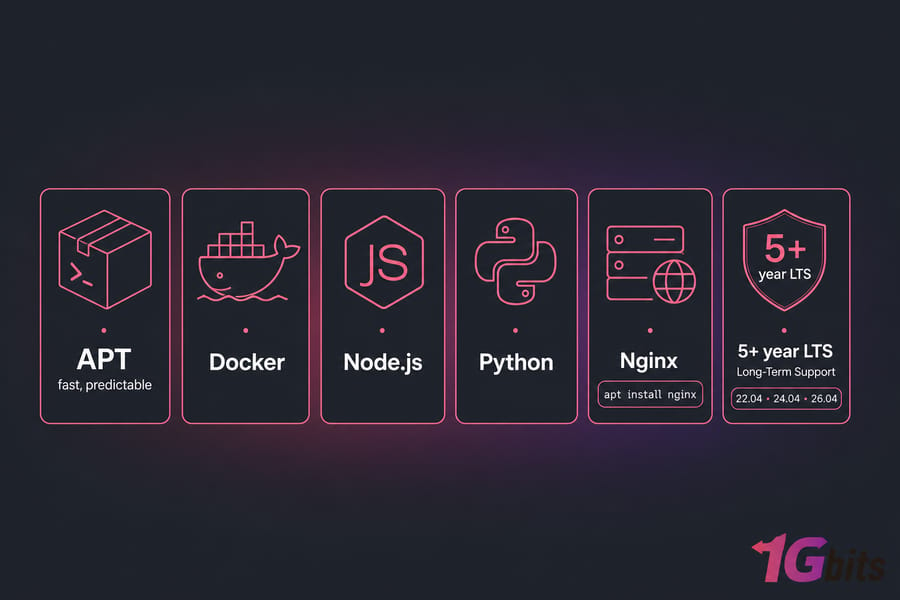
Long-Term Support releases ship every two years (22.04, 24.04, 26.04…) and get five years of standard updates, with extended support available through Ubuntu Pro pushing it to ten. That's a long enough runway for most projects to either reach maturity or migrate cleanly.
The bigger advantage is the ecosystem around it:
- Massive tutorial library almost every Linux how-to assumes Ubuntu
- Excellent cloud and container support; most Docker images are Debian/Ubuntu-based
- Modern packages for Node.js, Python, PHP, Go, Rust without exotic third-party repos
- APT is fast, predictable, and well-documented
- Strong default security posture (UFW, AppArmor, unattended-upgrades)
Ubuntu package ecosystem, APT, and developer tooling
If you're running anything modern a Node.js API, a Django app, a Laravel site, a Postgres database, a Docker Compose stack Ubuntu just works. The packages are current. The community examples match what you have installed. Want Nginx?
apt install nginx
We've covered the full walkthrough in how to install Nginx on Ubuntu if you need the step-by-step.
For a fresh VPS, picking the right LTS version matters too our guide to the best Ubuntu versions walks through which release fits which workload.
Where Ubuntu can be a weaker fit
Ubuntu isn't the right answer for everyone. Honest tradeoffs:
- cPanel doesn't fully support Ubuntu the way it supports EL distros. If you're running a traditional reseller hosting business, Rocky is the better fit.
- Some enterprise software (certain Oracle stacks, legacy Java apps, RHEL-certified products) expects an EL-based system.
- Faster-moving release cycle means you may upgrade more often than a Rocky admin would.
For more on the trade-offs, our breakdown of Ubuntu pros and cons goes deeper.
Pro tip: If you depend on tutorials, Stack Overflow answers, and rapid prototyping with modern dev stacks, Ubuntu LTS is almost always the fastest path from "fresh VPS" to "working app."
If you'd rather have a more RHEL-like environment, Rocky Linux is probably the better long-term fit.
Rocky Linux for VPS hosting: enterprise stability and RHEL compatibility
Rocky Linux is what a lot of sysadmins wanted CentOS to remain. Stable, predictable, RHEL-compatible, free. If you've spent years writing Ansible playbooks for EL systems or managing yum repos in your sleep, Rocky feels like home.
Why Rocky Linux appeals to production server admins
Rocky's release philosophy is conservative. Major versions get roughly a decade of support. Packages don't change underneath you. When a security patch lands, it's been through Red Hat's QA process before Rocky rebuilds it. That's exactly what you want for a database server, a long-running corporate web app, or anything where "working last Tuesday" should equal "working next Tuesday." This is also the logical landing point if you're migrating from CentOS after its end-of-life.
Strong fits for Rocky:
- Production hosting stacks that need 5+ years of stability
- cPanel/WHM environments (cPanel officially supports Rocky and AlmaLinux)
- Teams already familiar with RHEL, CentOS, or Fedora workflows
- Compliance-sensitive workloads that benefit from RHEL lineage
- Migrations off legacy CentOS 7 or 8 installations
DNF/YUM, enterprise packages, and panel compatibility
Rocky uses DNF (the modern successor to YUM, though both commands work). Package versions are typically older than Ubuntu's by design — you trade newness for stability. If you need a cutting-edge PHP or Node version, you'll add a third-party repo like Remi or NodeSource. That's normal in the EL world.
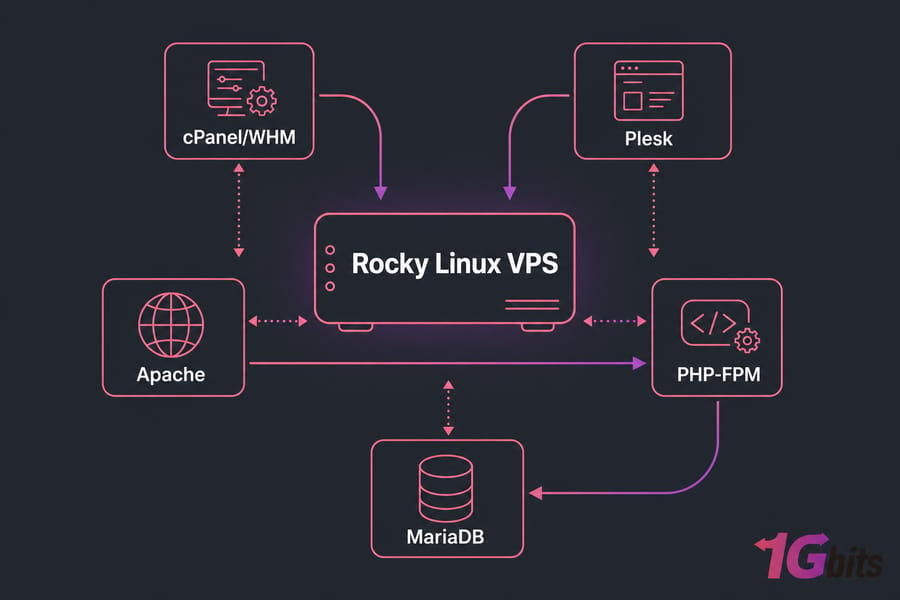
For control panel hosting, Rocky has clear advantages. cPanel has full support. Plesk works. Webmin is straightforward. If your business is shared hosting or reseller hosting, the ecosystem assumes an EL-based system.
Where Rocky Linux can be a weaker fit
Rocky isn't perfect either:
- Smaller tutorial pool than Ubuntu — you'll sometimes adapt Ubuntu instructions
- Default package versions can feel old (this is by design, not a bug)
- Some modern dev tools require enabling extra repositories
- SELinux is more aggressive out of the box, which can frustrate beginners
For a deeper look at what you're getting, see Rocky Linux features and requirements.
Pro tip: If you're migrating away from old CentOS habits, Rocky Linux is the cleanest modern replacement. Most of your existing scripts, playbooks, and muscle memory transfer directly.
Rocky is essentially the modern replacement people wanted from CentOS which raises the obvious question.
CentOS for server workloads: is it still worth using?
Short answer: for new VPS deployments in 2026, no with very narrow exceptions.
CentOS Linux vs CentOS Stream for new installs
You can't install CentOS Linux fresh anymore. CentOS 7 is EOL. CentOS 8 has been EOL for years. What's actually available is CentOS Stream, which is a different product with different update behavior. If you came looking for "CentOS the stable RHEL clone," that doesn't exist under the CentOS name. It exists under the names Rocky and AlmaLinux now.
When CentOS may only make sense for legacy environments
Legitimate reasons to still touch CentOS:
- You inherited a CentOS 7 server and need to keep it running while you plan migration
- An application you can't replace was certified only against CentOS Linux
- You're staging a migration test and need an identical OS to the source
None of those are "start a new project on CentOS" scenarios. They're "manage what already exists" scenarios. If you're on CentOS 7, our guide on upgrading CentOS can help you map out a migration path. You can also check your CentOS version first to confirm what you're working with.
Better alternatives to CentOS for a new VPS
For anyone considering a new install:
- Want stable, RHEL-compatible behavior? Use Rocky Linux or AlmaLinux.
- Want easy, modern, well-documented? Use Ubuntu LTS.
- Specifically want the upstream-of-RHEL preview model? Then CentOS Stream is fine — but go in eyes-open about what it is.
If you're managing existing CentOS infrastructure, our CentOS server resources may still be relevant for maintenance.
For most new deployments, the more useful comparison is Ubuntu vs Rocky Linux on the factors that actually affect everyday server management.
Ubuntu vs Rocky Linux for VPS: key differences that matter
This is the head-to-head most readers actually need. Let's break it down by the things you'll feel day to day.
Ease of use and learning curve
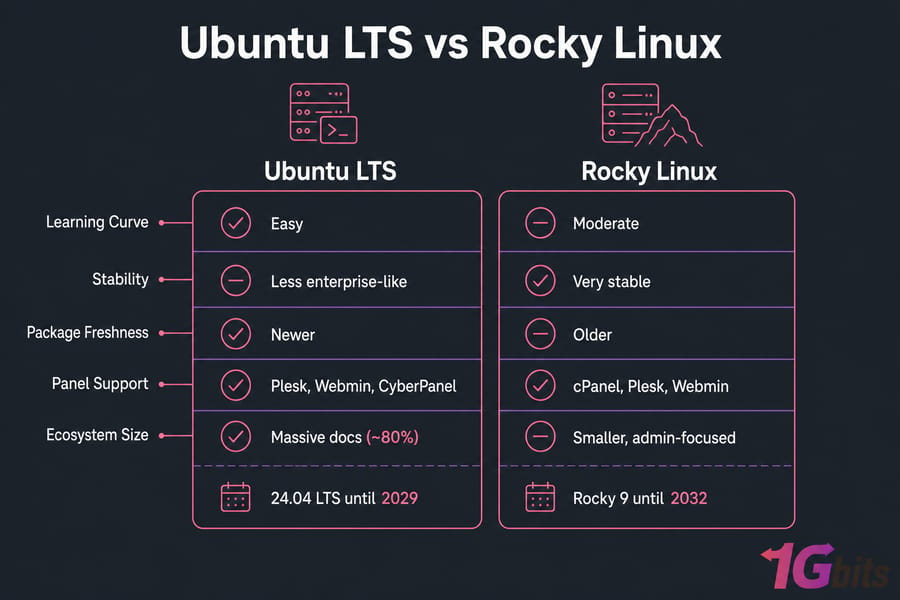
Ubuntu wins for newcomers. The defaults are friendlier, SELinux isn't enabled by default (Rocky has it on), and almost any tutorial you find online assumes Ubuntu. Rocky's learning curve is steeper if you've never managed a Red Hat-family system, but it's not painful just different.
Stability and update model
Both are stable when properly maintained. Rocky errs harder on the side of "don't change anything that works." Ubuntu LTS releases are stable too, but ship newer kernels and userspace by default, which means you get newer features at the cost of slightly more change between point releases.
Software compatibility and control panels
| Software / Use Case | Ubuntu | Rocky Linux | CentOS Stream | Notes |
| Docker | Excellent | Excellent | Good | Both work; Ubuntu has more example images |
| Nginx | Excellent | Excellent | Good | First-party repos available for both |
| Apache | Good | Excellent | Good | Apache + cPanel pairing favors EL |
| Node.js | Excellent | Good | Good | Newer versions land in Ubuntu first |
| Python | Excellent | Good | Good | Ubuntu typically ships newer 3.x |
| PHP | Excellent | Excellent (with Remi) | Good | Both fine for modern PHP-FPM |
| cPanel/WHM | Limited | Full support | Limited | cPanel officially supports Rocky/Alma |
| Plesk | Full support | Full support | Partial | Plesk is distro-flexible |
| Webmin | Full support | Full support | Full support | Distro-agnostic |
Security, support lifecycle, and maintenance
Both ship security patches promptly. Rocky inherits RHEL's security-first heritage; Ubuntu's security team is large and well-funded. Lifecycle-wise, Rocky 9 is supported until 2032, Ubuntu 24.04 LTS until 2029 (or 2034 with Pro). Either gives you plenty of runway.
One thing to clear up: raw OS performance differences on a VPS are minor. I've benchmarked. Configuration, resource allocation, and your application stack matter dramatically more than which distro the kernel ships from. Don't choose based on imagined speed differences. Choose based on workflow fit.
For broader OS context, see choosing the best OS for servers and our Debian vs Ubuntu comparison if you're also considering Debian.
So which distro actually wins for your specific use case?
Best Linux distro for VPS by use case
This is where I get tired of vague answers. Here's what I'd actually deploy in each scenario.
Best VPS OS for beginners
Ubuntu LTS. No contest. The tutorial volume alone settles it. When you Google "how do I do X on a Linux server," roughly 80% of the answers will be Ubuntu-flavored. Match your OS to where the help is.
Best OS for web hosting and control panels
Depends on the panel:
- cPanel/WHM: Rocky Linux (or AlmaLinux)
- Plesk: Either; both fully supported
- CyberPanel, HestiaCP, Webmin: Ubuntu LTS works great
- No panel, custom Nginx + WordPress stack: Ubuntu LTS
Best OS for Docker, development, and modern app stacks
Ubuntu LTS. The container ecosystem is built around Debian/Ubuntu base images. Modern dev tooling (Node 20+, Python 3.12+, Bun, Deno, Rust toolchains) lands in Ubuntu repos faster. If you're building anything containerized, this is the path of least resistance.
Best OS for enterprise-style workloads
Rocky Linux. If your team writes Ansible for EL targets, runs RHEL-certified software, needs SELinux compliance, or is migrating off legacy CentOS — Rocky is the answer. The 10-year lifecycle is a real advantage for systems that need to sit and run.
Recommendation matrix
| Use Case | Best OS | Why |
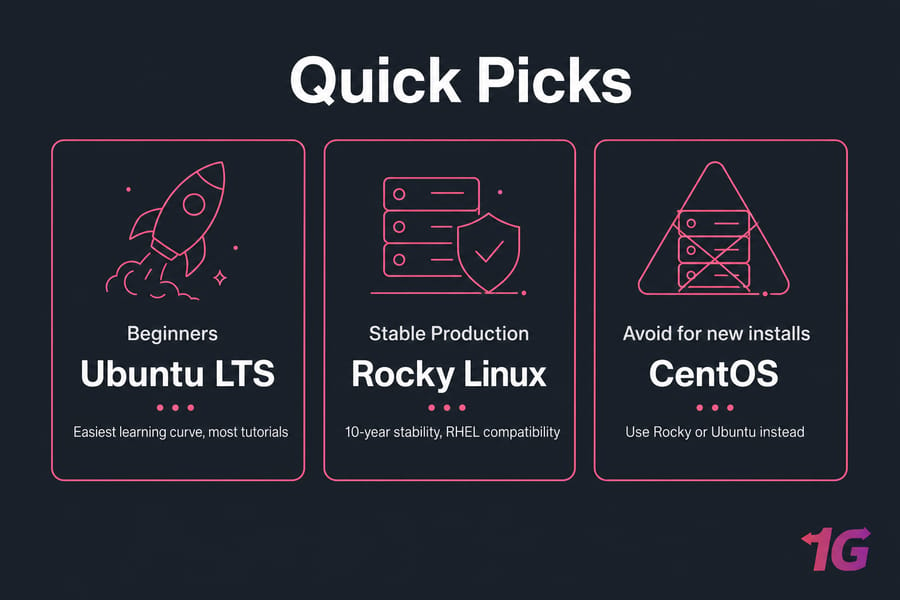
| Beginner's first VPS | Ubuntu LTS | Easiest learning curve, most tutorials |
| WordPress / LEMP stack | Ubuntu LTS | Modern PHP, easy Nginx setup |
| Docker / Node / Python apps | Ubuntu LTS | Container-friendly, current packages |
| cPanel reseller hosting | Rocky Linux | Official cPanel support |
| Long-running enterprise app | Rocky Linux | 10-year stability, RHEL compatibility |
| Legacy CentOS migration | Rocky Linux | Drop-in workflow replacement |
| General-purpose VPS | Ubuntu LTS | Balanced default for most workloads |
| Fresh CentOS install | Avoid | Use Rocky or Ubuntu instead |
Still on the fence? Use this 5-step checklist.
How to choose a Linux OS for your VPS in 5 steps
Run through these in order. By step five, you'll have your answer.
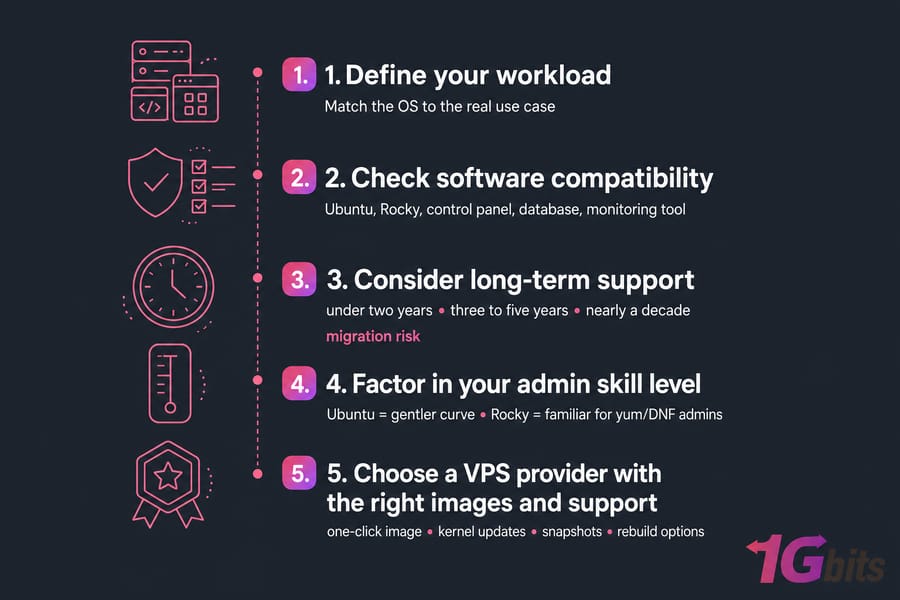
1. Match the distro to your workload
What are you actually running? A WordPress blog, a Node.js API, a cPanel reseller business, a database, a mail server, a game server? Write it down. The workload usually picks the OS for you. WordPress + Nginx + PHP → Ubuntu. cPanel + WHM → Rocky. Custom Docker stack → Ubuntu.
2. Check software and repository needs
Make sure your required software has first-party packages or supported repos for the OS you're considering. Check the official docs of every major piece of software in your stack. If your monitoring tool, your database, and your control panel all officially support both Ubuntu and Rocky, great. If only one supports one of them that's your answer.
3. Consider long-term support and migration risk
How long will this VPS run before a major rebuild? If under two years, either OS works. If three to five years, both are fine. If you want to set it and forget it for nearly a decade, Rocky's lifecycle slightly edges out. Don't pick a distro you'll have to migrate off in 18 months.
4. Factor in your admin skill level
Be honest with yourself. If you've never managed a Linux server, Ubuntu's gentler curve will save you hours. If you've been writing yum commands since 2010, you'll be more productive on Rocky from day one. There's no virtue in choosing the harder path because the internet says it's "more professional."
5. Choose a VPS provider with the right images and support
Make sure your host actually offers the OS you want as a one-click image, with kernel updates, and ideally with snapshots or rebuild options. Our guide on how to choose VPS hosting cover provider selection in detail.
Even with a solid checklist, people make a few avoidable mistakes.
Common VPS operating system mistakes to avoid
I've seen these play out enough times to call them out specifically.
Choosing based on popularity alone
"Ubuntu is most popular, so Ubuntu must be best" not necessarily for your workload. If you're running cPanel, Ubuntu's popularity won't help you. Match the OS to the use case, not to download charts.
Ignoring CentOS lifecycle changes
Some tutorials still recommend "CentOS" as if it's 2018. It's not. CentOS Linux is dead. CentOS Stream is a different product. If a guide tells you to install CentOS 8 today without explaining the EOL situation, the guide is outdated. Trust newer sources.
Overlooking panel or package compatibility
Don't pick the OS first and then discover your control panel doesn't support it. Pick the panel and stack first, then choose the OS that supports them best. This sounds obvious but it bites people every week.
Confusing "stable" with "easier"
Rocky is stable. It's not necessarily easier. Stability means packages don't change underneath you it doesn't mean the system holds your hand. Ubuntu changes more often but explains itself better.
Assuming distro choice alone determines performance
It doesn't. A poorly tuned Ubuntu server runs worse than a well-tuned Rocky server, and vice versa. Performance comes from RAM, CPU, disk type, network, and configuration not the distro logo.
Not thinking about future upgrades or migration
Pick something that will still be supported in three years and that has a clear upgrade path to the next major version. With those pitfalls out of the way, here's the simplest final answer.
Final verdict: Ubuntu vs CentOS vs Rocky Linux for VPS
Cutting through everything: there are three clear paths, and one obvious winner depending on what you're building.
Choose Ubuntu LTS if
- You're new to Linux servers
- You're running modern dev stacks (Docker, Node, Python, modern PHP)
- You want the largest community and the most tutorials
- You're building general-purpose web apps or APIs
- You value rapid iteration over rock-solid conservatism
Choose Rocky Linux if
- You want RHEL-compatible behavior without paying for RHEL
- You're running cPanel/WHM
- You're migrating off legacy CentOS
- Your team already lives in the EL ecosystem
- You need a 10-year support window
Avoid CentOS for new VPS installs if
- You're starting a new project
- You expected the old CentOS Linux model and didn't realize it's gone
- You need predictable downstream-of-RHEL stability pick Rocky instead
- You don't have a specific reason that requires CentOS Stream's update model
The bottom line: Ubuntu LTS is the best Linux distro for VPS for most users in 2026, Rocky Linux is the best choice for traditional server admin workflows, and CentOS shouldn't be on your shortlist for new deployments.
Ready to deploy? Skip the guesswork and launch a VPS with the Linux distro that fits your workload. Get an Ubuntu VPS for flexibility and simplicity,get a Rocky Linux VPS for RHEL-style consistency, orview all Linux VPS plans with full root access and global locations.

Leave A Comment