
Bare metal server security is the practice of locking down a single-tenant physical server across four overlapping layers: DDoS protection, firewalls, web application filtering, and network isolation. There's no hypervisor cushion, no shared neighbor to absorb half the blast radius, and no cloud provider quietly patching things behind the scenes. You own the iron and almost everything that runs on it.
That single-tenant nature is both the appeal and the responsibility. You get full control of the kernel, the NICs, the BMC, the storage controllers. You also inherit every bit of the attack surface those components expose. Defense-in-depth isn't a buzzword here; it's the only model that actually works when one weak layer can compromise the whole stack.
If you need a primer on dedicated hardware first, here's the complete introduction: What is a Dedicated Server?
Defining a Single-Tenant Security Posture
On a VPS, your provider runs a hypervisor that isolates tenants and (usually) handles edge ACLs, kernel patches, and live-migration during host failures. On bare metal, that wall doesn't exist. You're the only tenant. There's no Spectre-class side-channel risk from a noisy neighbor but there's also no automatic snapshot, no instant rollback, no SDN-managed firewall waiting in the control plane.
The shared-responsibility line shifts. The provider hands you a hardened data center, redundant power, BGP-level DDoS scrubbing (if they're any good), and a clean OS image. Everything above the NIC — kernel hardening, firewall rules, WAF, monitoring, IR sits squarely on your team.
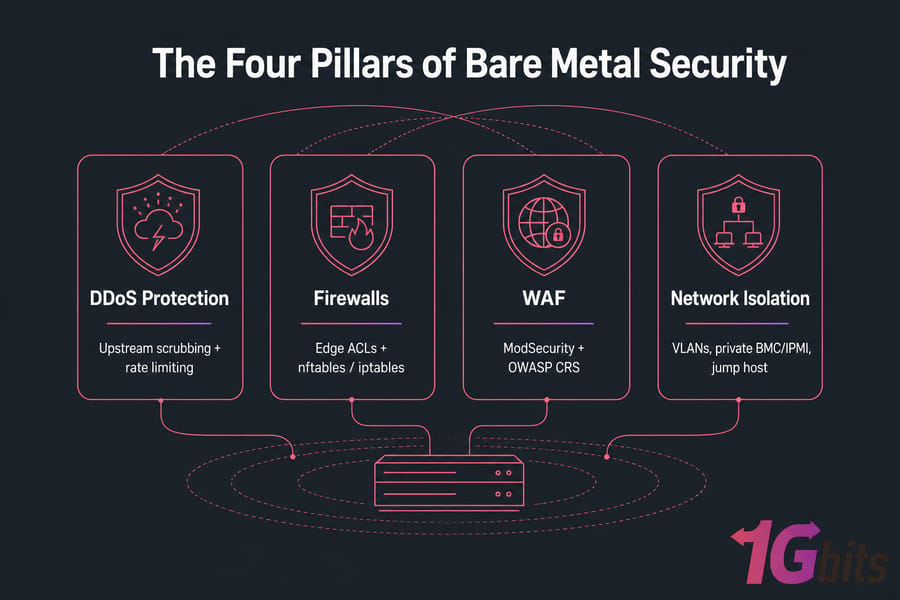
The Four Pillars of Bare Metal Defense
- DDoS protection — upstream scrubbing at terabit scale plus on-server rate limiting
- Firewalls — provider edge ACLs combined with host-level nftables or iptables
- WAF — ModSecurity with the OWASP Core Rule Set, or a cloud-edge WAF in front
- Isolation — VLAN segmentation, a private BMC/IPMI network, and a hardened jump host
Why Bare Metal Security Differs From VPS and Cloud Hosting
Most security articles treat all server types the same. They shouldn't. The threat model on bare metal is genuinely different, and pretending otherwise gets people compromised.
| Aspect | Bare Metal | VPS | Public Cloud |
| Hypervisor escape risk | None (no hypervisor) | Real (multi-tenant) | Real (multi-tenant) |
| Side-channel attacks (Spectre/Meltdown) | Effectively eliminated | Possible | Possible |
| Patching responsibility | Customer (kernel + firmware) | Customer OS, provider host | Mostly provider |
| BMC/IPMI exposure | Yes — must be hardened | Hidden by provider | Hidden by provider |
| Default firewall | Often none | Sometimes | Security groups by default |
| Snapshots/rollback | Manual | Built-in | Built-in |
| Headroom for inline IDS/WAF | Excellent (full hardware) | Limited | Limited per instance |
| Physical-layer attack surface | Drives, BMC, supply chain | Abstracted away | Abstracted away |
Unique Advantages of Single-Tenant Hardware
Here's the upside. With a full physical box, you can run Suricata inline at line rate, ModSecurity in blocking mode with paranoia level 2, full packet capture, and host-based EDR — all without the noisy-neighbor tax. You get deterministic latency for crypto operations. And the Spectre/Meltdown class of cross-tenant leaks? Largely moot, because there's no other tenant to leak to.
Unique Risks (No Hypervisor Safety Net)
The flip side: you own the BMC. You own firmware updates. You own the BIOS. If you skip those, you're exposed to attack vectors that simply don't exist on a VPS. I've watched a fintech client get owned through a Supermicro BMC running default credentials on a public IP the OS was perfectly hardened, and it didn't matter. The attacker had remote KVM, mounted an ISO, and pivoted from there.
For background on the trade-offs, see our breakdowns of dedicated server vs cloud server and VPS vs dedicated server.
The Bare Metal Threat Model: What You're Actually Defending Against
Before you write a single firewall rule, map your threats. A defense without a threat model is just expensive theater.
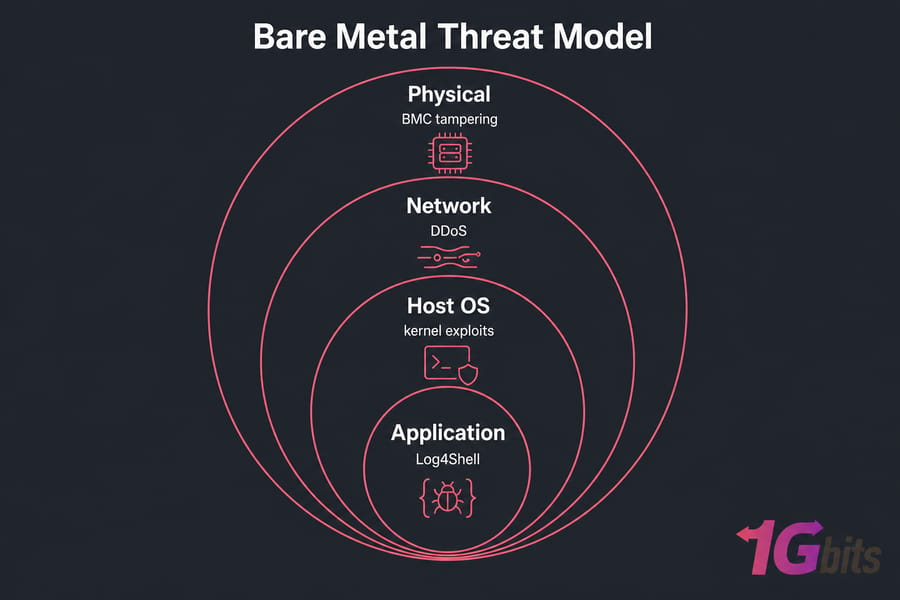
| Vector | Attack Type | Mitigation Pillar | Real-World Example |
| Volumetric DDoS | UDP/Memcached amplification | Provider scrubbing | GitHub 1.35 Tbps (2018) |
| Application DDoS | HTTP flood, slowloris | WAF + rate limiting | Mirai variants (ongoing) |
| BMC/IPMI compromise | Default creds, firmware bug | Isolation + hardening | USBAnywhere (CVE-2019-16649), Pantsdown |
| Kernel exploit | Local privilege escalation | Patching + LSM | Dirty Pipe (CVE-2022-0847) |
| Web app exploit | RCE, injection | WAF + secure code | Log4Shell (CVE-2021-44228) |
| Brute-force | SSH/RDP credential stuffing | Host firewall + fail2ban | Mirai botnet (ongoing) |
| Supply-chain | Compromised dependency | Monitoring + SBOM | SolarWinds, xz-utils (2024) |
Volumetric and Application-Layer DDoS
L3/L4 attacks try to saturate your pipe. L7 attacks look like real traffic and exhaust application resources — slowloris, HTTP/2 rapid reset, search-endpoint hammering. You need different tooling for each. The first calls for an upstream scrubbing center. The second calls for rate limiting and a WAF.
BMC/IPMI Exploits and Hardware-Level Compromise
This is the bare-metal-specific vector everyone underestimates. Cisco Talos has documented Supermicro BMC vulnerabilities. The USBAnywhere flaw let attackers mount virtual media remotely. Default vendor credentials still ship on a frightening number of boxes. SANS reporting has tied a majority of bare metal incidents to exposed or weakly authenticated management interfaces.
OS-Level Kernel and Privilege Escalation
Dirty Pipe, OverlayFS bugs, sudo CVEs — Linux ships kernel and userland privilege escalation flaws on a regular cadence. If you're not patching within 7 days of disclosure, you're behind.
Web Application and Supply-Chain Threats
Log4Shell taught everyone that one transitive dependency can take down half the internet. OWASP Top 10 still describes the bulk of what real attackers actually exploit. Your WAF stops the obvious stuff; your dependency hygiene stops the rest. For the foundational concepts, see what is a DDoS attack and how to prevent DDoS attacks.
Pillar 1 — DDoS Protection for Bare Metal Servers
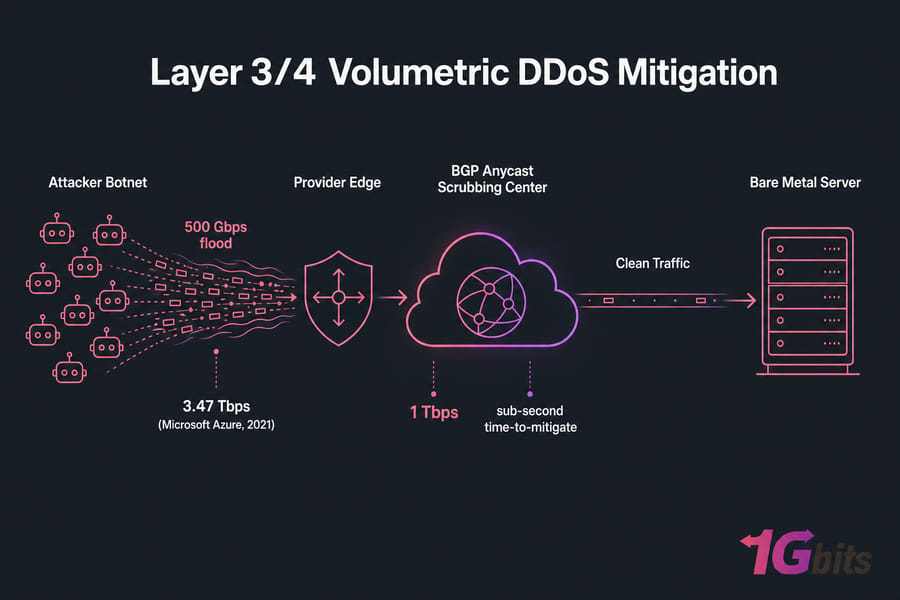
Key takeaway: No on-server tool can stop a 500 Gbps flood. Volumetric mitigation has to happen upstream, at the provider's edge. Your job on the box is layer 7.
Layer 3/4 Volumetric DDoS Mitigation
Volumetric attacks — SYN floods, UDP amplification, DNS reflection — are an arms race in raw capacity. The largest publicly documented attack peaked at 3.47 Tbps (Microsoft Azure, 2021). If your provider can't absorb at least 1 Tbps with sub-second time-to-mitigate, you have a problem.
Real mitigation lives in BGP anycast scrubbing centers. Traffic is announced from multiple PoPs, attack traffic gets diverted, scrubbed, and only clean packets reach your server. Cloudflare Magic Transit, Imperva, and tier-1 carriers all run this model. Some hosts ship it always-on; others flip to mitigation only when thresholds trigger. Always-on is safer — the first 30 seconds of an on-demand activation is where damage happens.
Layer 7 Application DDoS Defense
L7 is where on-server controls matter. A 50,000 RPS HTTP flood looks like legitimate traffic to a router. To Nginx, it's a death spiral. You need rate limiting, connection limits, and WAF rules tuned to your endpoints.
On-Server Rate Limiting With nftables and Nginx
A baseline nftables rate limit on new SSH connections:
table inet filter {
    chain input {
        type filter hook input priority 0; policy drop;
        ct state established,related accept
        iif lo accept
        tcp dport 22 ct state new limit rate 5/minute accept
        tcp dport { 80, 443 } ct state new limit rate 200/second burst 400 packets accept
        ip protocol icmp limit rate 10/second accept
        log prefix "nft-drop: " level info
    }
}
And the Nginx side, for HTTP-layer flood protection:
limit_req_zone $binary_remote_addr zone=api:10m rate=20r/s;
limit_conn_zone $binary_remote_addr zone=conn:10m;

server {
    location /api/ {
        limit_req zone=api burst=40 nodelay;
        limit_conn conn 10;
        proxy_pass http://backend;
    }
}
How to Verify Your Host's DDoS Mitigation Capacity
Don't take marketing claims at face value. Ask for specifics:
- Aggregate scrubbing capacity in Tbps and Mpps
- Time-to-mitigate (TTM) — under 10 seconds is the bar
- Always-on or on-demand?
- IPv6 mitigation parity?
- L7 mitigation included or only L3/L4?
- Mitigation SLA with credits
1Gbits ships every dedicated server with built-in L3/L4 DDoS protection by default — see our DDoS-protected dedicated server lineup or the dedicated DDoS-protected hosting plan if you need a smaller footprint.
Pro tip: Run hping3 --flood --rand-source -p 80 your.ip from an external box to confirm your edge actually drops the flood before it touches the server. If your monitoring shows packets arriving, your "protection" isn't.
Pillar 2 — Bare Metal Firewall Configuration: Network and Host
Key takeaway: One firewall is a single point of failure. Run two — one at the provider edge, one on the host — and have them disagree slightly so a misconfiguration in one doesn't open everything.
Network-Edge Firewall (Provider ACL / Hardware Firewall)
Most serious providers offer some form of edge ACL or hardware firewall — a Cisco ASA, Fortinet, or a custom SDN setup that filters before traffic ever hits your NIC. Use it. The edge firewall handles the broad strokes: drop everything that isn't 80, 443, your SSH port, and your management VLAN traffic. Done at the edge, you save bandwidth and CPU on the host.
If you're running your own rack-side appliance, pfSense and OPNsense are battle-tested. MikroTik gear is fine for smaller footprints. Compare them in MikroTik vs pfSense breakdown.
Host-Based Firewall: nftables, iptables, firewalld, ufw
| Tool | OS | Stateful | Best For |
| nftables | Modern Linux | Yes | Production hardening (recommended) |
| iptables | Legacy Linux | Yes | Older distros, existing rule sets |
| firewalld | RHEL/Fedora | Yes (zones) | Admins who want zone-based abstraction |
| ufw | Ubuntu/Debian | Yes (front-end) | Quick setups; thin wrapper over iptables |
| pfSense / OPNsense | FreeBSD-based appliance | Yes | Edge / gateway role |
| Windows Firewall (WFP) | Windows Server | Yes | Windows bare metal |
Baseline nftables Configuration
Default-deny inbound, restrictive outbound, log drops, persist across reboot:
#!/usr/sbin/nft -f
flush ruleset

table inet filter {
    chain input {
        type filter hook input priority 0; policy drop;
        ct state invalid drop
        ct state established,related accept
        iif lo accept
        ip saddr { 10.10.0.0/24 } tcp dport 22 accept   # SSH from mgmt VLAN only
        tcp dport { 80, 443 } accept
        ip protocol icmp icmp type echo-request limit rate 5/second accept
        log prefix "nft-drop-in: " level warn
    }

    chain forward {
        type filter hook forward priority 0; policy drop;
    }

    chain output {
        type filter hook output priority 0; policy accept;
        # Egress filtering — block known-bad outbound where possible
        ip daddr { 0.0.0.0/8, 169.254.0.0/16 } drop
    }
}
Save to /etc/nftables.conf and enable the service. For the full walk-through, see our guide on how to configure a firewall step-by-step and check your exposed ports with open-ports check.
Egress Filtering: The Most Overlooked Defense
Almost everyone allows all outbound. That's how compromised servers phone home, exfiltrate data, and join botnets. Restrict egress to what your application actually needs — DNS, NTP, package mirrors, your monitoring endpoints. If a curl to pastebin.com from your DB server gets blocked, you've just made the attacker's life much harder.
Pillar 3 — Web Application Firewall (WAF) for Bare Metal
Key takeaway: If your server runs anything HTTP-facing, you need a WAF. Network firewalls don't read HTTP bodies; that's the WAF's job.
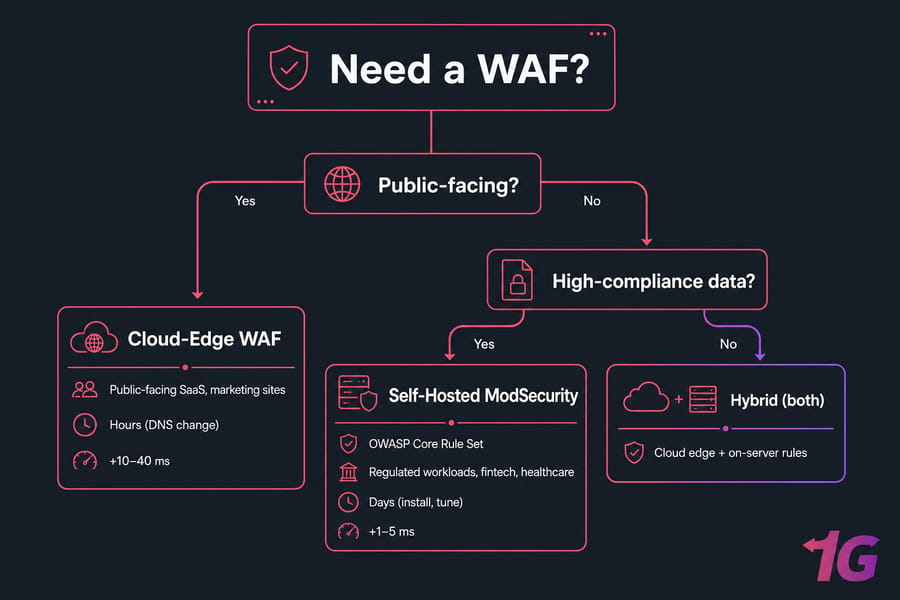
When You Need a WAF on a Dedicated Server
Short answer: any time you expose a web app, an API, or even a marketing site with a contact form. WAFs catch SQL injection, XSS, RCE attempts, and the slow drip of credential-stuffing bots that conventional firewalls never see.
ModSecurity + OWASP Core Rule Set on Nginx/Apache
The de facto self-hosted stack is ModSecurity 3 (libmodsecurity) plus the OWASP Core Rule Set. Install on Nginx via ModSecurity-nginx, point at crs-setup.conf, set paranoia to level 1 to start, then graduate to 2 once false positives stabilize. For Apache, mod_security2 has been around forever and is rock-solid.
Pair it with a reverse proxy pattern — see how to configure an Nginx reverse proxy — so the WAF terminates TLS, inspects the request, and passes clean traffic to your app server.
Cloud-Edge WAF vs. Self-Hosted WAF
| Criteria | Cloud-Edge WAF | Self-Hosted WAF |
| Setup time | Hours (DNS change) | Days (install, tune) |
| Latency impact | +10–40 ms | +1–5 ms (same box) |
| Rule control | Vendor-bounded | Full |
| DDoS scrubbing included | Usually yes | No |
| Compliance / data residency | Depends on vendor | You control it |
| Cost at scale | Grows with traffic | Mostly fixed |
| Best for | Public-facing SaaS, marketing sites | Regulated workloads, fintech, healthcare |
WAF Tuning: Avoiding False Positives
This part is tedious, honestly. Run the WAF in detection-only mode for at least a week. Pipe alerts to a log aggregator. Walk through the noisy rules — usually the SQL injection regex catching a legitimate JSON payload, or the path-traversal rule tripping on an upload endpoint. Whitelist by location, not globally. Then flip to blocking mode. A WAF that fires on real traffic is worse than no WAF at all, because the team learns to ignore the alerts.
Pillar 4 — Network Isolation, VLANs, and BMC/IPMI Hardening
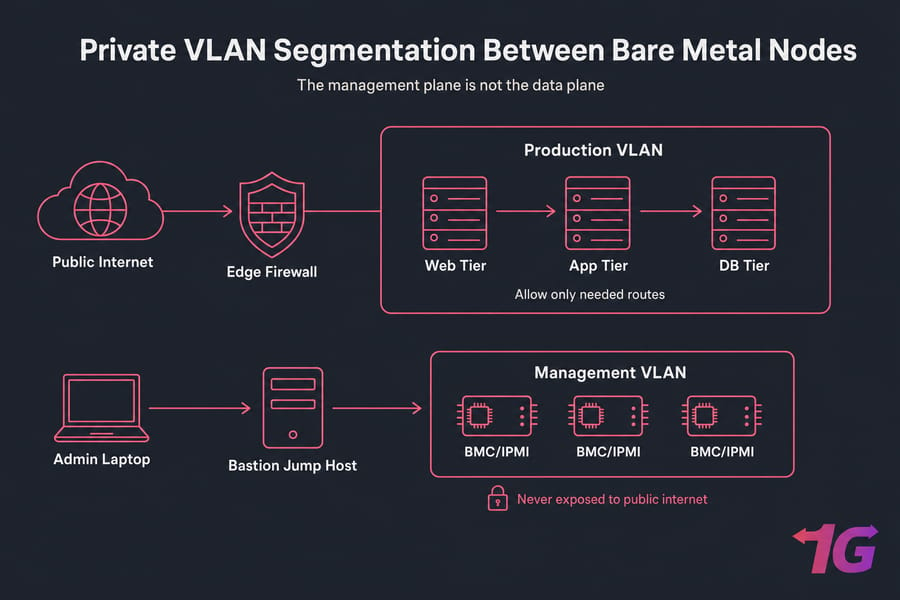
Key takeaway: The management plane is not the data plane. Treat them as different worlds.
Private VLAN Segmentation Between Bare Metal Nodes
If you're running multiple bare metal servers — say, web + app + database tiers — don't let them all see each other on the public network. Put them on a private VLAN, route only what's needed (web → app, app → db), and block east-west traffic that doesn't fit your application graph. Private VLANs (PVLANs) take this further by isolating ports within the same VLAN, so a compromised web server can't pivot sideways to its peers.
Out-of-Band Management: Securing iDRAC, iLO, and IPMI
Warning: Default IPMI/BMC credentials are responsible for a majority of bare metal compromises documented in SANS incident reports. Change them. Today.
The BMC — Dell iDRAC, HP iLO, Supermicro IPMI — is essentially a tiny computer-within-the-computer with full hardware access. If an attacker reaches it, they own the box at a level deeper than your OS can detect. Hardening checklist:
- Change vendor default credentials immediately — see our walkthroughs for changing iDRAC default credentials and resetting Supermicro IPMI passwords
- Never expose the BMC to the public internet — period
- Place it on a dedicated management VLAN reachable only via a bastion host
- Disable IPMI over LAN if not strictly needed; prefer Redfish API over legacy IPMI 2.0
- Apply ACLs by source IP — restrict to your admin subnet
- Disable the web UI if you're using API/CLI tools exclusively
- Patch BMC firmware every quarter — these vulns are real (USBAnywhere, Pantsdown)
- Audit which port iDRAC listens on — see iDRAC port reference
Jump Host and Bastion Architecture
One hardened, MFA-protected jump host. All admin SSH and BMC access flows through it. Direct admin access from the public internet to production or management is forbidden — full stop. The bastion runs minimal services, logs every session, and ideally records keystrokes for audit. If someone compromises an admin laptop, they still have to defeat MFA on the bastion before they can touch anything.
Disabling IPMI Over LAN and Enforcing ACLs
On a Supermicro BMC, the worst-case configuration is IPMI over LAN enabled, listening on the production interface, with a default password. That's the trifecta of "your server is owned in 24 hours." Disable it where possible, set ACLs in the BMC web UI, and verify with ipmitool lan print from a trusted host that the configuration actually took.
Operating System and Kernel Hardening Checklist
Once the four pillars are in place, harden the OS itself. This is where you separate a server that looks secure from one that actually is.
SSH Hardening
- Generate strong keys with ed25519 SSH keys; copy the public key and disable password auth in
sshd_config - Disable root SSH login — admins should sudo, not log in as root
- Change the default SSH port — security through obscurity is real for reducing log noise from drive-by scanners
- Install fail2ban with aggressive thresholds (5 failures in 10 minutes = 24-hour ban)
- Add MFA via PAM with
libpam-google-authenticatorfor any account with sudo - Set
AllowUsersto an explicit allow list
SELinux and AppArmor Enforcement
Don't disable these. I cannot count the number of times "we'll fix it later" SELinux-permissive systems became the breach vector six months later. Run in enforcing mode. When something breaks, write a policy with audit2allow. It's annoying for two weeks and saves you for years.
Kernel Parameters via sysctl
# /etc/sysctl.d/99-hardening.conf
net.ipv4.tcp_syncookies = 1
net.ipv4.conf.all.rp_filter = 1
net.ipv4.conf.all.accept_redirects = 0
net.ipv4.conf.all.send_redirects = 0
net.ipv4.conf.all.accept_source_route = 0
net.ipv4.icmp_echo_ignore_broadcasts = 1
net.ipv4.icmp_ignore_bogus_error_responses = 1
net.ipv6.conf.all.accept_redirects = 0
kernel.randomize_va_space = 2
kernel.kptr_restrict = 2
kernel.dmesg_restrict = 1
fs.protected_hardlinks = 1
fs.protected_symlinks = 1
Apply with sysctl --system and verify with sysctl -a | grep ....
Patch Management and Unattended Upgrades
On Debian/Ubuntu, enable unattended-upgrades for security packages. On RHEL/Rocky/Alma, configure dnf-automatic. Reboot windows are a planning problem, not a reason to skip the patch — use kexec or live patching where uptime is critical. Check your distro's hardening posture against CIS Benchmarks; run Lynis monthly; consider OpenSCAP if you're chasing formal compliance.
For OS-specific deep dives, our Linux server security guide and how to secure servers cover the broader hardening playbook. On Windows bare metal, see our Windows dedicated server security tips.
Monitoring, Intrusion Detection, and Incident Response
Hardening sets the floor. Monitoring tells you when someone tries to push through it.
| Tool | Type | Strengths | Best Use Case |
| Suricata | Network IDS/IPS | Multi-threaded, modern, ET rules | Inline NIDS at line rate |
| Snort 3 | Network IDS/IPS | Mature signatures, Cisco backing | Established SOC environments |
| Wazuh | Host IDS / XDR | FIM, log analysis, vulnerability scan, dashboard | Full HIDS + light SIEM |
| OSSEC | Host IDS | Lightweight, file integrity | Resource-constrained hosts |
| CrowdSec | Collaborative IPS | Crowd-sourced blocklists, modern | Edge servers, ban-by-reputation |
Log Aggregation and SIEM Integration
If logs only live on the server, an attacker's first move is to wipe them. Forward everything to a central system — Graylog, ELK, or Splunk if budget allows. Want to know what to log? See our reference on Linux logs. Auth logs, sudo, kernel, web access, WAF events, and BMC events all need to flow off-host within seconds.
Building an Incident Response Runbook
Five phases, in order: detect, contain, eradicate, recover, review. Write the runbook before the incident, not during. It should answer questions like: who has authority to pull a server from production? What's the rollback procedure? Who notifies legal/customers? Where are the backups stored, and have we tested restoring them this quarter? Pair it with a real server disaster recovery plan.
Compliance and Regulatory Requirements for Bare Metal Servers
| Standard | Key Required Controls | Bare Metal Fit |
| PCI-DSS 4.0 | Network segmentation, encryption in transit/rest, MFA for admins, log retention, single-tenant for cardholder data | Excellent — single-tenant by definition |
| HIPAA | BAA with provider, encryption, audit logs, access controls | Strong — provider must sign BAA |
| GDPR | Data residency in EU, breach notification, processor agreement | Strong — pick an EU data center |
| ISO 27001 / SOC 2 Type II | Risk management, access control, continuous monitoring | Inherits provider's certification posture |
For GDPR-driven workloads, EU residency matters. We host across multiple European data centers — see Europe dedicated servers for region details and the Germany hosting guide if Frankfurt-region latency is your priority. Background on EU hosting in our benefits of hosting in Europe piece.
How to Evaluate a Bare Metal Hosting Provider's Security
The shortcut is asking the provider questions they can't fudge. If they can't answer in specifics, walk away.
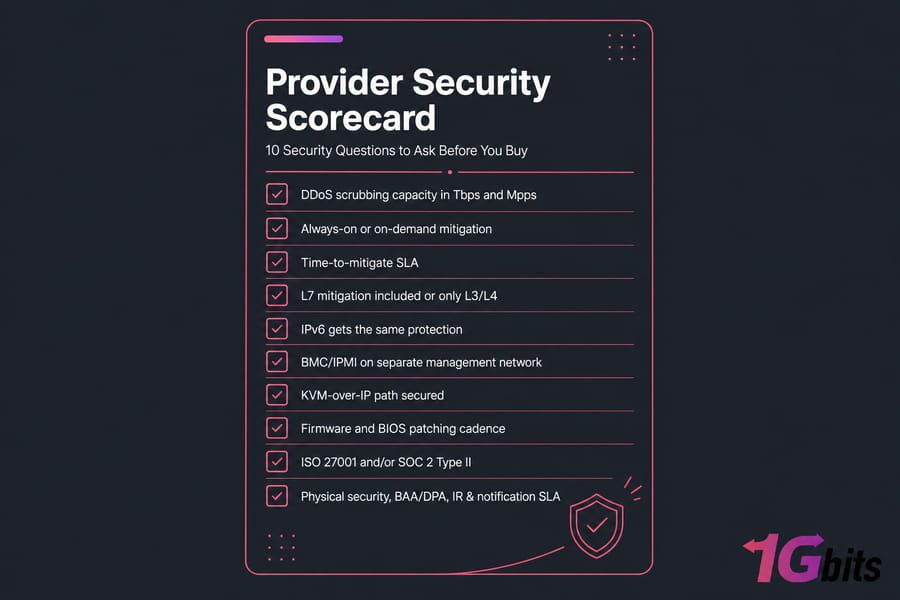
10 Security Questions to Ask Before You Buy
- What's your aggregate DDoS scrubbing capacity in Tbps and Mpps?
- Is mitigation always-on or on-demand, and what's the time-to-mitigate SLA?
- Is L7 mitigation included or only L3/L4? Does IPv6 get the same protection?
- How is BMC/IPMI access isolated? Is it on a separate management network by default?
- Do you offer KVM-over-IP, and how is that path secured?
- What's your firmware and BIOS patching cadence?
- Do you hold ISO 27001 and/or SOC 2 Type II certification? Can I see the report under NDA?
- What's the physical security posture of the data center (biometrics, cameras, audit trail)?
- Will you sign a BAA (HIPAA) or DPA (GDPR)?
- What's your incident response process and notification SLA when something happens?
Why 1Gbits Bare Metal Servers Are Secure by Default
We built our platform around the assumption that customers shouldn't have to bolt security on after the fact. Every dedicated server ships with L3/L4 DDoS protection enabled by default, isolated BMC networks, hardened OS images, and 24/7 support that actually responds when something goes wrong. If you'd rather not own the security stack yourself, our Bare Metal server tier handles patching, monitoring, and incident response for you. The full case is on our why 1Gbits page — and when you're ready to provision, the dedicated server is one click away.

Leave A Comment