
VMware licensing explains how VMware products such as vSphere, ESXi, and related bundles are priced and packaged for business use. Today, buyers typically compare editions by features, core-based or subscription terms, support level, and infrastructure scope to choose the most cost-effective option for small, mid-size, or enterprise environments. If you're new to virtualization concepts entirely, start with what is a virtual machine before diving into licensing models.
If you're searching for VMware Licensing Explained: vSphere Editions, Costs, and Best Fit, you're probably not looking for a generic virtualization intro. You want to know what VMware licensing actually means today, what changed, what it may cost, and which option fits your environment without overspending.
Fair concern. VMware licensing has become harder to read at a glance, especially after Broadcom-era packaging changes. Older advice about perpetual licenses, socket rules, and simple edition ladders can still show up in forums, but some of it no longer maps cleanly to current buying reality.
Before you go deeper, you should already know the basics: what a host is, what a VM is, how a cluster differs from a standalone hypervisor, and whether you only need compute virtualization or a broader stack. If you want a refresher, start with what is VMware and how it works and what is virtualization.
Key takeaway: VMware licensing is no longer just "pick a hypervisor edition." Bundle scope, subscription structure, support, and hardware sizing all affect the outcome.
Table of contents
- What VMware licensing means today
- How VMware licensing works
- vSphere editions and bundles compared
- VMware licensing cost factors
- Which VMware edition fits your business
- VMware licensing changes after Broadcom
- Common licensing mistakes to avoid
- VMware vs alternatives on cost and fit
- When dedicated hardware makes more sense
- Frequently asked questions
- Final recommendation
What VMware licensing means in practice
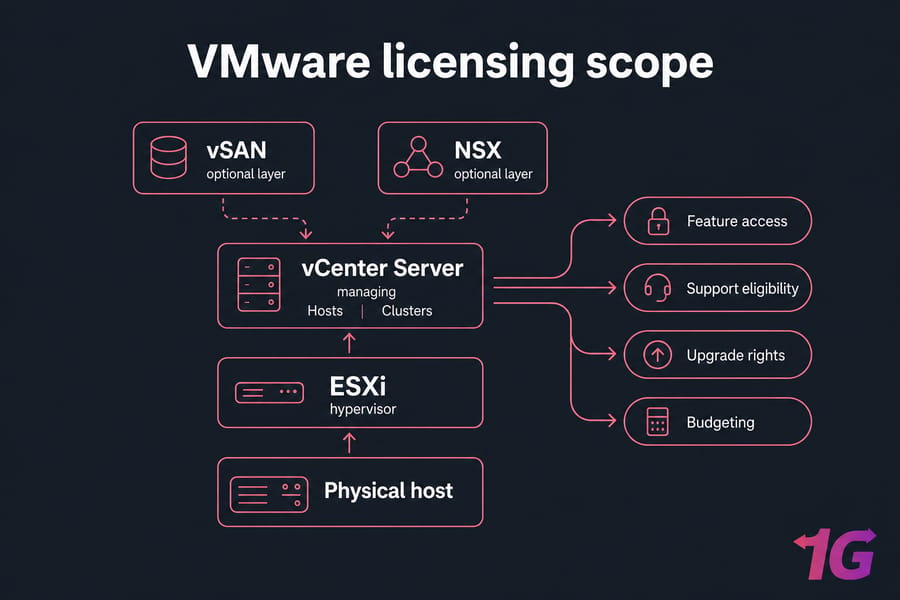
When most people say VMware licensing, they usually mean the commercial rights around VMware vSphere, ESXi, vCenter Server, and the bundles built around them. It's not just a permission slip to install software. It determines which features you can use, whether you're entitled to support, how upgrades are handled, and sometimes which management components are included.
What products are covered under VMware licensing?
At the center is vSphere, which is the virtualization platform most buyers care about. That typically includes ESXi on the physical host and, depending on the edition or bundle, access to management through vCenter Server. Higher-level bundles may also pull in products and capabilities tied to storage, networking, automation, or private cloud operations.
That difference matters more than people expect. I've seen teams budget for "VMware" as if it's one line item, then realize later they still need management, clustering features, or add-ons for storage and network policy. This is also why some organizations ultimately compare VMware against other enterprise-grade platforms our VMware vs Citrix comparison shows how licensing complexity varies between ecosystems, which directly affects your total cost of ownership.
Is VMware licensing different from ESXi or vCenter licensing?
Yes, at least from a buyer's point of view. ESXi licensing covers the hypervisor layer on the host. vCenter licensing, or vCenter access through a bundle, covers centralized management, inventory, cluster operations, and policy control. If you're evaluating management scope, it also helps to review how to install vCenter so you understand what that layer actually does in production.
So what does this actually mean? A small setup might get by with simpler rights. A multi-host environment with HA, vMotion, and operational discipline usually needs more than bare hypervisor access.
Why licensing has become more confusing in recent years
Because the model shifted. Broadcom-era changes affected packaging, availability, and how subscriptions and bundles are presented. That means old blog posts discussing perpetual editions or clean socket-based assumptions can mislead you fast.
Licensing also affects hardware planning. Core count, number of hosts, and whether you need advanced cluster features all shape the real bill. To choose the right edition, first understand how VMware licenses are structured today.
How VMware vSphere licensing works today
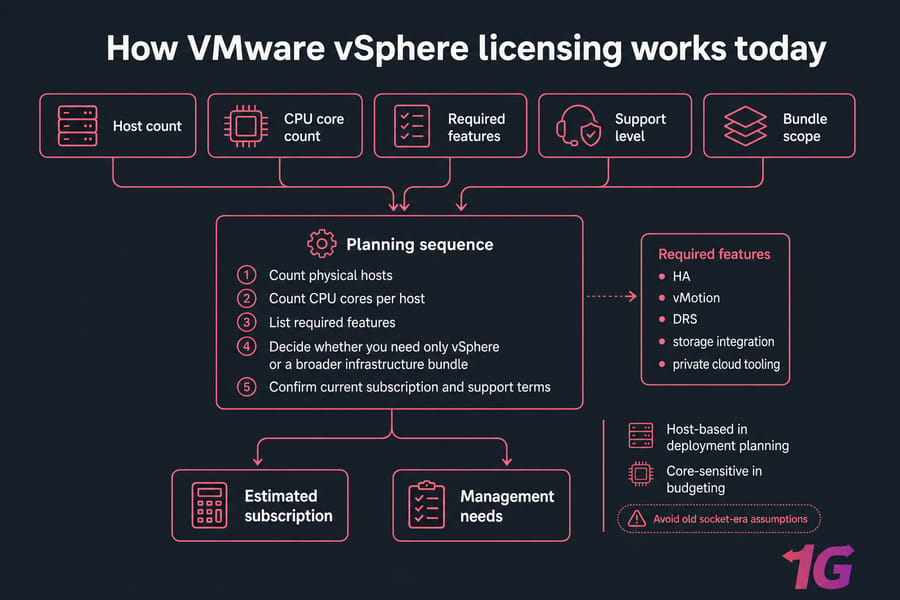
Current vSphere licensing usually has to be understood through three lenses: the physical hosts you're running, the CPU core counts in those hosts, and the subscription or bundle structure you're buying into. That's the practical frame. Anything simpler is often missing a piece.
Is VMware licensed per core, CPU, host, or subscription?
Today, many buyers encounter VMware licensing as a subscription-oriented model with core-based logic playing a major role. But you shouldn't assume every offer uses one identical rule in every region or channel. Product packaging, bundle composition, and minimum commitments can vary, so the safest approach is to treat licensing as host-based in deployment planning and core-sensitive in budgeting.
Historically, a lot of VMware conversations centered on CPU sockets. That's why you still see people asking whether VMware licensing is per CPU or per core. The short answer now is: don't rely on old socket-era assumptions without checking current terms from an authorized reseller or official documentation.
Here's the simple planning sequence I recommend:
- Count physical hosts.
- Count CPU cores per host.
- List required features such as HA, vMotion, DRS, storage integration, or private cloud tooling.
- Decide whether you need only vSphere or a broader infrastructure bundle.
- Confirm current subscription and support terms with your channel.
That's not glamorous, but it works.
What support and subscription usually include
In current VMware subscription licensing, support is often part of the commercial conversation rather than a separate afterthought. Depending on the offer, your subscription may tie together software entitlement, update rights, support access, and the right to run specific bundled components.
And support isn't just a checkbox for procurement. It affects patch access, escalation paths, compliance posture, and upgrade planning. If you're running production workloads, skipping this discussion is how "cheap VMware" quietly turns into a bad quarter.
Warning: Older perpetual and socket-based guidance may be outdated. Verify current support inclusion, subscription term, and any minimum commitments before budgeting.
Legacy perpetual licenses vs current subscription models
Older VMware buyers often remember perpetual licenses with separate support and subscription, sometimes called SnS. You bought the software entitlement, then renewed maintenance to keep updates and vendor backing. That model shaped a lot of forum advice.
Now, the market conversation is much more subscription-driven. That changes renewal planning, procurement timing, and total cost of ownership. It also changes how you evaluate long-term fit. If your environment is stable and predictable, a subscription may still make sense. If your workload mix changes constantly, you need to watch both the feature set and the recurring cost line.
Actual quotes vary by geography, reseller relationship, contract size, bundle mix, and term length. So no honest article should promise one universal VMware licensing calculator result. What you can build instead is a reliable estimate based on your environment.
| Licensing Factor | What It Means | Why It Matters |
| Physical host count | How many servers run ESXi | Drives management scope and deployment size |
| CPU core count | Total cores across licensed hosts | Can materially increase subscription cost |
| Edition or bundle | Standard, Enterprise Plus, Foundation, VCF, and related packaging | Controls feature access and included components |
| vCenter scope | Whether management is included or separately needed | Affects central operations and cluster management |
| Support level | Commercial support and update rights | Important for production stability and renewals |
| Term length | Subscription duration and contract structure | Changes annual and multi-year budgeting |
| Add-ons | vSAN, NSX, automation, private cloud components | Can expand both capability and cost quickly |
Once the licensing model is clear, comparing editions becomes much easier.
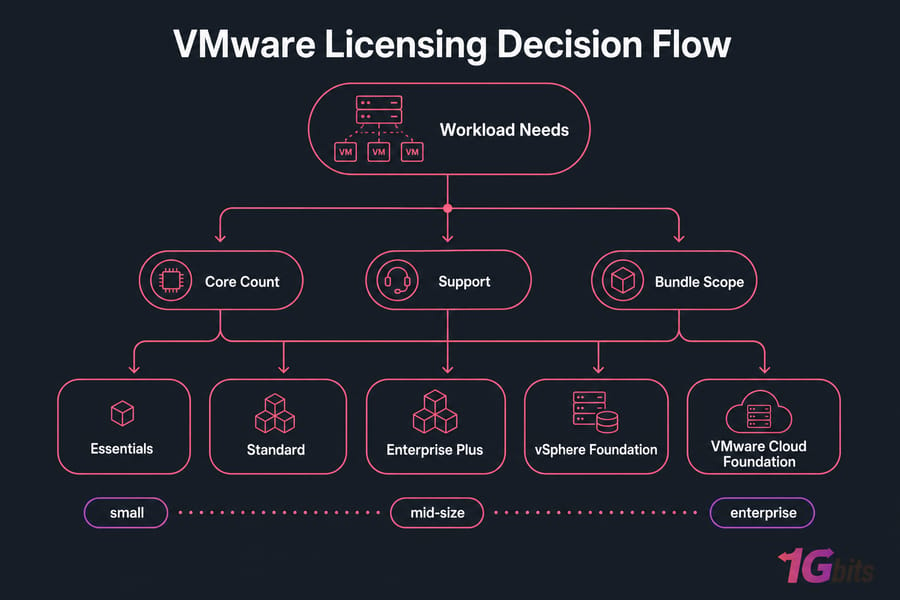
VMware vSphere editions and bundles compared
This is the part most buyers actually want. What are the VMware vSphere editions, what do they do, and where's the point where paying more is justified instead of just painful?
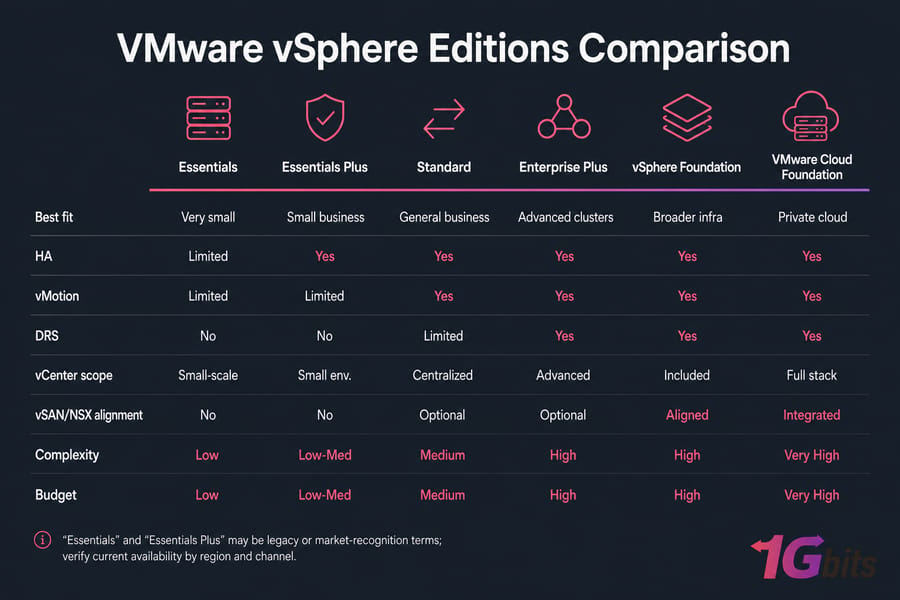
One caution before the table: some names still get heavy search volume even when packaging or availability has changed. That's especially true for Essentials and Essentials Plus. Buyers still search them because they were common reference points for small business environments. Treat those as legacy or market-recognition terms unless you verify current availability in your region and channel.
| Edition/Bundle | Best For | Core Features | Advanced Features | vCenter/Management Scope | Budget Level | Recommended Environment |
| Essentials | Very small environments, branch office, basic virtualization | Basic ESXi virtualization | Limited advanced cluster tooling | Usually small-scale management focus | Low | 1–3 hosts with simple internal workloads |
| Essentials Plus | Small business needing better resilience | Basic virtualization plus stronger SMB features | Often associated with HA and backup-oriented value | Small environment management | Low to medium | Small production setups that need more than a lab |
| vSphere Standard | General business virtualization | vMotion, HA, centralized operations depending on package | Less automation depth than higher tiers | Good fit for standard cluster management | Medium | Growing production clusters |
| vSphere Enterprise Plus | Larger environments with advanced cluster needs | Full production virtualization stack | DRS, richer policy and automation features | Built for larger, more dynamic clusters | High | Dense production clusters and operationally mature teams |
| VMware vSphere Foundation | Teams needing a broader managed virtualization bundle | vSphere plus management-oriented packaging | More bundle value than standalone hypervisor rights | Stronger integrated management path | Medium to high | Organizations standardizing on VMware operations |
| VMware Cloud Foundation | Enterprise private cloud | Full-stack private cloud direction | Deep integration with vSAN, NSX, and cloud operations | Broad infrastructure and private cloud management | High to very high | Enterprise, MSP, and private cloud platforms |
vSphere Essentials and Essentials Plus overview
For years, Essentials and Essentials Plus were the natural answer for VMware for small business. They made sense for 1 to 3 hosts, modest budgets, and straightforward internal applications. If you're looking after a branch office, small ERP deployment, file services, or a few line-of-business VMs, this tier historically fit well.
But here's the thing: small teams often anchor too hard on these names without checking whether current commercial availability still matches what they saw in old VMware documentation. If your reseller points you toward a different bundle now, that doesn't automatically mean you're being upsold. It may just reflect current packaging reality.
vSphere Standard overview
vSphere Standard is usually where business-grade virtualization starts feeling balanced. You get enough capability for real production use without immediately paying for every advanced scheduling and automation feature under the sun. For a growing company with several hosts, mixed workloads, and a need for vMotion and HA, Standard often lands in the "serious but sane" range.
I personally like Standard for environments that need reliability more than elegance. If you don't truly need advanced cluster intelligence, this tier often carries the best operational value. One nuance worth knowing: if you're licensing VMware specifically to run Windows Server VMs, understanding Windows virtual machines are licensed on top of vSphere can change your total cost calculation, since Microsoft has its own per-core rules that sit alongside VMware's.
vSphere Enterprise Plus overview
Enterprise Plus is where VMware becomes more than just a strong hypervisor. This tier is usually justified by richer cluster features, deeper automation, and capabilities such as Distributed Resource Scheduler (DRS) that matter once you have scale, density, and changing workloads.
It's worth it when you're running high availability business apps, managing larger clusters, or trying to keep performance balanced without babysitting every host. It's overkill if your environment is small, static, and easy to schedule manually.
That last part matters. I've seen small teams buy Enterprise Plus because they wanted "the best." Six months later, they were using maybe 30% of what they paid for.
VMware vSphere Foundation vs VMware Cloud Foundation
This is where buyers often get tangled up. vSphere Foundation and VMware Cloud Foundation aren't just "bigger vSphere editions." They're bundles with broader infrastructure implications.
vSphere Foundation is generally aimed at organizations that want a more integrated virtualization operating model without jumping immediately to the full private cloud stack. VMware Cloud Foundation goes further by combining compute, storage, networking, and cloud-style operations around technologies such as vSAN and NSX.
If you need software-defined storage, network virtualization, and a private cloud architecture, VCF can make sense. If you just need a capable virtualization platform for business apps, it may be too much stack, too much spend, and too much operational complexity.
Which features actually justify moving up a tier
Move up when the business problem demands it, not because the feature sheet looks impressive. In practical terms:
- Stay lower if you need basic VM consolidation, simple failover expectations, and modest host counts.
- Move to Standard if production reliability, vMotion, and central management are non-negotiable.
- Move to Enterprise Plus if DRS, advanced policy control, and larger cluster efficiency reduce real admin time or risk.
- Move to Foundation or VCF if you're building a broader VMware-centric platform, not just a virtualization island.
Quick summary: If you need only basic virtualization, don't jump straight to Enterprise Plus. Pay for advanced features when they solve a recurring operations problem or support a private cloud strategy.
The next question is cost both visible licensing cost and hidden operational cost.
VMware licensing cost: what affects the total price
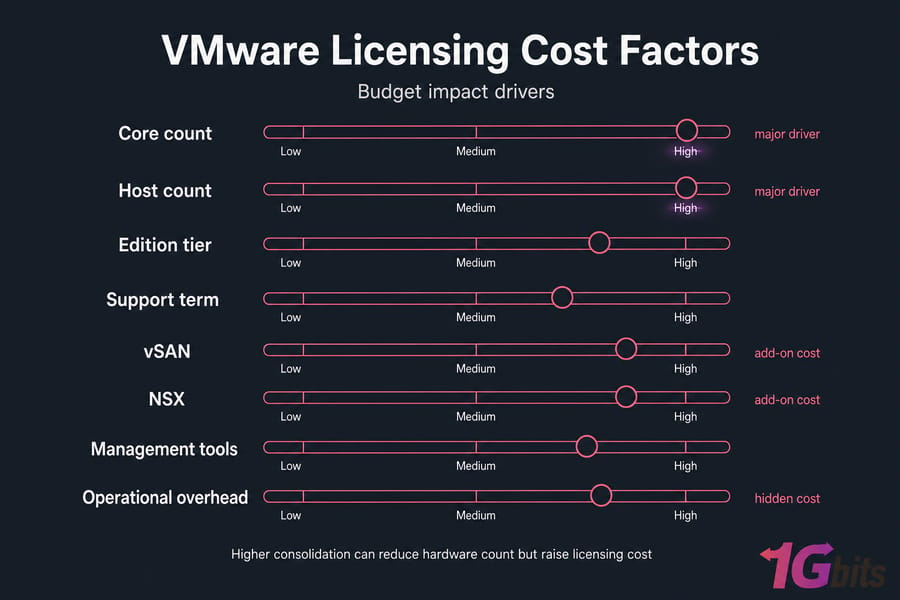
Let's be blunt: VMware licensing cost is hard to summarize with one clean number now. Exact pricing can change by reseller, region, contract size, current promotions, bundle structure, and support inclusion. If a page gives you one fixed number without context, be skeptical.
Core count and host count
These two are usually the first real cost drivers. More physical hosts mean more infrastructure to license and manage. Higher CPU core counts can increase cost fast, even when those cores improve consolidation.
That's the trade-off many teams miss. A dense modern server may let you run more VMs per host, which is great operationally, but the licensing economics can shift dramatically depending on how core entitlement is calculated.
Pro tip: High-core CPUs can improve workload density, but they can raise licensing cost quickly. Model both consolidation benefit and subscription impact before you buy hardware.
Support level, contract term, and reseller pricing
Support isn't just "extra." In a production environment, it's part of the real platform cost. Subscription term length also matters. Shorter commitments may preserve flexibility, while longer terms can change budgeting and procurement decisions.
And yes, reseller pricing can differ. That's normal in enterprise software. Geography, volume, existing account relationships, and bundle choices all affect the quote you receive.
Add-ons such as vSAN, NSX, and management tooling
The base hypervisor isn't always the full story. Once you add vSAN for software-defined storage, NSX for network virtualization, or broader management tooling, the project can move from "virtualization platform" to "private cloud stack" very quickly.
That isn't inherently bad. It may be exactly what your environment needs. But you should price the architecture you're actually building, not the simplified version someone mentioned in a sales call. For development teams running mixed macOS and Windows environments, the licensing picture gets even more complex our VMware vs Parallels comparison explains when VMware Fusion licensing makes more sense than a full vSphere deployment for smaller Mac-based labs.
Why "cheap VMware" often becomes expensive later
Because the cheapest initial line item can create downstream cost. Maybe you skip features that save admin time. Maybe you choose hardware that inflates per-core economics. Maybe you ignore support renewal. Maybe you buy a lower tier and discover six months later that your HA or cluster policy needs were understated.
Real total cost of ownership, or TCO, comes from four buckets:
- Base license scope — the rights to run the platform and edition you chose.
- Support/subscription — updates, entitlement continuity, vendor backing.
- Infrastructure add-ons — storage, networking, automation, and management extras.
- Operational overhead — admin time, downtime risk, migration effort, and scaling friction.
| Cost Factor | Why It Matters | Impact on Budget | Questions to Ask Before Buying |
| Total core count | Can materially influence subscription pricing | High | How many cores will each host have now and after refresh? |
| Number of hosts | Expands licensed footprint and management needs | Medium to high | Will you stay at 2 hosts or grow to 6 within 18 months? |
| Edition or bundle level | Controls feature depth and included components | High | Do you really need DRS, vSAN, NSX, or private cloud tooling? |
| Support inclusion | Affects updates, escalations, and renewal exposure | Medium | Is support included, and what happens at renewal? |
| Subscription term | Changes annualized cost and flexibility | Medium | Is a multi-year term required or optional? |
| Add-ons | vSAN, NSX, and tooling expand both power and spend | High | Which components are bundled and which are separate? |
| Hardware profile | High-core CPUs and memory density affect economics | Medium to high | Are you optimizing for density, cost, or both? |
| Operational complexity | Admin overhead changes long-term TCO | Medium | Will a pricier tier save enough time or reduce enough risk? |
Scenario example one: a small 2-host business running a few internal application VMs may find a simpler edition or smaller bundle economically sensible. Scenario two: a 6-host production cluster with growth plans may justify Standard or above because HA and live migration aren't optional anymore. Scenario three: an enterprise building private cloud with vSAN and NSX needs to model the whole stack, not only vSphere.
Cost alone is not enough the right edition depends on your environment.
Best VMware edition for small business, mid-size, and enterprise
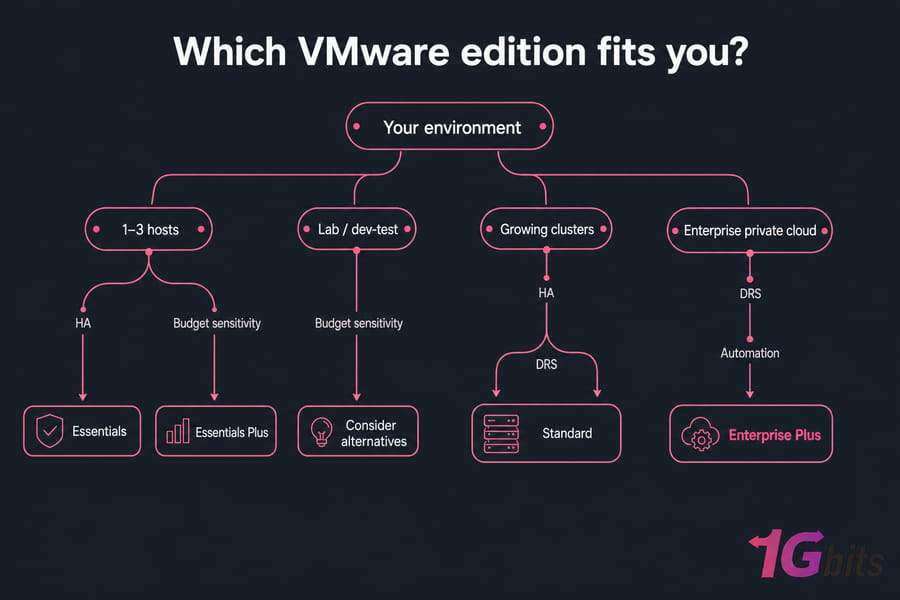
There isn't one best VMware license for everybody. There are a few solid fits depending on host count, feature needs, operational maturity, and budget tolerance. That's a much better way to think about it.
Best fit for 1–3 hosts
If you're an SMB running one to three hosts, your priorities are usually predictable uptime, straightforward management, and not burning budget on features you'll never touch. Historically, Essentials or Essentials Plus were the natural conversation here, though current availability should always be verified.
A branch office, small accounting platform, internal file services, or a compact app stack doesn't usually need the full Enterprise Plus story. VMware may still make sense if your team values polish, support, and familiar workflows. But if cost sensitivity is extreme, this is also the segment most likely to compare alternatives.
Best fit for growing clusters
Once you're beyond the tiny environment stage, Standard often becomes the practical center of gravity. Think 4 to 10 hosts, multiple production workloads, and a real need for HA and vMotion. You're not building a private cloud yet, but you absolutely need operational consistency.
This is common in mid-size businesses and MSP-style internal platforms. Standard is often worth it when the environment is growing faster than the team managing it.
Best fit for advanced automation and private cloud
Enterprise Plus starts making sense when cluster intelligence and automation save real money or reduce meaningful risk. If you run dense production workloads, business-critical apps, or multiple clusters that need balancing and policy-driven behavior, higher-tier features become easier to justify.
For full private cloud ambitions, VMware Cloud Foundation is the conversation. That means you're thinking beyond compute into storage, networking, security domains, and operational tooling. It's powerful. It's also not a casual purchase.
Best fit for labs, dev/test, and budget-sensitive teams
For labs and dev/test, VMware may be overkill unless you're specifically validating production parity. If your goal is simply to run test VMs cheaply, KVM or Proxmox may be more sensible. I say that as someone who appreciates VMware's maturity sometimes the smarter buy is the one that leaves budget for other work.
If you're using VMware to mirror production behavior, though, the extra cost can still be justified. Context matters.
| Use Case | Feature Priorities | Likely Best Fit | Worth It When | Overkill If |
| Branch office | Simple management, basic resilience | Essentials-type option or lighter bundle | You need VMware familiarity in a small footprint | You only need a handful of test VMs |
| Internal apps | HA, vMotion, central management | vSphere Standard | Downtime affects business operations | Workloads are non-critical and static |
| Mixed production workloads | Scalability, reliability, operational consistency | vSphere Standard or Enterprise Plus | You expect cluster growth and VM mobility | You have no need for advanced scheduling |
| High availability business apps | Cluster policy, balancing, advanced operations | Enterprise Plus | Admin efficiency and uptime are both critical | Your environment is too small to use the extras |
| MSP, hosting, private cloud | Automation, integrated stack, scale | vSphere Foundation or VMware Cloud Foundation | You need platform-level service delivery | You only need virtualization, not a full stack |
| Lab or dev/test | Low cost, flexibility | VMware only if production parity matters | You must match production VMware behavior | Budget is the top constraint |
Before you commit, make sure you understand the licensing changes that caught many buyers off guard.
Broadcom VMware licensing changes you need to know
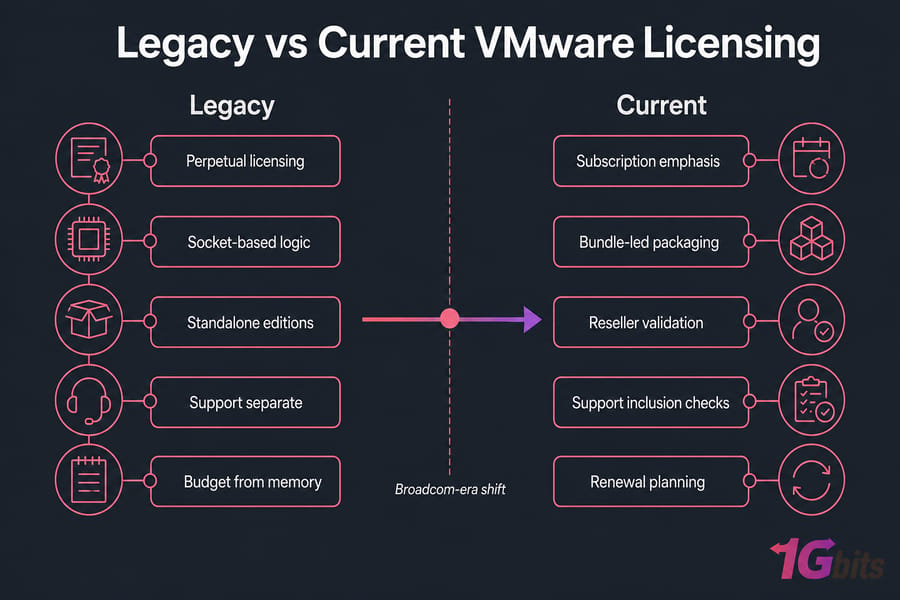
The Broadcom VMware licensing changes matter because they reshaped the buying process, not just the packaging labels. In broad terms, the market moved toward stronger subscription emphasis, more bundle-centric offers, and a procurement path that may look different from what longtime VMware buyers were used to.
What changed from older VMware licensing
Older assumptions often treated VMware licensing as a menu of standalone editions with clearer perpetual-style buying patterns. The current landscape puts more weight on subscriptions, packaged bundles, and validating what's included rather than assuming previous structures still apply.
That doesn't mean every old concept disappeared overnight. It means you shouldn't budget from memory.
Which legacy assumptions are now outdated
A few big ones show up again and again:
- Assuming socket-based logic still tells the whole story
- Assuming perpetual licensing is the default path
- Assuming older editions are still sold exactly as before
- Assuming support is always separate and simple
- Assuming one old blog post reflects current bundle availability
This is exactly why cost-sensitive readers are also looking into VMware alternatives. Not because VMware suddenly stopped being capable, but because the commercial model changed enough to force a fresh evaluation.
How to evaluate renewal risk before buying hardware
If you're buying new hosts or planning a refresh, verify five things before signing off:
- Which edition or bundle is currently available
- What the subscription term looks like
- Whether support is included and how renewal works
- Which components are bundled, especially vCenter, vSAN, and NSX-related rights
- Whether any minimum commitments apply
Warning: Licensing terms can change; validate current details with an authorized source before purchase. If Broadcom-era pricing is making you reconsider whether you need a full hypervisor at all, our comparison of VM vs container technologies walks through the licensing implications of running workloads on containers instead — which can dramatically reduce both your software spend and hardware footprint.
This is one of those areas where caution beats confidence. Businesses should confirm current official or authorized reseller terms before procurement, especially if they're designing hardware around a multi-year VMware plan.
Understanding the rules helps, but avoiding common mistakes saves the most money.
Common VMware licensing mistakes to avoid
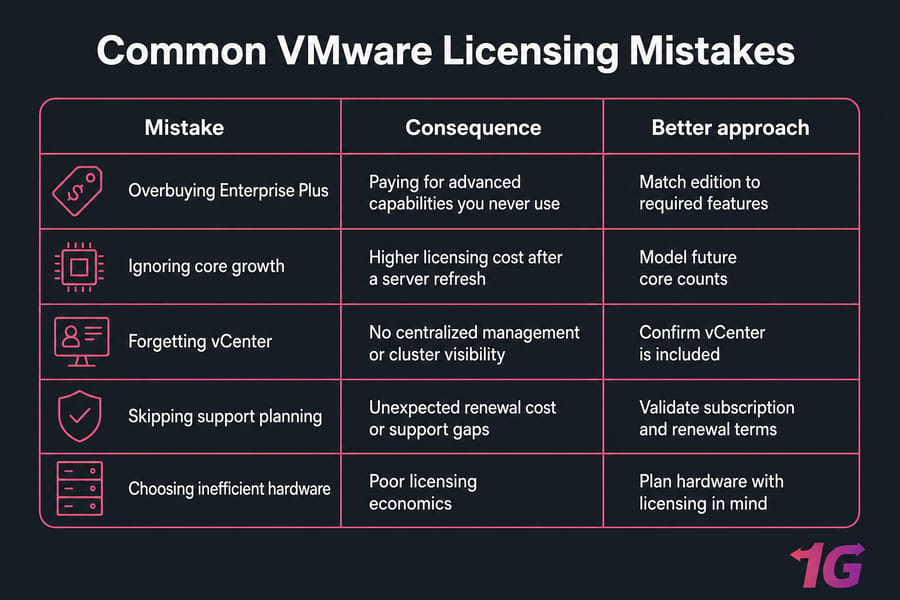
Most VMware licensing mistakes aren't dramatic. They're small planning errors that compound over time. A little overbuying here, a missed support assumption there, and suddenly the platform feels much more expensive than it needed to be.
Choosing by price instead of required features
The cheapest edition isn't always the least expensive in practice. If you need HA, vMotion, or better cluster management, buying too low can force a change later. That migration cost isn't always obvious on day one. For teams running Linux-heavy workloads who are questioning whether VMware is worth the premium, our guide to the best virtualization software for Linux covers open-source alternatives that can handle production workloads without the recurring licensing fees.
The reverse also happens. Teams buy Enterprise Plus because they don't want regret, then never use the advanced capabilities that justified the extra spend.
Ignoring future core growth
This one catches people during hardware refresh cycles. They model the current host layout, then deploy next-generation servers with much higher core counts. Great for consolidation, maybe bad for licensing economics.
If you expect growth, model it now. Don't only price the first 12 months.
Forgetting vCenter, support, or add-on costs
vCenter is easy to underestimate because people treat it as "just management." But management is where operations happen. If you need centralized control, cluster visibility, and policy-based administration, make sure your chosen edition or bundle really covers that.
Same with support renewal and add-ons. vSAN, NSX, and adjacent tooling can shift the budget more than people think.
Buying enterprise licensing for a simple workload
If your environment is a few steady internal apps on a small cluster, Enterprise Plus may be unnecessary. vSphere Standard often covers what matters without pushing you into a higher-cost tier. Or, if the workload is extremely simple, VMware itself may not be the best economic fit. Another common mistake is licensing VMware for container workloads our comparison of VM vs Docker explains when a full hypervisor is overkill and when containers save both licensing and hardware costs.
Hardware also plays a role. Running VMware on poorly matched servers can make licensing inefficient. Before you size a cluster, review your virtualization hardware options and compare realistic dedicated server plans.
| Mistake | Likely Consequence | Better Approach |
| Buying Enterprise Plus by default | Higher recurring cost with unused features | Map actual HA, DRS, and automation needs first |
| Ignoring future core count growth | Refresh cycle raises licensing cost unexpectedly | Price current and next hardware generation side by side |
| Forgetting vCenter scope | Management gap or surprise budget item | Confirm whether vCenter rights are included |
| Skipping support planning | Renewal shock or weaker production coverage | Model subscription and support as part of TCO |
| Choosing by headline price alone | Operational inefficiency and future rework | Balance software cost against admin time and downtime risk |
| Using licensing-unfriendly hardware | Poor cost efficiency per host | Match CPU core count, RAM, and workload density carefully |
If VMware pricing no longer aligns with your goals, compare it against realistic alternatives.
VMware vs Proxmox, KVM, and Hyper-V on licensing and value
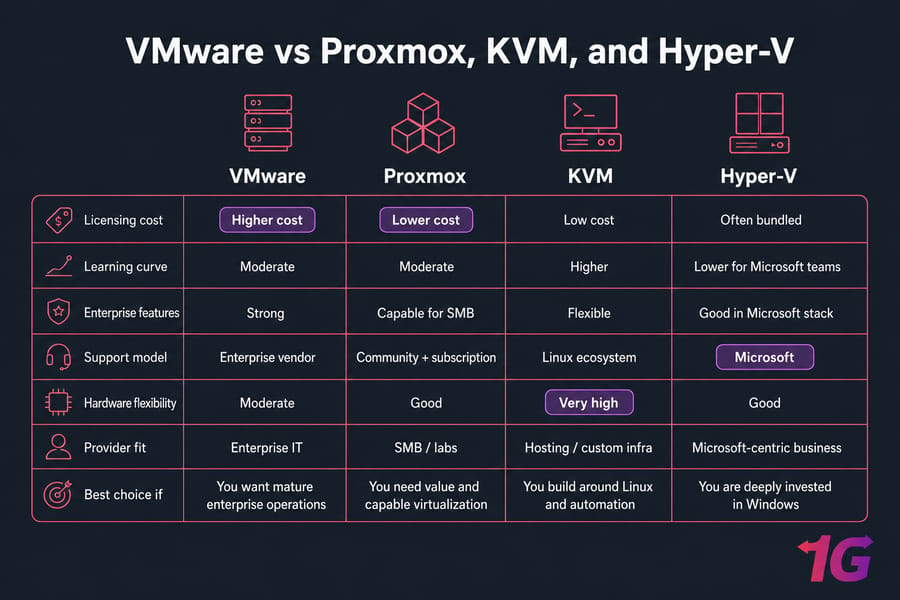
This comparison matters because many buyers aren't asking, "Is VMware good?" They already know it is. They're asking whether VMware is still worth the cost for their specific environment when Proxmox, KVM, or Hyper-V might do enough for less.
VMware vs Proxmox cost and support trade-offs
Proxmox is attractive because the licensing economics are usually lighter and the platform can be very capable for SMB, labs, and budget-conscious production workloads. You get strong functionality without VMware-level subscription pain. For smaller environments or individual developers who don't need enterprise features at all, our VMware vs VirtualBox covers the free alternative that works well for testing and local development. Where VMware still tends to win is enterprise workflow maturity.
Where VMware still tends to win is enterprise workflow maturity, ecosystem familiarity, and polished operational behavior in environments that already run around VMware processes. For a detailed breakdown of how Proxmox stacks up beyond just licensing, see this VMware vs Proxmox.
VMware vs KVM for hosting environments
KVM is a practical choice in hosting and infrastructure-heavy environments because it's flexible, widely supported in the Linux world, and often easier to shape around custom platforms. For a full introduction to how KVM works and why it's become the default hypervisor for most cloud providers, see our guide on what is the KVM virtualizor. If you're building around Linux, automation, and cost efficiency, KVM can be the smarter base than VMware. There's more detail in this KVM vs VMware guide.
VMware vs Hyper-V for Microsoft-heavy businesses
Hyper-V can make a lot of sense if your environment is deeply Microsoft-centric, your staff already knows Windows Server well, and your virtualization needs are closely tied to that ecosystem. Licensing alignment may also look more favorable in certain Microsoft-heavy shops. If that trade-off is relevant, read Hyper-V vs VMware.
When an alternative may be the smarter buy
Alternatives are often smarter when budget is the first constraint, not the fifth. That's especially true for labs, dev/test, small SMB deployments, or teams that don't need advanced VMware-specific workflows. For a broader look at what else is available, explore our roundup of VMware alternatives and best virtual machine software.
Platform comparison at a glance
| Platform | Licensing Cost | Ease of Use | Enterprise Features | Best Fit | Trade-Off |
| VMware | Medium to high | Very polished for trained teams | Excellent | Production clusters, enterprise operations, private cloud direction | Higher recurring cost and more complex commercial model |
| Proxmox | Low to medium | Accessible for many admins | Good, especially for SMB and mixed workloads | Budget-sensitive production, labs, smaller teams | Less enterprise standardization in some organizations |
| KVM | Low | Depends on tooling and Linux comfort level | Strong with the right stack | Hosting, Linux-centric teams, custom platforms | More DIY operations and less commercial uniformity |
| Hyper-V | Variable, often favorable in Microsoft estates | Good for Windows-focused teams | Solid | Microsoft-heavy businesses | Less attractive if your environment is broad and heterogeneous |
If you stay with VMware, infrastructure selection becomes the next cost lever.
Choosing the right VMware-ready infrastructure
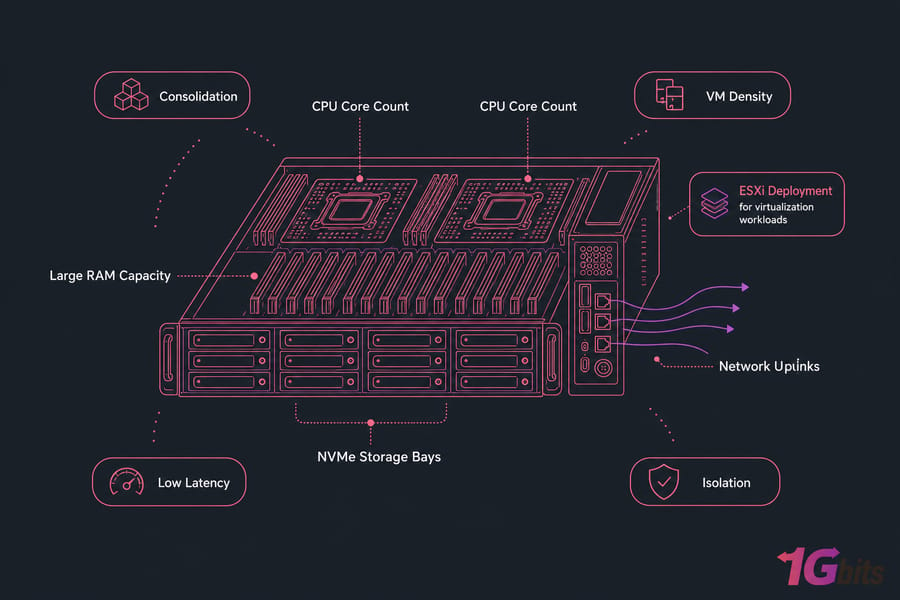
Licensing doesn't exist in a vacuum. Hardware decisions can improve VMware ROI or quietly wreck it. CPU core count, RAM density, storage design, and location strategy all change how much value you get from the platform.
Why hardware sizing changes licensing economics
High-core CPUs can improve consolidation but may raise license costs. Large RAM capacity helps you pack more VMs onto fewer hosts, which can be great for density. Fast NVMe storage reduces contention and improves workload responsiveness, especially for databases and mixed production loads.
Location matters too. If latency, disaster recovery design, or regional compliance are part of the project, the wrong server geography can create avoidable headaches later.
When a VMware dedicated server is the better fit
A dedicated server is usually the right move when you need isolation, predictable performance, custom ESXi deployment, or tighter operational control. It's also common for teams with compliance requirements, MSP-style workloads, or business-critical virtualization clusters that shouldn't compete with noisy neighbors.
What to ask a hosting provider before deployment
Ask these before you commit:
- What CPU core count options are available, and how do they affect cost efficiency?
- How much RAM can the platform support now and later?
- Is NVMe available for high-IO workloads?
- Can you deploy ESXi cleanly and manage out-of-band access?
- Which data center locations are available for latency or compliance needs?
- What does support look like during deployment and hardware incidents?
Use the summary below to make the final call quickly.
Final verdict: how to choose the right VMware license
If I had to reduce this whole topic to three steps, it would be this:
- Define the workload and feature need. Decide whether you only need dependable virtualization or a broader stack with HA, DRS, vSAN, NSX, and private cloud capabilities.
- Estimate hosts, cores, and support needs. Your physical host count, CPU core count, and production support expectations will shape the real budget more than most people expect.
- Match to the lowest tier that truly fits. For many environments, Standard is enough. Enterprise Plus is worth it when advanced cluster behavior saves time or risk. Foundation and VCF make sense when you're building a broader VMware platform, not just spinning up VMs.
That's the practical answer to VMware Licensing Explained: vSphere Editions, Costs, and Best Fit. Keep in mind that licensing terms can change, so validate the latest details with an authorized reseller or official source before you buy.
Key takeaway: The best-fit VMware licensing decision depends on feature need, core count, and long-term operating model not just the cheapest quote or the biggest edition name.
For businesses that need dedicated infrastructure for VMware workloads, 1Gbits can help map host specs to your virtualization goals. Explore VMware dedicated server hosting or contact our team if you want help choosing a configuration that fits your workloads and budget.

Leave A Comment