
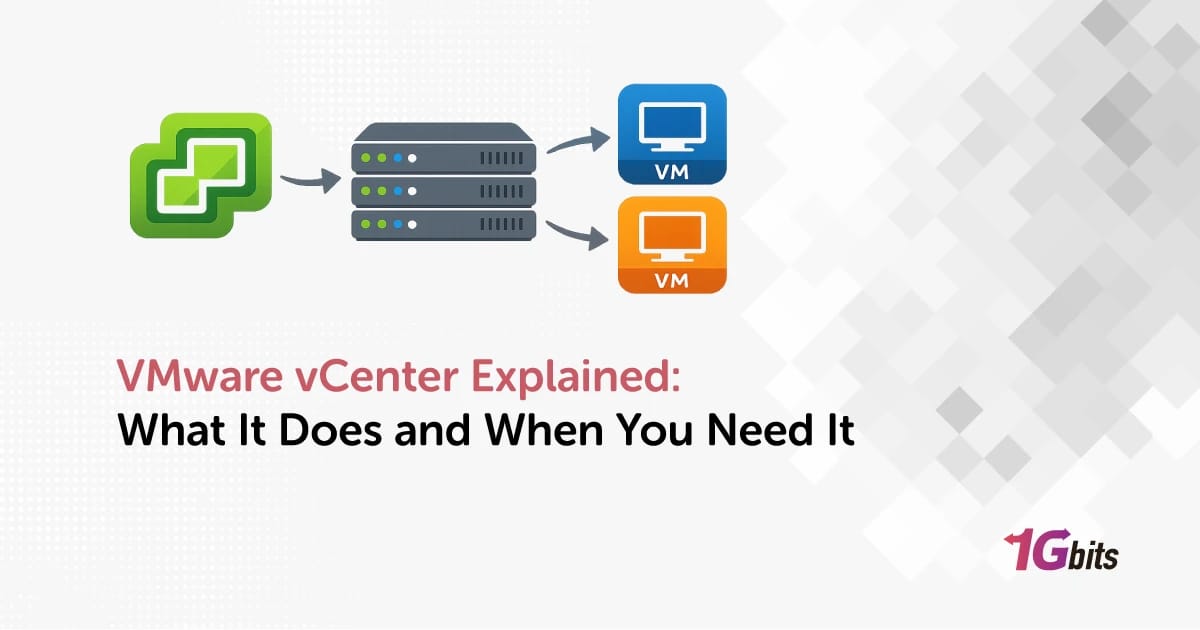
VMware vCenter Explained: What It Does and When You Need It starts with one simple idea: vCenter is the management layer for VMware, not the hypervisor that actually runs your virtual machines. VMware vCenter is the centralized platform used to manage ESXi hosts and VMs from one place, with features like templates, permissions, monitoring, vMotion, HA, and DRS becoming much easier or only possible at scale.
If you're still sorting out the basics, it helps to first read what is VMware and how VMware works and what is virtualization. I mention that because people mix up ESXi, vSphere, and vCenter all the time.
What Is VMware vCenter Server?
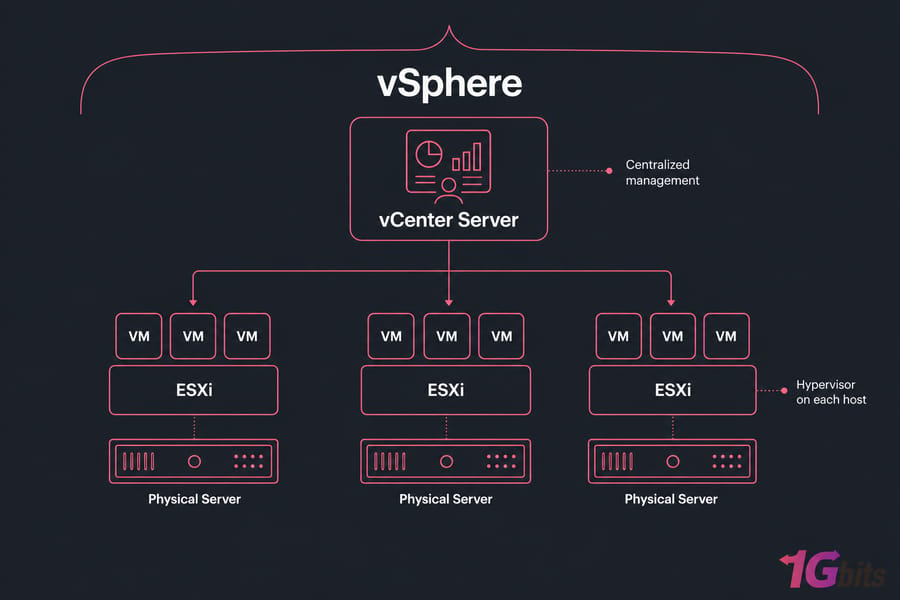
VMware vCenter Server is a centralized management platform for VMware virtual infrastructure. It gives you one control plane for hosts, clusters, datastores, networking objects, permissions, and virtual machines.
Is vCenter a hypervisor or a management platform?
It's a management platform. ESXi is the hypervisor. That's the part installed directly on a physical host to run VMs. vCenter sits above that layer and coordinates administration.
Where vCenter fits in the VMware stack
Think of ESXi as the engine in each server, and vCenter as the control room. You can run a single ESXi host without vCenter just fine. But once you need centralized VM management, shared visibility, or cluster-level features, vCenter starts earning its keep.
vCenter Server Appliance (VCSA) in simple terms
Most deployments use the vCenter Server Appliance, usually called VCSA. It's VMware's packaged appliance form of vCenter Server. You deploy it as a virtual appliance instead of building a traditional Windows-based management server like in older setups.
That matters because the terminology gets cleaner once you separate the layers. To understand why vCenter matters, you need to see how it works with ESXi and vSphere.
How VMware vCenter Works with ESXi and vSphere
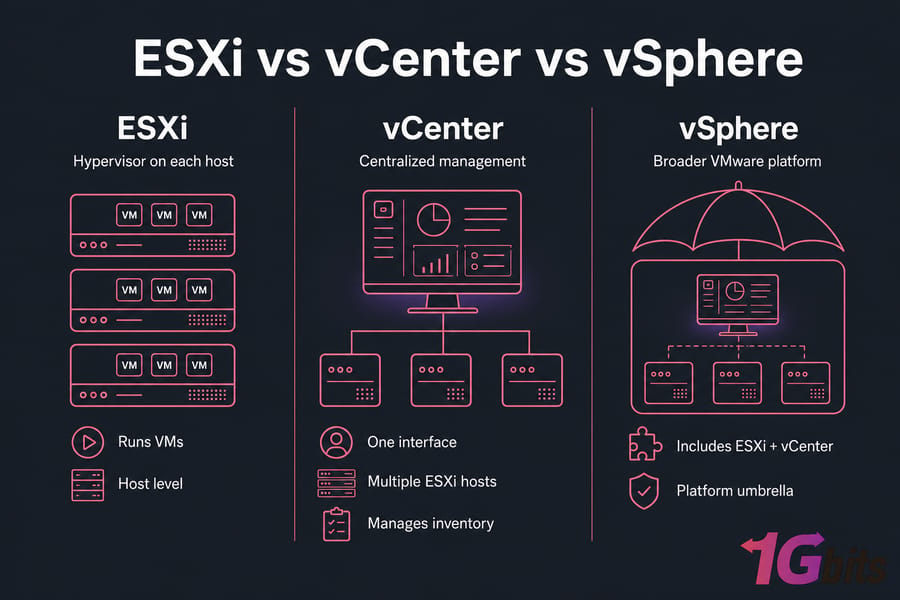
ESXi handles virtualization on each host
An ESXi host is the machine actually running your workloads. It abstracts the server hardware and lets you create and operate virtual machines. If one host is all you have, direct host management may be enough for a while.
vCenter provides centralized management
vCenter pulls multiple ESXi hosts into one inventory and lets you manage them through the vSphere Client. Instead of logging into each host separately, you work from one interface. In practice, that's where administration gets faster and less messy.
Why people confuse vCenter, ESXi, and vSphere
I've seen this confusion constantly. ESXi is the hypervisor. vCenter is the management server. vSphere is the broader VMware platform name that includes ESXi, vCenter, and related capabilities. They belong together, but they are not the same thing.
Once the terminology is clear, the next question is what vCenter actually lets you do.
VMware vCenter Features That Matter Most
Here's where vCenter stops being an abstract “management server” and becomes an operational tool.
| Feature | What it does | Why it matters |
| Centralized host and VM management | Manage multiple hosts and VMs from one console | Saves time and reduces admin mistakes |
| Inventory organization | Groups hosts, clusters, folders, and datastores | Makes larger environments easier to navigate |
| Templates and cloning | Build standard VM images and deploy copies quickly | Speeds provisioning and keeps builds consistent |
| Permissions | Role-based access control for admins and teams | Lets you share access without giving everyone full control |
| Monitoring and alarms | Tracks health, events, and performance | Helps catch issues before users do |
| Lifecycle Manager | Supports patching and lifecycle workflows | Improves host consistency and compliance |
| vMotion | Moves running VMs between hosts | Useful for maintenance and load handling |
| HA and DRS | Supports high availability and resource balancing | Critical in production clusters |
Not every advanced VMware capability is available in every edition or licensing scenario, so you'll want to verify that against VMware licensing explained. And if you're working at the host level already, knowing how to restart ESXi management agents is still useful.
vCenter vs ESXi: What’s the Difference?
| Category | ESXi | vCenter |
| Primary role | Hypervisor | Management server |
| Runs VMs | Yes | No |
| Standalone use | Yes | Usually paired with ESXi hosts |
| Multi-host visibility | Limited | Yes |
| Cluster management | No practical centralized cluster layer | Yes |
| vMotion workflows | Not the same centralized experience | Yes |
| Permissions model | Per-host | Centralized |
| Automation and inventory | Basic host-level management | Much stronger at scale |
So no, they're not alternatives in the usual sense. ESXi runs the workloads. vCenter manages the environment around them. Small environments often start with standalone ESXi, then add vCenter when complexity shows up.
If you're also weighing other platforms, compare VMware vs Proxmox or KVM vs VMware. Different shops land in different places.
Do You Need vCenter for Your VMware Environment?
This is the real question. And the honest answer is: not always.
| Environment Type | VM Count | Hosts | Need vCenter? | Reason |
| Home lab | 1–5 | 1 | Usually no | Direct ESXi management is often enough |
| Small office test setup | 3–10 | 1 | Maybe not | Unless you want templates or growth planning |
| SMB production | 10–30 | 2–3 | Often yes | Centralized administration starts saving real time |
| Clustered production | 20+ | 3+ | Yes | HA, DRS, and coordinated management matter |
| Multi-admin environment | Any | 2+ | Strong yes | Permissions and shared visibility become important |
One-host environments
If you have one ESXi host and a handful of VMs, you may not need vCenter yet. That's especially true for labs, dev boxes, or small internal apps. I've seen people deploy it too early and then spend more time maintaining the appliance than benefiting from it.
Small multi-host environments
Two or three hosts is the gray zone. If you need templates, centralized visibility, cleaner provisioning, and role separation, vCenter starts making sense fast. If those hosts are just lightly used and one person manages everything, maybe you can wait.
Clusters, HA, and growing teams
If you're planning cluster management, vMotion, HA, DRS, or shared operational workflows, vCenter is usually the right move. And if you're building for production, your hardware base matters just as much as your software stack.
When VMware vCenter Is Overkill
You may not need vCenter if:
- you run a simple single host with a low VM count
- it's a test lab or short-term sandbox
- one admin handles everything
- you don't need HA, DRS, or vMotion
- licensing and management overhead matter more than central control
That's not a knock on small environments. It's just practical. If you're still evaluating, read how to install vCenter later — but first decide if you should install it at all.
Common VMware vCenter Use Cases
A small business with 2–3 hosts and shared storage is a classic case. One admin handles backups, another handles provisioning, and both need clean permissions. vCenter makes that workable.
Another common one is business continuity. If you care about failover behavior, cleaner recovery planning, and standardized VM deployment, vCenter fits naturally beside a real server disaster recovery plan.
Service providers and internal IT teams also use it for templates, provisioning, monitoring, and branch-office coordination. And for shops that don't want to babysit every layer themselves, a managed dedicated server can take some pressure off. If you're still sourcing hardware, there's also the option to buy a dedicated server for a VMware-ready foundation.
VMware vCenter Limitations, Costs, and Trade-Offs
| Benefit | Cost/Complexity | Best For |
| Centralized management | Another appliance to deploy and maintain | Multi-host teams |
| HA, DRS, vMotion workflows | Licensing and design complexity | Production clusters |
| Centralized permissions | Learning curve | Shared admin environments |
| Lifecycle operations | Updates and backups required | Operationally mature setups |
| Standardized provisioning | May be overkill on one host | Growing VM estates |
That's the trade-off in plain English. vCenter is powerful, but it adds appliance resources, backups, upgrades, and operational overhead. For production VMware, though, many teams prefer suitable dedicated infrastructure so CPU, RAM, and storage stay predictable.
How to Decide If vCenter Is Right for You
Ask yourself these five questions:
- Do you have more than one ESXi host?
- Do you need centralized administration?
- Do you need HA, vMotion, or DRS?
- Do multiple admins need permissions control?
- Are you planning to scale soon?
If you answered yes to two or more, or any advanced feature question, vCenter is probably justified. If not, standalone ESXi may be enough for now. Simple.
Final Verdict on VMware vCenter
vCenter is not required for every VMware deployment. For a single ESXi host with a few VMs, it may be unnecessary. But if you're managing multiple hosts, planning HA, or sharing administration across a team, centralized management through vCenter usually pays off. And if you're building production VMware, don't ignore the hardware layer. You can pair the software decision with virtual machine hosting, VMware dedicated server hosting, or managed dedicated server options.

Leave A Comment