
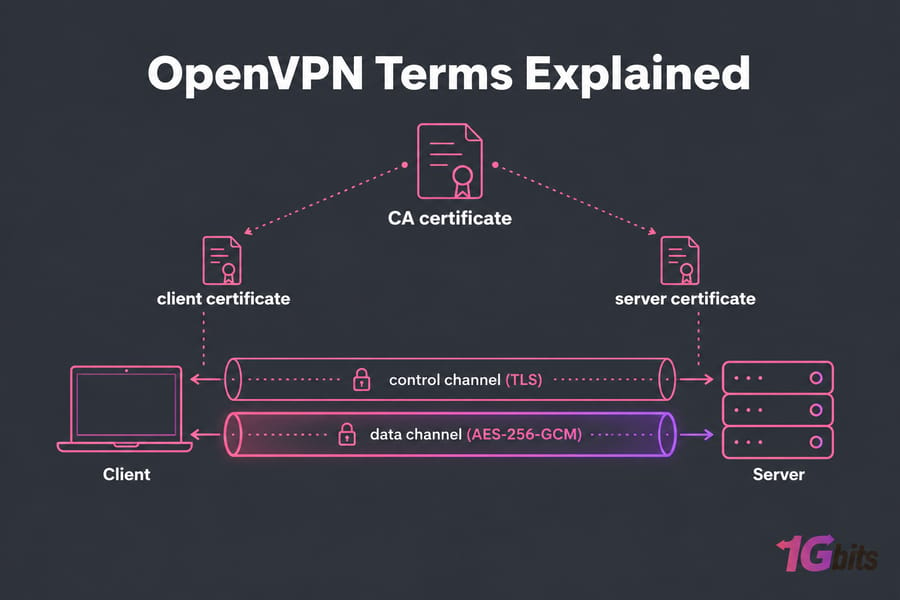
OpenVPN terms describe three things about a tunnel: how each side proves its identity, how traffic is encrypted, and how packets are routed. Certificates handle identity. TUN and TAP decide whether the tunnel carries Layer 3 IP packets or Layer 2 Ethernet frames, and AES-256 names the cipher that encrypts your data. Since OpenVPN 2.5 the client and server negotiate the cipher, usually landing on AES-256-GCM. The AES-256-CBC setting in older tutorials is no longer the default.
This glossary explains the words in a .ovpn file and assumes you know what a VPN is. For setup steps, see the guide on how to install OpenVPN.
OpenVPN glossary at a glance
| Term | Meaning | Status today |
| CA | Certificate authority that signs every server and client certificate | Required for certificate auth |
| cert / key | A machine's public certificate and the private key that goes with it | Required |
| TUN | Virtual device that carries IP packets (Layer 3, routed) | Modern default |
| TAP | Virtual device that carries Ethernet frames (Layer 2, bridged) | Only if needed |
| AES-256-GCM | AES with a 256-bit key in GCM mode, an AEAD cipher | Modern default |
| AES-256-CBC | AES in CBC mode with a separate HMAC | Legacy |
| data-ciphers | The list of ciphers the two sides are allowed to negotiate | Modern (2.5+) |
| tls-auth | Adds an HMAC signature to control channel packets | Works, but older |
| tls-crypt | Signs and encrypts control channel packets | Preferred |
| UDP / TCP | The transport protocol that carries the tunnel | UDP preferred |
| Port 1194 | OpenVPN's registered default port | Common |
| DCO | Data Channel Offload: encryption handled in the kernel | Modern (2.6+) |
| Subnet / NAT | The private address range for VPN clients, and the address translation that gets them online | Standard |
OpenVPN certificates explained
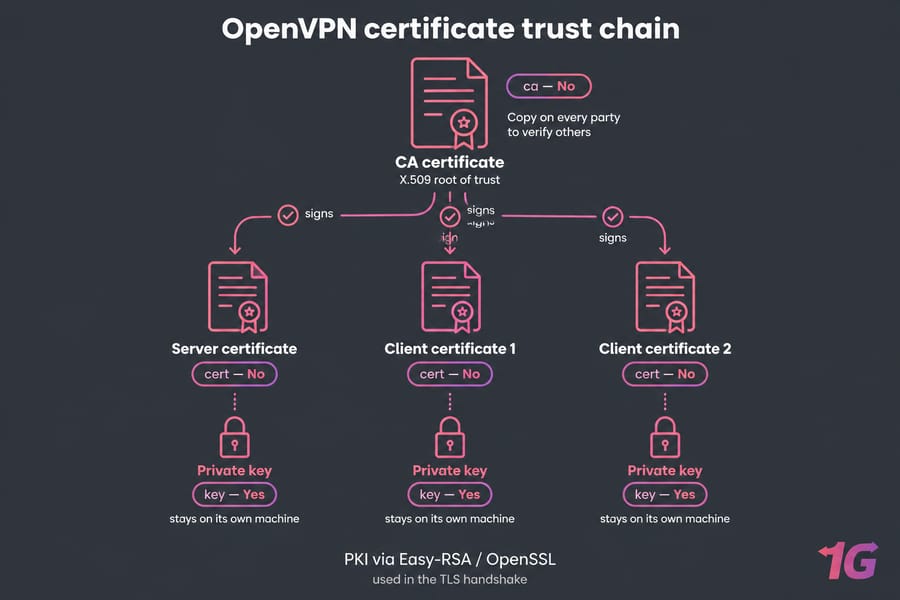
An OpenVPN certificate is an X.509 identity document used in the TLS handshake. The CA (certificate authority) is the root of trust: it signs the server certificate and each client certificate, and every party keeps a copy of the CA certificate to check the others. This setup is called a PKI, and Easy-RSA is the usual tool for building one with OpenSSL.
Authentication runs both ways. The client checks that your CA signed the server's certificate, and the server checks the client's the same way. Each certificate has a matching private key that stays on its own machine and should never be copied anywhere else.
| Config line | File | Secret? |
ca |
CA certificate | No, every party gets a copy |
cert |
This machine's certificate | No |
key |
This machine's private key | Yes |
Some servers also ask for a username and password. That login is an extra layer on top of the certificate check, not a replacement for it. To lock down the PKI side, see how to secure an OpenVPN server.
TUN vs TAP in OpenVPN
dev tun creates a routed Layer 3 tunnel for IP packets. dev tap creates a bridged Layer 2 tunnel that carries full Ethernet frames, broadcasts included. The OpenVPN manual says both ends must use the same mode, because the two represent different network layers.
| Feature | TUN | TAP |
| Layer | 3 (IP) | 2 (Ethernet) |
| Networking style | Routing | Bridging |
| Broadcast traffic | Not carried | Carried |
| Overhead | Lower | Higher |
| DCO support | Yes | No |
| Mobile clients | Supported | Often limited |
Choose TUN unless something needs Layer 2, such as older software that finds peers by broadcast (LAN games and some discovery protocols) or true Ethernet bridging into an office LAN. A Windows config may mention a "TAP adapter" even when it uses dev tun. That's the driver's name, and the tunnel is still in TUN mode.
AES-256 in OpenVPN: ciphers and channels
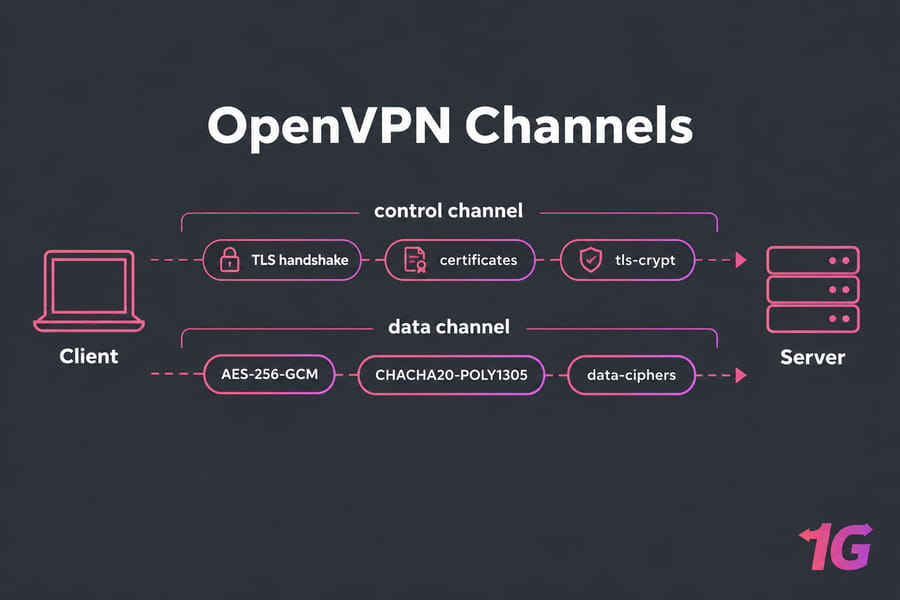
AES-256 means the AES cipher with a 256-bit key. The name leaves out the mode, which matters a lot. An OpenVPN connection also runs two separate channels:
- The control channel is a TLS session that handles authentication and key exchange.
- The data channel carries your actual traffic, encrypted with the negotiated cipher.
Since 2.5, OpenVPN only allows ciphers listed in data-ciphers, which defaults to AES-256-GCM:AES-128-GCM. In 2.6 the default also includes CHACHA20-POLY1305 where the platform supports it. GCM and ChaCha20-Poly1305 are AEAD ciphers, so they encrypt and authenticate each packet in one step. CBC needs a separate HMAC pass, and OpenVPN's own documentation treats GCM as the faster option.
If a 2.6 client connects to an old server that still uses cipher AES-256-CBC, you'll see an error like "failed to negotiate cipher with server." Fix it by updating the server. Adding CBC back to the client's list is a short-term workaround at best. For how this design compares with other protocols, read OpenVPN vs WireGuard and OpenVPN vs L2TP/IPsec.
TLS-auth vs TLS-crypt
Both options protect the control channel with a pre-shared static key before the TLS handshake finishes. The server drops any packet without a valid HMAC right away, which keeps port scans and floods of junk handshakes away from the TLS stack. People sometimes call this an "HMAC firewall."
| Feature | tls-auth | tls-crypt | tls-crypt-v2 |
| Signs control packets | Yes | Yes | Yes |
| Encrypts control packets | No | Yes | Yes |
| Key | Shared by all clients | Shared by all clients | One per client |
Needs key-direction |
Yes | No | No |
tls-auth still works, but for new deployments I'd use tls-crypt. It hides certificate details from anyone watching the handshake, and the traffic is harder to identify as OpenVPN. On larger setups, tls-crypt-v2 means one leaked client key doesn't expose everyone else.
OpenVPN UDP vs TCP and port 1194
proto udp is the usual choice. It has less overhead and avoids the stalls you get when TCP retransmits packets inside another TCP connection. OpenVPN's hardening guide also notes that UDP gives better protection against some DoS attacks and port scanning. Port 1194 is the registered default.
When a hotel or corporate firewall blocks UDP, switch to TCP (proto tcp-client on the client, tcp-server on the server), usually on port 443. You'll need to open whichever port you pick, and the guide to port forwarding covers routers. For background, see TCP vs UDP differences.
Routing, bridging, NAT and subnets
A line like server 10.8.0.0 255.255.255.0 sets up routed TUN mode and gives clients addresses from that private subnet. With topology subnet, each client gets one ordinary address in the range. server-bridge is the TAP version, where clients join your existing LAN subnet directly.
In routed mode, NAT on the server rewrites each client's 10.8.0.x source address to the server's public IP so clients can reach the internet. Reaching machines on a LAN behind the server also takes a push "route ..." line. If those terms are new, start with what an IP address is and what NAT means.
DCO, AEAD and other newer terms
DCO (Data Channel Offload) moves data channel encryption from the OpenVPN process into the kernel, which cuts down on context switching. OpenVPN 2.6 supports it on Linux with the ovpn-dco module, and recent OpenVPN Connect builds use it on Windows. DCO needs a TUN tunnel and a data-ciphers list that contains only AEAD ciphers (AES-GCM or ChaCha20-Poly1305). TAP, legacy CBC ciphers and compression all rule it out.
A sample .ovpn config, annotated
client
dev tun                          # routed Layer 3 tunnel
proto udp                        # UDP transport
remote vpn.example.com 1194      # server address and port
ca ca.crt                        # CA certificate used to verify the server
cert client.crt                  # this client's certificate
key client.key                   # private key, keep it secret
tls-crypt ta.key                 # signs and encrypts the control channel
data-ciphers AES-256-GCM:AES-128-GCM:CHACHA20-POLY1305
Router users will see the same directives in OpenVPN configuration on MikroTik, though RouterOS supports fewer of them.
Common mistakes with OpenVPN terms
- Copying configs from pre-2.5 tutorials that use
cipher AES-256-CBCorBF-CBC. - Leaving
comp-lzoorcompressturned on. Compression combined with encryption has known attacks, so enable legacy compression only when an old server leaves you no choice. - Choosing TAP when TUN would do the job.
- Judging a setup's security by "AES-256" alone. The mode, the control channel protection and the software version count just as much.
To run all of this on your own infrastructure, a Linux VPS with root access gives you full control over certificates, ciphers and routing. 1Gbits offers plans built for this as VPS for OpenVPN, plus broader VPS hosting for VPN.

Leave A Comment