

To secure an OpenVPN server on VPS, combine certificate-based authentication, MFA, tight firewall rules, tls-crypt, certificate revocation via CRL, SSH hardening, and regular patching. The safest build runs on a hardened Linux VPS with a protected CA, UFW or firewalld, and TOTP as the second factor.
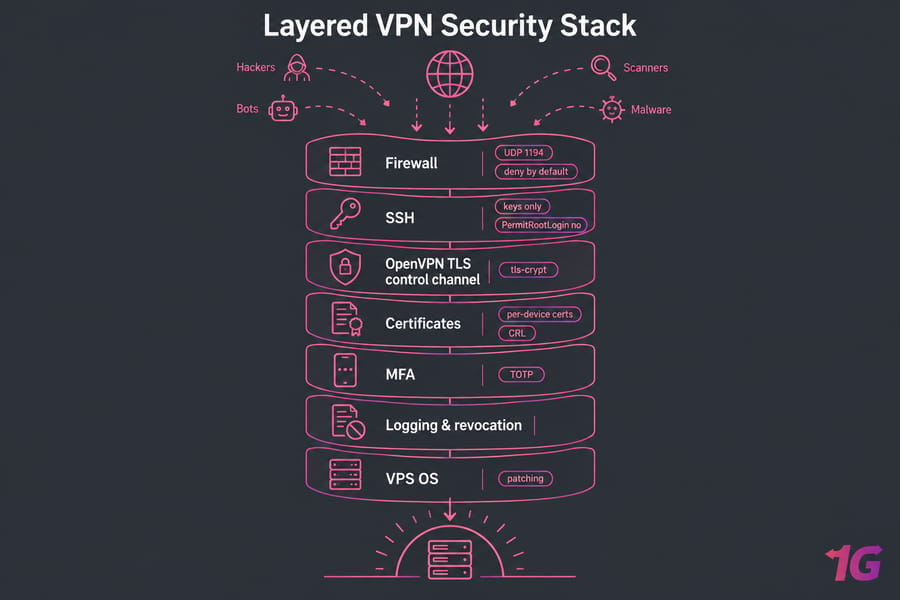
Why OpenVPN server security matters on a VPS
An exposed VPN endpoint is a door with your name on it. Scanners find UDP 1194 within hours of a fresh deploy. And a VPN isn't only privacy, it's access control into whatever sits behind the tunnel.
- Brute-force attempts against SSH and any username/password auth
- A stolen
.ovpnprofile lifted from a laptop or a Slack thread - Weak control-channel settings and outdated crypto defaults
- A compromised VPS that owns the CA and every certificate on it
Hardening the VPN config alone isn't enough. If root SSH is open with a password, your certificates don't matter much. Cover the secure your VPS basics first.
Choose the right authentication model
Decide this before you generate a single key.
| Model | Security | Best for | MFA |
| Certificates only | Good | Personal use, 1–3 devices | No |
| Certificates + password (PAM) | Better | Small teams | Via plugin |
| Certificates + password + TOTP | Best | Business, admin access | Yes |
The caveat most guides skip: MFA isn't equally easy across both products. Access Server ships TOTP MFA as an Admin Web UI toggle, covering local, PAM, LDAP and RADIUS auth. Community Edition has no built-in TOTP — you bolt it on with the PAM plugin.
My default: one certificate per device (not per person), user auth on top, TOTP for anyone with admin reach. Haven't installed the server yet? Start with how to install OpenVPN.
When a separate CA is worth it
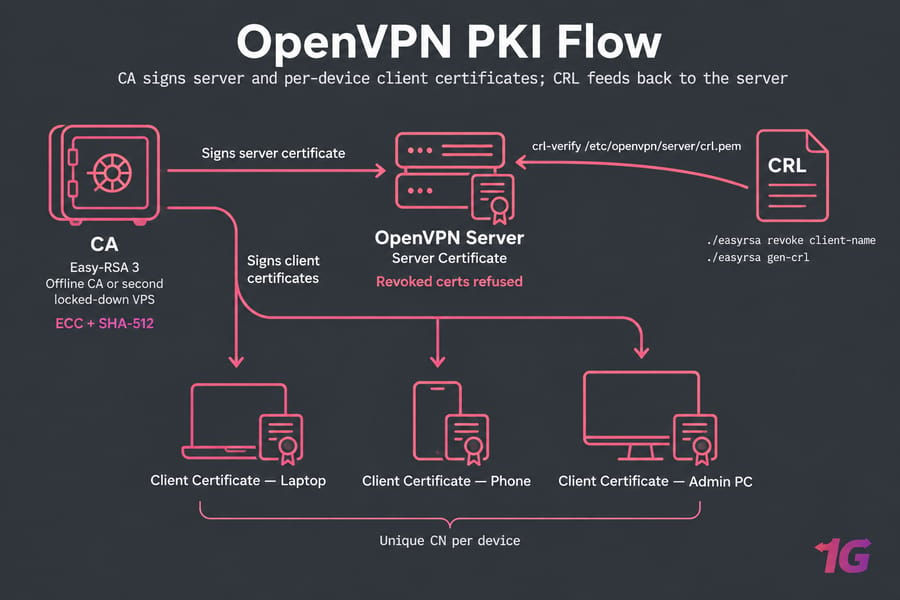
Running Easy-RSA on the same internet-facing box that terminates VPN traffic means one breach gives up your whole PKI. For business use, keep the CA offline or on a second locked-down VPS.
Harden the VPS first
Snapshot first. Locking yourself out of a VPS at 11pm is a special kind of misery.
- Create a sudo user:
adduser vpnadmin, thenusermod -aG sudo vpnadmin(wheelon Rocky/AlmaLinux). - Generate SSH keys, push them with
ssh-copy-id, and confirm key login in a second terminal before closing the first. - In
/etc/ssh/sshd_configsetPermitRootLogin noandPasswordAuthentication no. See disable root login in Linux. - Patch, then install
unattended-upgradesfor automatic security updates. - Confirm logging:
/var/log/auth.logon Ubuntu/Debian,/var/log/secureon RHEL-family systems.
Certificates and TLS hardening
Easy-RSA 3 handles the PKI. Run ./easyrsa init-pki, build the CA, issue the server certificate, then one client cert per device with a unique CN. Reused CNs make targeted revocation impossible. ECC keys with SHA-512 digests are a sane default, and faster than RSA-4096 on a 1 vCPU box pushing encrypted traffic.
tls-crypt vs tls-auth
Both protect the control channel, but they aren't equivalent. tls-crypt adds symmetric encryption on top of authentication, and that encryption applies even to the key exchange before the TLS session starts. It also drops the key-direction juggling tls-auth requires.
Use tls-crypt unless you support clients older than OpenVPN 2.4. Bonus: it hides the fact you're running OpenVPN from casual scanners.
port 1194
proto udp
tls-crypt /etc/openvpn/server/tc.key
auth SHA512
remote-cert-tls client
crl-verify /etc/openvpn/server/crl.pem
user nobody
group nogroup
verb 3
Add MFA with TOTP
Three proofs: the certificate proves the device, the password proves the account, the TOTP code proves possession right now.
On Community Edition you load the openvpn-plugin-auth-pam.so plugin server-side, add auth-user-pass client-side, and build a PAM stack with the Google Authenticator module. Users enroll once and append the six-digit code to their password. Fiddly — and a bad PAM stack locks out everyone at once, so test with a spare account. On Access Server it's a toggle, which is exactly why some teams pay for it. OpenVPN Connect handles the prompt either way.
Firewall rules for OpenVPN
Warning: allow SSH before enabling the firewall. Every admin learns this once.
| Service | Port/Proto | Why needed | Risk if exposed |
| SSH | 22/tcp or custom | Management access | Brute-force |
| OpenVPN | 1194/udp | The tunnel | Scanning, DoS |
| Everything else | — | Nothing | Deny by default |
With UFW: ufw allow OpenSSH, ufw allow 1194/udp, set DEFAULT_FORWARD_POLICY="ACCEPT", add a MASQUERADE rule in /etc/ufw/before.rules for your VPN subnet, and set net.ipv4.ip_forward=1 in /etc/sysctl.conf. Firewalld's masquerade zone does the same job on Rocky and AlmaLinux.
Layer the cloud firewall over the OS firewall, then verify with check open ports in Linux and the longer configure a firewall on your VPS guide.
Encrypted traffic eats CPU and bandwidth, so pick predictable networking — a VPS for OpenVPN or a Linux VPS hosting plan with full root access.
Revocation and client lifecycle
Deleting a .ovpn file does nothing. The certificate inside still authenticates until you revoke it.
Run ./easyrsa revoke client-name, then ./easyrsa gen-crl. Copy the file where the server can read it and enable crl-verify crl.pem in the config. Connecting clients get checked against the CRL, and matches are refused.
Watch the CRL expiry date — an expired CRL can block everyone. Rotate certs annually, revoke on offboarding, and keep scheduled automatic backups running.
Monitoring and brute-force protection
Install Fail2Ban and enable the sshd jail at minimum. It won't help a cert-only VPN port, but it kills SSH password hammering fast. Tail your OpenVPN log for repeated TLS handshake failures. Linux logs covers where everything lives, and a DDoS-protected VPS keeps the tunnel up when someone floods your endpoint.
Mistakes I keep seeing
| Don't | Do instead |
| Share one profile across the team | Unique cert and CN per device |
Skip crl-verify |
Enable it from day one |
| Enable UFW before allowing SSH | Add the SSH rule first |
| Keep the CA on the VPN box | Separate or offline CA |
OpenVPN or WireGuard?
| Factor | OpenVPN | WireGuard |
| Auth flexibility | Certs, PAM, LDAP, RADIUS | Static key pairs |
| MFA | Yes | Not natively |
| Revocation | CRL | Manual key removal |
Need MFA and per-user revocation? OpenVPN. Want a two-file config you'll never think about again? WireGuard — full breakdown in OpenVPN vs WireGuard.
Pre-launch checklist
- Snapshot taken before changes
- Sudo user created, root SSH login disabled
- Key-only SSH authentication
- Unattended upgrades enabled
- Unique client certificate per device
tls-crypton the control channelauth SHA512andremote-cert-tls clientsetcrl-verifyenabled, CRL current- MFA on for admin accounts
- Default-deny firewall, SSH and 1194/udp allowed
- IP forwarding and NAT verified
- Fail2Ban running, logs watched, revocation documented
Test from a fresh device with a non-admin account before calling it done. Building from scratch? Grab a VPS for OpenVPN and set it up your way.

Leave A Comment