

When searching for the best VPS hosting providers in 2026, it's essential to choose a provider that meets your performance, scalability, and budget requirements. This guide to the best virtual private servers (VPS hosting) will explore the top-rated providers offering the best VPS solutions. Whether you're looking for the best VPS hosting for your growing website or need the best virtual private server provider for advanced applications, these providers stand out for their reliability and performance. Our list of the best VPS options includes the fastest VPS hosting, best virtual private server hosting, and the best VPS server for various use cases. With so many choices available, selecting the best VPS provider can be overwhelming, but with the right information, you'll find the best virtual servers to meet your needs. Explore our curated list of the best VPS hosting providers for 2026 and discover the ideal solution for your hosting requirements.
If you need VPS, visit Buy VPS Hosting, or Windows VPS, or Linux VPS Hosting.
If you're shopping for the best VPS hosting in 2026, you probably don't want a vague list of "fast and reliable" hosts. You want a clear answer: which provider fits your budget, workload, operating system, and comfort level. That's what this page is for. I compared major VPS hosting providers by publicly available specs, pricing, support options, upgrade flexibility, OS availability, and real-world fit for different use cases — from WordPress and eCommerce to gaming, VPNs, and developer workloads.
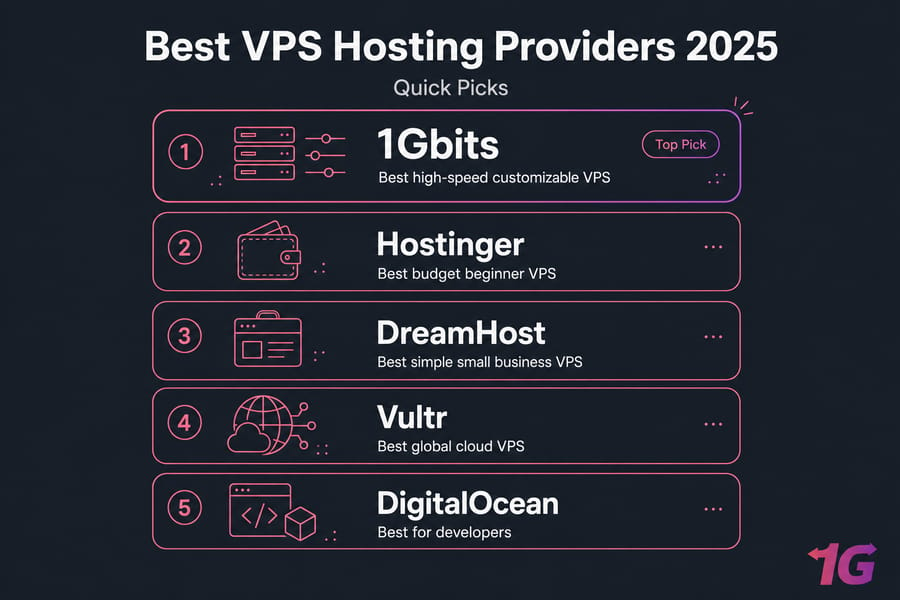
Best VPS Hosting Providers at a Glance
Here's the short version first. If you don't have time to read 5,000 words, start with this table and then jump to the provider or use case that matches what you're building.
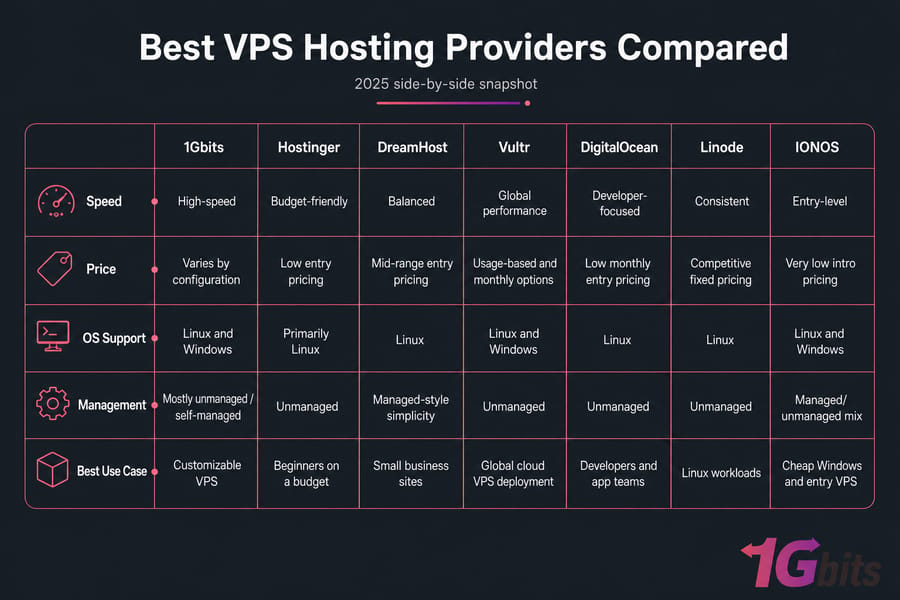
| Provider | Best For | Starting Price | Managed/Unmanaged | OS Support | Standout Feature |
| 1Gbits | High-speed customizable VPS | Varies by configuration | Mostly unmanaged / self-managed options | Linux and Windows | Flexible configurations, multiple VPS locations, strong network focus |
| Hostinger | Beginners on a budget | Low entry pricing | Unmanaged | Primarily Linux | Simple setup and low-cost plans |
| DreamHost | Small business sites | Mid-range entry pricing | Managed-style simplicity | Linux | Easy administration for standard web workloads |
| Vultr | Global cloud VPS deployment | Usage-based and monthly options | Unmanaged | Linux and Windows | Wide data center footprint and cloud VPS flexibility |
| DigitalOcean | Developers and app teams | Low monthly entry pricing | Unmanaged | Linux | Developer-friendly platform, API access, snapshots, tooling |
| Linode | Linux workloads and predictable pricing | Competitive fixed pricing | Unmanaged | Linux | Strong Linux hosting reputation and simple plans |
| IONOS | Cheap Windows and entry VPS | Very low intro pricing | Managed/unmanaged mix by product | Linux and Windows | Affordable starting plans and business-oriented options |
And yes, I kept the shortlist tighter than some "top 15" articles you see elsewhere. That's on purpose. I'd rather give you seven realistic choices with actual trade-offs than pad the page with hosts nobody serious would shortlist.
How We Chose the Best VPS Hosting Providers
This comparison was reviewed for 2026 using publicly available plan specs, pricing pages, feature documentation, support channels, and market fit. No fake benchmark charts here. If a provider didn't clearly explain what you get — RAM, vCPU, SSD or NVMe SSD storage, bandwidth allocation, root access, OS options — I weighed that against them.
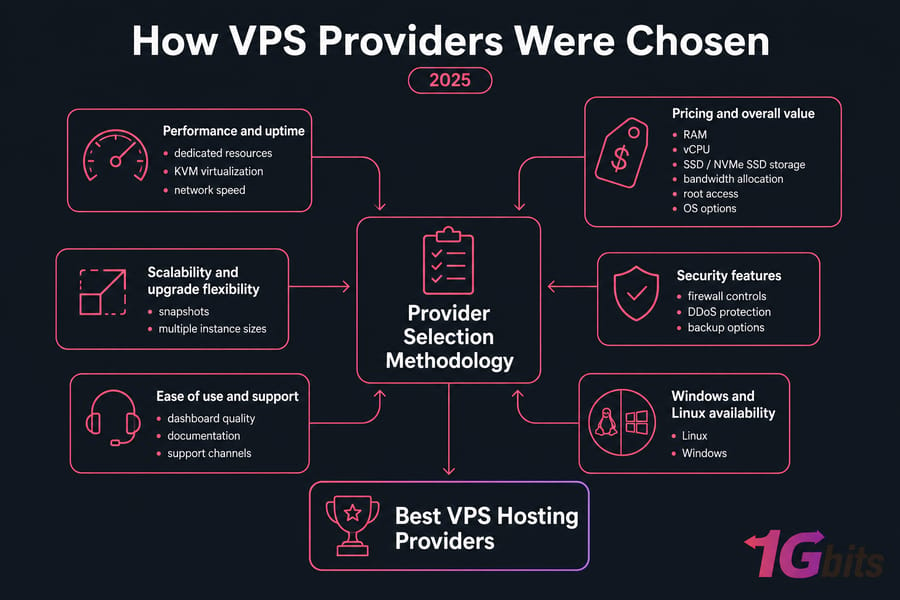
Performance and uptime
I looked at the basics first: dedicated resources, KVM virtualization where available, storage type, network speed, and whether the provider talks clearly about uptime guarantee and infrastructure quality. A VPS server can look cheap until you realize it's running on old storage, weak port speed, or overcrowded nodes.
What matters in practice? Disk speed, CPU consistency, and latency. If your site or app is database-heavy, NVMe storage usually beats older SSD storage by a noticeable margin. If you're serving users in one region, nearby data center locations matter more than flashy marketing.
Pricing and overall value
Cheap isn't always a bargain. I've seen low-cost virtual server hosting plans become expensive fast once you add backups, snapshots, control panel licenses, or Windows Server VPS fees. So I looked at base price, what's included, and how ugly the upgrade path gets later.
Some hosts win on entry price. Others charge more but give you better flexibility, cleaner scaling, or broader OS support. That's value.
Scalability and upgrade flexibility
A good VPS host should let you grow without rebuilding everything from scratch. I scored providers higher when they offered easy plan changes, multiple instance sizes, snapshots, and cloud VPS-style scaling options.
If you're running a startup, SaaS app, agency stack, or traffic-spiky store, this part matters a lot. Most people ignore it until migration week. Then it hurts.
Security features
Security isn't just a checkbox. I looked for firewall controls, DDoS protection, backup options, snapshot support, account security, and general transparency around server management. Managed VPS hosting providers may handle more of this for you, while unmanaged VPS hosting puts more of it on your plate.
Neither model is automatically better. But you should know which one you're buying.
Ease of use and support
Not everyone wants to manage packages, secure SSH, and troubleshoot boot issues at 2 a.m. Some of you do — and honestly, I get the appeal. Still, usability matters. I considered dashboard quality, onboarding, documentation, and support channels, especially for people moving up from shared hosting.
This is where beginner-friendly hosts separate themselves from developer-first platforms.
Windows and Linux availability
Linux VPS hosting is still the default for most web projects because it's cheaper, lighter, and better supported by the open-source ecosystem. But Windows VPS hosting matters for .NET apps, Remote Desktop workflows, MSSQL, or software that simply expects a Windows environment.
Which Factors should you consider when choose Best VPS Hosting Providers 2026?
When it comes to hosting websites, applications, or online services, selecting the right Virtual Private Server (VPS) hosting provider is crucial for your website's performance, reliability, and scalability. With numerous options available, choosing the best VPS hosting providers for 2026 can be overwhelming. In this guide, we will explore the key factors to consider when selecting the best virtual private server hosting, ensuring you make an informed decision. Whether you need the best Windows VPS hosting providers, best cloud VPS hosting providers, or the best VPS for your specific use case, this comprehensive guide will help you navigate through the best VPS hosting options, including the best virtual private server providers and features. Also read What Is VPS Hosting, Dedicated Server Vs VPS Hosting, and Top 10 Benefits of Using VPS for Your Business.

1. Performance and Speed
When choosing the best VPS hosting, performance should be a top priority. VPS hosting offers dedicated resources (CPU, RAM, storage), ensuring that your site or app performs optimally. The best VPS hosting providers ensure minimal downtime and optimal loading speeds, which are essential for user experience and SEO rankings.
To achieve the best virtual private server performance, providers should offer fast SSD storage, robust CPU resources, and enough RAM for your needs. If speed is a crucial factor, some of the best virtual private server providers offer the fastest VPS hosting with high-performance servers designed for resource-intensive applications.
Factors like the quality of data centers, server location, and bandwidth are also essential in determining the speed of your VPS hosting. For businesses requiring the fastest VPS hosting, choosing a provider with high-speed network infrastructure will ensure smooth operations. Also read VPS Advantages and Disadvantages, VPS vs Cloud, VPS vs VPN.
2. Scalability and Flexibility
Scalability is one of the most important factors to consider when choosing the best VPS hosting providers. As your business or website grows, you will need a VPS solution that can scale with your needs. The best VPS hosting services allow you to upgrade or downgrade your resources (RAM, storage, CPU) with ease.
Whether you need the best virtual private server for trading or high-traffic websites, look for providers who offer flexible resource allocation and easy upgrades. The best VPS provider will provide you with an easy way to scale your virtual private server as your traffic or demands increase without experiencing service disruption.
In 2026, cloud VPS hosting is gaining popularity due to its flexibility. Cloud VPS providers allow on-demand scaling with instant provisioning, meaning you can adjust resources as needed.
3. Security Features
A secure environment is essential for any hosting provider. When considering the best VPS hosting, ensure the provider offers robust security measures, such as:
-
Firewalls: To protect your server from external attacks.
-
DDoS Protection: To mitigate risks of large-scale attacks.
-
SSL Certificates: For secure connections between servers and users.
-
Backup Solutions: To ensure your data is safely stored and can be recovered if needed.
For businesses relying on sensitive data or handling financial transactions, the best virtual private server hosting should include advanced security features like encrypted connections and regular vulnerability scans. The best VPS hosting services will implement security protocols to protect your data and guarantee uptime.
4. Technical Support and Customer Service
Responsive and knowledgeable customer support is essential when choosing the best virtual private server hosting. A VPS provider with 24/7 support ensures that issues are addressed immediately. The best VPS hosting for your needs should provide various support channels, including live chat, email, and phone support.
Look for VPS hosting providers who offer specialized support for your chosen operating system, whether it's Linux, Windows, or other environments. Good VPS hosting providers also offer extensive knowledge bases, FAQs, and tutorials to assist with managing and configuring your server.
5. Cost and Pricing Models
Pricing is a significant factor when selecting the best VPS hosting provider. Providers typically offer tiered pricing plans based on resource allocation. While it's tempting to choose the cheapest virtual private server, be cautious of the quality of service and support at lower prices.
The best VPS hosting plans provide a balance between affordability and features. Some providers, especially in cloud VPS hosting, offer pay-as-you-go pricing models, allowing you to pay only for the resources you use. In contrast, dedicated VPS hosting can be more expensive but provides more robust resources and control.
For users on a budget, looking for cheap VPS hosting with cPanel or the cheapest virtual private server may be more suitable for smaller projects. However, always ensure the plan meets your resource needs to avoid performance limitations.
6. Managed vs. Unmanaged VPS Hosting
VPS hosting can be either managed or unmanaged, depending on how much control you want over the server. Managed VPS hosting means the provider handles all server management tasks, including updates, monitoring, and security, while unmanaged VPS hosting gives you full control over the server and requires you to manage everything yourself.
For those who are looking for a hassle-free experience, choosing the best virtual private server provider offering managed VPS hosting might be the best option. This allows you to focus on your business without worrying about server maintenance. However, for tech-savvy users, unmanaged VPS hosting provides greater flexibility and control.
7. Type of VPS Hosting: Cloud vs. Dedicated
Understanding the differences between VPS hosting and dedicated hosting is essential in making the right decision. While both options offer dedicated resources, VPS hosting is more cost-effective and allows for more flexible scaling, making it suitable for smaller businesses or websites that need high-performance but don't want the overhead of a dedicated server.
For those looking for the best VPS hosting for WordPress or resource-heavy applications, a VPS provides the best balance of price and performance. In contrast, dedicated hosting is better suited for those needing guaranteed resources and full control over the hardware.
Cloud VPS hosting is particularly appealing for its flexibility, scalability, and high availability, which is why it ranks as one of the best virtual private server hosting solutions for growing businesses in 2026.
Best VPS Hosting Providers Compared
Below are the full reviews. Same structure for each provider, because that's the only fair way to compare them.
1. 1Gbits — Best for high-speed customizable VPS
Best for
Users who want flexible configurations, strong network options, both Linux and Windows availability, and more control over how the VPS is set up. It's a good fit for developers, agencies, VPN projects, trading setups, and businesses that care about low-latency hosting. Also read Best Linux VPS Hosting in 2026, Best Forex VPS.
Key Features of 1Gbits VPS Hosting
| Feature | Description |
| 1Gbits Speed | The provider offers 1Gbps speed, ensuring fast data transfers. |
| Virtual Private Servers | Dedicated virtual servers that offer more flexibility compared to shared hosting. |
| Scalable Solutions | Easily scalable hosting plans for growing businesses. |
| High Reliability | Offers high uptime guarantees with robust infrastructure. |
| Cost-Effective Plans | Affordable prices without compromising performance. |
| Flexible Control | Full root access to control your server with complete freedom. |
Benefits of Choosing 1Gbits VPS Hosting
- Optimal Speed and Performance: With a speed of up to 1Gbps, 1Gbits provides a best VPS hosting service for anyone who values performance. The 1Gbits VPS ensures seamless operation and fast data processing, allowing businesses to handle large amounts of traffic and transactions.
- Scalable for Future Growth: 1Gbits offers flexible scaling options, enabling you to increase resources as your business grows. Whether you're just starting out or managing a large e-commerce website, you'll have the capability to scale seamlessly.
- More Control with Virtual Private Servers: 1Gbits' virtual private servers come with full root access, offering greater control compared to shared hosting services. This allows businesses to install custom software, configure advanced settings, and customize security measures.
- Cost-Effective Solution: Unlike dedicated servers, which can be expensive, 1Gbits VPS hosting offers great performance at an affordable price point. It ensures that you don't have to break the bank to get premium server performance.
- Top-notch Security: With dedicated resources, 1Gbits provides strong isolation and security, protecting your data from other users.
Pros
- Good flexibility if you need a tailored VPS server instead of a rigid starter package
- Supports both Windows Server VPS and Ubuntu VPS style deployments
- Works well for users who care about server location and latency
- Broad commercial path if you need to scale or rent specialized instances via VPS Rental
Cons
- Less beginner-polished than mass-market shared hosting brands
- Self-managed VPS users still need technical confidence
- Pricing depends on configuration, so it isn't as instantly comparable as fixed-entry plans
Pricing overview
Pricing varies based on RAM, vCPU, storage, bandwidth, operating system, and region. That makes quick comparison slightly harder, but it also means you can avoid paying for resources you don't need.
Why Choose 1Gbits VPS Hosting?
1Gbits is a top VPS hosting provider that stands out for its fast and scalable services. The ability to handle demanding applications, coupled with good VPS provider options, ensures it delivers high-quality performance for websites, online stores, and gaming servers. If you're looking for top 10 best VPS hosting, you'll find that 1Gbits offers a balance of affordability, speed, and flexibility that sets it apart from other providers.
- Affordable Pricing: One of the biggest advantages of 1Gbits VPS is its cost-effective nature. While the VPS offers the best VPS hosting services, the price remains competitive, making it accessible to small businesses and startups.
- Excellent Support: 1Gbits offers 24/7 customer support, ensuring that technical issues are resolved quickly. For any user seeking the best VPS providers, responsive support is a crucial factor, and 1Gbits excels in this area.
Additionally, if you're looking for VPS hosting options in specific locations, 1Gbits provides flexible solutions tailored to different regions. You can explore their diverse VPS locations and find the perfect match for your business needs by visiting 1Gbits VPS Locations.
If you want to explore options directly, start with Buy VPS Hosting, check Windows VPS, browse Linux VPS Hosting, or test a trial VPS.
2. Hostinger — Best budget VPS for beginners
Best for
First-time VPS buyers who want cheap VPS hosting with a simpler learning curve and predictable starter plans. Also read Best VPS for VPN.
Advantages of Hostinger VPS
| Feature | Hostinger VPS |
| Affordable Plans | Hostinger offers low-cost plans for small businesses and individuals. |
| Fast Setup | Quick deployment and setup process. |
| High-Performance Servers | 100% SSD storage ensures fast data retrieval. |
| Excellent Customer Support | 24/7 support via live chat and tickets. |
| Easy Management | Access to a user-friendly control panel. |
| Multiple Data Center Locations | Available in the USA, Europe, and Asia. |
Disadvantages of Hostinger VPS
- Limited Customization: Although flexible, Hostinger's VPS plans can lack the level of customization that some users may need.
- Resource Limits: Higher-tier plans can get quite expensive compared to other best VPS providers for the same resource allocation.
- No Free Backup: Backup options may incur additional costs, which can be an inconvenience.
Pros
- One of the easier ways to move from shared hosting to a small Linux VPS
- Good value for personal sites, small WordPress projects, and test environments
- Low-cost starting plans make it accessible
Cons
- Not the strongest option for advanced customization
- Windows support isn't its core strength
- Support and control can feel basic once your workload gets more serious
Pricing overview
Hostinger usually competes aggressively on introductory pricing. That's great if your main priority is cost, but you'll still want to check renewal rates and resource ceilings before committing long term.
How it compares
Hostinger is easier for beginners than developer-first platforms like DigitalOcean or Linode. But if you need broader OS support, lower-latency regional choice, or more specialized deployment flexibility, other providers pull ahead.

3. DreamHost — Best simple VPS for small businesses
Best for
Small business websites, brochure sites, and straightforward business apps that need more stability than shared hosting without a highly technical admin experience.
Advantages of DreamHost VPS
| Feature | DreamHost VPS |
| Solid Performance | SSD storage ensures fast access times and reliable performance. |
| Scalable Solutions | DreamHost offers a wide range of scalable options as your business grows. |
| User-Friendly | Easy-to-use interface, perfect for beginners and developers. |
| Free SSL Certificates | Provides free SSL certificates for added security. |
| Excellent Customer Support | 24/7 customer support via live chat and email. |
| Highly Reliable Uptime | DreamHost guarantees 100% uptime, with a robust infrastructure. |
Disadvantages of DreamHost VPS
- Higher Pricing: While DreamHost offers excellent performance, it tends to be on the pricier side compared to some other best VPS hosting providers.
- Limited OS Choices: DreamHost focuses more on Linux-based operating systems and offers fewer choices for Windows users.
- Limited Customization: Advanced customization options may be restricted compared to more flexible providers like 1Gbits.
Pros
- Easier than many unmanaged VPS hosting services
- Good fit for business owners who don't want to tinker constantly
- Clearer upgrade path than staying on crowded shared hosting
Cons
- Less appealing for developers who want deep infrastructure control
- Not a standout choice for Windows VPS hosting
- Can feel limited for modern app deployment compared with cloud VPS providers
Pricing overview
DreamHost typically sits in the sensible middle: not ultra-cheap, not wildly expensive. You're paying for simplicity more than raw flexibility.
How it compares
If you're running a small business site and don't want self-managed complexity, DreamHost makes sense. If you're building APIs, game servers, VPN endpoints, or custom stacks, it probably won't be your first pick. For those seeking even more customization and robust performance, consider exploring 1Gbits VPS rental, which offers a powerful hosting solution with flexible configurations tailored to your needs.
4. Vultr — Best cloud VPS for global deployment
Best for
Users who need cloud VPS hosting with broad global coverage, flexible instance deployment, and better reach across regions.
Advantages of Vultr VPS
| Feature | Vultr VPS |
| Global Server Locations | Vultr offers servers in 25+ locations around the world, ensuring low-latency and fast performance for global users. |
| Affordable Pricing | Vultr's pricing is competitive, making it an attractive choice for those looking for cheap VPS solutions. |
| High Performance | Offers SSD-based storage for fast performance and low latency. |
| Simple Control Panel | The user-friendly control panel makes managing servers easy. |
| Customizable Options | Flexible plans that can be tailored to meet specific needs. |
| Excellent Customer Support | 24/7 customer support via live chat and tickets. |
Disadvantages of Vultr VPS
- No Managed Services: Vultr does not offer managed VPS solutions, which could be a disadvantage for users seeking full management for their servers.
- Limited Windows Support: While Vultr provides a variety of operating systems, its Windows VPS options are less robust compared to other providers like 1Gbits.
- Advanced Configuration Required: For users who need more advanced configurations, Vultr may require more technical expertise compared to easier-to-manage platforms.
Pros
- Excellent choice if server proximity matters
- Solid for developers, SaaS teams, and international apps
- Usage patterns map well to modern cloud-style infrastructure
Cons
- Not as beginner-friendly as traditional web hosts
- Costs can climb if you add extras and larger instances
- Self-managed by default for most serious use cases
Pricing overview
Vultr offers both monthly and more flexible cloud-style billing options depending on the service. That's useful, but it also means you need to watch spend more carefully.
How it compares
Vultr is stronger than many classic VPS brands when you care about geographic reach. Compared with DigitalOcean, it often wins on location variety and Windows options. Additionally, for those looking to try out VPS hosting before committing, 1Gbits offers a trial VPS option, allowing you to experience their service firsthand with no long-term commitment.

5. DigitalOcean — Best VPS for developers
Best for
Developers, DevOps teams, startups, and technical users who want API access, clean infrastructure primitives, and a platform built around self-service workflows.
Advantages of DigitalOcean VPS
| Feature | DigitalOcean VPS |
| Scalability | DigitalOcean provides flexible, scalable VPS plans to meet the growing needs of businesses. |
| Developer-Friendly | It has a user-friendly control panel and powerful API that allows developers to manage servers effortlessly. |
| Affordable Pricing | DigitalOcean offers competitive pricing, making it an ideal choice for developers, startups, and small businesses. |
| High-Performance SSD Storage | SSD-based VPS hosting ensures faster performance and quick data access. |
| Global Data Center Locations | With data centers located in North America, Europe, and Asia, DigitalOcean provides low-latency services worldwide. |
| Great Documentation | Offers comprehensive tutorials and guides to help users manage their servers. |
Disadvantages of DigitalOcean VPS
- Limited Managed Services: DigitalOcean does not provide fully managed services, which could be a drawback for users who prefer hands-off management.
- Lacks Full Windows Support: Although DigitalOcean offers a variety of Linux distributions, Windows hosting options are limited compared to other VPS providers.
- Less Control Over Networking: Users may find the networking options less customizable compared to 1Gbits or other VPS providers.
Pros
- Excellent for self-managed VPS users
- Easy to deploy Linux-based workloads quickly
- Works especially well for developers and engineering teams
Cons
- Not ideal for non-technical beginners
- Windows isn't a standard DigitalOcean strength
- Support expectations should be calibrated — this is not concierge hosting
Pricing overview
DigitalOcean starts affordably, especially for smaller droplets. But as with most cloud platforms, resource add-ons and growth can change the total bill fast.
How it compares
If you want a VPS for developers, DigitalOcean is still one of the first names worth considering. I personally wouldn't recommend it to someone coming straight from cPanel shared hosting unless they're ready to learn Linux server management.
6. Linode — Best Linux VPS for predictable pricing
Best for
Linux hosting users who want clean pricing, decent performance, and a platform that stays focused on infrastructure rather than beginner hand-holding.
Key features
- Strong Linux VPS hosting reputation
- Predictable plan structure
- Good fit for Ubuntu VPS, Debian, and other common distributions
- Useful for developers, agencies, and smaller app stacks
Pros
- Easy to understand pricing model
- Good match for classic Linux workloads
- Better than many budget hosts for technical users
Cons
- Not especially beginner-focused
- Windows options are limited compared with broader providers
- Faces strong pressure from Vultr and DigitalOcean in the same segment
Pricing overview
Linode has historically been attractive for users who want fixed, understandable billing. That's still a big selling point if you're budgeting for client projects or internal tools.
How it compares
Linode feels like a sensible middle ground between bare-bones budget VPS hosting and feature-heavy cloud platforms. If Linux is your world, it's still very relevant.
7. IONOS — Best cheap Windows and entry VPS
Best for
Buyers looking for best cheap VPS hosting options, especially those who want low entry pricing or a business-oriented provider with both Linux and Windows paths.
Key features
- Very low starting prices on some plans
- Windows VPS hosting options
- Business support orientation
- Appealing for smaller projects and cost-conscious buyers
Pros
- Affordable starting point
- One of the more accessible paths into Windows VPS hosting
- Useful for simple deployments and test use
Cons
- Intro offers can be more attractive than long-term value
- Not the first choice for advanced developer workflows
- Interface and plan structure aren't everyone's favorite
Pricing overview
IONOS is often among the cheapest visible options early on. Just read the pricing page carefully. Cheap upfront is good; surprise renewal pricing is not.
How it compares
IONOS is stronger for budget shoppers than for power users. If you're choosing between IONOS and a more technical cloud provider, the real question is simple: do you want lower friction or deeper control?
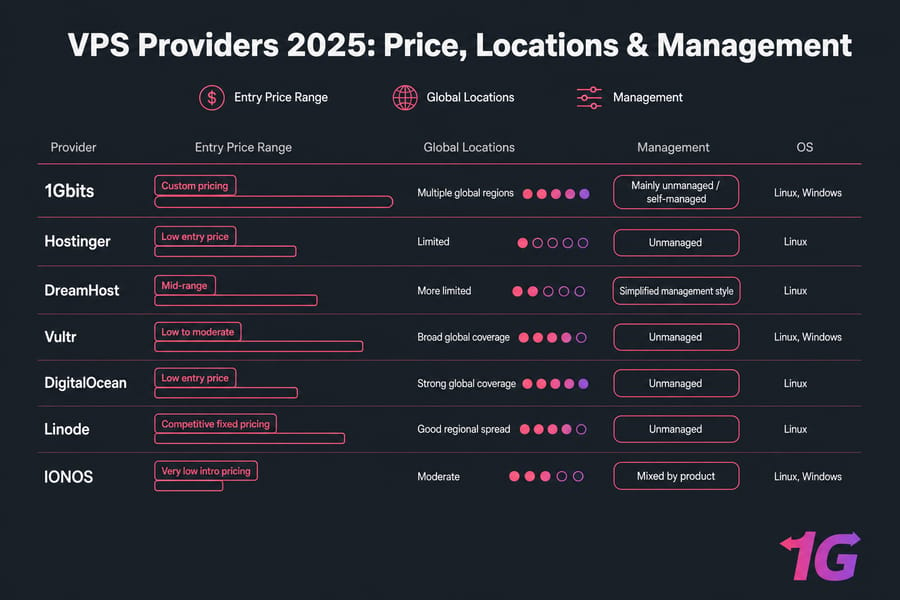
VPS Hosting Comparison Table
Here's the more detailed side-by-side view. This is the section most buyers scroll for first — and for good reason.
| Provider | Starting Price | Managed/Unmanaged | OS Options | Data Center Locations | Storage Type | Best For |
| 1Gbits | Custom pricing | Mainly unmanaged/self-managed | Linux, Windows | Multiple global regions | SSD/NVMe depending on plan | Custom high-speed VPS and regional deployments |
| Hostinger | Low entry price | Unmanaged | Linux | Limited compared with cloud-heavy rivals | SSD/NVMe by plan generation | Beginners and budget users |
| DreamHost | Mid-range | Simplified management style | Linux | More limited | SSD | Small business sites |
| Vultr | Low to moderate | Unmanaged | Linux, Windows | Broad global coverage | SSD/NVMe | Cloud VPS hosting and global apps |
| DigitalOcean | Low entry price | Unmanaged | Linux | Strong global coverage | SSD/NVMe | Developers and SaaS teams |
| Linode | Competitive fixed pricing | Unmanaged | Linux | Good regional spread | SSD/NVMe | Linux hosting with predictable billing |
| IONOS | Very low intro pricing | Mixed by product | Linux, Windows | Moderate | SSD | Cheap VPS hosting and Windows entry plans |
Best VPS Hosting by Use Case
A provider can be excellent and still be wrong for you. That's the part most roundup posts skip. So here's the practical breakdown.
Best VPS for beginners
Top pick: Hostinger. If you're moving up from shared hosting and just need a straightforward Linux VPS, Hostinger is one of the easier entry points. The dashboard is approachable, pricing is low, and you won't get overwhelmed immediately.
Alternatives: DreamHost if you're a small business owner who wants simplicity, and 1Gbits if you already know you need more configuration flexibility.
Top pick: DigitalOcean. This is the obvious one for engineering teams, and that's not a bad thing. API access, snapshots, Linux-first workflows, and strong docs make it attractive for self-managed environments.
Alternatives: Linode for straightforward Linux hosting, and 1Gbits for developers who also need region-specific deployment or Windows support. If that's your lane, check Best VPS for Developers.
Best VPS for Windows
Top pick: 1Gbits. Windows VPS hosting has more overhead, often costs more, and narrows your provider list fast. 1Gbits stands out here because it supports Windows deployments without treating them like an afterthought.
Alternatives: Vultr and IONOS. If you're comparing options more deeply, see Best Windows VPS Providers or browse live Windows VPS hosting plans.
Best VPS for Linux
Top pick: Linode. For pure Linux hosting, Linode remains a sensible choice. Clean plans, predictable pricing, and broad distro support keep it competitive.
Alternatives: DigitalOcean for developer-heavy stacks and 1Gbits for customizable Linux VPS hosting. If you want more Linux-specific advice, see Best Linux VPS Hosting or review Linux VPS hosting options.
Best VPS for WordPress
Top pick: DreamHost. For a typical business WordPress site that has outgrown shared hosting, DreamHost is easier to live with than a raw cloud instance. You get a cleaner path without diving into full self-managed ops on day one.
Alternatives: Hostinger for budget WordPress and 1Gbits for heavier custom WordPress stacks, agencies, or WooCommerce workloads that need more tuning room.
Best VPS for gaming
Top pick: 1Gbits. Gaming workloads care about low latency, steady CPU access, and server location more than marketing copy. 1Gbits is a strong candidate if you're running private game servers, region-sensitive sessions, or specialized setups.
Alternatives: Vultr for global region choice and DigitalOcean for more technically managed game backends. For more on this niche, check Best Game VPS Hosting.
Best VPS for VPN hosting
Top pick: 1Gbits. If you're building a VPS for VPN hosting, you need root access, stable networking, decent bandwidth allocation, and the ability to choose a useful region. 1Gbits checks those boxes well.
Alternatives: Vultr for location diversity and DigitalOcean for more developer-controlled VPN deployments. You can dig deeper with VPS vs VPN comparison.
Best cheap VPS hosting
Top pick: IONOS. If your goal is to spend as little as possible upfront, IONOS usually lands near the top of the shortlist.
Alternatives: Hostinger for a friendlier beginner experience and 1Gbits if "cheap" for you means good cost-to-performance, not just the lowest sticker price. For similar options, browse Cheap VPS Hosting.
How to Choose the Right VPS Hosting Plan
Now here's the part people rush. Don't. Picking the wrong plan is how you end up overpaying for idle resources or underbuying and dealing with constant slowdowns.
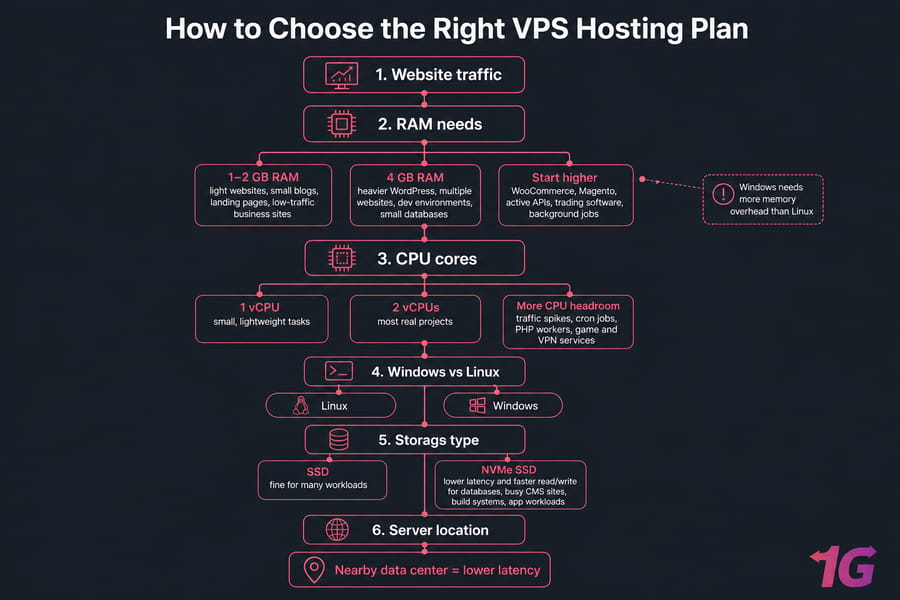
How much RAM do you need?
For light websites, small blogs, landing pages, and low-traffic business sites, 1 to 2 GB of RAM is often enough. It's the entry point, not the comfort zone. Add caching and keep your stack lean, and it can work fine.
For heavier WordPress installs, multiple websites, dev environments, or small databases, 4 GB is a much safer floor. If you're running WooCommerce, Magento, active APIs, trading software, or concurrent background jobs, start higher.
Windows needs more memory overhead than Linux. That's one of the easiest mistakes beginners make when moving to Windows Server VPS. They size it like a Linux box, then wonder why everything feels sluggish.
How many CPU cores do you need?
One vCPU can handle small, lightweight tasks. Two vCPUs are better for most real projects. Once you're serving traffic, processing cron jobs, handling PHP workers, or running game and VPN services, CPU becomes a bottleneck faster than people expect.
My rule of thumb: if you regularly hit CPU spikes on shared hosting, don't move to the smallest VPS plan and hope for magic. Give yourself headroom.
SSD vs NVMe storage
SSD storage is still fine for many workloads. NVMe SSD is better when you care about lower latency and faster read/write performance — databases, busy CMS sites, build systems, and app workloads especially.
Will every user feel the difference instantly? No. But on a busy site, faster storage helps more than most brochure pages admit.
Managed vs unmanaged VPS
Managed VPS hosting means the provider helps with server management tasks like updates, monitoring, security hardening, and sometimes backups or migration. Unmanaged VPS hosting gives you root access and responsibility. More freedom, more work.
If you know Linux administration, self-managed VPS can save money and give you tighter control. If you don't, managed service is often worth it. I know plenty of smart business owners who insist on unmanaged hosting to save a few dollars, then pay much more later when something breaks in production.
For a deeper breakdown, read How to Choose VPS Hosting and VPS Advantages and Disadvantages.
Server location and latency
Choose the server close to your users — or close to the service endpoint that matters. If you're hosting a site for German customers, a U.S.-only deployment is rarely ideal. Same story for gaming, Forex, and VPN workloads.
Latency isn't abstract. It's user experience. It's trade execution timing. It's game responsiveness. Browse available VPS locations before you buy.
Bandwidth and port speed
Bandwidth allocation tells you how much traffic you can push. Port speed tells you how fast the server can move data at a given moment. You need both. A VPS with generous storage but weak network throughput can still feel slow under load.
For websites, apps, and media-heavy services, pay attention to transfer allowances. For VPNs, downloads, and gaming, port speed matters even more.
Control panel and OS choice
Not everyone wants root-only command line administration. A control panel like cPanel or Plesk can make life easier, especially if you're managing multiple sites or handing the system to a non-technical client. But licenses cost extra.
Linux is usually the default recommendation because it's cheaper and lighter. Windows is the right call when your software stack depends on it. Simple, but critical.
If you're new to basic access tasks, this guide on How to Login to VPS is a good place to start.
VPS Hosting vs Shared Hosting vs Dedicated Server
This comparison trips people up all the time, mostly because hosting companies blur the lines to make upgrades sound urgent.
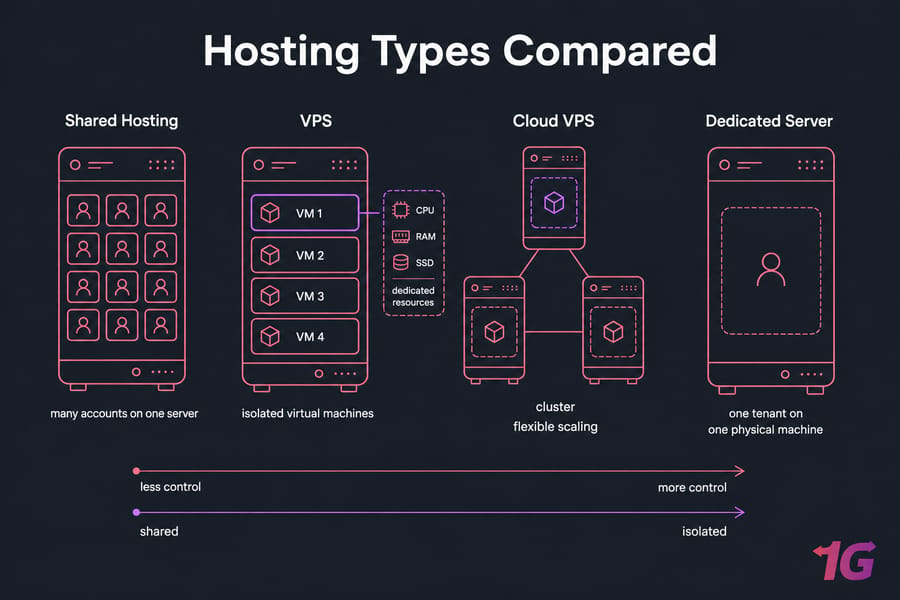
When VPS is the right choice
VPS is the sweet spot when shared hosting feels cramped but dedicated hardware would be overkill. You get dedicated resources, root access, OS control, and better isolation than shared hosting — without paying dedicated-server money.
It's a strong fit for growing websites, web apps, agencies, eCommerce stores, staging environments, custom stacks, and anyone who needs more say in server management.
And if you're wondering when to make the jump, the answer is usually: when you're hitting resource limits, needing custom software, or worrying that one noisy shared neighbor is hurting performance.
When cloud VPS is better
Cloud VPS hosting is often better when you need fast scaling, flexible deployment, and infrastructure that behaves more like modular building blocks. It's often the better choice for startups, development teams, SaaS apps, and workloads with variable demand.
For a deeper comparison, see VPS vs Cloud and Best Cloud VPS Hosting Providers.
When dedicated hosting makes more sense
Dedicated hosting wins when you need the whole physical server: heavy databases, high and predictable resource demand, strict compliance, or very specific hardware needs. It's more expensive, but sometimes that's the right answer.
If you need help drawing the line, read Dedicated Server Vs VPS Hosting. Home lab users may also find Best Servers for Home Use useful if they're deciding between renting and buying hardware.
Linux vs Windows VPS Hosting
This decision affects cost, resource needs, software compatibility, and how much support you'll find online. So don't treat it like a cosmetic setting.
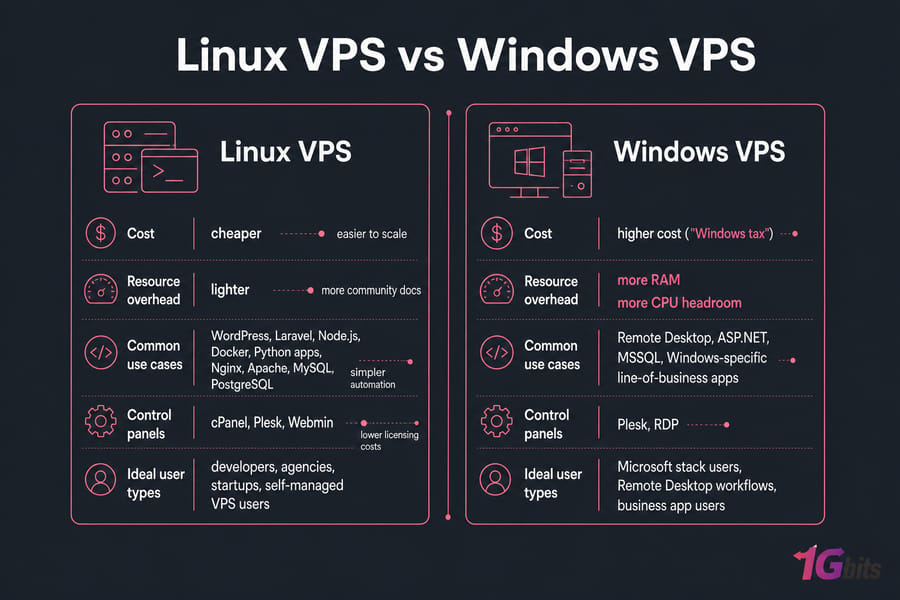
When to choose Linux VPS
Choose Linux VPS hosting if you're running WordPress, Laravel, Node.js, Docker, Python apps, Nginx, Apache, MySQL, PostgreSQL, or almost any standard web stack. It's cheaper, lighter, and easier to scale efficiently.
Linux is also the better fit for developers, agencies, startups, and self-managed VPS users. You'll usually get more community docs, simpler automation, and lower licensing costs.
When to choose Windows VPS
Choose Windows VPS hosting when you need Remote Desktop, ASP.NET, MSSQL, Windows-specific line-of-business apps, or tooling that simply expects Microsoft Server environments. That's the real reason to pay the Windows tax.
You'll want more RAM, a bit more CPU headroom, and a provider that actually supports Windows well. Don't just assume every host does. If this is your path, compare Windows VPS options directly.
Who Should Use VPS Hosting?
Not everybody needs a VPS. Sometimes shared hosting is enough. Sometimes cloud-native infrastructure is a better fit. But for a lot of projects, VPS is exactly where things start to make sense.
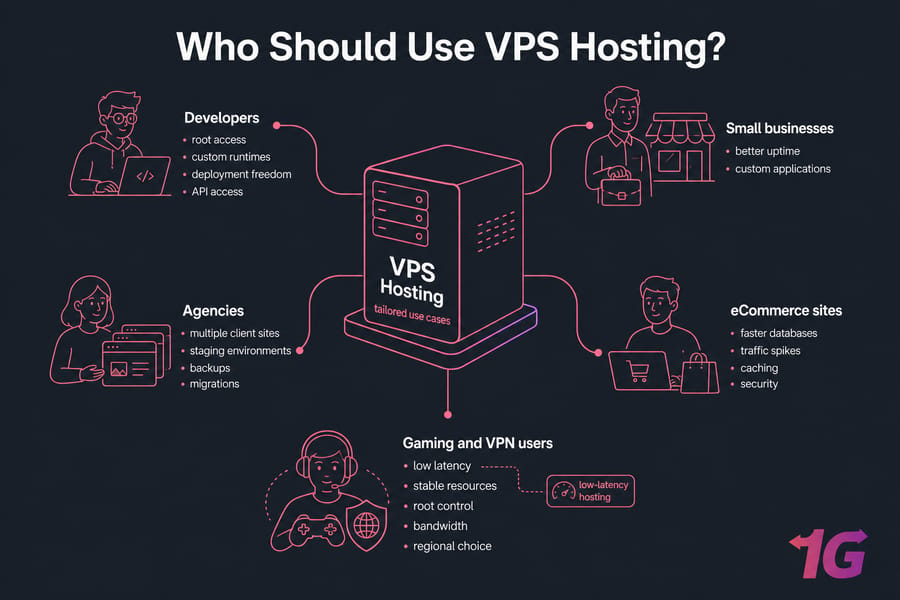
Small businesses
If your business site is slow on shared hosting, needs better uptime, or requires custom applications, VPS hosting gives you more breathing room. It's especially useful once traffic becomes consistent rather than occasional.
Developers
This one is obvious. Developers need root access, custom runtimes, deployment freedom, API access, and the ability to break things in staging without a host treating them like a problem. A good VPS for developers solves that.
eCommerce sites
eCommerce stores benefit from better isolation, faster databases, stronger performance under traffic spikes, and more control over caching and security. VPS for eCommerce isn't mandatory at the smallest scale, but it often becomes necessary sooner than store owners expect.
Agencies
Agencies often juggle multiple client sites, staging environments, and custom requirements. A VPS can centralize that without the cost jump of dedicated hardware. It also makes backups, migrations, and per-client segmentation easier if set up well.
Gaming and VPN users
These are classic VPS use cases. Gaming wants low latency and stable resources. VPN hosting wants root control, bandwidth, and regional choice. Trading and Forex users often care about proximity to brokers and low-latency hosting too — if that's you, take a look at Best Forex VPS.
What to Look for in VPS Performance Benchmarks
A quick reality check: most hosting comparison pages throw around "performance" without explaining what that means. You should care about benchmark context, not just the headline.
Look for CPU consistency, not just burst speed. Look for disk throughput and latency, especially if the plan uses NVMe SSD. Look for network performance, server latency, and whether the test location matches the real audience. And if a benchmark compares totally different plan sizes, ignore it. That's not analysis; that's decoration.
I also prefer providers that clearly describe storage type, virtualization stack, and network limits. KVM virtualization, dedicated resources, snapshots, backups, and firewall controls tell you more about real usability than a random single screenshot from a synthetic test.
Managed vs Unmanaged VPS: Which Is Right for You?
If you're still unsure, here's the blunt version. Managed VPS hosting is for people who want outcomes. Unmanaged VPS is for people who want control.
| Factor | Managed VPS | Unmanaged VPS |
| Who it's for | Business owners, agencies, non-admin users | Developers, sysadmins, advanced users |
| Server maintenance | Provider handles more tasks | You handle updates, security, and fixes |
| Cost | Higher | Lower base price |
| Control | Less direct | Full root access and flexibility |
| Time required | Lower | Higher |
| Risk of admin mistakes | Lower for beginners | Higher if you're inexperienced |
If you already know how to secure SSH, manage packages, configure a firewall, monitor logs, and restore from backups, unmanaged can be a great deal. If not, managed is often the smarter buy. Not the cheaper-looking one — the smarter one.
When to Upgrade from Shared Hosting to VPS
Upgrade when your site has outgrown the "everything on one crowded box" model. Common signs include slow admin panels, traffic spikes causing timeouts, plugin or application restrictions, recurring CPU throttling, or the need for custom software and root access.
Another sign: you're spending too much time working around limitations. At that point, shared hosting isn't saving money anymore. It's just hiding the bill in your time and missed performance.
Best Cheap VPS Hosting Options
If price is the main filter, IONOS and Hostinger are the usual entry points. They make sense for small sites, experiments, and first VPS deployments.
But here's my opinion after watching plenty of migrations go sideways: don't choose a cheap VPS hosting plan based on monthly price alone. Check storage type, backups, snapshots, support quality, OS support, and how painful upgrades will be. A $5 plan that collapses under mild load isn't cheap. It's just underpowered.
For budget-focused options, you can browse cheap VPS hosting and compare against your actual workload instead of the sticker price.
Final Verdict: Which VPS Hosting Provider Is Best for You?
Here's the simple wrap-up.
- Choose 1Gbits if you want customizable VPS hosting, Windows and Linux flexibility, strong regional choice, and a better fit for VPN, gaming, trading, or tailored deployments.
- Choose Hostinger if you want the easiest low-cost starting point for beginner Linux VPS hosting.
- Choose DreamHost if you run a small business site and want simplicity over deep infrastructure control.
- Choose Vultr if global deployment and cloud VPS hosting flexibility matter most.
- Choose DigitalOcean if you're a developer or startup team that wants clean infrastructure and API-friendly workflows.
- Choose Linode if you want solid Linux hosting with predictable pricing.
- Choose IONOS if your main goal is the lowest-cost entry point, especially for basic Windows or business use.
If I had to reduce the whole thing to one sentence, it'd be this: the best VPS provider isn't the one with the loudest marketing — it's the one whose management model, OS support, location, and resource profile actually match what you're running.
Conclusion
In conclusion, selecting the Best VPS Hosting Providers 2026 depends on your specific needs, whether it's performance, scalability, or customer support. Providers like DigitalOcean, 1Gbits, and Hostinger offer various features tailored to different use cases. Carefully evaluate your requirements to choose the Best VPS Hosting Providers 2026 for optimal performance.
And if you already know you want flexibility first, start by exploring VPS hosting plans compare Linux VPS hosting and Windows VPS hosting, or test a trial VPS.
People also read:

Leave A Comment