

What Is Game VPS Hosting?
Game VPS hosting is a virtual private server tuned for running multiplayer game servers Minecraft, ARK, CS2, Valheim, Rust, you name it. You get a slice of a physical machine with guaranteed CPU, RAM, and NVMe storage, plus root access to install whatever you want. No noisy neighbors stealing your tick rate. Think of it as the middle ground between cheap shared "game panels" (where you're limited to whatever the host allows) and a full dedicated server (which most communities don't need or want to pay for).
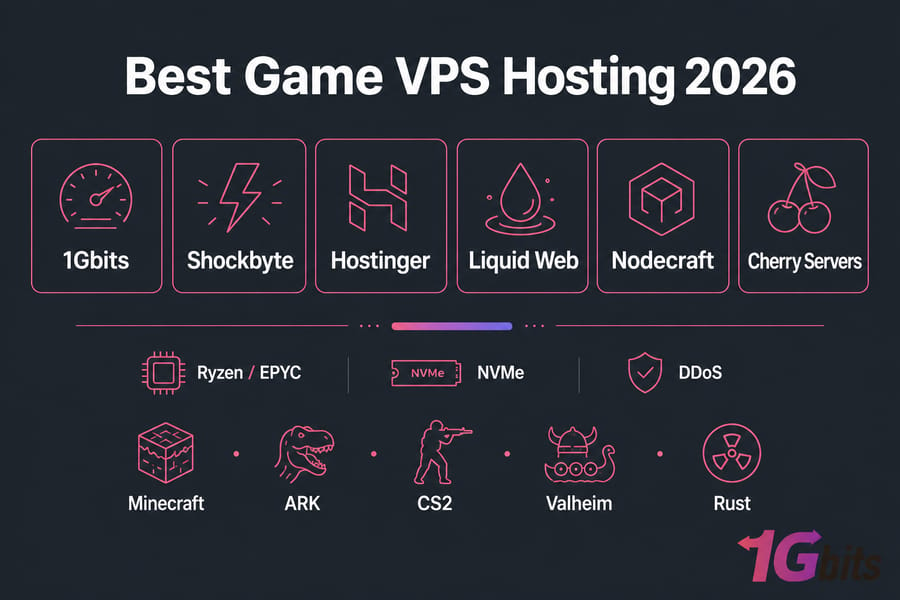
Fast CPUs, NVMe drives, low-latency global connectivity, and integrated DDoS protection are all must-haves for gamers and server admins in 2026. Whether it's a Minecraft server with friends, an ARK: Survival Evolved server, or a massive multiplayer community, VPS enables smooth gameplay and a seamless management experience.
Quick answer: For most gaming communities under 100 concurrent players, a VPS with 4 vCPU, 8 GB RAM, NVMe storage, and DDoS protection somewhere in the $15–25/month range is the sweet spot. For a deeper look at performance benchmarks, check out Boost Your Gaming Performance With Game VPS Hosting.
Why Use a Dedicated VPS for Your Game Server?

A dedicated VPS game hosting plan gives you the stability and power needed to run game servers without interruptions. With dedicated resources, you can ensure better speed, security, and flexibility compared to shared hosting.
- High performance (fast CPUs, NVMe): Game VPS servers come with modern processors like Ryzen or EPYC and ultra-fast NVMe SSD storage. This combination guarantees smoother gameplay, quicker loading times, and the ability to handle multiple players without lag. On a VPS, your CPU cores and RAM are yours — when your server hits 40 players on a Friday night, it doesn't slow down because someone else is hammering the disk.
- Built-in DDoS protection: Gaming servers are common targets for denial-of-service attacks. With integrated DDoS protection, your server stays secure and online even during malicious traffic spikes.
- Low-latency global server options: Many providers offer worldwide data center locations to minimize ping. Good providers run their game-friendly nodes on modern Ryzen or EPYC silicon with NVMe, in data centers close to your player base. By choosing the closest server to your players, you ensure faster response times and seamless multiplayer experiences.
- Custom mods, one-click installs, root access: A VPS gives you complete control to install mods, plugins, or even custom game files. Root access is the real unlock — you can install custom JARs, server wrappers, Pterodactyl, BungeeCord, Forge, Sodium, whatever. With one-click setup tools and root access, you can configure your game environment exactly how you want. Full root access gives you system-level control, mod and plugin support without restrictions, scalable resources, and the choice of Linux or Windows as the host OS.
How We Evaluated the Best Game VPS Hosting Providers
This isn't a popularity contest it's based on public specs, plan pages, panel documentation, uptime SLAs, and what's been seen running well (or badly) for game workloads.
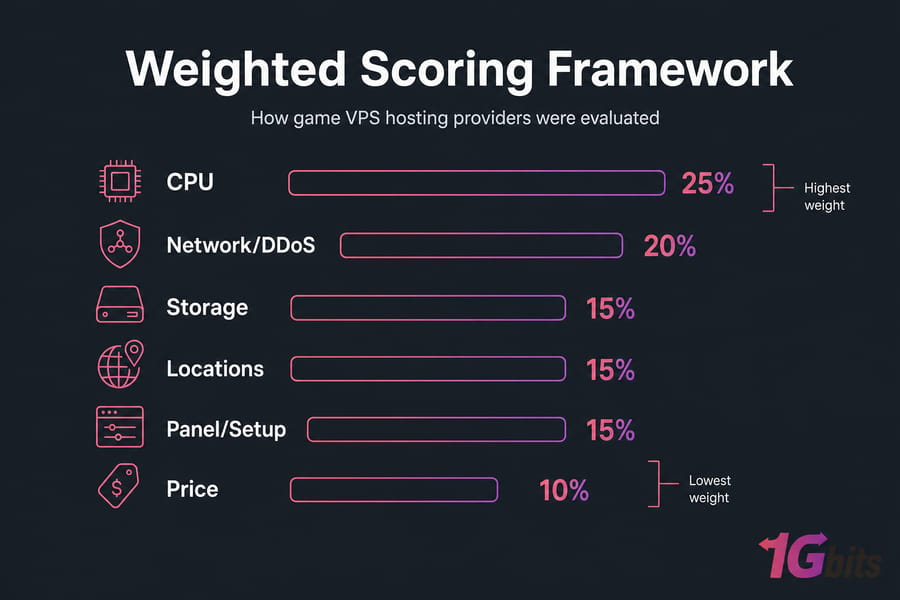
- CPU and single-thread performance: Most game servers (Minecraft especially) are brutally single-threaded. A modern Ryzen or EPYC core at 3.5+ GHz will outperform an older Xeon with eight slower cores every time. CPU was weighted heavily. For more on what makes a CPU great for gaming, see our roundup of the best gaming CPUs.
- NVMe storage and overall responsiveness: World saves, chunk loading, mod assets — all I/O bound. NVMe SSDs cut chunk-load stutter dramatically compared to SATA SSDs, and it's basically table stakes in 2026.
- DDoS protection and uptime guarantees: Game servers attract attacks. Always have. A good provider includes always-on, network-level DDoS mitigation. Look for a 99.9%+ SLA in writing.
- Global server locations and latency: A server in Frankfurt is great for EU players and terrible for Sydney. Bonus points went to providers with broad geographic coverage.
- Control panels, backups, and ease of setup: Pterodactyl, Plesk, custom panels, one-click installers, automated snapshots — these reduce setup time from hours to minutes. Worth real weight, especially for non-sysadmins.
- Pricing and overall value: Price matters, but cheapest is rarely best. The focus was on what you actually get per dollar — not just the headline number.
Top Game VPS Hosting Providers at a Glance
Here's the quick comparison. Skim it, then read the deeper breakdowns below.
| Provider | Best For | Starting Price | CPU | Storage | DDoS | Panel | Locations | Type |
| 1Gbits | Global low-latency hosting | ~$7/mo | Ryzen / EPYC | NVMe SSD | Included | Custom + cPanel/Plesk | 25+ locations | Self-managed |
| Shockbyte | Budget Minecraft | ~$2.50/mo | Intel / Ryzen | SSD | Included | Multicraft | 10+ locations | Managed (Minecraft) |
| Hostinger | Beginner multi-game | ~$8/mo | AMD EPYC | NVMe | Included | hPanel / Game Panel | 8+ locations | Semi-managed |
| Liquid Web | Managed reliability | ~$25/mo | Xeon / EPYC | NVMe | Optional add-on | InterWorx / cPanel | 3 locations | Fully managed |
| Nodecraft | Beginner-friendly UX | ~$10/mo | Ryzen | NVMe | Included | NodePanel | 10+ locations | Managed |
| Cherry Servers | Advanced customization | ~$10/mo | AMD / Intel | NVMe | Included | Custom + API | 5+ locations | Self-managed |
1Gbits — Best Overall for Global Low-Latency Game Hosting
1Gbits earns the top slot because of one thing competitors rarely match: 25+ global locations on modern Ryzen/EPYC nodes with NVMe and included DDoS protection. If you have players spread across continents, you can drop a node close to each cluster without juggling three providers. 1Gbits stands out in 2026 as a top choice for gamers needing speed, uptime, and worldwide coverage.
- Top Games: Perfect for Minecraft, CS:GO, Team Fortress 2, ARK: Survival Evolved, and Valheim. These games demand performance and stability, which 1Gbits delivers effortlessly.
- Global Network: With 25+ data centers across the US, Europe, and Asia, players get minimal latency and smooth gameplay. Multiple regional servers mean you can host close to your community.
- 99.99% Uptime Guarantee: Reliability is crucial for gaming, and 1Gbits ensures near-continuous availability.
- Independent Resources: Each VPS runs on isolated resources, guaranteeing consistent CPU and memory usage even during peak gaming hours.
Pros: Massive geographic coverage, NVMe storage standard, built-in DDoS mitigation, full root access (Linux or Windows), aggressive pricing starting around $7/month.
Cons: Primarily self-managed — you'll do your own setup. No game-specific one-click installers on every plan. For lower-budget builds, the cheap VPS tier handles smaller servers comfortably.
Best for: Communities with international playerbases running Minecraft, ARK, Rust, CS2, FiveM, or Valheim. If you want the spec breakdown and live pricing, check the VPS Gaming plans.
Shockbyte — Best for Budget Minecraft Hosting
Shockbyte is well-known for affordable pricing and reliable game hosting, especially for Minecraft enthusiasts. Plans start near $2.50/month, the Multicraft panel is friendly, and DDoS is included. It's an ideal pick for beginners who want an easy setup and strong protection.
- Affordable Plans: With low pricing, Shockbyte makes VPS game hosting accessible for all gamers. Even entry-level plans come with solid specs.
- NVMe Storage: Fast NVMe SSDs ensure low-latency performance and quick world loading, especially in modded servers.
- DDoS Protection: Built-in protection shields servers from cyberattacks, allowing uninterrupted gameplay.
Pros: Cheap, easy, Minecraft-tuned, decent global footprint.
Cons: Limited to Minecraft and a handful of other games, no root, fewer mod options on entry plans.
Best for: Vanilla and lightly-modded Minecraft SMPs.
Hostinger — Best for Easy Multi-Game Hosting
Hostinger offers a gamer-focused VPS solution with its Game Panel, combining performance, affordability, and ease of use. Decent EPYC hardware, NVMe, included DDoS, and a beginner-friendly UI. Good pick if you want to spin up an ARK or Valheim server without touching a Linux terminal.
- AMD EPYC CPUs & NVMe SSDs: Cutting-edge hardware ensures strong performance under heavy loads.
- Automatic Backups: Your game worlds and data are safe with built-in backup features.
- Global Data Centers: Hostinger's wide network reduces latency no matter where your players are.
- One-Click Installs & Root Access: Quick setup makes hosting popular games simple, while root access allows deep customization.
Pros: Good hardware, friendly panel, one-click installs, auto backups.
Cons: Fewer locations than 1Gbits, upsell-heavy checkout flow.
Best for: Gamers running multiple game servers who want affordable but strong performance.
Liquid Web — Best Managed VPS for Reliability
Liquid Web is widely recognized for premium managed VPS hosting tailored to serious gamers and businesses. It's the "I just want it to work and I'll pay for that" option — fully managed, strong support, but pricey ($25+ to start) and DDoS is an add-on.
- High Single-Thread CPU Performance: Ideal for games requiring strong per-core performance, reducing lag in high-activity multiplayer sessions.
- 100% Uptime SLA: Liquid Web guarantees complete reliability — gamers and communities benefit from uninterrupted access.
- Managed VPS with Root Access: The best of both worlds — fully managed support plus total control when needed.
Pros: Premium managed VPS, unbeatable uptime guarantees, expert support.
Cons: Expensive, DDoS is an add-on, limited locations.
Best for: Professional or competitive gamers who prioritize reliability and managed support.
Nodecraft — Best for Beginner-Friendly Control Panels
Nodecraft specializes in providing a tailored experience for gamers, with a focus on simplicity and control. NodePanel is genuinely one of the cleanest game hosting UIs out there — one-click installs for 30+ games, automated backups, and easy switching between game types on the same plan.
- NodePanel Control Panel: Designed for gamers, it simplifies server setup and management. Players can easily install mods, change settings, and manage backups.
- Intel Xeon Hardware with NVMe: Enterprise-grade CPUs ensure stability, while NVMe drives deliver lightning-fast response times.
- Affordable Pricing: Nodecraft's mid-range pricing makes it an accessible yet powerful choice, balancing cost and features.
Pros: Cleanest game hosting UI, one-click installs for 30+ games, automated backups.
Cons: Mid-range pricing, less raw power than self-managed options.
Best for: Gamers who want a simple setup with strong customization options.
Cherry Servers — Best for Advanced Customization
Cherry Servers offers highly customizable VPS and dedicated hosting with strong SLAs and crypto-friendly payments. It's perfect for advanced users seeking flexibility and full control.
- Customizable Plans: Users can tailor CPU, RAM, and storage to match their exact needs, making it ideal for hosting large or niche game communities.
- Strong SLA (99.97% Uptime): Reliability is guaranteed through strict service-level agreements, with fewer disruptions and consistent server stability.
- Crypto Billing Options: Cherry Servers supports crypto payments, appealing to tech-savvy and privacy-focused users — a unique feature among providers.
Pros: Highly customizable, strong SLA, crypto-friendly, advanced API support.
Cons: Requires technical know-how, fewer locations.
Best for: Experienced admins and technical users who want full control and customization.
Provider Breakdown: Strengths & Ideal Use Cases
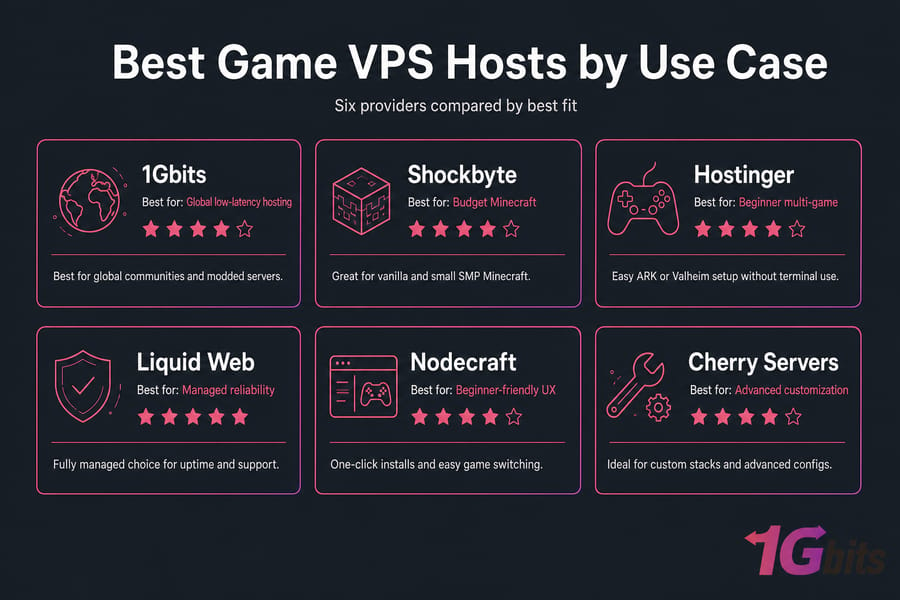
1Gbits: Best of All
- Hardware: Ryzen & EPYC CPUs, NVMe SSDs, 25+ global data centers
- Standout Perks: 99.99% uptime, DDoS protection, wide coverage, supports Minecraft, CS:GO, ARK, and Valheim
- Best For: Gamers who want the most reliable, globally available, and performance-optimized VPS hosting option.
Shockbyte: Minecraft-Focused, Beginner-Friendly
- Hardware: NVMe SSDs, global server network
- Standout Perks: Budget-friendly, strong DDoS protection, quick setup for Minecraft and similar games
- Best For: Minecraft players and beginners looking for low-cost, easy-to-use VPS hosting.
Hostinger: Multi-Game, Budget Performance
- Hardware: AMD EPYC processors, NVMe SSDs
- Standout Perks: Game Panel, one-click installs, auto backups, global DCs
- Best For: Gamers running multiple game servers who want affordable but strong performance.
Liquid Web: Serious Gamers Wanting Managed Reliability
- Hardware: High single-thread CPUs, enterprise-grade hosting
- Standout Perks: Managed VPS with root access, 100% uptime SLA, DDoS protection
- Best For: Professional or competitive gamers who prioritize reliability and managed support.
Nodecraft: Balanced for Mixed Game Types and Easy Control
- Hardware: Intel Xeon CPUs, NVMe SSDs
- Standout Perks: NodePanel for easy management, automatic backups, gamer-focused tools
- Best For: Gamers hosting different titles who want a simple setup with strong customization options.
Cherry Servers: Technically Fluent Users Needing Customization
- Hardware: Customizable CPU/RAM, NVMe storage
- Standout Perks: Crypto billing, SLA 99.97%, advanced server configuration
- Best For: Experienced admins and technical users who want full control and customization.
Best Game VPS Hosts by Use Case
Best for Minecraft servers
For vanilla and small SMPs: Shockbyte. For larger or modded networks where single-thread CPU matters: 1Gbits with a Ryzen-backed plan.
Best for ARK and survival games
ARK is a RAM and CPU monster. 1Gbits mid-tier plans (8–16 GB RAM) are the practical pick. Hostinger works too if you want a managed feel.
Best for CS2/CS:GO servers
FPS servers live and die by tick rate and latency. Pick the provider with a location closest to your players — that usually points to 1Gbits for global communities or Cherry Servers for advanced configs.
Best for modded game servers
Modded Minecraft, modded ARK, FiveM — these need root access and headroom. 1Gbits or Cherry Servers. Skip the panel-only hosts.
Best budget option
Shockbyte for Minecraft. 1Gbits cheap VPS tier for everything else.
Best managed option
Liquid Web if budget isn't an issue. Nodecraft for friendlier pricing with managed feel.
Recommended VPS Specs for Popular Games
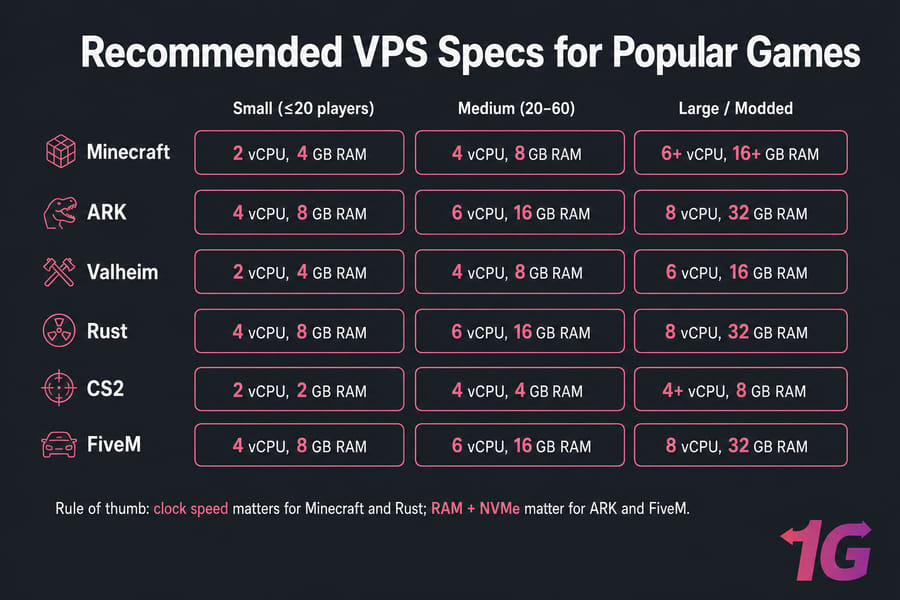
| Game | Small (≤20 players) | Medium (20–60) | Modded / Large |
| Minecraft (vanilla) | 2 vCPU, 4 GB RAM | 4 vCPU, 8 GB RAM | 6+ vCPU, 16+ GB RAM |
| Modded Minecraft | 4 vCPU, 8 GB RAM | 6 vCPU, 16 GB RAM | 8 vCPU, 32 GB RAM |
| ARK: Survival | 4 vCPU, 8 GB RAM | 6 vCPU, 16 GB RAM | 8 vCPU, 32 GB RAM |
| Valheim | 2 vCPU, 4 GB RAM | 4 vCPU, 8 GB RAM | 6 vCPU, 16 GB RAM |
| Rust | 4 vCPU, 8 GB RAM | 6 vCPU, 16 GB RAM | 8 vCPU, 32 GB RAM |
| CS2 / CS:GO | 2 vCPU, 2 GB RAM | 4 vCPU, 4 GB RAM | 4+ vCPU, 8 GB RAM |
| FiveM | 4 vCPU, 8 GB RAM | 6 vCPU, 16 GB RAM | 8 vCPU, 32 GB RAM |
| Terraria / Palworld | 2 vCPU, 4 GB RAM | 4 vCPU, 8 GB RAM | 6 vCPU, 16 GB RAM |
Rule of thumb: if the game depends heavily on one thread (Minecraft, Rust), pay for clock speed. If it's RAM-hungry (modded ARK, FiveM), pay for memory and NVMe. For a detailed breakdown based on player count and modpacks, read our guide on how much RAM you need for gaming and hosting.
Managed vs Unmanaged Game VPS Hosting
When managed VPS is worth paying for
If you've never used SSH, don't want to learn iptables, and your community will riot when something breaks at 11 PM — pay for managed. A good managed VPS covers OS patches, support, sometimes even mod updates.
When self-managed VPS is the better choice
If you enjoy tinkering, want full control over your mod stack, or are building something custom — self-managed wins on price and flexibility. Most communities land here eventually. And if you need to access your server remotely for admin tasks, check out our guide on using remote desktop connection for gaming.
How to Choose the Right Game VPS
- Match specs to player count. Use the table above as a starting point, then add 25% headroom.
- Pick the closest server location. Latency under 60ms feels great; over 120ms feels rough on FPS games. Global networks like 1Gbits offer multiple locations for optimal coverage.
- Demand DDoS protection and backups. Both. Non-negotiable. Backups protect your progress, while DDoS protection keeps your server online against attacks.
- Check upgrade paths. Can you bump RAM next month without migrating?
- Test support quality. Open a pre-sales ticket. How fast they respond predicts everything.
- Managed vs. self-managed preferences. Managed VPS plans handle updates and security for you. Self-managed VPS gives you full control but requires technical know-how.
- Required mods or customization level. If you plan to add mods or custom game files, ensure the VPS allows root access and easy configuration.
Quick Decision Checklist
Choosing the right game VPS hosting provider doesn't have to be complicated. Use this quick checklist to match your gaming needs with the best hosting option in just a few steps. Still comparing broader options? Read Best VPS Hosting Providers.
| Step | What to Do | Why It Matters |
| Identify your game & player scale | Decide if you're hosting Minecraft, ARK, CS:GO, Valheim, or others, and estimate how many players will join. | Different games and player counts need varying levels of CPU, RAM, and bandwidth. |
| Set budget & performance baseline | Define how much you're willing to spend monthly and what specs you need. | Balances affordability with the performance required for lag-free gaming. |
| Choose managed vs. self-managed | Decide if you want hands-off management or prefer full root control. | Managed saves time; self-managed offers full flexibility. |
| Check CPU & storage specs | Look for modern hardware like AMD EPYC, Intel Xeon, and NVMe SSDs. | Ensures high performance, low latency, and smooth gameplay. |
| Compare bonus features | Evaluate features like custom panels, backups, and DDoS protection. | Adds extra security, ease of use, and reliability to your server. |
| Select a provider based on fit | Match your requirements to the provider that best meets them. | Guarantees you get the best game VPS hosting for your exact needs. |
How to Set Up a Game Server on a VPS
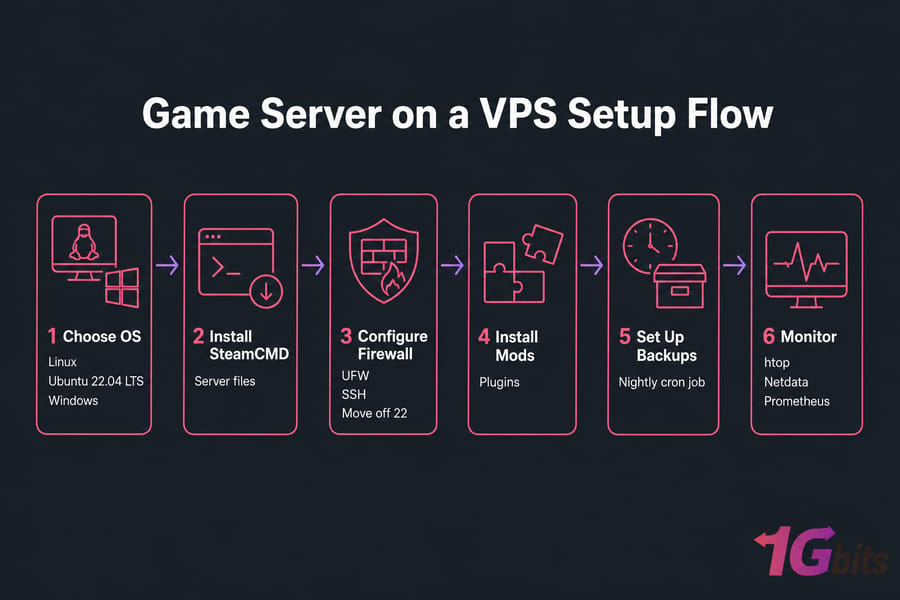
Step 1 — Choose Linux or Windows
For 90% of game servers, Linux (Ubuntu 22.04 LTS) is faster, cheaper, and better documented. Pick Windows only if your game explicitly requires it. Not sure which distro to pick? Our guide on the best Linux distros for gaming walks through the top options for game server hosting.
Step 2 — Install server files
For Steam-based games, SteamCMD does the heavy lifting. For Minecraft, grab the official JAR or your modpack's server pack.
Step 3 — Configure firewall and open ports
UFW on Ubuntu is straightforward. Open only the ports your game actually needs — typically one UDP port for the game, plus SSH (which you should move off 22 anyway).
Step 4 — Add mods, plugins, and backups
Drop mod files into the right directory, then set up a nightly cron job to tar your world folder to a separate location. Future you will thank present you.
Step 5 — Monitor it
Install htop at minimum. Better yet, set up Netdata or a simple Prometheus stack so you know when something's eating CPU before players start complaining.
Common Mistakes to Avoid
- Buying on price alone. A $3/month box that crashes on Friday night costs you more in player churn than $15 would have. If your community is outgrowing VPS limits entirely, a game dedicated server gives you full hardware control with zero resource sharing.
- Ignoring server location. Don't host EU players in Dallas because the plan was cheaper.
- Underestimating CPU. Minecraft modpacks especially — single-thread speed beats core count.
- Skipping backups. Until your world file corrupts, you'll think this is paranoia. It's not.
- Picking Windows by default. It eats RAM you could spend on player slots.
- Not checking DDoS protection details. "Included" sometimes means "we'll null-route you for 24 hours."
Conclusion
In 2026, game server VPS hosting providers differentiate themselves with faster CPUs, NVMe storage, and gaming-optimized networks with DDoS protection and low latency. Whether you're running a small Minecraft SMP, a competitive CS2 server, or a heavily modded ARK community, there's a provider that fits your needs. The key is matching your game type, player count, budget, and technical comfort level to the right host.
For most communities, Game VPS Server plans from 1Gbits offer the best balance of global reach, performance, and price. If you're just getting started, consider a Buy VPS Online plan to get up and running quickly. The uninterrupted flow of games will be assured, reinforced by secure conditions, and the gameplay will be truly worry-free if the chosen host aligns with your means, management style, server region, and other perks.

Leave A Comment