

An SEO VPS is a virtual private server used to run SEO tools, browser automation, rank tracking, web scraping, and other search marketing tasks on dedicated remote resources. It doesn't directly improve your rankings but it gives you more uptime, control, speed, scalability, and IP/location flexibility for the work behind the rankings.
SEO VPS definition: what it means in simple terms
Here's the part most articles get wrong. An SEO VPS isn't some special hosting technology. It's just a regular VPS hosting setup that happens to be sized and configured for SEO workloads. Same underlying virtualization, same isolated slice of a physical machine the "SEO" label just describes what you run on it. If you're fuzzy on the foundations, it helps to step back and understand what VPS hosting is before chasing niche labels.
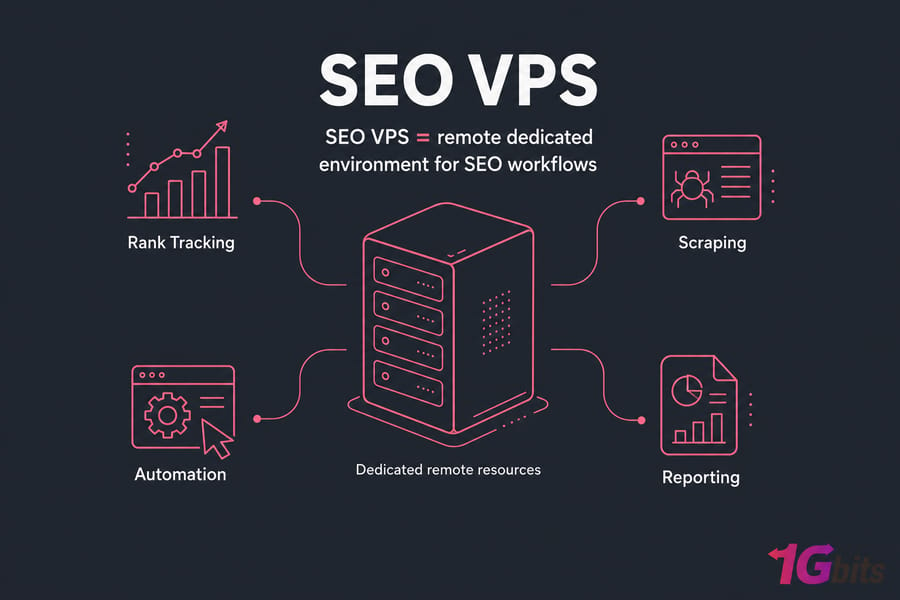
What "SEO" changes about a standard VPS
Not much technically. What changes is intent. When you pick a VPS for SEO, you tend to prioritize a few things over others:
- Enough RAM to run crawlers and browser-based tools without choking
- Solid uptime so scheduled tasks actually run when you're asleep
- A specific IP address or data center location for geo-sensitive work
- Fast storage for big audit exports and scraped datasets
What an SEO VPS does not do
It will not magically push your site up Google. Let me say that again, because vendors love to blur this line: a server can't manipulate rankings for you. What it does is host the tools and processes you use to do SEO — the tracking, the crawling, the reporting, the automation. Operational support, not ranking sorcery.
To see why people actually pay for one, let's look at how an SEO VPS works.
How an SEO VPS works for SEO tools and automation
A VPS carves out an isolated chunk of a physical server — its own CPU cores, RAM, storage, and network. Those resources are yours. No noisy neighbor eating your CPU when their traffic spikes.
You install what you need on it. SEO software, a headless browser, a rank tracker, a few Python scraping scripts, a reporting dashboard — whatever your workflow calls for. Then you connect remotely and treat it like a second computer that never sleeps.
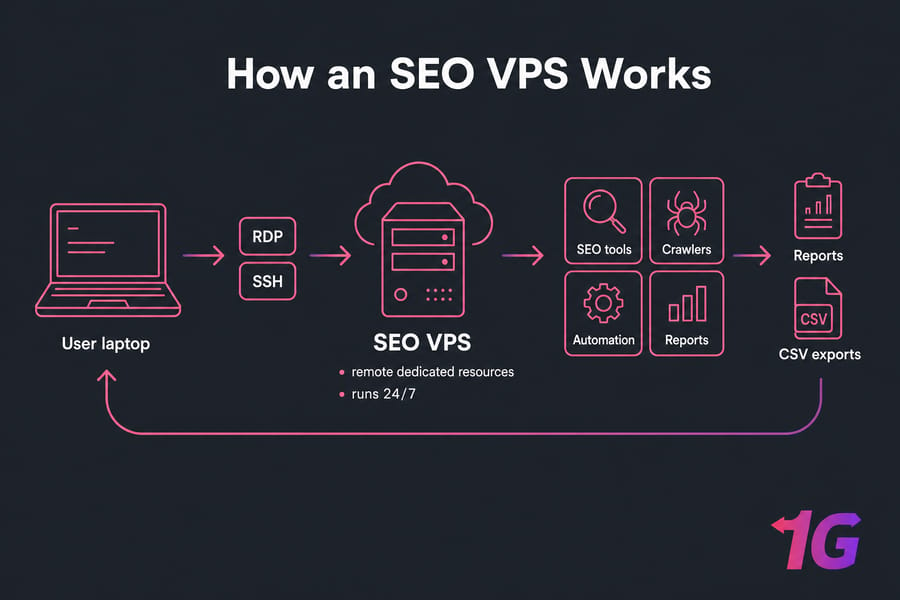
Running SEO software on remote dedicated resources
The big shift from a local machine? Your laptop stays free. Run a Screaming Frog crawl of a 200,000-page site and your own computer doesn't turn into a jet engine for three hours. The VPS handles it in the background while you do other work — or close the lid and go to lunch.
Using RDP or SSH to access your SEO VPS
Two ways in, depending on your operating system.
- RDP (Remote Desktop Protocol) — for a Windows VPS. You get a full graphical desktop, like remote-controlling another Windows PC. Great for point-and-click SEO tools.
- SSH — for a Linux VPS. Command-line access, lean and fast. Ideal for scripts, cron jobs, and automation.
Either way, you're logging into a machine that lives in a data center, not under your desk.
Why uptime matters for rank tracking and crawlers
This is the quiet reason SEO VPS makes sense. A lot of SEO work is scheduled. Nightly crawls. Hourly SERP checks. Automated reports that fire off Monday morning. If those jobs run on your laptop, they only work when the laptop's on, awake, and connected. A VPS runs 24/7 — so your automation doesn't depend on you leaving a machine humming in the corner.
Once you understand the setup, the next question is what people actually do with all this.
Common SEO VPS use cases for agencies, freelancers, and in-house teams
This is where a VPS for SEO tools earns its keep. Let's break down the real scenarios — not vague promises.
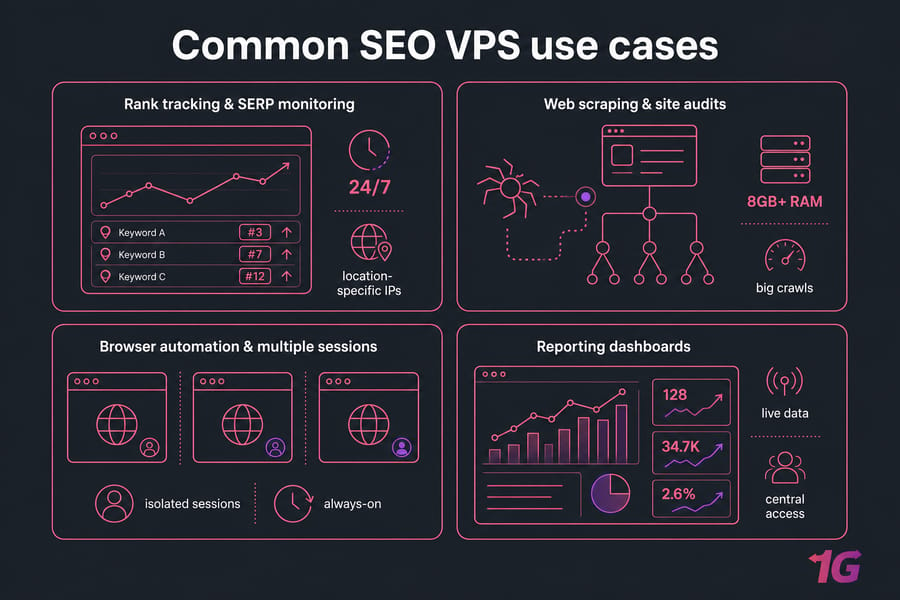
Rank tracking and SERP monitoring
Rank trackers need to check positions consistently, often from specific locations. Running them on an always-on VPS means your keyword data keeps updating whether you're working or not. Location-specific IPs help when you're tracking rankings for different countries or cities.
Web scraping and site audits
Crawling large sites with Screaming Frog or pulling competitive data can eat memory fast. A VPS with 8GB+ RAM chews through big crawls that would crawl (pun intended) on a modest laptop. And the exports live on the server, so you're not clogging your own drive.
Browser automation and multiple sessions
Managing several browser-based tools or isolated sessions is cleaner on a dedicated machine. You keep those workflows separate from your personal browsing and personal IP. For agencies juggling multiple clients, that separation is genuinely useful.
Hosting lightweight SEO dashboards or reporting tools
Got an internal reporting tool or a self-hosted dashboard pulling from Google Search Console and your rank tracker? A VPS hosts it centrally so the whole team accesses the same live data. No more "which spreadsheet is current?"
| Use Case | Why VPS Helps | Best OS | Resource Intensity |
| Rank tracking / SERP monitoring | Runs 24/7, location flexibility | Linux or Windows | Low–Medium |
| Web scraping | Handles heavy jobs, isolates data | Linux | Medium–High |
| Site audits (Screaming Frog) | Frees local machine, more RAM | Windows | Medium–High |
| Browser automation | Session isolation, always-on | Windows or Linux | Medium |
| Reporting dashboards | Central team access, uptime | Linux | Low |
Warning: Scraping and automation must follow the target site's terms of service, applicable laws, and your provider's policies. A VPS gives you capability — it doesn't give you a pass on compliance.
Want broader ideas beyond SEO? The wider list of VPS use cases covers plenty of other workloads too. But not every SEO task needs a server, so let's compare your options.
SEO VPS vs regular VPS vs shared hosting
The honest truth: an SEO VPS is a regular VPS most of the time. The difference is how you size and use it. Here's how the tiers actually stack up.
| Feature | Shared Hosting | Regular VPS | SEO VPS | Dedicated Server |
| Dedicated resources | No | Yes | Yes | Entire machine |
| Run tools 24/7 | Limited | Yes | Yes | Yes |
| Root/admin access | No | Usually | Usually | Full |
| IP/location choice | No | Often | Often | Yes |
| Handles heavy automation | No | Depends on specs | Yes (sized for it) | Best |
| Cost | Lowest | Moderate | Moderate | Highest |
When shared hosting is not a fit
Shared hosting is built to host websites, not to run software you install and control. No root access, no persistent background tasks, no installing a rank tracker or a Python script. For SEO tooling, it's a dead end. See the full breakdown in VPS vs shared hosting.
When a regular VPS is enough
Most of the time, honestly. A properly sized standard VPS does everything an "SEO VPS" does. Don't pay extra just for an SEO badge on the product name.
When to consider a dedicated server instead
If you're running massive concurrent crawls, heavy automation across dozens of accounts, or a full agency's worth of tooling, a dedicated server may serve you better. Not many people hit that ceiling — but if you do, you'll know.
Quick summary: Most SEO VPS plans are simply well-sized regular VPS plans used for SEO tasks. Buy the specs, not the label.
Windows SEO VPS vs Linux SEO VPS
Your operating system choice comes down to one question: are your tools graphical or scriptable?
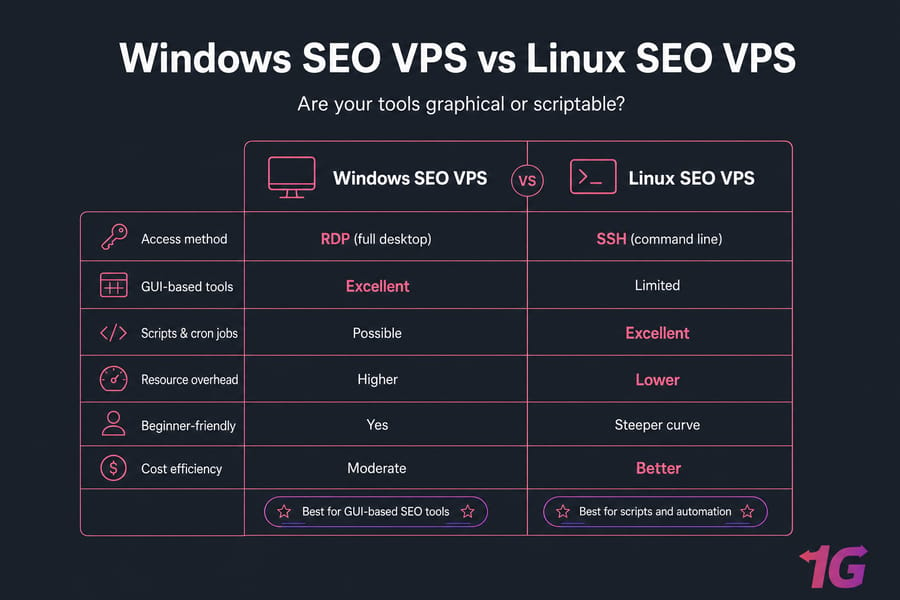
| Factor | Windows SEO VPS | Linux SEO VPS |
| Access method | RDP (full desktop) | SSH (command line) |
| GUI-based tools | Excellent | Limited |
| Scripts & cron jobs | Possible | Excellent |
| Resource overhead | Higher | Lower |
| Beginner-friendly | Yes | Steeper curve |
| Cost efficiency | Moderate | Better |
When to choose Windows for GUI-based SEO tools
Some SEO software is desktop-first and Windows-native. Screaming Frog runs beautifully with a graphical interface, and plenty of browser-based reporting tools are just easier to click through on a full desktop. If you want it to feel like your own PC, go Windows VPS.
When Linux is better for scripts and automation
Running Python scrapers, cron-scheduled crawls, or lightweight automation? Linux is leaner and cheaper. It uses less RAM on the OS itself, leaving more for your workloads. A Linux VPS (Ubuntu is a solid pick) is the automation crowd's default.
Which option is easier for beginners
Windows, no contest. If the command line makes you nervous, RDP feels familiar from minute one. You can always graduate to Linux later once your automation grows.
After you've picked an OS, the specs are what really matter.
Key SEO VPS features to look for before you buy
This is where buyers overspend or underbuy. Match the machine to the work — here's what actually counts.
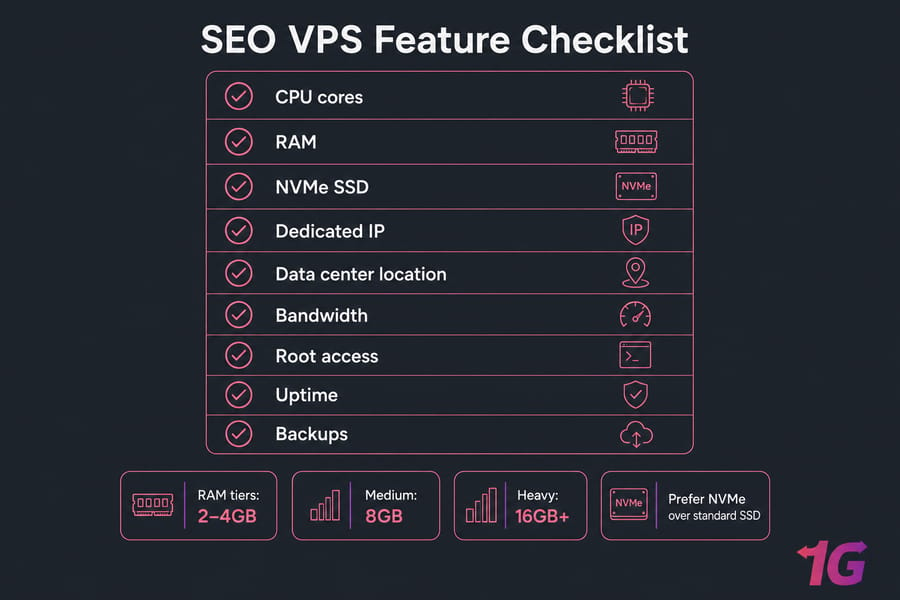
CPU, RAM, and NVMe SSD sizing
RAM is your first bottleneck for SEO work. Rough tiers:
- 2–4GB — light rank tracking, small crawls, a dashboard or two
- 8GB — medium crawls, browser automation, a few tools at once
- 16GB+ — heavy scraping, large site audits, multiple concurrent workloads
For storage, go NVMe VPS over standard SSD. Crawl exports and scraped data hit the disk hard, and NVMe reads and writes several times faster. The difference is obvious when you're processing big datasets.
IP address, location, and network quality
A dedicated static IP keeps your workflows consistent and clean. Data center location matters for geo-targeted rank tracking — if you track rankings for German keywords, a German location gives you more representative results. Check bandwidth and network quality too; scraping is network-heavy.
Root access, scalability, and security
You'll want root access in VPS hosting to install and configure your tools freely. Scalability matters because SEO needs grow — start small, upgrade when you outgrow it. And security isn't optional: firewall, updates, strong credentials. A DDoS-protected VPS is worth considering if you're exposing dashboards publicly.
Managed vs unmanaged SEO VPS hosting
Not comfortable running a server? A managed VPS means the provider handles updates, security, and maintenance. Technical enough to want full control? An unmanaged VPS is cheaper and hands-on. Before committing, it's worth learning how to evaluate a VPS provider — support quality and uptime beat flashy "SEO" branding every time.
Pro tip: For GUI-heavy SEO tools, a Windows VPS is usually easier. For scripts and cron jobs, Linux is leaner and cheaper. Pick based on your tools, not hype.
Benefits and limitations of using an SEO VPS
Let's keep this balanced. A VPS isn't right for everyone, and pretending otherwise wastes your money.
| Benefits | Limitations |
| Runs tasks 24/7 without your local machine | Monthly cost on top of your tool subscriptions |
| Remote access from anywhere | Setup and admin take some learning |
| Frees your laptop from heavy jobs | Some tools have per-machine licensing limits |
| Scalable — grow specs as needed | IP reputation can matter for some workflows |
| IP and location flexibility | You're responsible for compliance and TOS |
Legal and ethical considerations
One more time, because it matters: an SEO VPS improves operations, not rankings. And whatever you run on it — scraping, automation, account management — needs to respect the target site's terms, local law, and your host's acceptable use policy. Lock the box down properly; securing your VPS is part of the job, not an afterthought.
So an SEO VPS is valuable for some people and total overkill for others. Which are you?
Who should use an SEO VPS and who probably should not
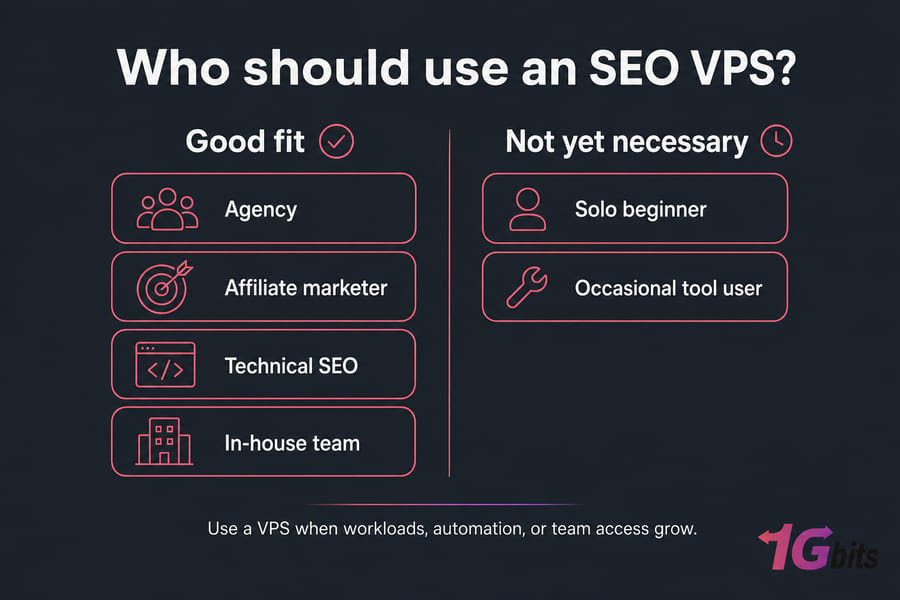
Best fit user profiles
- Agencies running tools across multiple clients
- Affiliate marketers managing several sites
- Technical SEOs doing automation and heavy crawls
- In-house teams needing shared, always-on tools
- Anyone whose laptop can't keep up anymore
Signs your local machine is enough
If you check rankings once a week, run the occasional small crawl, and keep a few browser tabs open, you don't need a VPS yet. Your computer's fine. Save the money.
Signs it's time to upgrade
Your laptop lags during crawls. You need tasks running overnight. Your team needs access to the same tools. You're tracking multiple locations. Concurrency is climbing. Any of those? A VPS starts paying for itself. This mirrors the pattern in why a VPS suits growing operations.
Mini-example: An agency running Screaming Frog audits overnight and browser-based reporting tools across multiple clients would likely prefer a Windows SEO VPS with 8GB RAM and NVMe storage — enough headroom to crawl big sites while reports run in parallel.
If that sounds like you, here's how to choose without overpaying.
How to choose the best VPS for SEO tools
A simple checklist beats guesswork every time:
- List your tools and tasks. GUI-heavy? Lean Windows. Script-heavy? Lean Linux.
- Match specs to intensity. Use the sizing table below — don't guess.
- Start small, scale up. You can always upgrade RAM and CPU later.
- Pick your OS deliberately. Base it on your software, not habit.
- Go managed if you're non-technical. The peace of mind is worth it.
- Prioritize uptime, support, and NVMe storage over vague "SEO-optimized" marketing.
- Check the data center location if geo matters to your work.
| Workload | vCPU | RAM | Storage | OS | Best For |
| Light | 2 | 4GB | NVMe | Windows/Linux | Solo SEO, small crawls, tracking |
| Medium | 4 | 8GB | NVMe | Windows/Linux | Freelancers, browser automation |
| Heavy | 8+ | 16GB+ | NVMe | Linux (usually) | Agencies, heavy scraping, concurrency |
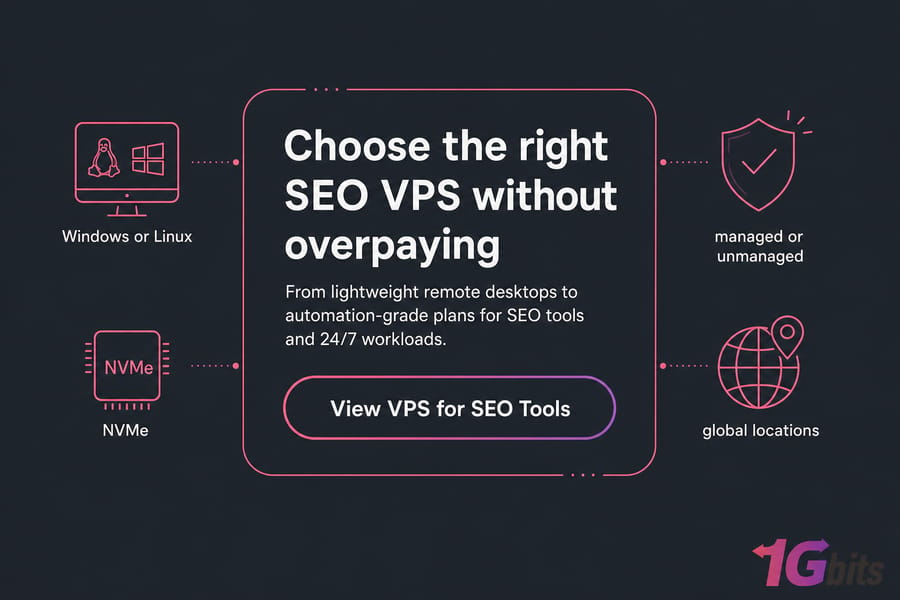
When you're ready, browse SEO VPS hosting plans built for remote SEO tools, automation, and 24/7 workloads or head straight to buy a VPS once you know your specs. 1Gbits offers Windows and Linux options, NVMe performance, managed and unmanaged plans, and global locations.

Leave A Comment