
Root access in VPS hosting means full administrative control over your virtual server. It lets you install software, change system settings, manage users, configure security tools, and shape the entire server environment to your needs. That kind of control is powerful but it also hands you full responsibility if something breaks.
On a Linux system, "root" is the highest privilege level. It's the superuser account that can read, write, modify, or delete anything on the machine. When a hosting provider hands you root on a VPS, you're getting near-complete control over the virtual environment not the physical hardware, but everything running inside your slice of it.
Here's what that practically unlocks:
- Install or remove any supported package or software stack
- Edit system configuration files in
/etcand elsewhere - Restart, stop, or start services like Nginx, Apache, or MySQL
- Add and manage users, open or close ports, set firewall rules
- Deploy custom apps, schedule cron jobs, tune kernel settings
Compare that to shared hosting, where you're boxed into a control panel and can't touch the underlying server. With a VPS that gives you root, those walls come down. This is exactly why people upgrade from shared to a VPS and it's a core part of what VPS hosting is all about.
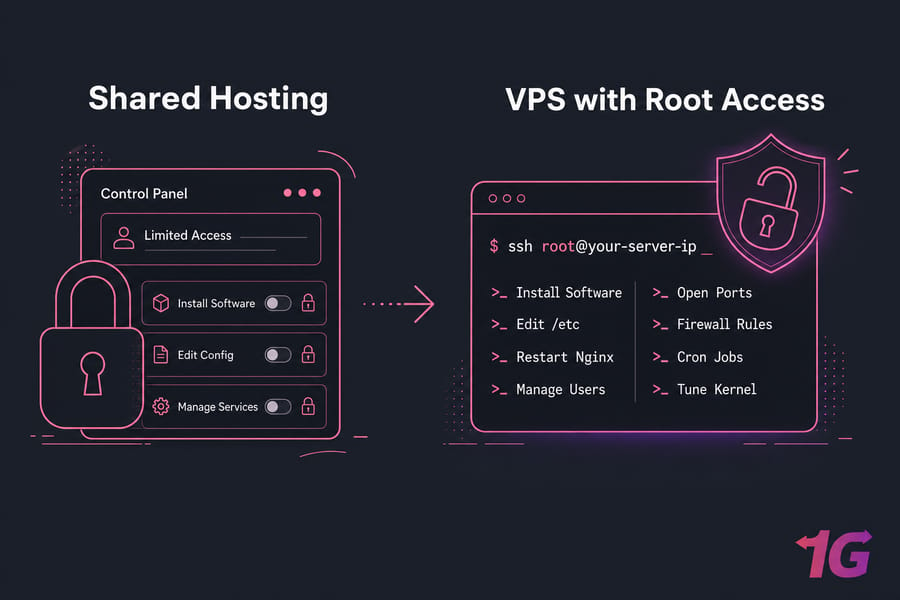
Key takeaway: Root access means full control over the VPS operating system — not the provider's physical server or virtualization layer.
To see why root access matters, it helps to understand how it actually works on a VPS.
How VPS Root Access Works on a Virtual Server
Your VPS runs its own operating system inside a virtualized environment. The provider slices a physical machine into multiple isolated virtual servers, and each one gets its own OS instance, allocated resources, and when offered its own root or administrator account.
Root access through SSH on Linux VPS
On a Linux VPS hosting plan, you connect over SSH. Open a terminal, run something like ssh root@your-server-ip, enter your credentials (or use a key), and you're in. From that shell, you've got full command-line control. If you're new to this, our guide on how to log in to a VPS walks through it step by step.
Administrator access on Windows VPS
Windows works differently. There's no "root" — the equivalent is the Administrator account. You connect via RDP (Remote Desktop Protocol) instead of SSH, and you get a full graphical desktop. A Windows VPS hosting plan with Administrator rights lets you install applications, change system policies, and manage services through familiar Windows tools.
What you can and cannot control inside a VPS
Full root access still operates within boundaries the provider defines. You control your OS — but not the host node it sits on. Here's the clean split:
| You Control (Inside the VPS) | You Don't Control (Outside the VPS) |
| Operating system and updates | Physical hardware |
| Installed software and packages | The host node / hypervisor |
| Users, services, and processes | Provider-level virtualization settings |
| Firewall, ports, and network config | Physical network hardware |
| Files, directories, and permissions | Other tenants' VPS instances |
| Cron jobs and automation | Data center infrastructure |
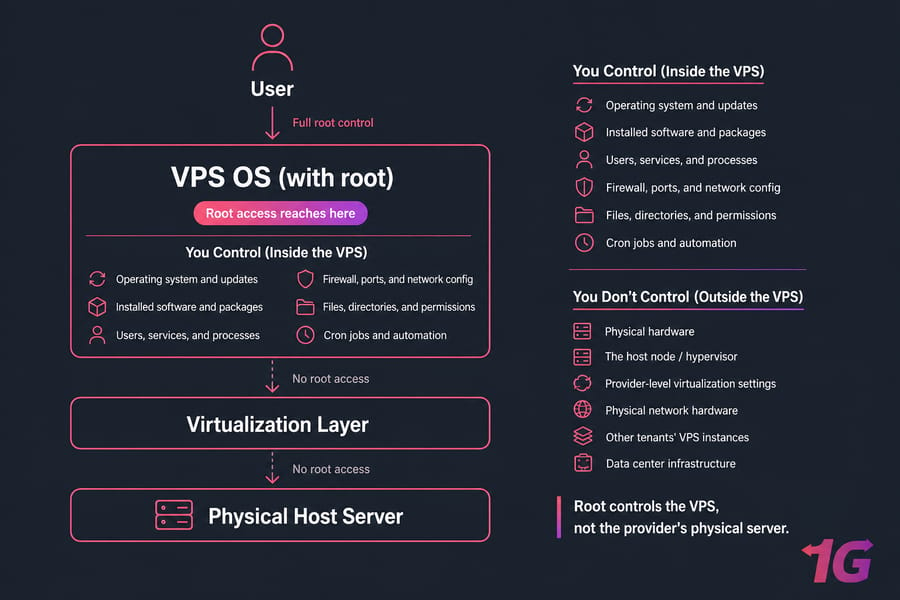
So when a provider advertises "full root access," they mean full control of your virtual machine — not bare-metal access to the physical box. That's an honest and important distinction. Need a refresher on connecting? Check how to connect to a VPS.
That leads to a common point of confusion: root access is not always the same thing as sudo.
Root User vs Sudo vs Administrator Access
People mix these up constantly. Let's clear it up fast, because it affects how you should actually run your server day to day.
Root is the unrestricted superuser on Linux. It can do anything, no questions asked. Sudo isn't a separate account — it's a mechanism that lets a normal user run specific commands with elevated privileges, temporarily. And Administrator is the Windows equivalent of a high-privilege account, though the implementation is quite different under the hood.
| Access Type | Typical OS | Privilege Level | Best Use | Risk Level |
| Root | Linux | Unrestricted superuser | Critical, one-off system tasks | High |
| Sudo | Linux | Temporary, command-scoped elevation | Daily administration | Lower |
| Administrator | Windows | Full account-level control | App installs, system management | Medium–High |
When sudo is safer than logging in as root
Here's the rule almost every experienced admin follows: don't log in directly as root for everyday work. Instead, create a normal user, give it sudo rights, and prefix privileged commands with sudo. Why? Because it forces a deliberate pause before each powerful action, and it leaves an audit trail. I've watched people accidentally wipe directories logged in as root — sudo would've at least made them stop and think.
Want the deeper mechanics? Read up on sudo in Linux and what sudo privileges actually grant you.
One more beginner trap: SSH access and root access are not the same thing. SSH is just the connection method — the door. Root is the privilege level — what you can do once you're inside. You can have SSH access as a limited user with zero root rights.
Pro tip: Use a sudo-enabled user for daily administration instead of logging in as root directly. Your future self will thank you.
Once the access levels are clear, the next question is why people want full root access in the first place.
Benefits of Full Root Access VPS Hosting
Full root access is the reason a lot of technical buyers choose a VPS over shared hosting. It removes the ceiling. Here's what you get in real terms.
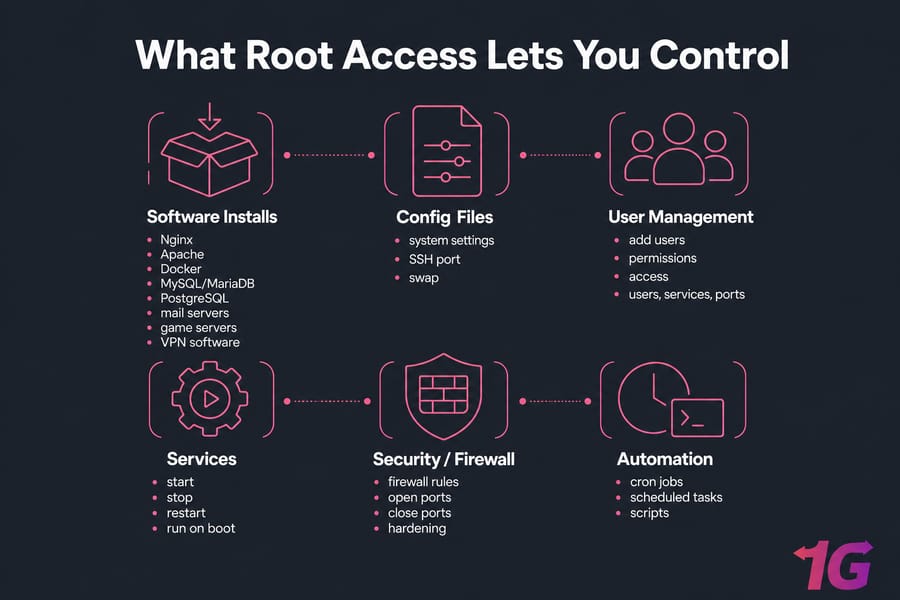
Install any supported software stack
Need Docker for containerized apps? A specific version of Node.js? A custom database? With root, you run your package manager — apt, yum, or dnf — and install whatever your project requires. No waiting on a provider to approve software. No "that's not supported on our plan."
- Set up Nginx or Apache exactly how you want it
- Run MySQL/MariaDB, PostgreSQL, or any database engine
- Deploy Docker containers for clean, isolated environments
- Install mail servers, game servers, or VPN software
Customize server settings for performance and security
Root lets you tune the parts that actually move the needle. Adjust firewall rules, change the SSH port, configure swap, set up cron jobs for automation, and harden the system to your standards. For a busy site, that control can mean the difference between a server that buckles under load and one that hums along.
Manage users, services, ports, and automation
You decide who has access, which services run on boot, which ports stay open, and what runs on a schedule. You can also pick your own control panel — cPanel, Plesk, Webmin — or skip the panel entirely and run lean from the command line. That freedom is genuinely useful for agencies hosting multiple client sites and for developers deploying custom stacks.
Curious what you can actually run? Browse applications you can run on your VPS and broader VPS use cases.
But the same freedom that makes root access powerful also creates real security and stability risks.
Root Access Risks and Security Trade-Offs
Let's be honest about the downside. Root gives you the keys to everything — which means a single careless move can take everything down. This isn't fearmongering; it's just the trade-off you accept.
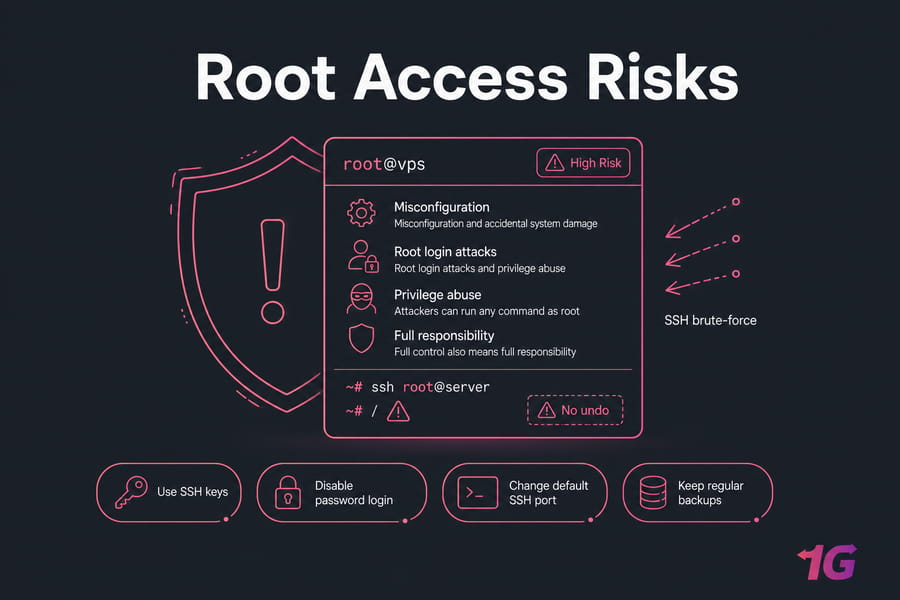
Misconfiguration and accidental system damage
One mistyped command say, a recursive delete pointed at the wrong directory can wipe critical system files or break permissions across the server. There's no "undo" button at the root level. The classic horror story is running a destructive command as root when you meant to run it somewhere harmless.
Root login attacks and privilege abuse
Attackers know that "root" is the default high-value target on every Linux box. Brute-force bots constantly hammer SSH trying common passwords against the root account. If malware or an attacker gets in and has root, the damage isn't contained they own the whole machine. That's why locking down root login matters so much.
Why full control also means full responsibility
Root access shifts the operational burden onto you. Updates, security patches, firewall configuration, backups, monitoring — all of it. The principle of least privilege exists for a reason: give every account only the access it needs, and nothing more.
Here are the main risks and how to blunt each one:
- Accidental damage → keep regular backups and test commands carefully
- Brute-force attacks → use SSH keys, disable password login, change the default SSH port
- Exposed services → configure a firewall on your VPS and close unused ports
- Compromise → apply least privilege, keep packages updated, monitor logs
If the worst happens, here's how to secure your VPS and lock things down properly.
Warning: A single root-level mistake can break services or expose your entire server. Root access itself isn't insecure — misuse is the problem.
For many users, those risks are worth it because root access unlocks very specific server use cases.
Common VPS Root Access Use Cases
So who actually needs this level of control? Quite a few people, it turns out. Here's where root earns its keep.
| Task | Needs Root? | Why |
| Install Docker and run containers | Yes | Docker requires system-level privileges to manage the daemon |
| Set up a VPN (OpenVPN, V2Ray) | Yes | Needs network and firewall configuration |
| Host a custom web stack | Yes | Installing and tuning Nginx/Apache + databases |
| Run a private Git server | Yes | Service installation and user management |
| Deploy a Node.js or Python app | Often | Installing runtimes, managing services and ports |
| Run a game server | Yes | Opening ports, installing dependencies |
| Host a single basic WordPress site via panel | No | A control panel can handle this without manual root use |
| Learn Linux administration | Yes | Hands-on practice requires real privileges |
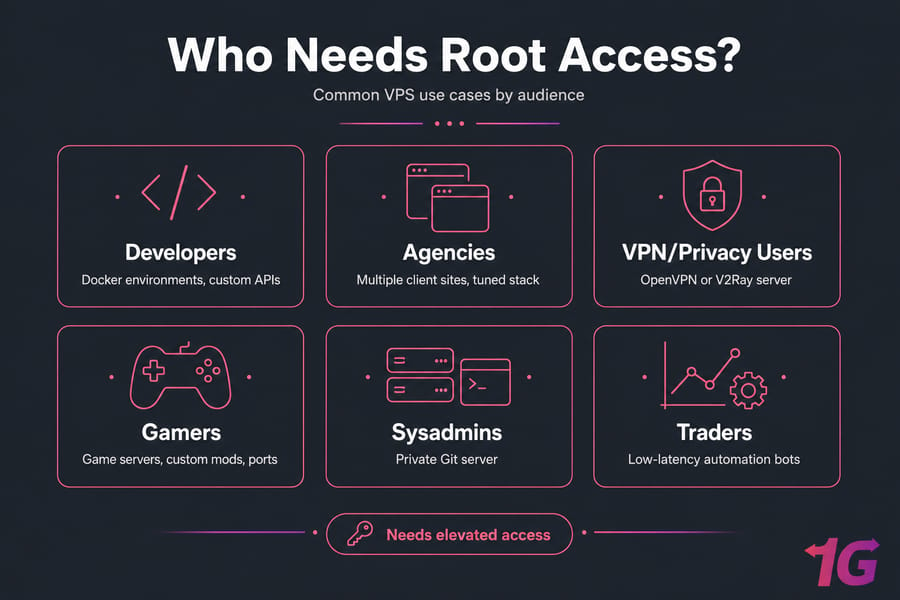
Let's put some faces to these. Developers spin up Docker environments and deploy custom APIs. Agencies host multiple client sites on a single tuned stack — here's how to host a website on a Linux VPS. Privacy-focused users deploy OpenVPN or a V2Ray server. Gamers run their own game servers with custom mods and full port control.
Then there are sysadmins setting up a private Git server, traders running low-latency automation bots, and learners who want a real sandbox to break and rebuild. The common thread? Every one of these tasks is either impossible or painfully limited without elevated access.
Need full server control without shared hosting limits?
If you need custom software installs, firewall control, Docker support, or advanced server configuration, a 1Gbits VPS gives you the flexibility to build your environment your way. Explore VPS hosting and pick the control level that fits.
Still, not every VPS buyer needs this level of control.
Do You Need Root Access on a VPS?
Honest answer: maybe not. More control sounds better, but it's only valuable if you'll actually use it — and if you're comfortable owning the responsibility. Let's figure out which camp you're in.
Best fit for developers and system admins
Root access is a strong fit if you're deploying custom applications, running multi-service stacks, need specific packages, or want service-level and firewall control. Developers, sysadmins, and advanced users get real mileage out of it. If you're the type who likes to troubleshoot your own stack, you'll want root.
When beginners should avoid full root control
If you're running a simple website, a standard WordPress blog, or you just want to manage everything through cPanel without touching a terminal — full root control is overhead you don't need. There's no shame in that. Plenty of successful projects never require manual root commands.
Signs a managed VPS is the better option
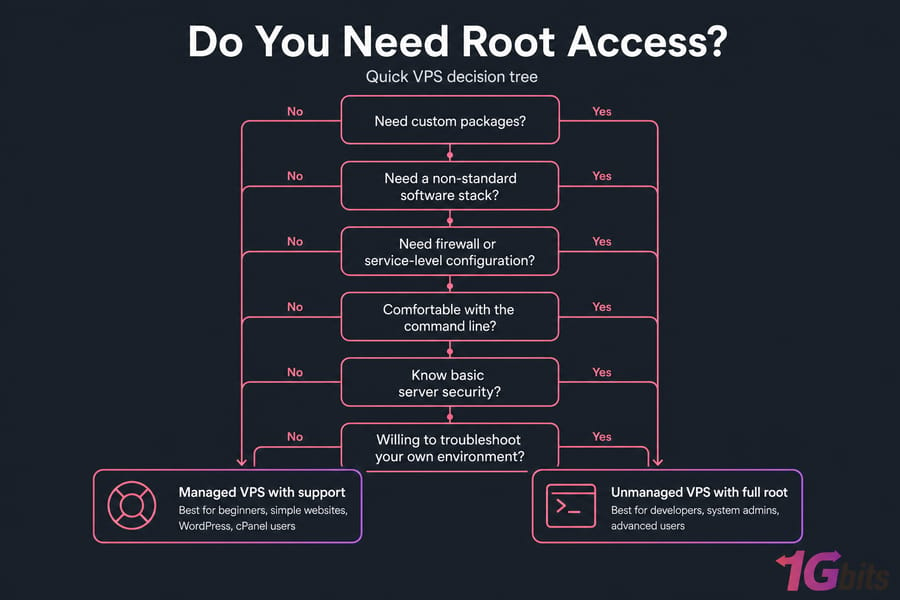
Run through this quick checklist. The more "no" answers you have, the more a managed setup makes sense:
- Do you need custom packages or a non-standard software stack?
- Do you need firewall or service-level configuration?
- Are you comfortable with the command line and basic server security?
- Do you want to troubleshoot your own environment when things break?
New to all this? Start with the beginner's guide to VPS hosting, then read how to choose VPS hosting that matches your goals.
In practice, the biggest difference comes down to managed vs unmanaged VPS hosting.
Managed vs Unmanaged VPS: How Root Access Changes the Experience
This is where the buying decision really lives. Both can include root or administrator access — the difference is who handles the work around it.
An unmanaged VPS hands you full control and then steps back. You set up the OS, harden it, run updates, and troubleshoot every issue yourself. Maximum freedom, maximum responsibility. A managed VPS may still give you root access, but the provider assists with maintenance, setup, and certain support tasks depending on the plan scope.
One thing worth stressing: root access alone does not equal managed service. You can have full root on an unmanaged box and be entirely on your own. And managed doesn't mean the provider does literally everything — support scope varies.
| Feature | Managed VPS | Unmanaged VPS |
| Root / admin access | Often included | Included |
| Initial server setup | Provider assists | You handle it |
| OS updates & patching | Provider helps (by scope) | Your responsibility |
| Security hardening | Often supported | Entirely yours |
| Troubleshooting | Support available | Self-service |
| Software installation | May assist | You do it |
| Control / flexibility | High | Maximum |
| Best for | Control without full admin burden | Technical, hands-on users |
So which fits you? Go unmanaged if you're technical, want total flexibility, and don't mind owning maintenance. Go managed if you want control without spending your weekends on patching and hardening. Either way, dig into the full breakdown of managed vs unmanaged VPS hosting before you commit.
Quick summary: Unmanaged = maximum control, maximum responsibility. Managed = support with a lighter admin burden. Both can include root access.
If you do choose a root-access VPS, securing it should be your first priority.
Best Practices for Securing Root Privileges on a VPS
Root access is safe — when you secure it properly. Skip these steps and you're basically leaving the front door unlocked. Here's the practical checklist I run on every new server.
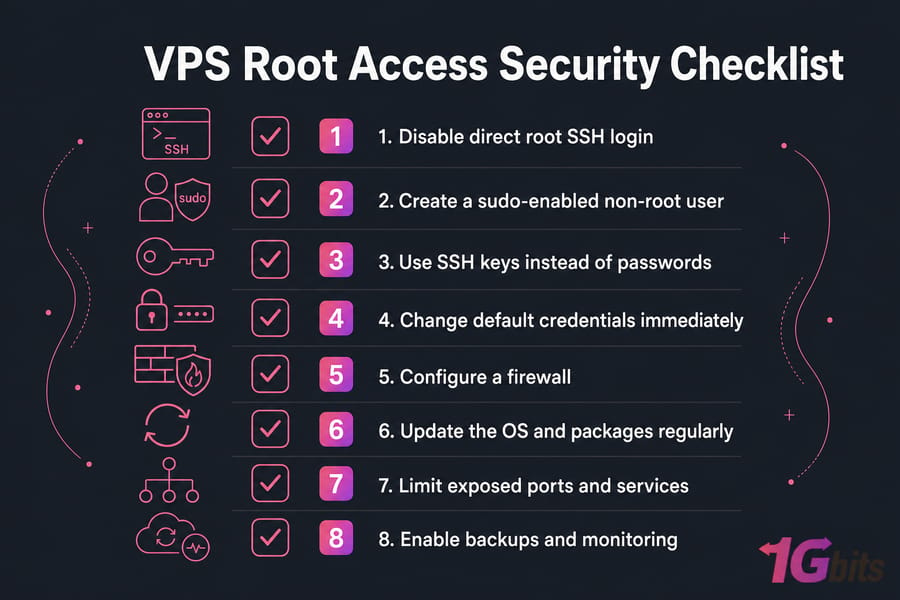
- Disable direct root SSH login. Edit your SSH config so root can't log in remotely. Force everyone through a normal user account first.
- Create a sudo-enabled non-root user. Do daily work as this user and elevate only when needed.
- Use SSH keys instead of passwords. Keys are far harder to brute-force. Here's how to generate an SSH key.
- Change default credentials immediately. Never leave a server running on the password it shipped with.
- Configure a firewall. Use UFW or iptables to allow only the ports you actually need — see how to configure a firewall on your VPS.
- Update the OS and packages regularly. Most breaches exploit known, already-patched vulnerabilities.
- Limit exposed ports and services. Turn off anything you're not using. Smaller attack surface, fewer problems.
- Enable backups and monitoring. Backups turn a disaster into an inconvenience. Schedule them and forget about it.
On Windows, the same logic applies to the Administrator account: use a strong unique password, restrict RDP access, change the default RDP port, enable account lockout policies, and keep the system patched. The tools differ; the discipline is identical.
Want the full security playbook? Our guide on how to secure your VPS ties all of this together.
With the basics covered, you can now decide whether root access is a feature you need or a responsibility you'd rather skip.
Final Verdict: When Full Server Control Is Worth It
Here's the short version. Root access in VPS hosting equals full control plus full responsibility. There's no separating the two.
- Choose full root access if you need custom setups, advanced configuration, or the freedom to learn and administer your own server.
- Lean toward managed if you want support, less risk, and someone to share the maintenance load.
- Root is powerful, not automatically "better." The right choice depends on your skills and your project.
Next steps for choosing the right VPS
Match the access level to where you actually sit. Want full root and total flexibility? A Linux VPS on an unmanaged plan is your lane. Need a Windows desktop with Administrator rights? Go for a Windows VPS. Want control without the full admin burden? Compare managed options instead.
Choose the right VPS for your level of control
Want full root access and total flexibility? Explore unmanaged VPS plans. Prefer help with maintenance and setup? Compare managed VPS options. Or just buy VPS hosting and get started today with 1Gbits, you get a range of operating systems, global locations, and support when you need it.

Leave A Comment