
![How to Secure a Debian VPS Server [Step-by-Step] 🔒](https://1gbits.com/cdn-cgi/image/width=1200,quality=80,format=auto/https://s3.1gbits.com/blog/2026/07/secure-a-debian-vps-server-main.webp "How to Secure a Debian VPS Server [Step-by-Step] 🔒")
To secure a Debian VPS server, start by updating packages, creating a sudo user, disabling root SSH login, enforcing SSH keys, enabling a firewall, installing Fail2ban, removing unused services, turning on automatic security updates, and monitoring logs, open ports, and backups regularly.
Debian VPS security starts with a clean baseline
If you're new to VPS hosting or still getting familiar with what Debian is, here's the short version: Debian 12 gives you a solid base, but a public VPS gets scanned within minutes. I've seen brand-new servers hit with SSH login noise before the first coffee.
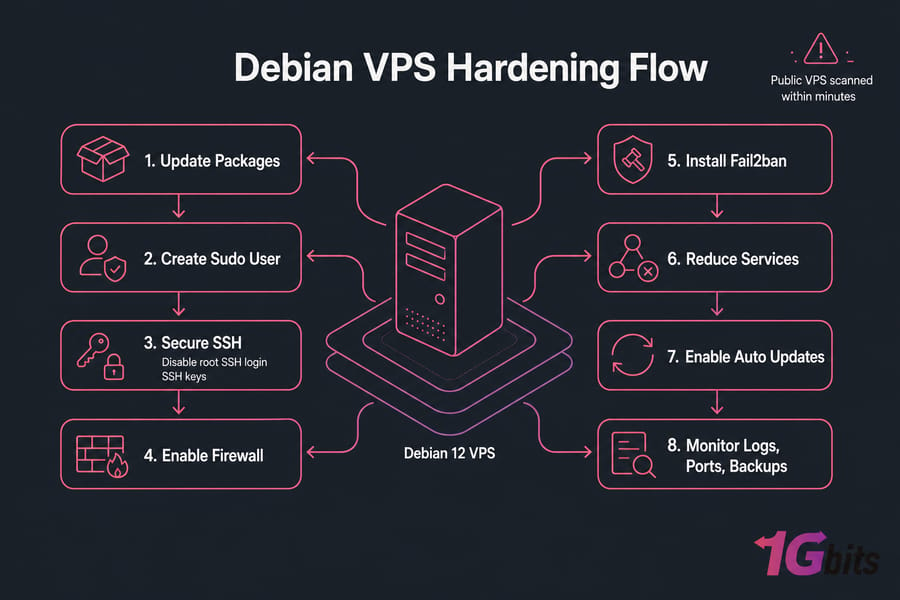
Debian server hardening means reducing attack surface and tightening access. In practice, that includes:
- locking down SSH
- using a firewall allowlist
- applying updates fast
- adding brute-force protection with Fail2ban
- removing services you don't need
- checking logs, ports, and backups ongoing
There are levels to this. A minimal setup is fine for a hobby box. A production-grade setup adds stricter monitoring, backups, and maybe AppArmor or 2FA. Different risk, different effort. Before changing anything, protect access and create a rollback point.
Pre-hardening checklist for your Debian server
This Debian hardening checklist starts with safety, not tweaking. Good call, because the easiest way to “secure” a server badly is to lock yourself out.
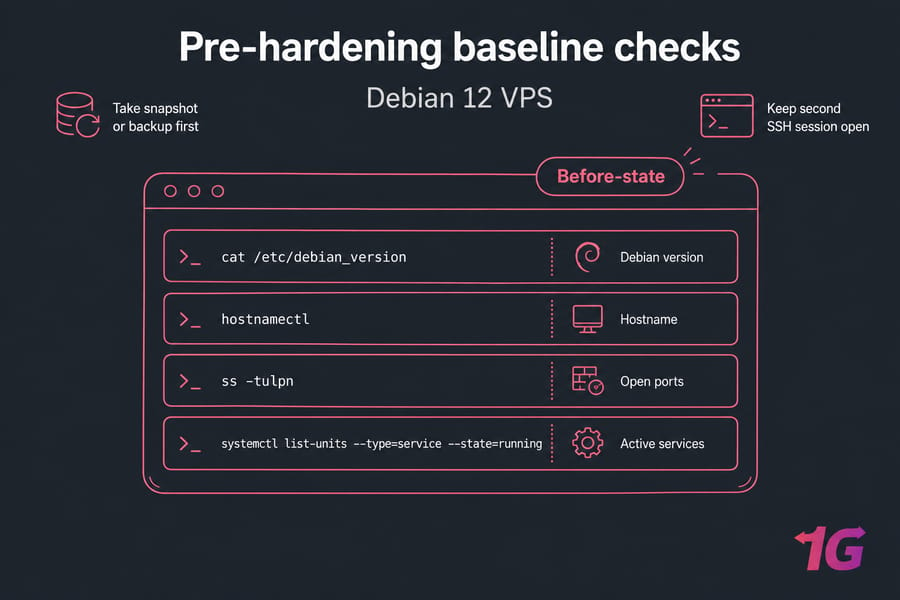
First, take a snapshot or backup. If your provider offers snapshots, use one. If not, at least schedule automatic backups for your Linux server before major changes.
Second, keep a second SSH session open. Seriously. Never disable password auth or root login until key access works in another session.
Run these baseline checks:
cat /etc/debian_version
hostnamectl
ss -tulpn
systemctl list-units --type=service --state=running
You can also review how to log in to a VPS or how to connect to a VPS if access itself is still a little shaky.
You're confirming Debian version, hostname, open ports, and active services. That gives you a before-state. Later, you'll compare it after hardening and catch anything odd.
Update Debian packages and install security tools
Patch first. Old packages are low-hanging fruit for attackers, and Debian server hardening starts with known-good software.
apt update && apt upgrade -y
apt full-upgrade -y
apt autoremove -y

apt install -y sudo curl ufw fail2ban unattended-upgrades apt-listchanges needrestart
apt upgrade handles normal package updates. apt full-upgrade can add or remove packages if dependencies changed, so read the prompt if you're on a sensitive production host. For a fresh Debian 12 VPS, it's usually fine.
If you want a refresher on package workflow, 1Gbits has guides on the apt-get command and how to update Linux securely.
Reboot only if needed. Check for kernel or core library changes:
needrestartIf it reports a kernel update or critical daemons needing restart, schedule a reboot. Don't do blind reboots on busy production servers. Once the server is patched, secure administrative access before exposing more services.
Create a sudo user and disable direct root access
Daily root login is risky. One typo can wreck a system, and one leaked credential gives full control. Least privilege isn't just theory — it saves you from yourself too.
adduser youruser
usermod -aG sudo youruser
su - youruser
sudo whoami
If sudo whoami returns root, you're good. Use a strong password even if you'll move to SSH keys. And no, don't “delete root.” You still want root available through sudo when needed.
| Access Model | Why It Matters |
| Direct Root Login | High risk, no accountability, bigger blast radius |
| Sudo User | Safer admin workflow, clearer audit trail, better least privilege |
For deeper background, see how to disable root login in Linux, what sudo privileges are, and sudo in Linux.
Harden SSH on Debian with keys, port rules, and safer defaults
This is the section most people care about, and for good reason. SSH is usually your front door.
Generate a key on your local machine if you don't already have one. If needed, use this guide to generate an SSH key.
ssh-copy-id youruser@your_server_ipBefore editing OpenSSH settings, back up the config:
cp /etc/ssh/sshd_config /etc/ssh/sshd_config.bakThen edit /etc/ssh/sshd_config and set something like this:
PermitRootLogin no
PubkeyAuthentication yes
PasswordAuthentication no
PermitEmptyPasswords no
MaxAuthTries 3
X11Forwarding no
AllowUsers youruser
Warning: Don't set PasswordAuthentication no until you've confirmed key login works from a second session.
Here are the key directives that matter most:
| Directive | Recommended Value | Why It Matters | Risk If Wrong |
| PermitRootLogin | no | Stops direct root SSH access | Easy target for bots |
| PasswordAuthentication | no | Removes password brute-force risk | Account guessing stays possible |
| PubkeyAuthentication | yes | Enables key-based access | You may lose secure login path |
| PermitEmptyPasswords | no | Blocks blank-password accounts | Trivial compromise |
| MaxAuthTries | 3 | Limits repeated attempts | More brute-force room |
| X11Forwarding | no if unused | Reduces unnecessary features | Extra exposure |
| AllowUsers | specific users | Limits who may log in | Too many accounts can try SSH |
Should you change port 22? Maybe. It cuts bot noise, but it's not real hardening by itself. If you want to change the SSH port, do it as a minor friction layer, not your main defense. You can also review what the SSH port does and the basics of how to SSH or SSH keys.
Test before reloading:
sshd -t
systemctl reload ssh
Then open a new terminal and log in again. Only close the original root session after the new one works.
Need a Debian VPS you can harden with full root control? Explore Debian VPS hosting.
Debian firewall setup with UFW or nftables
A default-deny firewall is one of the fastest wins in Debian firewall setup. Allow only what's needed.
ufw default deny incoming
ufw default allow outgoing
ufw allow OpenSSH
ufw allow 80/tcp
ufw allow 443/tcp
ufw enable
ufw status verbose
Warning: allow SSH before enabling UFW, or you'll have a bad afternoon.
| Service | Port | Protocol | Public/Private | Needed for Most VPS? |
| SSH | 22 | TCP | Public | Yes |
| HTTP | 80 | TCP | Public | Web only |
| HTTPS | 443 | TCP | Public | Web only |
| MySQL | 3306 | TCP | Private | No |
| PostgreSQL | 5432 | TCP | Private | No |
For most users, UFW is enough. If you need custom chains, sets, or tighter integration, Debian's native nftables is the better long-term fit. Just know it's less forgiving. Docker can also bypass or modify firewall behavior, so check container networking carefully.
For more detail, see how to configure a firewall on your VPS and how to check open ports in Linux.
Install Fail2ban on Debian to stop brute-force attacks
Fail2ban Debian setups are straightforward, and they're worth it. It watches logs for repeated failures and bans offending IPs. It's not a firewall replacement, though. Think of it as a reactive helper.
systemctl enable --now fail2ban
cp /etc/fail2ban/jail.conf /etc/fail2ban/jail.local
[sshd]
enabled = true
bantime = 1h
findtime = 10m
maxretry = 5Then restart and verify:
systemctl restart fail2ban
systemctl status fail2ban
fail2ban-client status
fail2ban-client status sshd
I usually avoid super-aggressive bans on public servers unless I know the login pattern well. Too strict, and you can ban yourself or teammates.
Reduce attack surface, automate updates, and monitor continuously
Minimizing exposed software is often more effective than cosmetic tweaks. Audit first with ss -tulpn and list running services in Linux. Then disable what you don't use:
systemctl disable --now apache2
apt purge ftp-server-package
Common cleanup targets: unused FTP, mail daemons, demo apps, old web panels, and anything you forgot you installed. Be careful with dependencies. Also review permissions with chmod and chown, tighten cron jobs, and keep /tmp from becoming a junk drawer.
Now turn on automatic security updates:
dpkg-reconfigure unattended-upgrades
systemctl status unattended-upgrades
unattended-upgrade --dry-run -d
For highly customized production stacks, auto-updates need change control. For a normal Debian VPS, they're a huge help. Keep patching, but don't assume automation replaces maintenance.
Monitoring is the part people skip. Then they regret it later. Check:
| Command | What It Checks | How Often | Warning Signs |
| journalctl -xe | System events | Weekly | Service failures, auth issues |
| last / lastb | Login history | Weekly | Unexpected users, failed logins |
| who | Current sessions | As needed | Unknown active sessions |
| ss -tulpn | Listening ports | Weekly | New exposed services |
| ps aux | Running processes | Weekly | Suspicious binaries or miners |
For deeper reading, review Linux logs, explore Linux monitoring, and learn how to monitor network traffic in Linux. Backups matter too — and restore testing matters even more.
Advanced later: AppArmor adds application confinement, AIDE helps with file integrity monitoring, and SSH 2FA via PAM makes sense for higher-risk admin access. Not every small VPS needs all three. But if you're hosting client data or public apps, they're worth considering.
Debian hardening checklist summary and secure VPS next steps
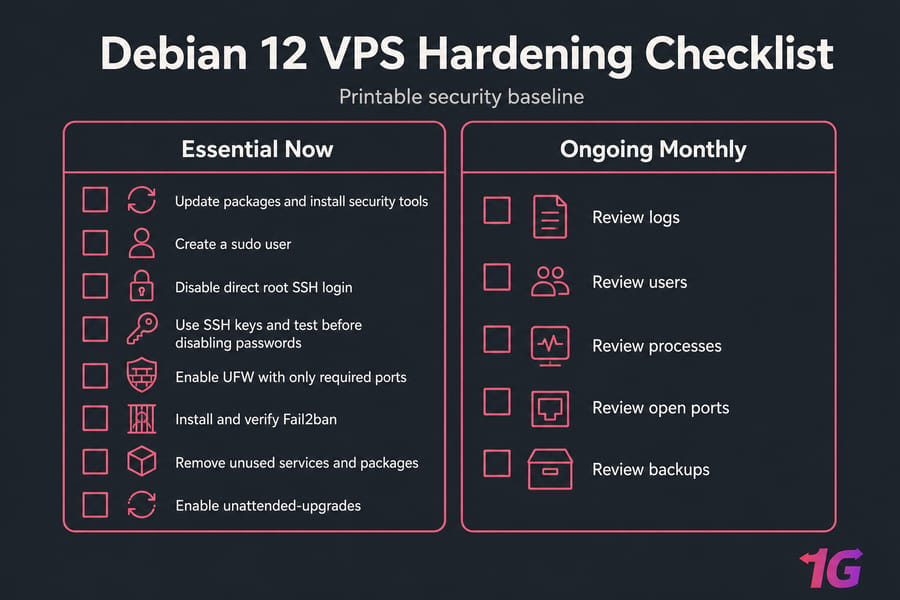
- Update packages and install security tools
- Create a sudo user
- Disable direct root SSH login
- Use SSH keys and test before disabling passwords
- Enable UFW with only required ports
- Install and verify Fail2ban
- Remove unused services and packages
- Enable unattended-upgrades
- Review logs, users, processes, open ports, and backups monthly
If you run an unmanaged server, this VPS hardening checklist should be part of every deployment. If you'd rather spend less time babysitting updates and logs, managed VPS hosting can reduce the overhead. And if your apps are public-facing, a DDoS-protected VPS is often the smarter baseline.
1Gbits also offers Linux VPS servers and Debian-ready plans with full control. If something already went wrong, read what to do if your VPS gets hacked. And if you want broader context, their guide to Linux server security best practices is worth bookmarking.

Leave A Comment