
![How to Set Up a Conan Exiles Dedicated Server [2026] 🎮](https://1gbits.com/cdn-cgi/image/width=1200,quality=80,format=auto/https://s3.1gbits.com/blog/2026/09/how-to-set-up-a-conan-exiles-dedicated-server-2026-main.webp "How to Set Up a Conan Exiles Dedicated Server [2026] 🎮")
To set up a Conan Exiles dedicated server, you need a Windows machine (or a Windows-based VPS/dedicated box) with enough CPU and RAM, the Conan Exiles Dedicated Server files installed via SteamCMD or the Dedicated Server Launcher, ports 7777, 7778 and 27015 open on UDP, your server name and admin password set in the config files, and a quick connectivity test from the in-game browser or direct connect. That's the whole job. The details are where people get stuck.
The short version (and what you're actually signing up for)
I've built these servers for clans of six and clans of forty. The install itself takes maybe twenty minutes. The part that eats an afternoon? Getting the thing to actually show up in the server browser. So this guide walks the sequence in the order that works: requirements, hosting choice, install, config, ports, launch, mods, then troubleshooting.
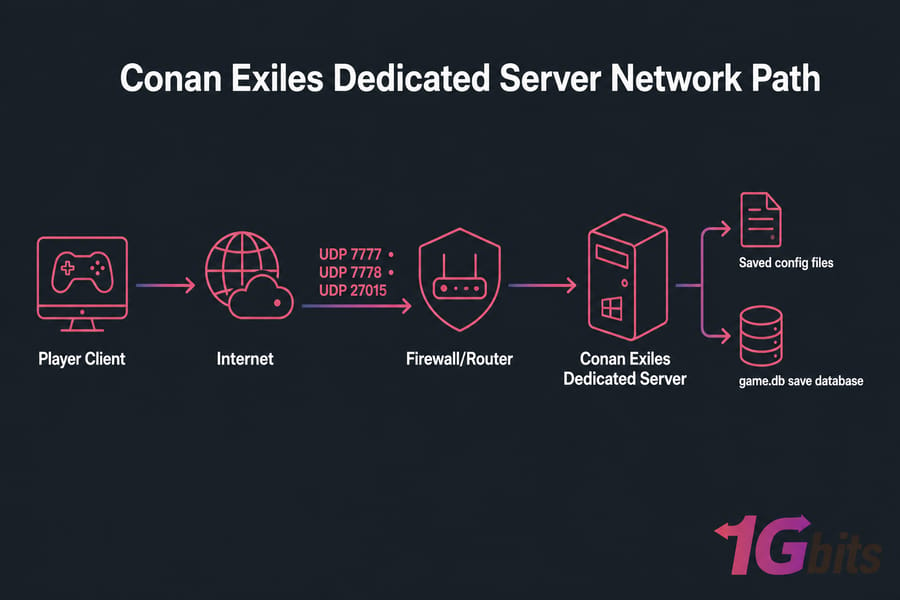
What you need before a Conan Exiles dedicated server setup
First, clear up a common confusion. When you click "Play Singleplayer/Co-op" in Conan Exiles, you're running a listen server — the world only exists while your game client is open. A dedicated server is a separate process running the world 24/7, whether anyone's logged in or not. That's what your clan actually wants. If you're new to the concept, here's a primer on what a dedicated server is in general hosting terms.
Your prep checklist
- A Windows PC, Windows VPS, or dedicated server with administrator access
- A public IPv4 address (or router access if you're hosting at home behind NAT)
- SteamCMD, or the Conan Exiles Dedicated Server Launcher from Steam's Tools library
- Around 60–80 GB of free disk space for the install plus growing save data
- A plain-text editor — Notepad works, Notepad++ is nicer
- Firewall permissions, and router port forwarding if home-hosted
Windows first, and here's why
Funcom only ships a Windows server binary. There's no native Linux build. People do run it under Wine or Proton with a bit of patience, and it works — but it's fiddly, it breaks on patch days, and troubleshooting doubles in difficulty. If you're a beginner, take the Windows path. If you're renting a box, you'll want to log in to your VPS over RDP rather than SSH.
Conan Exiles dedicated server requirements for smooth performance
Conan Exiles is heavier than most survival games because the Exiled Lands map is enormous and every building piece, thrall, and NPC gets simulated. RAM usage climbs as players build. I've watched a 10-slot server sit at 6 GB on day one and hit 14 GB three months later.
| Use case | Players | CPU | RAM | Storage | Recommended hosting |
| Testing / 2–4 friends, vanilla | 2–4 | 2 cores, high clock | 8 GB | 60 GB SSD | Home PC or small VPS |
| Private clan server, vanilla | 5–10 | 4 cores, 3.5 GHz+ | 16 GB | 100 GB NVMe | NVMe VPS |
| Modded clan server | 10–20 | 6 cores, 4.0 GHz+ | 24–32 GB | 150 GB NVMe | Dedicated server |
| Public server, heavy mods, Siptah + Exiled Lands | 20–40 | 8+ cores, 4.5 GHz+ | 48–64 GB | 250 GB+ NVMe | Dedicated server |
Pro tip: single-core clock speed matters more than core count here. Conan Exiles' game thread doesn't parallelise well, so a 4-core chip at 4.5 GHz will outperform a 16-core at 2.4 GHz for tick rate. Adding RAM won't fix a slow CPU. If you're unsure how much memory to budget, this breakdown of how much RAM you need for gaming, design, and hosting is a useful sanity check.
Storage type matters too. The save is a single SQLite-style database file (game.db), and it gets written to constantly. On spinning disks you'll see stutter during saves. NVMe-backed VPS storage removes that problem entirely. Bandwidth-wise, budget roughly 100–150 Kbps upstream per player, plus headroom for mod downloads.
Conan Exiles server hosting options: self-hosting vs VPS vs dedicated server
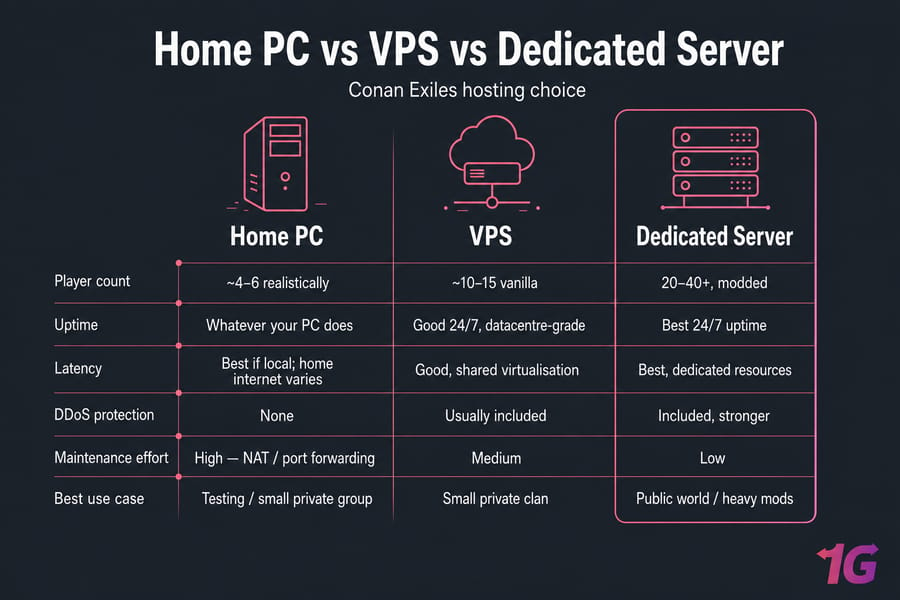
| Factor | Home PC | VPS | Dedicated server |
| Upfront cost | Free (you own it) | Low monthly | Higher monthly |
| Uptime | Whatever your PC does | Good | 24/7, datacentre-grade |
| Upload bandwidth | Usually the bottleneck | Shared, decent | Dedicated uplink |
| Player ceiling | ~4–6 realistically | ~10–15 vanilla | 20–40+, modded |
| DDoS protection | None | Usually included | Included, stronger |
| NAT / port forwarding | Required, often painful | Not needed | Not needed |
Home hosting is fine for testing. But residential upload is asymmetric — you might have 500 Mbps down and 20 Mbps up — and if your ISP uses CGNAT, you literally cannot expose the server without a workaround. That's the single most common reason a home-hosted Conan server never appears publicly.
A VPS covers small private groups nicely. Once you add mods and cross ten players, the shared-CPU nature of virtualisation starts showing up as tick drops during raids. That's the point where VPS vs dedicated server stops being a philosophical question. For a public world, a purpose-built Conan Exiles dedicated server hosting plan removes the NAT problem, the uptime problem, and the bandwidth problem in one move.
Conan Exiles dedicated server setup steps to install the server files
Two install routes. Pick one.
Route A: Dedicated Server Launcher (easiest)
- In your Steam client, switch the Library filter to Tools.
- Find Conan Exiles Dedicated Server Launcher and install it.
- Launch it. Click Install/Update Server — it pulls the server files for you (~40 GB, so grab a coffee).
- Use the launcher's tabs to set server name, passwords, and gameplay options without touching a single config file.
Route B: SteamCMD (better for remote boxes)
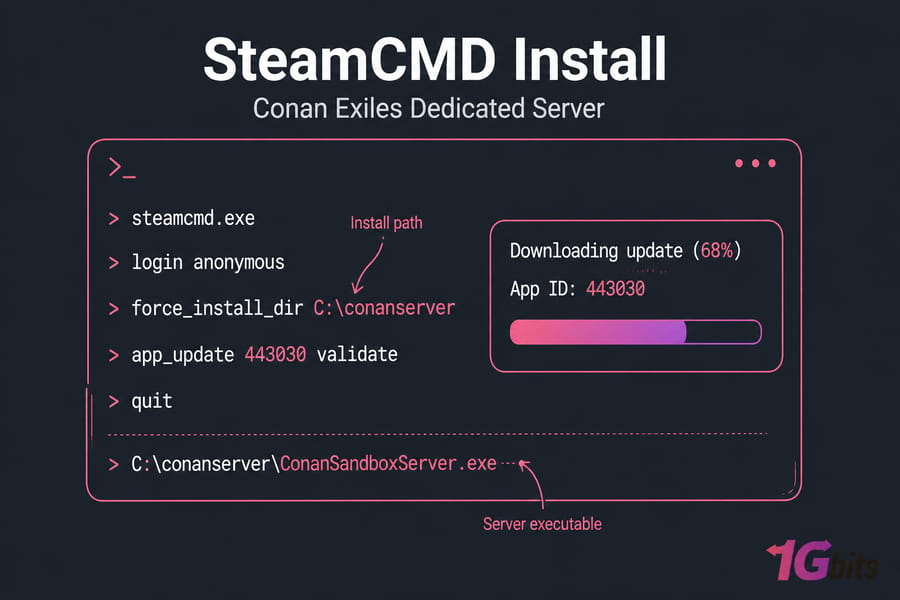
- Download SteamCMD and extract it to something like
C:\steamcmd. - Run
steamcmd.exeand let it self-update. - Log in anonymously — the server app doesn't need a licensed account.
login anonymous
force_install_dir C:\conanserver
app_update 443030 validate
quit
App ID 443030 is the Conan Exiles Dedicated Server. Once it finishes, your executable lives at:
C:\conanserver\ConanSandboxServer.exeConfig and save files land under:
C:\conanserver\ConanSandbox\Saved\Config\WindowsServer\
C:\conanserver\ConanSandbox\Saved\game.db
Note that Saved and the config .ini files only appear after the first launch. So run the executable once, let it initialise for two or three minutes, then shut it down and start editing.
To update after a patch: rerun the same app_update 443030 validate command. Always back up game.db first. Always. I've seen one bad update wipe three weeks of building because nobody had a copy. If you're running a Linux host with Wine, set up scheduled automatic backups for a Linux server so this is never a manual decision.
Conan Exiles server settings you should configure first
The main file you'll edit is ServerSettings.ini. Engine.ini holds the network and slot config. Game.ini is for a handful of gameplay overrides. Back up all three before your first edit.
| Setting | What it controls | Starter recommendation |
| ServerName | Name shown in the browser | Something searchable and unique |
| ServerPassword | Join password (private server) | Set it if the server is invite-only |
| AdminPassword | In-game admin panel access | Long, random, not your join password |
| MaxPlayers (Engine.ini) | Player slots | Match your RAM budget, not your ambition |
| PVPEnabled | PvP on/off | False until the clan agrees |
| PlayerXPRateMultiplier | Levelling speed | 1.0–2.0 |
| HarvestAmountMultiplier | Resource yield | 1.0–2.0 |
| DayCycleSpeedScale | Day/night length | 1.0 to start |
| ThrallDecayTime | Thrall persistence | Leave default first month |
| ServerRegion | Region filter in browser | Match your datacentre location |
| ServerCommunity | Purist/Relaxed/Hard Core/Roleplay tag | Pick one — it affects browser filters |
Two things people get wrong. First, ServerPassword and AdminPassword are different animals — one gates entry, the other grants god mode. Never share the admin one casually. Second, cranking harvest and XP to 10x feels great for a weekend and then the server has nothing left to do. Start conservative; you can always raise multipliers later.
Keep a plain-text changelog of every setting you touch. When something breaks two months from now, you'll want it. And if you're hardening a public box, run through basic Linux server security practices on the host side too.
Conan Exiles server ports and firewall configuration
| Port | Protocol | Purpose | Where to open |
| 7777 | UDP | Main game traffic | Firewall + router |
| 7778 | UDP | Raw UDP socket (required) | Firewall + router |
| 27015 | UDP | Steam query / browser listing | Firewall + router |
| 25575 | TCP | RCON (optional) | Firewall only, restrict by IP |
Warning: allowing a port in Windows Defender Firewall is not the same as forwarding it on your router. Home hosts must do both. Rented VPS and dedicated servers sit on a public IP, so only the OS-level firewall matters.
Windows firewall steps: open Windows Defender Firewall with Advanced Security → Inbound Rules → New Rule → Program → browse to ConanSandboxServer.exe → Allow. Then add a second Port rule covering UDP 7777-7778 and 27015. Do the same under Outbound Rules.
Home routers need port forwarding to your machine's LAN IP — our guides on how to do port forwarding and port forwarding on your router cover the vendor quirks. On a Linux host running the server under Wine, or on any VPS, follow the steps for configuring a firewall on your VPS and verify with a check of open ports.
Verify from outside your network — a phone on mobile data works fine. If port 27015/UDP isn't reachable, the server exists but nobody will ever see it in the browser.
How to start a Conan Exiles dedicated server and join it
- Run
ConanSandboxServer.exe(or hit Start in the launcher). - Wait. First boot takes 3–10 minutes while the world generates. Don't panic-restart.
- Watch for the log line confirming the server is registered with Steam.
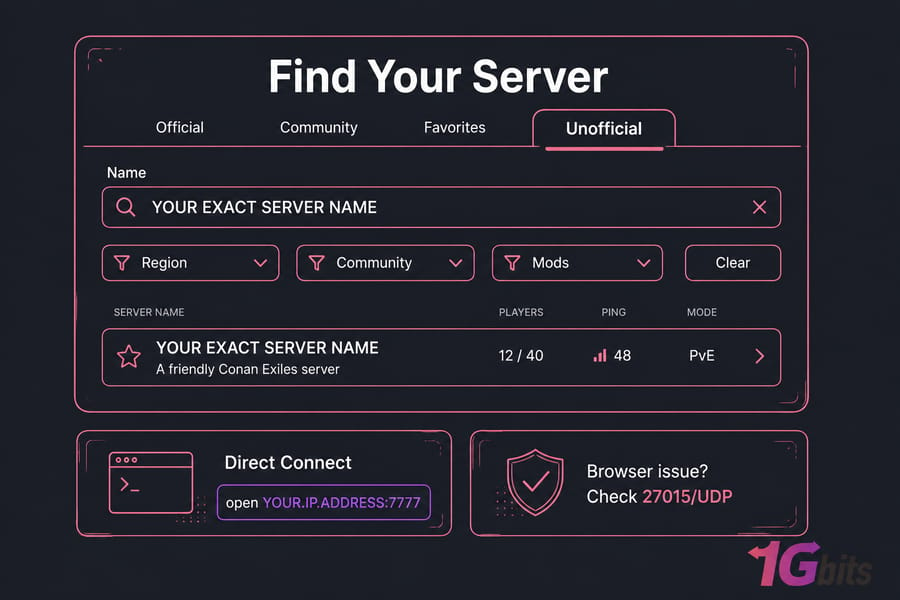
- In-game, open the server browser, switch to the Unofficial tab, and type your exact server name into the filter. Clear every other filter first — region, community, and mod filters hide servers constantly.
- If it's not listed, use direct connect: press
~to open the console, then typeopen YOUR.IP.ADDRESS:7777.
Direct connect is your friend. It bypasses the Steam query system entirely, which means if direct connect works but the browser doesn't, your problem is port 27015 — not the server. Share your public IP and the join password with your clan; here's how to find your IP address on Linux if you need it.
Conan Exiles mods server setup and update workflow
Mods live in the Steam Workshop, and the server needs the exact same set as every client — same mods, same order. Mismatch means players get kicked at login.
- Subscribe to the mods on your own Steam client, or pull them server-side with SteamCMD using the workshop item IDs.
- Create
modlist.txtinConanSandbox\Mods\listing each.pakpath, one per line. - Order matters. Framework mods (Pippi, Age of Calamitous dependencies) go first; content mods after.
- Restart the server. Check the log for load errors.
- Join and verify. Then add the next mod.
One mod at a time. I know it's slow. It's still faster than bisecting a broken 15-mod stack at midnight. And back up game.db before every mod change — removing a content mod can orphan every item it added.
Patch days are the real risk. Funcom updates the game, mod authors scramble, and your server may refuse to load until they catch up. Don't auto-update a live server the moment a patch drops. Wait a day, check the mod pages, then update. When something goes sideways, general Linux server troubleshooting habits — read logs before changing anything — apply just as well here.
Conan Exiles dedicated server not showing up and other common fixes
| Problem | Likely cause | Fix |
| Server missing from browser, direct connect works | UDP 27015 blocked | Open the query port on firewall and router |
| Nothing connects at all | UDP 7777/7778 blocked | Add both ports; 7778 is often forgotten |
| Works on LAN, not from outside | CGNAT or missing forward | Ask ISP for a public IP, or move to hosted |
| Friends get "connection failed" | Wrong IP shared (LAN instead of public) | Share your WAN IP, not 192.168.x.x |
| Server appears then vanishes | Version mismatch after a patch | Run app_update 443030 validate |
| Kicked at login screen | Mod list or order mismatch | Match client mods exactly to server |
| Rubber-banding, delayed hits | CPU saturation or thin uplink | Check Task Manager; reduce slots or upgrade |
| Random crashes after weeks | RAM exhaustion from world growth | Add RAM, schedule daily restarts |
| Save won't load | Corrupted game.db |
Restore your most recent backup |
Read the logs in ConanSandbox\Saved\Logs\ before you start changing things. Nine times out of ten the answer is sitting right there. For bandwidth-related weirdness, monitoring network traffic on the host tells you whether you're saturating the pipe.
If NAT headaches and home-network visibility issues keep eating your evenings, that's a signal — hosted infrastructure eliminates several of these failure modes outright.
Best server for Conan Exiles if you want lower latency and less maintenance
You've outgrown self-hosting when: players complain about lag during raids, you're restarting daily to reclaim RAM, your PC has to stay on permanently, or you've promised uptime you can't personally guarantee.
What to look for in Conan Exiles server hosting:
- High single-core clock — the tick rate depends on it
- NVMe storage — smoother saves, faster restarts
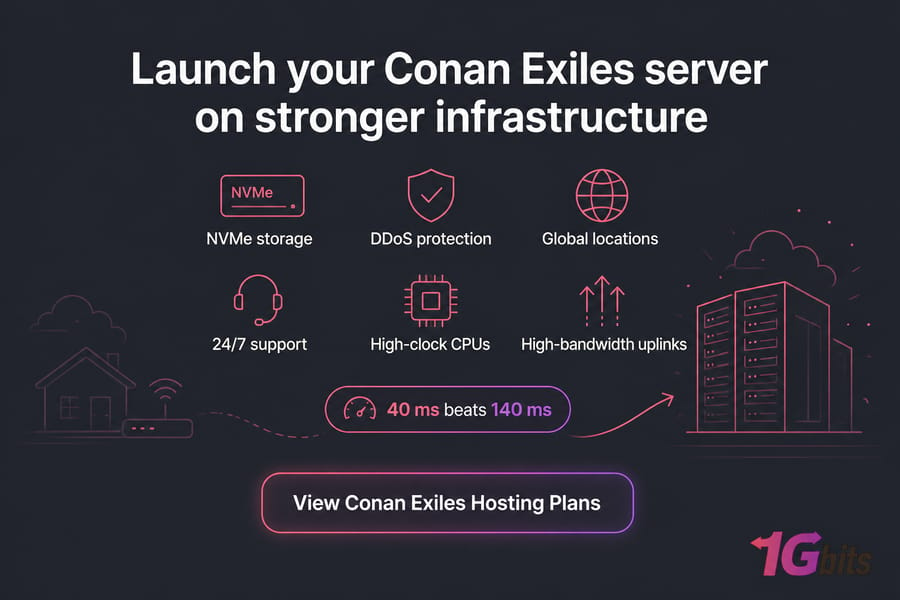
- A datacentre near your players — check available dedicated server locations, since 40 ms beats 140 ms every time
- DDoS protection — public Conan servers attract grudges
- Full root/admin control — you need to edit configs and manage mods yourself
1Gbits runs game dedicated server hosting built for exactly this workload: high-clock CPUs, NVMe-backed storage, high-bandwidth uplinks, multiple global locations, and 24/7 support. If you'd rather skip the router fights entirely, browse the Conan Exiles dedicated server plans and pick specs that match the table earlier in this guide.
Final Conan Exiles server setup checklist
Run through this before you invite anyone.
- Server files installed and validated via app ID 443030
- First launch completed so config files exist
- Server name, region, and community tag set
- Join password and a separate admin password configured
- Player slots matched to your RAM budget
- UDP 7777, 7778, 27015 open in the firewall (and forwarded, if home-hosted)
- Browser listing confirmed and direct connect tested from outside your network
- Backup of
game.dbtaken and a recurring backup schedule in place - Mods validated one at a time, with matching client instructions written down
- Monitoring plan for CPU, RAM, and disk growth
That's the full process. You absolutely can self-host a Conan Exiles dedicated server on your own hardware, and for a handful of friends it's genuinely fine. But persistent public worlds live and die on uptime, latency, and bandwidth you don't control from a spare room. If that's where you're headed, put it on hardware built for it — and if you get stuck mid-setup, the 1Gbits support team deals with this stuff daily.

Leave A Comment