

Docker Compose isn't a separate download anymore — not for most people. It ships as a plugin inside the Docker CLI, and you run it with docker compose (space, not hyphen). That single detail trips up more people than any actual install step.
In this guide, we'll walk you through how to install Docker Compose on Ubuntu, Debian, RHEL-family distros, Amazon Linux, macOS, and Windows — plus the legacy standalone binary if you're stuck supporting an older box. We'll verify the install with a real one-service stack, then fix the errors that show up most often in the wild.
🐳 What is Docker Compose?
Before diving into the installation process, let's take a quick look at what Docker Compose is and why you need it.
First of all, you should know Docker: 'compose' is not a standalone Docker command — it's a plugin. Compose is a tool for defining and running multi-container applications from a single YAML file. If you're new to containers entirely, start with our guide on What is Docker first, then come back here.
The file describes the services, networks, and volumes for your application. With Docker Compose, you can easily manage the lifecycle of your containers — building, starting, stopping, and scaling — which makes it essential for managing complex Docker environments, especially when working with microservices.
You'll want it for local development, multi-service apps, CI/CD test environments, and self-hosted stacks on a server. If you're still fuzzy on the concept, our guide on What is Docker Compose covers the fundamentals in more depth.
🔀 Docker Compose v2 vs docker-compose: what actually changed
The docker compose plugin
Compose v2 was rewritten in Go and integrated into the Docker CLI as a plugin. It's maintained, faster, and it's what Docker's own official documentation points you to.
The legacy docker-compose binary
The old v1 tool was a Python standalone binary. It reached end of life and no longer receives updates. Plenty of tutorials and CI scripts still reference it, which is why you'll keep seeing hyphenated syntax.
Which one should you use?
The plugin. Always, unless something blocks it. If old scripts depend on the hyphenated command, install the docker-compose-v2 compatibility package on Debian/Ubuntu rather than resurrecting v1.
📋 Prerequisites
- Docker Engine (Linux) or Docker Desktop (Windows/macOS) already installed — Compose does nothing on its own
sudoor administrator privileges- Working internet access, and no proxy or firewall blocking
download.docker.com - A functional package manager:
apt,dnf, oryum - A 64-bit OS — amd64 (x86_64) or arm64/aarch64. Note your architecture; it matters for the binary method
Need Docker itself first? Start with our guide on How to Install Docker, then come back here.
🗺️ Recommended installation method by operating system
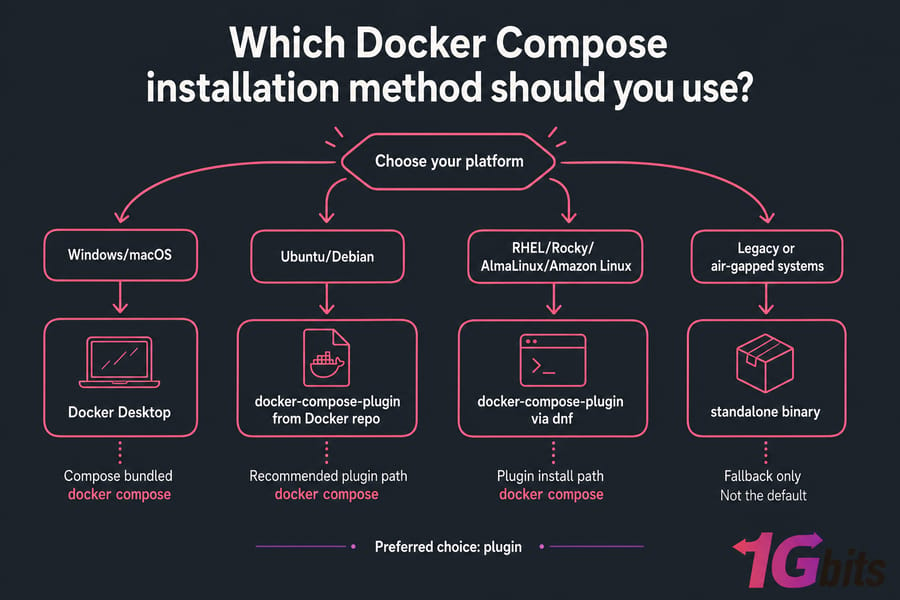
| Operating system | Recommended method | Command form | Notes |
| Ubuntu 22.04 / 24.04, Debian 12 | docker-compose-plugin from Docker's repo |
docker compose |
Cleanest path; updates via apt |
| RHEL 9, Rocky Linux, AlmaLinux, CentOS Stream | docker-compose-plugin via dnf |
docker compose |
Requires Docker's CE repo |
| Amazon Linux 2 / 2023 | Docker from Amazon repo + plugin manually | docker compose |
Plugin isn't in the AL repos |
| macOS (Intel & Apple Silicon) | Docker Desktop | docker compose |
Compose is bundled — nothing extra to install |
| Windows 10 / 11 | Docker Desktop + WSL 2 | docker compose |
Compose is bundled |
| Linux VPS / production server | Plugin from Docker's repo | docker compose |
Same as desktop Linux; no GUI needed |
🟠 How to Install Docker Compose on Ubuntu and Debian
Installing Docker Compose on Ubuntu is straightforward. Follow these steps to get started.
Before you begin, make sure you have Docker installed on your system. If you haven't installed Docker yet, you can refer to our guide on How to Install Docker.
Step 1: Add Docker's official repository
sudo apt update
sudo apt install -y ca-certificates curl gnupg
sudo install -m 0755 -d /etc/apt/keyrings
sudo curl -fsSL https://download.docker.com/linux/ubuntu/gpg -o /etc/apt/keyrings/docker.asc
sudo chmod a+r /etc/apt/keyrings/docker.asc
echo "deb [arch=$(dpkg --print-architecture) signed-by=/etc/apt/keyrings/docker.asc] https://download.docker.com/linux/ubuntu $(. /etc/os-release && echo "$VERSION_CODENAME") stable" | sudo tee /etc/apt/sources.list.d/docker.list > /dev/null
sudo apt update
That GPG key is what makes the packages trustworthy. Don't skip it, and don't grab Compose binaries from random mirrors or blog downloads — use Docker's repo or GitHub Releases only. On Debian, swap ubuntu for debian in both URLs.
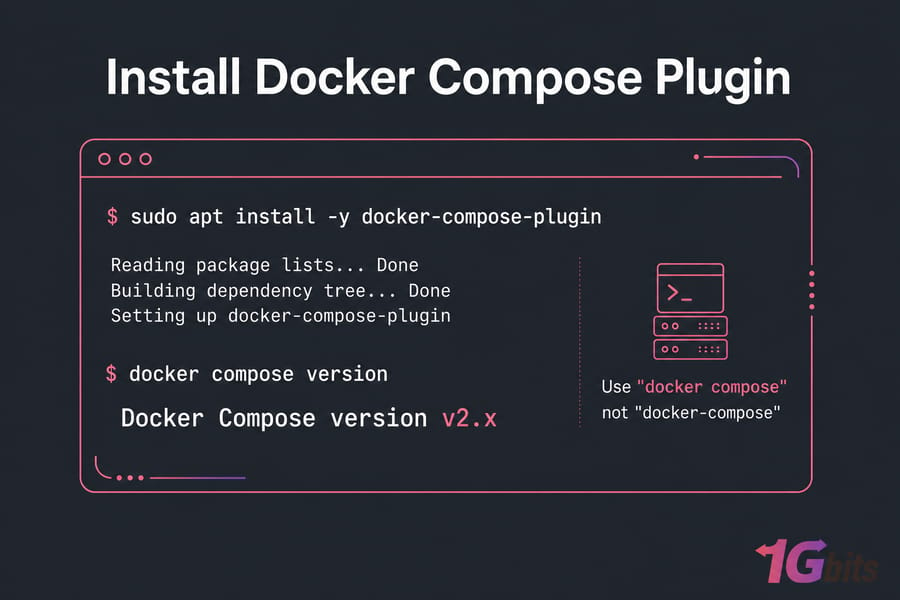
Step 2: Install the plugin package
sudo apt install -y docker-compose-pluginStep 3: Verify Installation
docker compose versionThis should display the version of Docker Compose you installed, confirming that it was successfully installed.
If you're new to Docker and Docker Compose, be sure to check out our detailed guides on Install Docker and How to Install Docker on Windows.
🐧 How to Install Docker Compose on Other Linux Distributions
How to Install Docker Compose on Kali Linux
To install Docker Compose on Kali Linux, follow the same steps as for Ubuntu. The process is identical, as Kali Linux is based on Debian. Ensure that Docker is already installed on your system and follow the commands mentioned in the Ubuntu section above.
How to Install Docker Compose on Debian 12
For Debian 12, the process is the same as Ubuntu and Kali Linux. Simply swap ubuntu for debian in the repository URLs and follow the plugin install steps shown earlier. If you want a Debian-specific walkthrough with repository setup and post-install tuning, we've covered it in detail in Install Docker Debian.
How to Install Docker Compose on RHEL, CentOS Stream, Rocky Linux, and AlmaLinux
sudo dnf -y install dnf-plugins-core
sudo dnf config-manager --add-repo https://download.docker.com/linux/centos/docker-ce.repo
sudo dnf install -y docker-compose-plugin
docker compose version
For RHEL 9 proper, use the rhel repo path instead of centos. If SELinux is enforcing and containers can't touch mounted volumes later, add :z to your volume definitions — that's a container issue, not an install failure.
🍎 How to Install Docker Compose on Mac
Step 1: Install Docker Desktop for Mac
The easiest way to install Docker Compose on Mac is by installing Docker Desktop. Docker Desktop comes with Docker Compose pre-installed. You can download Docker Desktop from the official website.
Step 2: Verify Installation
Once Docker Desktop is installed and the whale icon has stopped animating, open a terminal and verify the installation of Docker Compose by running:
docker compose versionIf everything is set up correctly, it will display the version of Docker Compose. Apple Silicon and Intel both work with the same installer — no extra steps needed.
For a deeper walkthrough — including Colima, Homebrew, and Apple Silicon quirks — see our dedicated guide on How to Install Docker on Mac.
How to Install Docker Compose on Windows 10 and 11
Installing Docker Compose on Windows is relatively simple, especially if you use Docker Desktop, which includes Docker Compose. Here's a detailed guide.
Step 1: Install Docker Desktop for Windows
- Download Docker Desktop
Visit the official Docker Desktop download page and download the latest version for Windows. - Run the Installer
Once downloaded, run the .exe file to start the installation. Follow the on-screen prompts and allow the installer to make changes to your system. - Enable WSL 2
Docker Desktop requires the WSL 2 backend. Runwsl --installin an elevated PowerShell, reboot, then confirm withwsl -l -vthat your distro shows version 2. - Complete Installation and Restart
Once the installation is complete, restart your computer to finalize the process.
Step 2: Verify Docker Compose Installation
- Open Command Prompt or PowerShell.
- Run the following command to check the Docker Compose version:
docker compose versionIf Docker Compose is installed correctly, this command will output the installed version. If Docker Desktop isn't running, no Docker command works at all — including Compose.
Step 3: Running Docker Compose
Once Docker Compose is installed, you can use it directly from the Command Prompt or PowerShell. Docker Compose commands work the same way as they do on Linux or Mac, so you can use docker compose up, docker compose down, and other commands to manage multi-container applications.
📦 Alternative Method: Install Docker Compose Using winget
If you prefer to install Docker Compose manually or if you're not using Docker Desktop, you can use winget, the Windows package manager:
- Open Command Prompt or PowerShell as Administrator.
- Run the following command to install Docker Compose:
winget install Docker.DockerCompose- After the installation is complete, verify the installation by running:
docker compose version☁️ How to Install Docker Compose on Amazon Linux 2 and 2023
Amazon's repos ship Docker but not the Compose plugin, so this one's a two-parter:
- Install Docker: If you haven't installed Docker on Amazon Linux yet, refer to our guide on How to Install Docker.
sudo dnf install -y docker        # use "yum" on Amazon Linux 2
sudo systemctl enable --now docker
sudo usermod -aG docker $USER

DOCKER_CONFIG=${DOCKER_CONFIG:-$HOME/.docker}
mkdir -p $DOCKER_CONFIG/cli-plugins
curl -SL https://github.com/docker/compose/releases/latest/download/docker-compose-linux-x86_64 \
  -o $DOCKER_CONFIG/cli-plugins/docker-compose
chmod +x $DOCKER_CONFIG/cli-plugins/docker-compose
docker compose version
On Graviton instances, replace x86_64 with aarch64. Wrong architecture is the number one cause of "cannot execute binary file" here.
⚙️ How to Install Docker Compose Using Ansible
If you are managing multiple servers, you may want to automate the installation of Docker Compose using Ansible. Here's a basic playbook to install Docker Compose:
---
- name: Install Docker Compose
  hosts: all
  become: yes
  tasks:
    - name: Download Docker Compose binary
      get_url:
        url: "https://github.com/docker/compose/releases/download/{{ docker_compose_version }}/docker-compose-{{ ansible_system }}-{{ ansible_architecture }}"
        dest: /usr/local/bin/docker-compose
        mode: '0755'

    - name: Verify Docker Compose installation
      command: docker-compose --version
This playbook downloads the Docker Compose binary and sets the correct permissions, then verifies the installation.
🔧 The Standalone Binary (Legacy Fallback)
Use this only when the plugin package isn't available or an old script insists on docker-compose:
sudo curl -SL https://github.com/docker/compose/releases/latest/download/docker-compose-linux-x86_64 \
  -o /usr/local/bin/docker-compose
sudo chmod +x /usr/local/bin/docker-compose
docker-compose version
Downside: no automatic updates. You'll be re-downloading it by hand forever.
✅ Test Your Install with a Sample compose.yaml
Version output proves the binary exists. It doesn't prove Compose can actually talk to the Docker daemon. So create compose.yaml in an empty folder:
services:
  hello:
    image: nginx:alpine
    ports:
      - "8080:80"
Then:
docker compose up -d
docker compose ps
curl http://localhost:8080
docker compose down
Nginx welcome HTML in your terminal means everything works. By the way — compose.yaml is the modern preferred filename, but docker-compose.yml is still fully supported, so old projects won't break.
🚨 "Unable to Locate Package docker-compose-plugin" Error
If you're encountering the error "Unable to locate package docker-compose-plugin" while trying to install Docker Compose on a Linux distribution, it typically indicates that the package source or repository does not include the Docker Compose plugin. This can happen due to incorrect package lists or outdated repositories. Here's how to resolve it:
- Update Your Package List: Begin by updating your package list to ensure the system is aware of the latest repositories.
sudo apt update- Install Required Dependencies: Install the
apt-transport-httpspackage, which is necessary for accessing Docker's repository securely.
sudo apt install apt-transport-https ca-certificates curl software-properties-common- Add Docker's Official Repository: Download Docker's official GPG key and add Docker's repository to your system.
curl -fsSL https://download.docker.com/linux/ubuntu/gpg | sudo gpg --dearmor -o /usr/share/keyrings/docker-archive-keyring.gpg
echo "deb [arch=amd64 signed-by=/usr/share/keyrings/docker-archive-keyring.gpg] https://download.docker.com/linux/ubuntu $(lsb_release -cs) stable" | sudo tee /etc/apt/sources.list.d/docker.list > /dev/null- Install Docker Compose Plugin: Finally, install Docker Compose:
sudo apt update
sudo apt install docker-compose-plugin
🩺 Common Installation Errors and Fixes
| Error | Likely cause | Fix |
docker: 'compose' is not a docker command |
Docker installed, plugin missing | Install docker-compose-plugin, or drop the binary into ~/.docker/cli-plugins/ |
Unable to locate package docker-compose-plugin |
Docker's repo not configured, or wrong codename | Re-add the repo, then sudo apt update |
docker-compose: command not found |
You're using v1 syntax on a v2 install | Use docker compose, or install docker-compose-v2 |
| Permission denied | User not in the docker group |
sudo usermod -aG docker $USER, then log out and back in |
| Binary in place but not found | PATH doesn't include /usr/local/bin |
Check echo $PATH; symlink into /usr/bin |
| Cannot connect to the Docker daemon (Windows) | Docker Desktop stopped or WSL 2 backend off | Start Docker Desktop; enable WSL 2 in Settings |
cannot execute binary file |
Architecture mismatch | Download the aarch64 build for ARM64 |
🔄 Update and Uninstall Docker Compose
Plugin installs update with your system: sudo apt update && sudo apt upgrade docker-compose-plugin (or sudo dnf update docker-compose-plugin). Docker Desktop updates Compose through its own updater. For a standalone binary, re-download over the old file.
Removing it is just as quick — sudo apt remove docker-compose-plugin for the package, or sudo rm /usr/local/bin/docker-compose for the binary.
🖥️ Docker Compose on Linux Servers and VPS
Compose is where it really earns its keep on a server. Self-hosted tools, staging environments, WordPress plus MariaDB plus Redis — one YAML file, one docker compose up -d, and redeploys become trivial. Keeping a Compose file in every project repo is one of the simplest wins you can give yourself.
You'll want at least 2 GB RAM before running more than a couple of containers comfortably. A VPS or cloud instance handles small stacks fine, while heavier multi-container workloads belong on a dedicated server with real CPU headroom. Root access is the requirement — you can't install Docker on shared hosting.
Additionally, if you're interested in learning more about Docker VPS Hosting, explore our Docker VPS Hosting page for more details.
🎯 Conclusion
Installing Docker Compose is a straightforward process that can be accomplished on various platforms such as Ubuntu, Mac, Linux distributions, and more. By following the steps outlined in this guide, you'll be up and running with Docker Compose in no time. Whether you're managing a small project or working with complex multi-container applications, Docker Compose will make managing Docker containers much easier.
If you're looking for more Docker-related content, explore our guides on What is Docker Compose and How to Run Docker. Happy Dockerizing!
📚 People Also Read
Once Docker Compose is installed and your first stack is running, these guides help you go deeper — from architecture comparisons to real-world deployments.
- VM vs Docker: Which Is Better for Your Development and Deployment — understand when containers beat virtual machines, and when they don't.
- Docker vs Podman: A Comprehensive Comparison — daemonless containers and the security trade-offs.
- Docker vs Containerd — where the runtime ends and the platform begins.
- Docker vs LXC — OS-level containerization compared.
- Docker vs Portainer — when a web UI makes sense for managing your stacks.
- Docker Desktop vs Colima — picking the right Mac setup.
- Best Docker Alternatives for Mac — if Desktop isn't your thing.
- Best Docker Tutorial Sources — courses and labs worth your time.
- How to Install WordPress with Docker on a VPS — a real-world Compose deployment from start to finish.

Leave A Comment