

![How to Fix Terraria Server Lag: Reduce Ping [2026] 🎮](https://1gbits.com/cdn-cgi/image/width=1200,quality=80,format=auto/https://s3.1gbits.com/blog/2026/10/how-to-fix-terraria-server-lag-main.webp "How to Fix Terraria Server Lag: Reduce Ping [2026] 🎮")
Here's the short version of any Terraria server lag fix: figure out whether you're fighting server load, network latency, or desync before you change anything. The quickest wins? Swap Host & Play for a dedicated server, join by direct IP instead of Steam relay, plug into Ethernet, and host closer to your players. On modded servers, check versions and mods too.
I've watched plenty of groups throw RAM at a ping problem. It almost never works.
What Kind of Terraria Multiplayer Lag Are You Dealing With?
Start with who's affected. Everyone stutters together? Look at the server. One friend rubber-bands while the rest are fine? It's almost always their end. Careful, though: an overloaded server can look exactly like bad ping.
| Symptom | Likely Cause | Affects Who | First Fix |
| Everyone freezes during bosses or events | Server CPU load | All players | Move off Host & Play, get a faster CPU |
| Enemies teleport, blocks reappear | Network latency / desync | Specific players | Direct IP, Ethernet |
| Low FPS, choppy screen, server feels fine | Client hardware | One player | Lower that player's graphics settings |
| Short pause every few minutes | World autosave on slow disk | All players | Move the world to NVMe storage |
| Lag began right after a mod update | tModLoader version or mod conflict | All or some | Match versions, disable mods in batches |
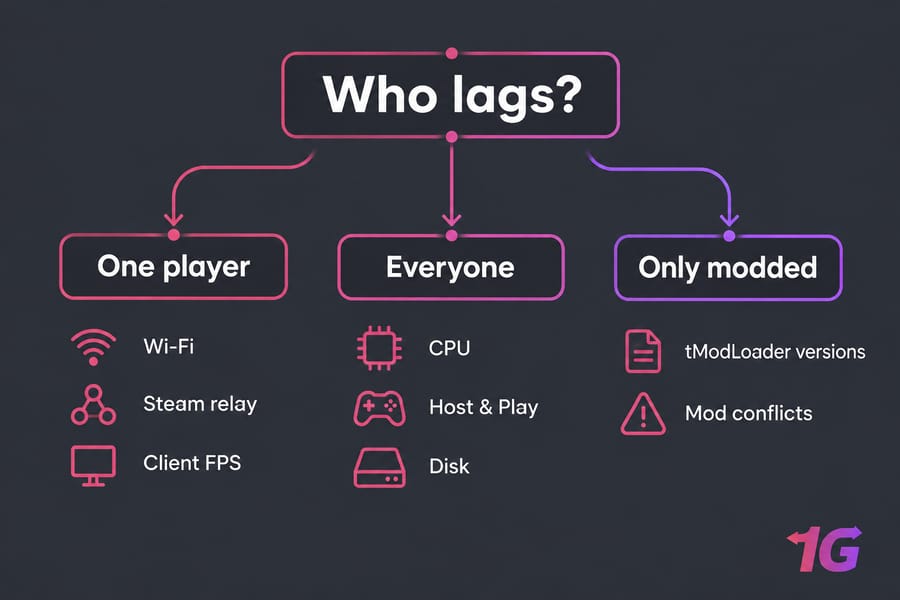
Terraria Lag vs Ping vs Desync
People use these words like they mean the same thing. They don't.
- Ping/latency: how long a round trip to the server takes. When ping is high, you swing and the damage number pops up a beat late.
- Desync: your client and the server disagree about what's happening. You see enemies snap into new positions, and a block you just broke shows up again.
- Rubber-banding: the visible symptom, where you get yanked back to where the server thinks you are.
- Low FPS: that's a local rendering problem. The server's fine, but your PC is struggling.
More background: what latency is and packet loss.
Fast Terraria Lag Fixes to Try First
Do these in order. The first two fix more problems than you'd expect.
- Use direct IP instead of Steam relay. A Steam invite sends your traffic through Valve's relay servers, and that extra hop adds latency even when the server is next door.
- Switch from Wi-Fi to Ethernet. Wi-Fi latency jumps around, and that jitter turns into NPC rubber-banding.
- Stop using Host & Play for anything bigger than two or three casual players. Run
TerrariaServer.exeor a hosted Terraria dedicated server hosting plan instead. - Test vanilla. If vanilla runs smooth and modded doesn't, the problem is your mods.
How to Reduce Ping and Latency on a Terraria Server
Geography wins every time. If your group is in Texas and the server sits in Frankfurt, no setting will save you. Pick a region near most of your players. USA VPS hosting is a good fit for North American groups, and our dedicated server locations page covers everywhere else.
Next, cut out the extra hops. Hamachi and similar VPN tunnels get around closed ports, but in my experience they nearly always push ping up.
If you self-host, open the port properly. Terraria uses TCP port 7777 by default, and when you're behind NAT (most home connections are) you have to forward it before anyone can join. Our guides on how to do port forwarding and how to port forward on your router walk through it. Check that your firewall allows TerrariaServer.exe, and pause cloud sync or streaming apps on the host.
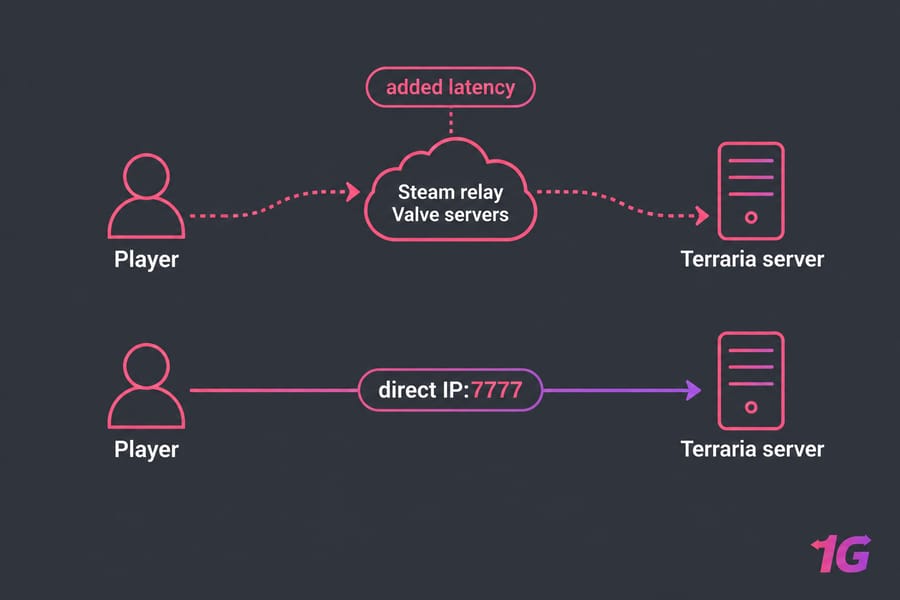
How to Fix Terraria Desync and Rubber-Banding
Ping looks okay but mobs still snap around? That's desync. The common client-side tweak: close Terraria, open config.json (on Windows it's under Documents\My Games\Terraria), and set the NPC smoothing value to 0.
Here's a detail most guides miss. Hosting guides call the key MultiplayerNPCSmoothness, but the official wiki lists it as MultiplayerNPCSmoothingRange (default 300 pixels). Edit whichever key is actually in your file. Each player has to make the change on their own machine.
Keep expectations realistic. This only changes how enemy movement looks on your screen. It won't fix distance, a maxed-out server CPU, or heavy mods. If the whole group desyncs at once, the server is the bottleneck.
Terraria Server Optimization for Boss Fights and Events
Moon Lord lag is CPU lag. Bosses and events flood the server with projectiles, and Terraria leans on single-thread speed. More RAM prevents crashes, not stutter.
| Scenario | Likely Bottleneck | Fix |
| Lag spikes in boss fights | CPU single-thread speed | Get faster cores |
| Host's game stutters while hosting | Host & Play contention | Run a headless dedicated server |
| Pauses during autosave | HDD storage I/O | Move to NVMe |
| Slowdown around big farms | Liquids, wiring, large world | Trim contraptions, keep worlds sensible |
Host & Play makes one PC render the game and run the server at the same time. A dedicated server doesn't render anything. On a VPS, read about VPS performance bottlenecks, optimize your VPS for maximum performance, and benchmark VPS hosting performance to see if your plan delivers. Linux admins can monitor network traffic in Linux to tell network spikes from CPU spikes.
tModLoader Lag Fix: Troubleshooting Modded Servers
Modded servers break faster than vanilla. Work through this sequence:
- Make sure the server and every client run the exact same tModLoader version.
- Confirm mod versions match too, so check
install.txtandenabled.jsonon the server. - Watch the console for repeating errors. Conflicts and mismatches fill the log nonstop and drag performance down over time.
- Disable mods in batches to isolate the culprit.
- Keep TShock plugins lean, because each one adds overhead.
Our guide on how to host a modded Terraria server covers the full tModLoaderServer workflow.
Host & Play vs Dedicated Server for Terraria
| Setup Type | Best For | Weakness | Upgrade Trigger |
| Host & Play | 2–3 casual friends | One PC renders and hosts, and the world goes offline when you do | Boss lag, remote friends |
| VPS | Small to mid groups, 24/7 modded worlds | Shared host hardware | Big modpacks, CPU ceiling |
| Dedicated server | Large communities, heavy modpacks | Higher cost | Rarely needed |
When to Upgrade Your Terraria Hosting
Upgrade when everyone lags at once, bosses always stutter, your PC can't handle client plus server, friends are far away, or the modpack has outgrown the machine. Look for a nearby region, fast single-core CPUs, NVMe, enough RAM, and stable uptime.
1Gbits' game VPS hosting fits private and small modded worlds. Larger communities should consider a game dedicated server, which gives you dedicated resources, NVMe, and low-latency global locations.

Leave A Comment