
Secure Shell (SSH) is a powerful protocol used to remotely access servers, configure systems, and transfer files securely. However, one frustrating and fairly common issue users encounter is the "Connection reset by peer" SSH error. This error abruptly cuts the connection and leaves users unable to proceed.
Short version: the remote side slammed the TCP connection shut with an RST packet before the SSH session finished setting up. Your client didn't quit — the server (or something between you and it) did. Nine times out of ten the culprit is one of five things: port 22 blocked by a firewall or cloud security group, sshd not running, your IP banned by Fail2Ban, broken .ssh permissions, or a key exchange (KEX) algorithm mismatch.
The variant most people paste into Google looks like this:
kex_exchange_identification: read: Connection reset by peerThat one is telling. It means the reset happened before authentication — you never even got to type a password. Whether you are managing a robust Linux VPS, handling complex file transfers, or simply connecting to a remote server via port 22, this comprehensive guide is designed to help you resolve the interruption and maintain a stable connection.
🔍 Understanding the "Connection reset by peer" SSH Error
Before diving into how to fix "Connection reset by peer" SSH Error, it's important to fully understand what "Connection reset by peer" actually means in the context of SSH. This error message often appears in the following forms:
- kex_exchange_identification: read: Connection reset by peer
- error='Connection reset by peer (104)'
At its core, this message indicates that the remote host — typically the server you're trying to SSH into — has abruptly closed the connection. The term "peer" refers to the remote machine, and a "reset" means the server forcefully ended the session before a successful connection could be established. This often happens because the server detects a security threat or a protocol incompatibility before the authentication phase can even begin. To get a better grasp of the environment you are connecting to, you might want to review what is an SSH server.
The most critical part of the message is during the key exchange or KEX process. This is when SSH tries to establish a secure session by negotiating cryptographic keys between the client and server. If something goes wrong during this early handshake — before even reaching username or password authentication — you'll get this error.
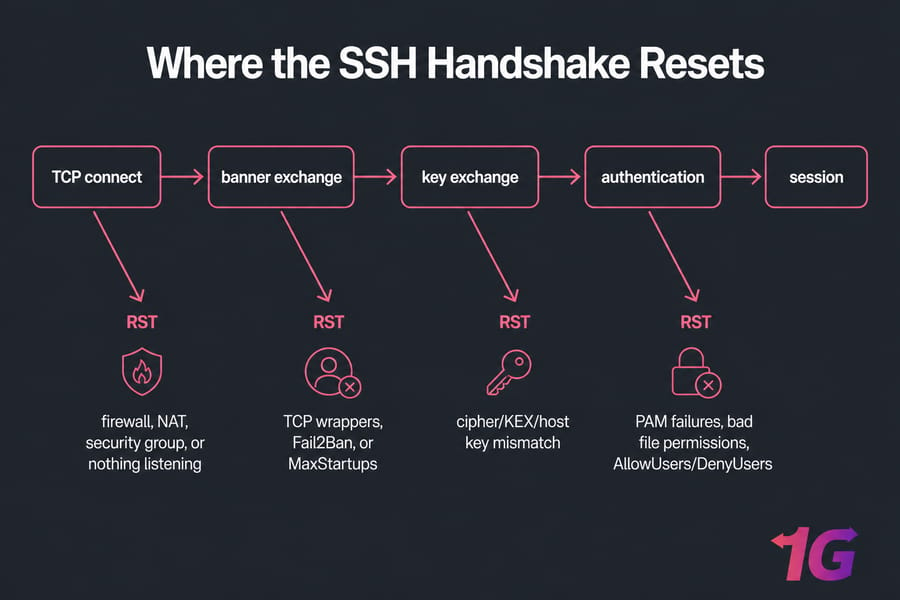
Where in the Handshake the Reset Happens
An SSH connection goes through four stages. Knowing which one broke saves you an hour of guessing.
- TCP connect — reset here means firewall, NAT, security group, or nothing listening on the port.
- Banner exchange — you see
ssh_exchange_identificationorkex_exchange_identification. Usually TCP wrappers, Fail2Ban, orMaxStartupsthrottling. - Key exchange — cipher/KEX/host key mismatch between an old client and a hardened server (or vice versa).
- Authentication — PAM failures, bad file permissions,
AllowUsers/DenyUsersrules.
📋 Common Variations of the Error
This issue might manifest in slightly different ways, depending on your SSH client or system. Here are some variations to look out for:
- ssh error connection reset by peer
- client_loop: send disconnect: Connection reset by peer
- error(104, 'Connection reset by peer')
- kex_exchange_identification read: connection reset by peer connection reset by port 22
- sftp connection reset by peer
All of these essentially mean the same thing: your SSH session was unexpectedly dropped by the server during the early stages of connection setup. Regardless of the variation, the troubleshooting steps on how to fix "Connection reset by peer" SSH Error are generally similar, focusing on diagnosing the environment, configuration, and system logs.
🚀 Why This SSH Error Happens
There are multiple reasons why the SSH session is terminated with this error. Understanding the cause will help you fix "connection reset by peer" SSH error efficiently.
1. Firewall or Security Group Blocking the Port
The most common cause is SSH traffic being blocked, especially on port 22. Firewalls (like UFW, iptables, or firewalld) or cloud platform security groups may block incoming SSH requests. If you are struggling with these configurations, learning how to configure a firewall on your VPS is essential for keeping your connection ports accessible.
2. SSH Daemon (sshd) Not Running or Misconfigured
If the SSH service on the server isn't running, or the config file (sshd_config) is misconfigured (e.g., improper AllowUsers, Match block, or MaxSessions), it can reject your connection.
3. Fail2Ban or DenyHosts Blocking Your IP
Security tools like Fail2Ban automatically ban IP addresses after repeated failed login attempts. If your IP is blacklisted, you'll get the "reset by peer" message.
4. Incorrect Permissions on .ssh Folder
If the ~/.ssh folder or keys have incorrect permissions, the SSH server might reject the connection. Understanding what are SSH keys and how to manage their permissions is crucial for secure access.
5. SSH Key Exchange Failure or Timeout
This may happen if there's a mismatch between the SSH versions or algorithms on the client and server, leading to a failure during KEX (Key Exchange).
Client-Side Causes
Outdated OpenSSH that doesn't support modern KEX algorithms. Wrong hostname or stale DNS. A corrupted known_hosts entry. Group- or world-writable ~/.ssh — OpenSSH refuses to touch permissive key files, and some setups reset instead of explaining.
Server-Side Causes
sshd stopped or crashed after a config edit. MaxStartups throttling unauthenticated connections on a busy box (default 10:30:100 — it starts dropping at ten pending logins). Memory exhaustion, so sshd can't fork. DenyUsers, AllowUsers, or a /etc/hosts.deny entry left over from an old TCP wrappers setup. SELinux blocking a non-standard port after you moved SSH to 2222 and forgot semanage port -a.
Network and Middlebox Causes
Cloud security groups missing an inbound rule on 22. Corporate ISP filtering. A VPN or WAF edge device injecting resets. IPv6 vs IPv4 mismatch — try ssh -4 user@host, I've seen this fix "impossible" resets more than once.
🧪 Quick Diagnosis Checklist
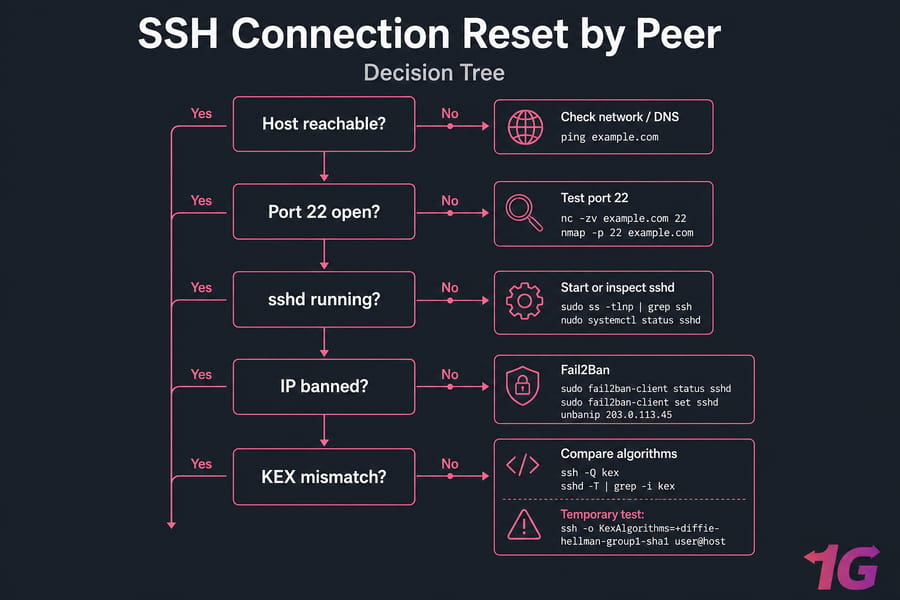
Run these in order. Stop when something looks wrong.
ping example.com                 # may be blocked by ICMP rules — not decisive
nc -zv example.com 22            # is port 22 actually open?
nmap -p 22 example.com           # alternative port check
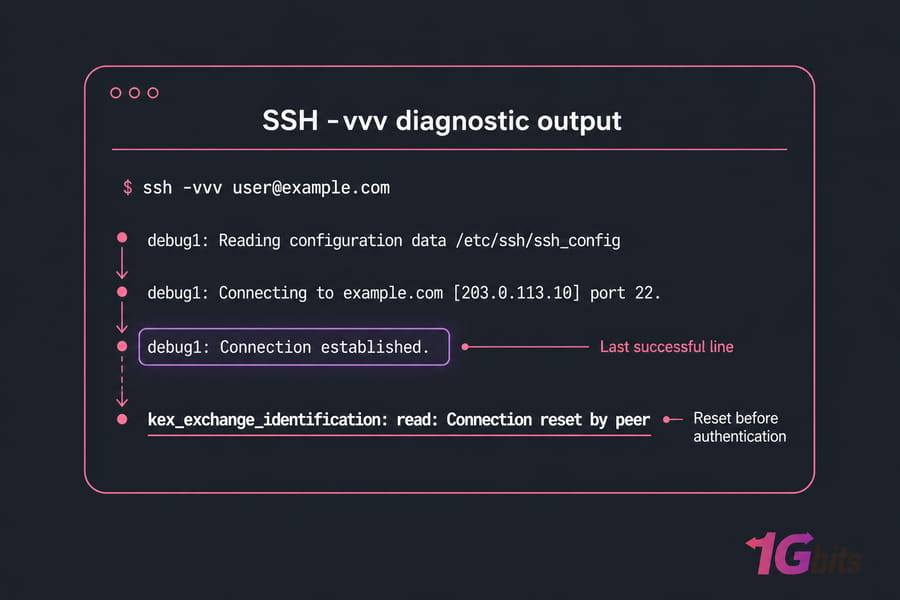
ssh -vvv user@example.com        # where does it die?
sudo systemctl status sshd       # from console/KVM if you can't SSH in
The ssh -vvv output is the single most useful thing here. Look for the last successful line. If it dies right after Connecting to..., it's network. If it dies at expecting SSH2_MSG_KEX_ECDH_REPLY, it's crypto. If it dies after Authenticating to..., it's auth or PAM.
🛠 How to Fix "Connection reset by peer" SSH Error: Step-by-Step
Before you touch anything server-side: keep one working SSH session open in another terminal. Always run
sudo sshd -tbefore restarting the daemon. Skip this and you will lock yourself out of a remote box eventually — ask me how I know.
1. Check if SSH Port 22 is Open and Listening
Run this on the server:
sudo netstat -tuln | grep :22Or:
sudo ss -tuln | grep :22You should see SSH listening on 0.0.0.0:22 or 127.0.0.1:22. If not, the SSH service might not be running. You can check for any active processes using the linux ps command.
2. Restart the SSH Service
Ensure sshd is active. Use:
sudo systemctl restart sshdThen test your connection again. If SSH isn't installed properly, reinstall:
sudo apt install openssh-server3. Check Firewall and Security Groups
UFW (Uncomplicated Firewall):
sudo ufw allow ssh
sudo ufw reload
iptables:
sudo iptables -A INPUT -p tcp --dport 22 -j ACCEPTfirewalld:
sudo firewall-cmd --permanent --add-service=ssh
sudo firewall-cmd --reload
Then check your provider's cloud firewall separately. The host firewall being open means nothing if the security group isn't. Still stuck? Follow our detailed guide on How to solve the SSH connection refused error for in-depth troubleshooting.
4. Read the Right Log File
Logs often reveal the exact reason for the disconnect. Check Linux logs by running:
| Distribution | Log path | journald command |
| Ubuntu / Debian | /var/log/auth.log |
journalctl -u ssh -xe |
| CentOS / RHEL / AlmaLinux | /var/log/secure |
journalctl -u sshd -xe |
| macOS (client) | log show --predicate 'process == "ssh"' |
— |
| Windows OpenSSH | Event Viewer → Applications and Services → OpenSSH | — |
Look for clues like IP ban notices, protocol mismatch, missing host keys, or permissions errors.
5. Unban Your IP in Fail2Ban
sudo fail2ban-client status sshd
sudo fail2ban-client set sshd unbanip 203.0.113.45
sudo lastb | head        # failed login attempts
If your IP shows in the banned list, that's your answer. Whitelist your office range in jail.local with ignoreip so it doesn't happen again.
6. Verify SSH Configuration (sshd_config)
Open the config file:
sudo nano /etc/ssh/sshd_configCheck for AllowUsers directive, MaxSessions, MaxStartups, and ensure Port 22 is not commented out. Restart SSH after editing:
sudo systemctl restart sshd7. Confirm File Permissions
On the client-side, make sure .ssh and its contents have the correct permissions:
chmod 700 ~/.ssh
chmod 600 ~/.ssh/authorized_keys ~/.ssh/id_ed25519
chmod 644 ~/.ssh/id_ed25519.pub
8. Resolve KEX or Cipher Mismatch
Check what each side supports with ssh -Q kex on the client and sshd -T | grep -i kex on the server. As a temporary test only:
ssh -o KexAlgorithms=+diffie-hellman-group1-sha1 user@hostSecurity warning: diffie-hellman-group1-sha1 is deprecated and weak. Use it to confirm the diagnosis, then upgrade OpenSSH on whichever side is stuck in 2012. Don't leave it in ~/.ssh/config permanently. See sshd_config(5) and ssh(1) for the current algorithm lists.
9. Try SSH with Verbose Output
Run:
ssh -vvv user@hostThis gives a step-by-step debug trace and helps identify exactly where the error happens.
10. Test with Different Clients or Systems
Sometimes the issue is local. Try switching networks, connecting from another device, or using a different client (e.g., PuTTY on Windows). Refer to our guide on How to SSH for client configuration help. Tether to your phone and retry — works on the hotspot but not office Wi-Fi? Your problem is corporate filtering or an IP-level ban, not the server.
🔍 Special Cases of SSH "Connection Reset by Peer" Errors
Now that we've covered the general meaning and causes of the error, let's look at some platform-specific scenarios where this error tends to appear frequently.
Error Example: SSH connection reset by port 22 Windows
Windows machines, especially home editions or systems not configured for development or server access, can sometimes block SSH traffic by default.
Possible Causes and Fixes:
- Windows Defender Firewall: Create an inbound firewall rule to allow TCP traffic on port 22.
- Lack of OpenSSH Client: Go to Settings > Apps > Optional Features and install OpenSSH Client.
- Use WSL: Use Windows Subsystem for Linux for a more reliable environment.
If you're interested in learning the correct way to initiate SSH connections from Windows or any system, check out our full guide: How to SSH.
Error Example: kex_exchange_identification: read: Connection reset by peer macOS
On macOS systems, the problem may stem from outdated SSH clients or strict security settings. Solutions include updating OpenSSH via Homebrew or adjusting your application firewall.
If your server is older, you may need to specify legacy algorithms manually:
ssh -oKexAlgorithms=+diffie-hellman-group1-sha1 user@host💡 Bonus: Fixing SFTP and SSHFS Connection Reset Errors
SFTP and SSHFS errors often follow the same troubleshooting logic as standard SSH. Ensure the server supports sftp-server and check your fuse/sshfs versions for compatibility. All three ride on SSH transport, so they fail for the same reasons — plus a few of their own. If plain SSH works but SFTP resets, check that Subsystem sftp /usr/lib/openssh/sftp-server exists in sshd_config. For SCP on OpenSSH 9.x, the default switched to the SFTP protocol; try scp -O against older servers. SSHFS resets usually trace back to FUSE version mismatch or a restricted login shell on the remote account.
| Issue Category | Common Troubleshooting Check |
| Network | Firewall rules, port forwarding, and IP blocking |
| Security | Fail2Ban status, SSH key file permissions |
| Configuration | sshd_config parameters, SSH version compatibility |
📋 Related Errors People Confuse With This One
| Error | What it means | Usual cause | First check |
| Connection reset by peer | Remote sent TCP RST mid-handshake | Fail2Ban, MaxStartups, KEX mismatch | ssh -vvv + auth logs |
| Connection refused | Nothing listening on that port | sshd down or wrong port |
ss -tlnp |
| Connection timed out | Packets silently dropped | Firewall DROP rule, security group | Cloud inbound rules |
| Connection closed by remote host | SSH closed cleanly after banner | DenyUsers, hosts.deny, PAM | /var/log/secure |
| Permission denied (publickey) | Handshake fine, auth failed | Wrong key or bad permissions | authorized_keys mode 600 |
🛡️ How to Stop It Happening Again
- Back up
sshd_configbefore every edit:sudo cp /etc/ssh/sshd_config{,.bak} - Validate with
sudo sshd -t, then restart — never the other way around - Add your static IP to Fail2Ban's
ignoreipand your cloud security group - Keep OpenSSH patched on both ends so algorithm negotiation never breaks
- Raise
MaxStartupson high-traffic servers, and document any non-standard port
🚀 Try a Stable Server: 1Gbits VPS Hosting
Still facing unpredictable SSH errors? It might be time to switch to a reliable host. Buy VPS for fast, stable, and secure VPS servers with full SSH access and 24/7 support. Whether you need a Ubuntu VPS server or a specialized Kali Linux VPS, our infrastructure ensures you spend less time fixing connection issues and more time building your projects.
📝 Final Thoughts
Work the stages in order — network, daemon, bans, permissions, crypto — and this error stops being mysterious. The ssh -vvv output plus the right log file will name the culprit almost every time. Whether the problem lies in server configuration, firewalls, permissions, or the SSH handshake process, the steps above will help you diagnose and learn how to fix "Connection reset by peer" SSH Error effectively. Remember that maintaining a secure environment, as outlined in our guide on how to secure your VPS, is key to avoiding these issues in the long run.
If you're looking for a smooth SSH experience, consider migrating your infrastructure to a stable platform like 1Gbits VPS Hosting where connection issues are minimal and technical support is always within reach. Get a VPS with full root SSH access and predictable resources.

Leave A Comment