


Choosing a hosting environment is fairly straightforward when a website or application is small. Shared hosting can handle basic websites at a low cost, while VPS hosting gives growing projects more resources and control. The decision becomes more important when an application starts consuming substantial CPU, RAM, storage, or bandwidth and infrastructure performance begins to affect users or business operations.
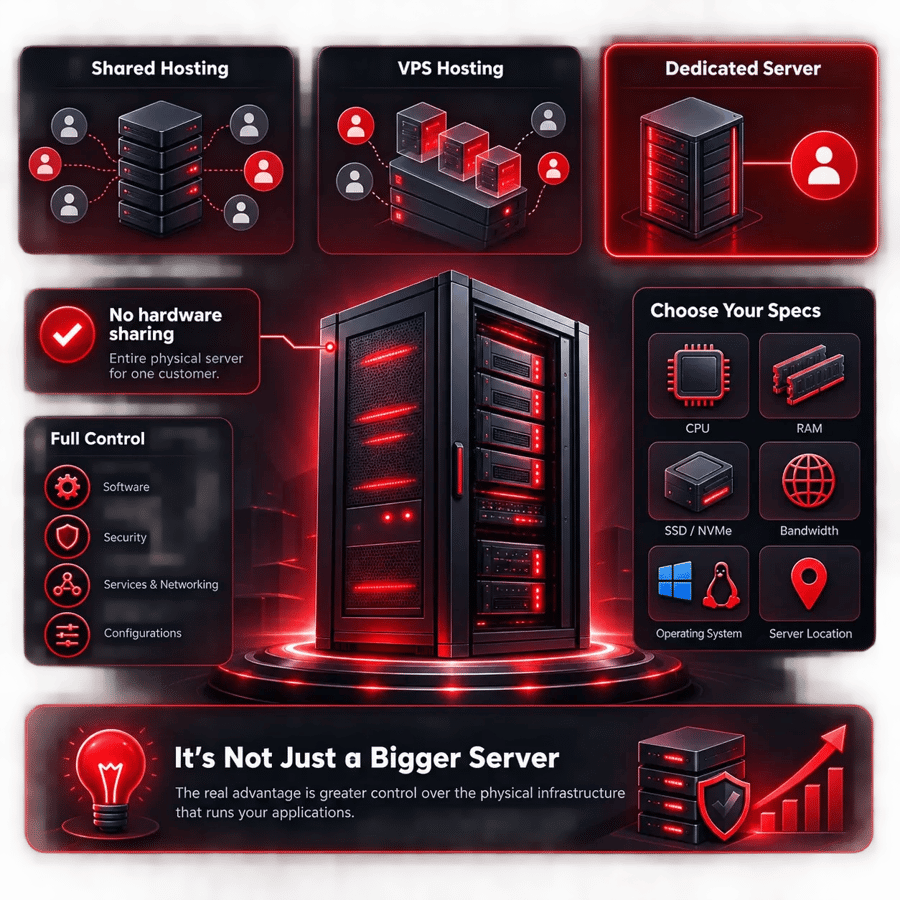
This is where dedicated server hosting becomes relevant. Instead of sharing the underlying physical machine with unrelated customers, a dedicated server allocates the physical server to a single customer. This gives businesses and technical teams much greater control over hardware resources, operating systems, storage, security policies, and application configurations.
Demand for server infrastructure remains strong in 2026. IDC reports that worldwide server spending increased 30.7% year over year in Q1 2026, while server unit growth was only 3.3%. IDC attributes much of this spending growth to continued investment in GPU servers and high-performance infrastructure. The dedicated server hosting market itself is estimated at $23.94 billion in 2026, according to The Business Research Company.
These numbers do not mean every company needs dedicated infrastructure. A small business website may see little benefit from paying for an entire physical server. A busy ecommerce platform, SaaS application, large database, game server, or high-bandwidth service may have very different requirements.
The main benefits of dedicated server hosting include dedicated hardware resources, predictable performance, physical workload isolation, greater configuration control, flexible hardware choices, and the ability to support demanding workloads. Understanding where these advantages actually matter can help you decide whether dedicated hosting is right for your business.
What Is Dedicated Server Hosting?
Dedicated server hosting is a hosting model where an entire physical server is allocated to one customer. In shared hosting, many customers use the same server environment. With a VPS, one physical machine is divided into multiple virtual server environments. A dedicated server removes that physical hardware sharing with unrelated customers. For a deeper explanation, see what is a dedicated server.
Depending on the hosting provider and server plan, customers can choose specifications such as CPU, RAM, SSD or NVMe storage, bandwidth, operating system, and server location. Root or administrator access can also provide greater control over software installation, security settings, services, networking, and application configurations.
The distinction becomes important when an application has substantial or specialized infrastructure requirements. Dedicated hosting is therefore not simply about buying a "bigger server." Its real advantage is gaining greater control over the physical infrastructure supporting your workload.
What Are the Main Benefits of Dedicated Server Hosting?
The value of dedicated hosting depends on how you intend to use it. For smaller projects, a VPS may provide everything required at a lower cost. Once resource usage becomes substantial or predictable, however, dedicated infrastructure can offer several important advantages.
1. Dedicated Hardware Resources
One of the biggest benefits of a dedicated server is access to physical server resources without unrelated customers running workloads on the same machine. CPU, RAM, and storage can therefore be planned around your applications rather than a multi-tenant hosting environment.
This becomes particularly valuable for resource-intensive workloads. A large ecommerce store may need substantial processing capacity during sales campaigns, while a database-heavy application might depend more on RAM and storage I/O. Dedicated infrastructure allows technical teams to choose hardware based on these workload characteristics.
It also makes capacity planning more practical. Administrators can monitor CPU utilization, memory consumption, disk performance, and network usage and determine whether the current configuration is sufficient. If RAM is consistently close to capacity, for example, the team has a measurable reason to consider an upgrade instead of guessing which hosting plan might solve the problem.
2. More Consistent and Predictable Performance
Performance is one of the most commonly discussed dedicated server benefits, but it is important to understand what this actually means. A dedicated server is not automatically faster than every VPS or cloud instance. A modern VPS running on powerful hardware can outperform an older or poorly configured dedicated server. For Linux-based workloads, see the Linux dedicated server performance and reliability benefits.
The main advantage is predictable access to physical resources. Because unrelated tenants are not using the same physical machine, your application's performance can be evaluated against known hardware. This can be valuable for databases, ecommerce platforms, SaaS applications, APIs, game servers, and other workloads where resource demand is substantial.
Real-world performance still depends on CPU architecture, clock speed, available cores, RAM, storage technology, networking, operating system configuration, caching, database design, and application code. Dedicated hosting gives administrators greater control over these variables, but good server specifications cannot compensate for an application that is poorly optimized.
3. Greater Control Over the Server Environment
Shared hosting is intentionally restrictive because the hosting provider needs to maintain a stable environment for many customers. Dedicated hosting gives experienced administrators considerably more freedom to configure the server around their own applications.
With appropriate root or administrator access, technical teams can install required software, manage users, configure services, change firewall rules, customize operating system settings, deploy monitoring tools, and build application stacks according to their requirements.
This level of control can be particularly valuable for developers, SaaS companies, hosting businesses, system administrators, and organizations running specialized software. Rather than modifying an application to fit the restrictions of a standard hosting package, teams can configure the infrastructure around the application.
Greater control also means greater responsibility. Incorrect server configurations, outdated packages, weak credentials, or poorly configured network services can create performance and security problems. Businesses choosing unmanaged dedicated servers should therefore have the technical expertise required to maintain them — see our comparison of managed vs unmanaged dedicated servers.
4. Stronger Workload Isolation and Security Control
A dedicated server provides physical workload isolation from unrelated hosting customers. Your applications are not sharing the same physical server with unknown websites or services, removing one layer of multi-tenant exposure found in other hosting models. For Windows-specific hardening, check these security tips for your dedicated Windows server.
Administrators also gain greater freedom to implement security controls according to their own requirements. These may include firewall policies, SSH or RDP restrictions, IP allowlists, user permissions, intrusion detection, security monitoring, patch management, backup policies, and rules controlling which services are publicly accessible.
However, dedicated hosting should never be described as automatically secure. Physical isolation is only one part of server security. An unpatched operating system, exposed administrative port, compromised password, vulnerable application, or incorrectly configured firewall can still create serious security risks.
The practical benefit is therefore security control, not guaranteed security. Businesses can implement a security posture appropriate to their applications instead of relying entirely on the restrictions and policies of a shared environment.
5. Greater Control for Compliance and Data Privacy Requirements
Organizations handling financial records, customer information, healthcare data, or other sensitive information may have specific requirements around access controls, data location, logging, encryption, retention, and infrastructure management. Dedicated hosting gives technical teams greater control over many of these areas because they can configure the operating system, network policies, storage, permissions, and security controls around their own requirements.
However, using a dedicated server does not automatically make an organization compliant with GDPR, PCI DSS, HIPAA, or another regulatory framework. Compliance depends on the complete technical and organizational environment, including how data is collected, stored, encrypted, accessed, backed up, and monitored. Businesses with regulatory requirements should therefore evaluate both the server infrastructure and the hosting provider's available certifications, data-center locations, policies, and contractual commitments.
6. Better Support for High-Traffic Websites
High traffic does not automatically mean a website requires a dedicated server. The amount of work generated by that traffic matters just as much as the number of visitors.
For example, a heavily cached content website can sometimes serve a large audience with relatively modest resources. An ecommerce platform receiving similar traffic might need to process account sessions, inventory checks, personalized recommendations, searches, payments, database queries, and API requests for every user.
Dedicated hosting allows infrastructure to be sized around these demands. Businesses can allocate CPU, RAM, storage, and bandwidth according to the application rather than relying on a generic hosting environment.
This can be useful for ecommerce stores, SaaS platforms, large publishers, customer portals, marketplaces, and other websites where performance directly affects the user experience. Administrators can also monitor actual server utilization and identify whether CPU, memory, database activity, storage, or networking is becoming the bottleneck.
7. Flexible Hardware Configuration
Different workloads require different hardware, which is why configuration flexibility is one of the most practical advantages of dedicated server hosting. Buying the largest server available is rarely the best approach. The goal should be to match hardware to the workload.
Database-intensive applications, for example, may benefit from additional RAM and fast NVMe storage. Compute-heavy workloads may need more CPU cores or stronger per-core performance. Storage-focused applications might prioritize capacity and RAID configuration, while streaming services may care more about network bandwidth and port speed.
NVMe storage is a good example of why workload analysis matters. Moving from an HDD or SATA SSD to NVMe can improve storage-intensive workloads, but it will not necessarily fix an application limited by CPU performance or inefficient database queries. Server upgrades should address an identified bottleneck rather than simply increasing every specification.
The same principle applies to CPU, RAM, RAID, and networking. A well-selected server is one where the configuration reflects what the application actually needs today while providing reasonable room for expected growth.
8. Greater Scalability for Growing Workloads
As a website, application, or online business grows, its infrastructure requirements usually grow with it. Higher traffic, larger databases, more simultaneous users, and additional services can increase CPU, RAM, storage, and bandwidth requirements. A dedicated server gives businesses more flexibility to plan for this growth because the physical resources are allocated to their workloads.
If the existing configuration is no longer enough, options may include upgrading supported components, migrating to a more powerful server, or adding additional dedicated servers to distribute workloads. A growing application might initially run its web application and database on one server, then move the database to separate infrastructure once database activity begins consuming a significant percentage of the available resources.
Dedicated servers are particularly useful when demand is substantial and relatively predictable. However, they are not always the most flexible choice for workloads that change dramatically from hour to hour. Cloud infrastructure may be more suitable when resources need to scale up and down automatically. Scalability should therefore be evaluated according to the application's traffic patterns, architecture, budget, and expected growth.
9. More Predictable Infrastructure Costs for Stable Workloads
For applications with relatively stable resource requirements, dedicated hosting can make infrastructure spending easier to forecast. Many dedicated server plans use a fixed monthly price for a defined hardware configuration and include a specified amount of bandwidth or data transfer, although pricing structures vary between providers.
This can be useful for businesses running continuously high workloads because CPU and RAM requirements do not generate separate usage charges every time utilization increases. However, dedicated hosting is not automatically cheaper than cloud or VPS hosting. A lightly utilized physical server can actually be less cost-effective because the business continues paying for capacity it does not use.
The financial advantage is strongest when resource demand is high, predictable, and sustained. Businesses should therefore compare total cost based on hardware utilization, bandwidth, management, backups, additional IPs, software licensing, support, and expected growth rather than monthly server price alone.
10. Better Visibility for Business-Critical Applications
When a website is a small side project, occasional infrastructure problems may be inconvenient. When an ecommerce platform, SaaS product, API, or internal business application supports revenue or daily operations, infrastructure performance becomes much more important.
Dedicated hosting provides administrators with clearer visibility into the relationship between their applications and the underlying server resources. If CPU utilization suddenly reaches 90%, technical teams can investigate their own processes and applications rather than accounting for unrelated customer workloads on the physical machine.
This visibility makes capacity planning and troubleshooting more straightforward. CPU, memory, disk I/O, network traffic, database load, and application performance can be monitored together to identify where bottlenecks are developing.
It is still important to distinguish dedicated resources from guaranteed availability. A dedicated server can experience hardware, network, software, configuration, or data-center problems just like other infrastructure. Backups, monitoring, redundancy, recovery planning, and good system administration remain essential for business-critical applications.
11. Dedicated IP and Greater Network Control
Dedicated server environments commonly support dedicated IP addresses, depending on the provider and configuration. A consistent IP can be useful for remote administration, application communication, DNS configurations, firewall allowlists, and services that need to connect to a known server address. For a comparison, see dedicated IP vs shared IP.
The broader advantage is network control. Administrators can determine which services need to be publicly accessible, restrict administrative access to trusted IP addresses, close unnecessary ports, and create firewall policies around the application's actual requirements.
This becomes increasingly important as infrastructure becomes more complex. A database, for example, may need to communicate with an application server but not be publicly accessible from the internet. Proper network rules can restrict access accordingly.
Dedicated networking options vary between hosting providers, so businesses should evaluate IP allocation, bandwidth, port speed, traffic allowances, DDoS protection, and network architecture rather than assuming every dedicated server includes the same capabilities.
12. Better Support for Large Databases and Data-Intensive Applications
Databases are often one of the first infrastructure bottlenecks encountered by growing applications. As the number of users, records, and queries increases, database operations can consume substantial CPU, RAM, and storage I/O.
Dedicated servers allow technical teams to choose hardware around these requirements. Additional RAM can be valuable for caching frequently accessed data, while NVMe storage can improve performance for workloads performing intensive disk operations. CPU requirements can also increase when databases need to process large numbers of simultaneous or computationally expensive queries.
The ability to control the server environment also means database software can be configured according to the available hardware. Memory allocation, caching, connections, storage configuration, and other settings can be tuned based on the workload rather than being limited by a standard shared-hosting environment.
Hardware alone is not a substitute for database optimization. Poor indexing, inefficient queries, unnecessary database calls, or badly designed schemas can remain slow even on expensive infrastructure. Dedicated hosting provides more resources and control, but application-level optimization still matters.
13. Suitable for Gaming, Streaming and Other Resource-Heavy Workloads
Dedicated servers are not limited to conventional website hosting. They can support game servers, streaming services, virtualization, development environments, databases, SaaS platforms, private business applications, APIs, and other workloads requiring substantial computing or networking resources.
The requirements differ considerably between these use cases. Multiplayer game servers may prioritize strong CPU performance and low network latency, while streaming infrastructure can place greater emphasis on bandwidth and port capacity. Virtualization environments may need large amounts of CPU, RAM, and storage because several virtual systems are running on the same physical machine.
This is also why server location matters. For latency-sensitive applications such as gaming, hosting closer to the primary user base can reduce the physical distance network traffic needs to travel. For high-bandwidth applications, network capacity and traffic allowances may be more important than geographic distance alone.
There is no universal "best dedicated server" for every workload. The advantage is having enough flexibility to select infrastructure according to what the service actually requires.
14. Long-Term Infrastructure Flexibility
Standard hosting packages work well when technical requirements are standard. As applications mature, businesses may need specific operating systems, custom software stacks, unusual storage configurations, specialized networking, larger amounts of memory, or more granular security controls.
Dedicated infrastructure gives technical teams greater freedom to build around these requirements. Services can eventually be separated across multiple servers, databases can run independently from application servers, and infrastructure can evolve as an application's architecture becomes more complex.
The broader server market demonstrates how quickly infrastructure requirements are changing. IDC reports that worldwide server spending rose 30.7% year over year in Q1 2026 even though unit shipments increased only 3.3%, reflecting significant investment in increasingly powerful server configurations.
At the same time, efficiency matters. Gartner forecasts worldwide data-center electricity consumption at 565 TWh in 2026, up 26% year over year, with AI-optimized servers expected to account for 31% of data-center electricity consumption. For businesses, the takeaway is not that every workload needs increasingly powerful hardware. It is that infrastructure should be sized carefully around actual computing requirements rather than overprovisioned without a clear reason.
Dedicated Server vs VPS vs Shared Hosting
Dedicated hosting has significant advantages, but those advantages come with higher costs and potentially greater management responsibilities. Comparing the three common hosting models makes it easier to determine which level of infrastructure is appropriate. For a direct comparison, see dedicated server vs VPS hosting.
| Feature | Shared Hosting | VPS Hosting | Dedicated Server |
| Physical hardware | Shared | Shared | Dedicated |
| Resources | Shared | Allocated virtual resources | Physical server resources for one customer |
| Server control | Limited | Moderate to high | High |
| Customization | Limited | Good | Extensive |
| Physical server isolation | No | No | Yes |
| Typical workload | Small websites | Growing websites and apps | Resource-intensive workloads |
| Technical knowledge | Low | Moderate | Moderate to high |
| Typical cost | Low | Medium | Higher |
Shared hosting generally makes sense for smaller websites that need few server resources and little administrative control. A VPS provides a useful middle ground for growing websites and applications because it offers virtualized resources and greater control without the cost of an entire physical server.
Dedicated hosting becomes more attractive when an application needs substantial resources, physical server isolation, specialized hardware, custom configurations, or greater control over the server environment. If the decision is primarily between the latter two options, comparing dedicated server and VPS hosting according to actual resource requirements is more useful than choosing based on price alone.
When Should You Choose a Dedicated Server?
There is no universal visitor count that tells you when to move to a dedicated server. Two websites receiving 100,000 monthly visitors can have completely different infrastructure requirements. A cached content site may use relatively few resources, while an ecommerce application serving the same traffic could perform thousands of database queries, searches, API requests, and dynamic transactions.
A better indicator is actual server utilization. If your existing hosting environment regularly reaches CPU or RAM limits, database and storage performance are becoming bottlenecks, or the application requires server-level configurations that your current hosting does not allow, it may be time to evaluate dedicated infrastructure.
Dedicated hosting is also worth considering when physical workload isolation, specialized software, predictable resource availability, large databases, custom networking, or specific security controls have become important requirements. The decision should be based on measurable technical needs rather than simply assuming a dedicated server is the next step after VPS hosting.
When Is a Dedicated Server Not the Best Choice?
Despite the many advantages of dedicated server hosting, an entire physical server can be unnecessary for smaller projects. A new blog, portfolio website, small company site, or lightweight application may consume only a small fraction of the server's resources, making shared hosting or VPS hosting more cost-effective.
A VPS can also be a better option when you need root access and greater control but your resource requirements remain moderate. Cloud infrastructure may be preferable when demand changes rapidly and applications need resources that can scale dynamically.
Management requirements should also be considered. An unmanaged dedicated server can require experience with operating systems, security updates, networking, firewall configuration, monitoring, backups, user permissions, and troubleshooting. If those capabilities are not available internally, businesses should consider managed options or another hosting model that reduces administrative responsibility.
How to Choose the Right Dedicated Server
Choosing a dedicated server should begin with your workload rather than the price or the largest specifications available. Review current CPU usage, RAM consumption, disk performance, storage capacity, bandwidth, and traffic patterns. These measurements provide a much stronger basis for choosing hardware than estimating requirements from website traffic alone. For a full walkthrough, see our guide on how to choose a dedicated server.
For CPU selection, consider whether your applications benefit from additional cores or stronger per-core performance. RAM requirements should account for the operating system, application, database, caching, and expected growth. Storage should be selected according to both capacity and I/O requirements, while RAID configuration should be evaluated separately from backups because RAID is not a replacement for a proper backup strategy.
Network requirements also deserve attention. Review bandwidth allowances, port speed, expected data transfer, latency requirements, server location, DDoS protection options, and the geographic distribution of your users. A gaming service and a database server may require completely different network characteristics even if their CPU and RAM specifications are similar.
Finally, consider operating system support, management level, monitoring, backups, security options, and technical support. The OS decision matters too — compare Linux vs Windows dedicated server and see how to choose the best OS for dedicated servers. Businesses and developers that have outgrown shared or virtual infrastructure can compare 1Gbits Dedicated Server Hosting options based on their actual workload requirements rather than simply selecting the highest available specifications.
Are Dedicated Servers Worth It?
Dedicated servers can be worth the additional cost when a workload genuinely benefits from dedicated physical resources, greater control, workload isolation, and flexible configurations. High-traffic ecommerce platforms, SaaS applications, large databases, game servers, streaming services, and other demanding workloads are examples where these advantages may provide meaningful value.
For smaller projects, the economics are different. If an application uses only a small percentage of the available CPU and RAM, paying for an entire physical server may provide little practical benefit. A properly configured VPS may deliver everything the application needs at a lower cost and with easier scaling.
The better question is therefore not whether dedicated hosting is "better" than VPS or cloud hosting. The question is whether your workload benefits enough from dedicated infrastructure to justify its cost and management requirements. When those requirements are clear and measurable, dedicated hosting can provide a strong foundation for long-term infrastructure.
Final Thoughts
The main benefits of dedicated server hosting come from control and predictability. Having a physical server allocated to your workloads gives you greater freedom to select hardware, configure software, implement security policies, manage networking, and optimize infrastructure around the way your applications actually operate.
Dedicated servers can be particularly useful for high-traffic websites, large databases, ecommerce platforms, SaaS applications, gaming, streaming, and other resource-intensive workloads. They are not, however, an automatic upgrade for every growing website. VPS or cloud infrastructure may offer better value when workloads are smaller, unpredictable, or need highly elastic scaling. Compare providers in our best dedicated server providers roundup before deciding.
Before making a decision, evaluate CPU, RAM, storage, bandwidth, application architecture, security requirements, technical expertise, expected growth, and budget. If those requirements point toward dedicated infrastructure, 1Gbits Dedicated Servers can be compared according to the hardware and infrastructure requirements of your workload.

Leave A Comment