
![How to Choose a Dedicated Server? 🚀 [5 Pro Tips]](https://1gbits.com/cdn-cgi/image/width=1200,quality=80,format=auto/https://s3.1gbits.com/blog/2023/12/How-to-Choose-a-Dedicated-Server377-847xAuto.jpg "How to Choose a Dedicated Server? 🚀 [5 Pro Tips]")
Let's skip the introductions and definitions. You're here because you want to know how to choose the right dedicated server for your specific goals and use cases. So, stay with us at 1Gbits as we guide you through 7 key steps to help you make the smartest investment for your digital future. If you're new to the concept entirely, start with what is a dedicated server before diving into specs and comparisons.
Executive Summary (TL;DR)
If you don't have enough time to go through the technical details, this quick checklist can point you in the right direction. The final decision always depends on balancing your processing needs with your available budget.
| Primary Business Priority | Recommended Choice | Key Feature |
| Maximum virtualization and VM density | AMD EPYC 9005 (Turin) | 192 physical cores and massive memory bandwidth |
| Relational databases and low latency | Intel Xeon 6 (Granite Rapids) | Superior single-thread (ST) performance and AMX acceleration |
| Lowest cost for web services | Intel Xeon 6 (Sierra Forest) | Efficient cores (E-Cores) with very low power consumption |
| Gaming and streaming platforms | High-clock CPUs (3.5GHz+) | Reduced ping and higher tick rate |
| Mass storage and archiving | Servers with SATA HDD drives | High capacity up to 80TB with lower cost per GB |
In addition to choosing the processor, make sure the selected data center has at least a Tier III certification to ensure 99.982% uptime. Also, if you do not have a specialized technical team, managed servers, despite their higher cost, can provide better security and peace of mind. For a deeper comparison of management levels, read managed vs unmanaged dedicated servers.
Who really needs a dedicated server?
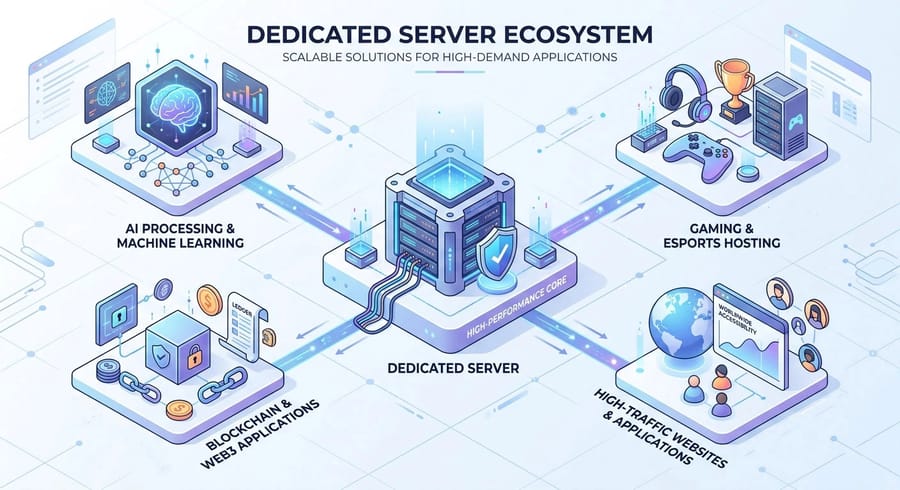
A dedicated server is not the best choice for every scenario, but it is unmatched for workloads that require full resource isolation. In dedicated servers, unlike virtual servers, there is no such thing as a "noisy neighbor." All CPU cycles, memory bandwidth, and disk I/O operations are exclusively allocated to a single entity. In general, key use cases in 2026 include:
- High-traffic web hosting: News platforms or large e-commerce stores that require dedicated and stable bandwidth.
- Artificial Intelligence and Machine Learning (AI/ML) training: Workloads that need powerful GPUs and direct access to the PCIe bus. For these workloads, a GPU dedicated server provides the hardware-level control needed to optimize CUDA libraries and driver stacks.
- Gaming servers: Where latency below 50 milliseconds is critical and high-clock CPUs (above 3.5 GHz) are essential. Our game dedicated server plans are purpose-built for low-latency multiplayer environments.
- Blockchain infrastructure and validator nodes: Systems that require uninterrupted 24/7 operation to avoid network penalties.
In short, any application involving heavy processing, continuous 24/7 usage, strict security requirements, or compliance standards such as PCI, HIPAA, or GDPR will typically require a dedicated server. If your workload involves handling sensitive user data, having a dedicated IP also strengthens access control and audit trails.
Fundamental difference: Dedicated server vs VPS and cloud
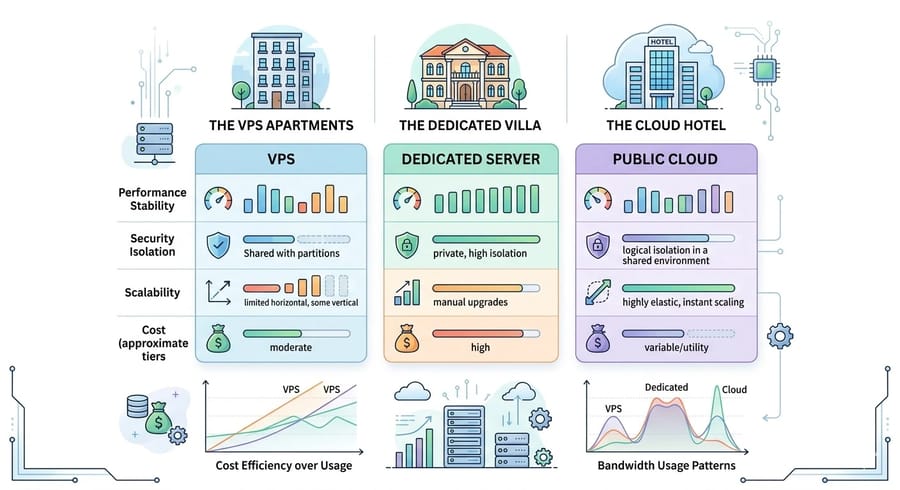
Understanding the structural differences between these models is essential for optimizing your budget. A Virtual Private Server (VPS) is like living in an apartment. You have your own space, but the infrastructure such as plumbing and electricity is shared. The cloud is like staying in a hotel. It is flexible and ready to use, but expensive in the long run. A dedicated server, however, is like owning a private villa. All resources are entirely yours. For a deeper breakdown of the architectural and cost differences, read our comparison of dedicated server vs VPS hosting. Take a look at the table below:
| Feature | Virtual Server (VPS) | Dedicated Server | Public Cloud |
| Processing performance | Variable due to shared resources | Stable and maximum (bare metal) | Variable and dependent on neighbors |
| Physical security | Shared at the hardware layer | Fully isolated and dedicated | Shared and software-based |
| Scalability | Fast and software-driven | Physical and time-consuming (hardware upgrades) | Instant and automatic (auto-scaling) |
| Cost model | Monthly and predictable | Fixed and cost-efficient for heavy workloads | Variable and often unpredictable |
Research shows that for workloads with consistent resource usage; dedicated servers can be about 30 to 40 percent cheaper than public cloud solutions. In public cloud environments, outbound bandwidth costs, known as egress fees, can account for up to 15 percent of the total bill. In dedicated servers, these costs are typically minimal or even zero. If you want to avoid overage charges entirely, an unmetered dedicated server gives you predictable monthly costs regardless of traffic volume.
Step 1: Precisely define your requirements (traffic, CPU, RAM, and network)
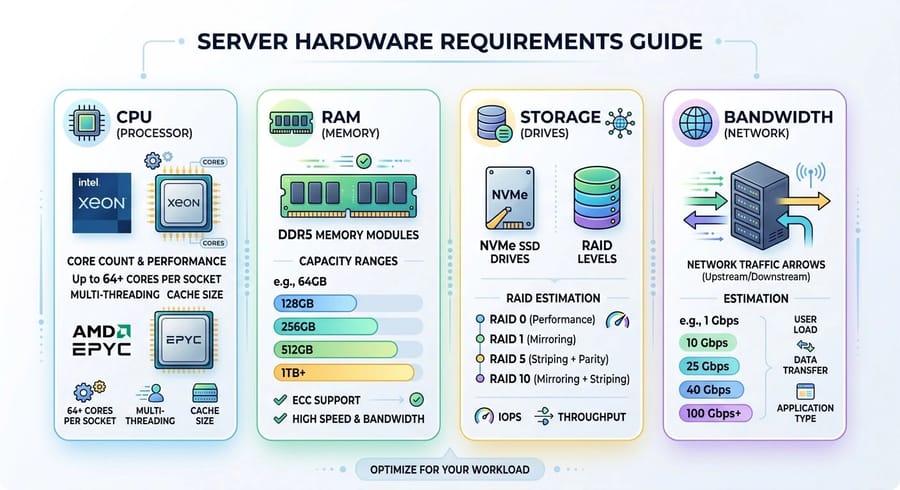
The starting point for success is a clear understanding of your workload. Choosing overly powerful hardware leads to wasted budget, while underpowered hardware can cause project failure.
1.1. Processor (CPU)
Today, the two main contenders, Intel Xeon and AMD EPYC, each excel in specific areas:
- AMD EPYC 9005 (Turin): Based on the Zen 5 architecture, these processors offer up to 192 cores in a single socket. They are an excellent choice for heavy virtualization nodes or parallel processing due to high core density and greater memory bandwidth, around 540 GB/s.
- Intel Xeon 6: Includes Performance Cores (P-Cores) for latency-sensitive workloads and Efficient Cores (E-Cores) for higher density. With AMX technology, it can perform up to 70 percent faster than competitors in AI workloads and certain databases.
For heavy workloads with many users, at least 4 to 8 fast cores are required, with emphasis on single-core frequency. In gaming servers and scientific computing, single-core performance is more important. For virtualization or databases, more cores (8 or more) and higher RAM (32 to 64 GB) are recommended. A common rule of thumb is about 2 GB of RAM per CPU core. If raw processing power is your top priority, a high-end dedicated server with the latest EPYC or Xeon chips ensures zero resource contention.
1.2. Memory (RAM) and modern standards
By 2026, DDR5 with speeds around 5600 MT/s is the standard. Estimate your RAM needs based on your application type:
- Simple websites: 8 to 16 GB
- E-commerce platforms: 32 to 64 GB
- Database and virtualization servers: 128 to 512 GB
Keep in mind that more RAM allows better data caching and improved stability under peak load.
1.3. Storage: from SATA to NVMe Gen5
Storage speed has a direct impact on response time (TTFB). For high-performance workloads such as databases or gaming, SSDs are several times faster than HDDs. NVMe drives go even further, offering lower latency and higher IOPS compared to SATA SSDs, making them ideal for IO-intensive workloads.
RAID configuration depends on your needs:
- RAID 0 or RAID 10 for higher read and write speed
- RAID 1 or RAID 10 for better redundancy
RAID provides a layer of fault tolerance and can typically handle the failure of at least one drive. RAID 10 often offers a good balance between performance and redundancy. Also consider the number of drives, RAID controller type, and availability of separate backups.
1.4. Traffic and bandwidth estimation
A simple rule of thumb: if each visit averages 2 MB, then 1,000 daily visits require about 2 GB per day, or 60 GB per month in traffic.
For online gaming, the limitation is usually the port capacity. For example, a 1 Gbps port can theoretically transfer up to about 10.8 TB per day, which is sufficient for hundreds of concurrent players.
If your usage exceeds the plan limit, overage charges will apply. Providers typically offer either unmetered bandwidth with capped speeds or monthly traffic packages with additional fees. Carefully reviewing these limits and overage costs is essential.
Step 2: Managed vs Unmanaged. What level of support do you need?
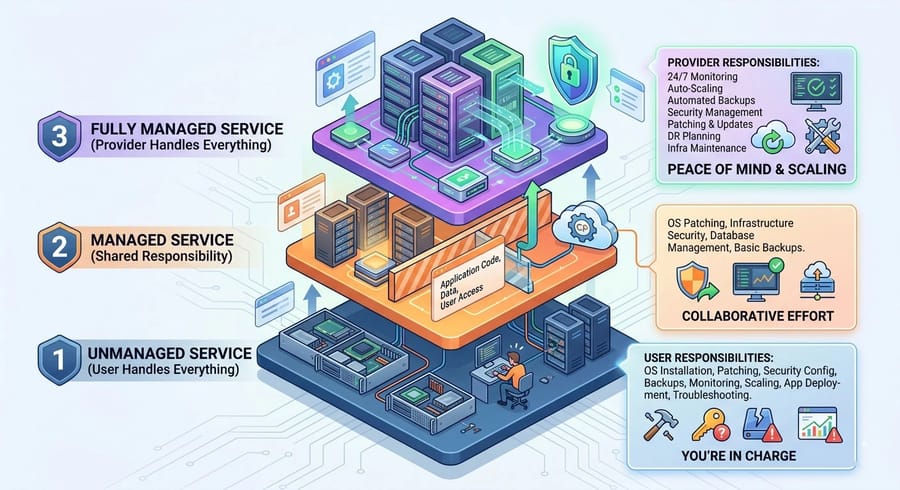
In dedicated servers, there are generally three models: unmanaged, managed, and fully managed. The key difference lies in who is responsible for maintenance, updates, security, and monitoring.
| Feature | Unmanaged | Managed | Fully Managed |
| OS installation and configuration | By you | By provider | By provider |
| Security updates and patching | You | Provider (limited) | Provider (full) |
| Monitoring and reporting | Minimal | Basic (infrastructure) | Comprehensive (software and hardware) |
| Backup | Your responsibility | May be optional | Usually included |
| Cost | Low (hardware only) | Medium | High (full service) |
In summary:
- Unmanaged: You get the hardware, network, and server port. Everything else such as OS setup, software installation, security, and backups is your responsibility. The base cost is low, but it requires solid technical expertise. For Windows-based setups, our guide on security tips for dedicated Windows servers covers essential hardening practices.
- Managed: The provider handles part of the server management. This typically includes OS installation, basic firewall setup, 24/7 support for hardware issues, and some routine administrative tasks. It is sufficient for many users and reduces operational burden, though it costs more than unmanaged.
- Fully Managed: The provider takes care of everything from initial setup to advanced monitoring and even custom software installation under a technical team's supervision. This option is ideal if you have limited technical knowledge or prefer to outsource server management entirely.
How to decide? Ask yourself a simple question: do you have the time and technical expertise to manage a server? If yes, unmanaged is the most cost-effective option. If not, choosing managed or fully managed allows you to focus on developing your application or content instead of dealing with maintenance and operational tasks. For a detailed breakdown, read managed vs unmanaged dedicated servers.
Step 3: Security, compliance, and backups. What you should demand
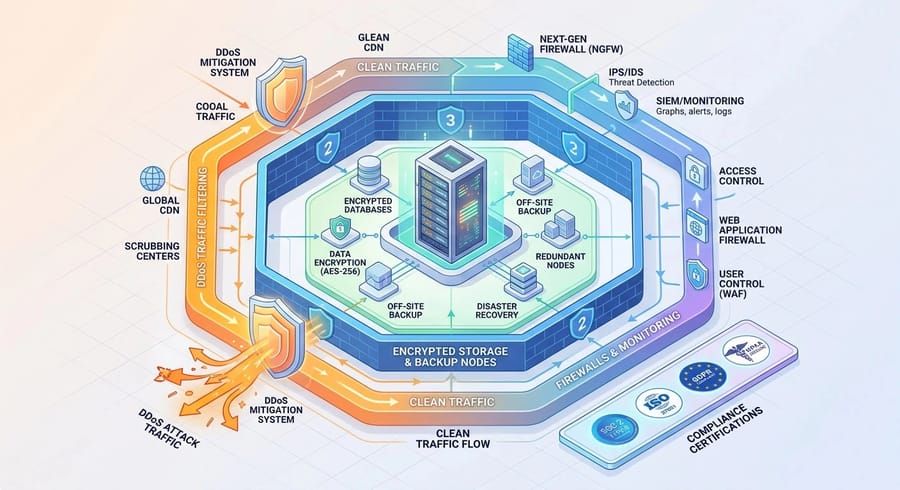
With a dedicated server, you are responsible for designing your own defense layers. However, when negotiating with a provider, there are several critical points you should always clarify:
3.1. DDoS protection
Many data centers provide basic protection against DDoS attacks by default, typically filtering traffic in the range of 10 to 20 Gbps. For sensitive websites or gaming platforms, you must verify the maximum mitigation capacity. Some providers offer protection at the terabit level, for example up to 1,800 Gbps, which is crucial for high-risk environments.
3.2 Backups
Always check whether automated backups are included in the base plan. In many cases, backup services such as cloud storage or separate backup nodes come at an additional cost. Pricing often depends on storage volume and retention duration. Setting up a regular backup schedule, especially off-site, is essential to ensure data safety.
3.3 Compliance and certifications
If you operate in a regulated industry, look for data centers with certifications such as SOC 2, SOC 3, and ISO standards. These facilities provide the infrastructure required for compliance with regulations like HIPAA in healthcare and PCI-DSS in financial services. They also offer audit-ready environments, which can significantly simplify regulatory processes.
Step 4: Network, uptime, and data center location
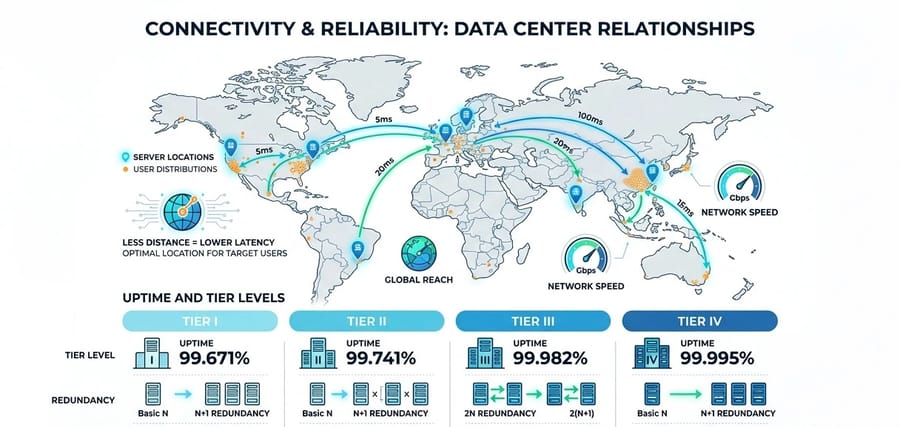
The geographic location of your server directly affects how fast data reaches end users. Latency depends on both physical distance and the quality of network routing. Explore all dedicated server locations to find a data center close to your primary audience.
4.1. Understanding data center tiers
Data centers are typically built with redundancy designs such as N+1 or 2N in critical systems to prevent downtime. This includes multiple power feeds, UPS systems, backup generators, and extra cooling capacity to handle failures or maintenance.
The Uptime Institute classification is a useful guideline for reliability:
- Tier I and II: Suitable for non-critical workloads, with uptime between 99.67 percent and 99.74 percent.
- Tier III (gold standard): Features N+1 redundancy in power and cooling systems. It supports concurrent maintainability, meaning maintenance can occur without downtime, and offers 99.982 percent uptime.
- Tier IV: The highest level of resilience with 99.995 percent uptime. It is fully fault-tolerant and can continue operating even during a complete failure of one power path.
Always review the uptime SLA, for example 99.9 percent or higher, and confirm that the provider uses multiple ISPs for network redundancy. The presence of generators and UPS systems should be clearly stated.
4.2. Port speed, peering, and latency
Most dedicated servers come with at least a 1 Gbps port, but many providers offer upgrades to 10 Gbps or higher.
Depending on your user base, factors such as peering relationships and the number of Internet Exchange Points (IXPs) play a major role in performance. Data centers at Tier III or higher typically connect to multiple major ISPs, improving routing efficiency.
For online gaming and latency-sensitive services, choosing a data center close to your users or connected through optimized routes can significantly improve performance. Also, verify whether the port speed is truly dedicated or shared, as some providers apply fair-use policies that may limit actual throughput.
Step 5: Pricing and Total Cost of Ownership (TCO)
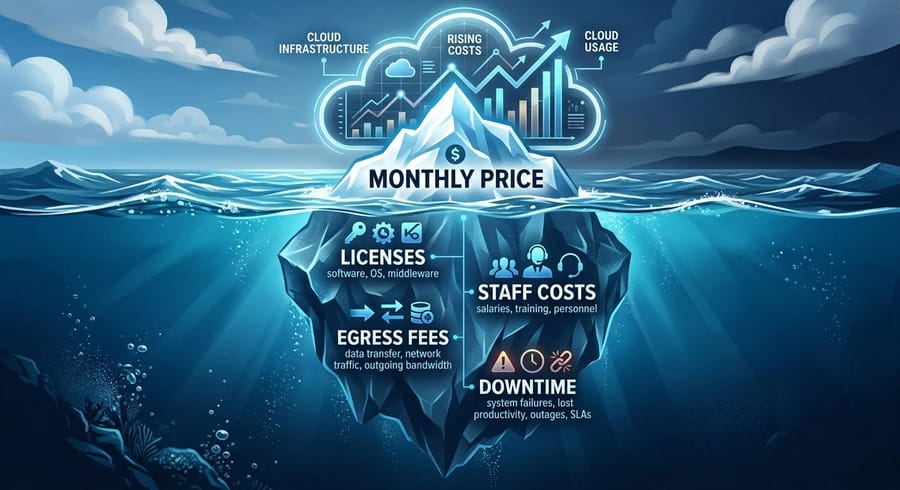
The monthly server price is only the tip of the iceberg. The real cost includes all expenses over the system's lifecycle, typically 3 to 5 years. To calculate TCO accurately, consider the following formula:
TCO=(CostHardware+CostLicense)+(CostStaff+CostEgress)+CostDowntime
Some costs that are often overlooked:
- Egress traffic costs: In public clouds, these are very high, but in dedicated servers they are usually free up to a certain limit, for example 40 TB.
- Licenses: Windows Server, SQL Server, or panels like cPanel have significant monthly costs.
- Staff costs: Time spent by the IT team on updates and troubleshooting. Every hour of a senior engineer is a hidden cost that must be included in the budget.
An analysis of 142 virtual machines showed that the annual cost in AWS was about 599,556 dollars. After migrating to a dedicated infrastructure, specifically a hosted private cloud, this cost decreased to 282,624 dollars in the first year, including migration costs. Over a 5-year period, this organization saved about 2.8 million dollars. To compare real numbers across the fleet, check dedicated server pricing or explore cheap dedicated server options if you're working with a tighter budget.
Step 6: Performance testing and benchmarks
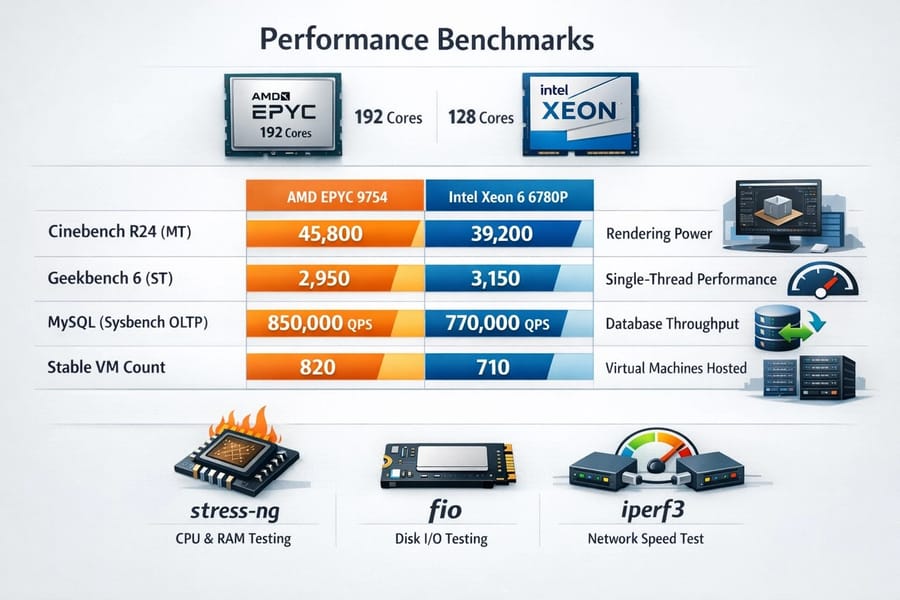
Before entrusting all your data to a new server, you must verify its real performance. Benchmarks show whether the delivered hardware matches marketing claims. The following benchmarks were run on a system with 1 TB of RAM, with only the processor differing.
| Workload Type | AMD EPYC 9754 (192c) | Intel Xeon 6 6780P (128c) | Importance for the user |
| Cinebench R24 (MT) | 45,800 | 39,200 | Rendering power and parallel computation |
| Geekbench 6 (ST) | 2,950 | 3,150 | Responsiveness in single-threaded applications |
| MySQL (sysbench OLTP) | 850,000 qps | 770,000 qps | Database processing capacity per second |
| Stable VM count | 820 | 710 | Capacity for hosting virtual servers |
In addition, it is recommended to run simple tests before purchase to ensure the hardware matches what is claimed. Useful free tools include:
- stress-ng: For testing CPU and RAM. You can utilize all cores and check whether the server experiences overheating or errors.
- fio: For disk testing. It measures IOPS and throughput using random and sequential read/write parameters. Note that fio writes test data to the disk and consumes space, so remember to delete test files afterward.
- iperf3: For measuring network speed between two servers or between a server and a client. It shows actual send and receive rates in Mbps or Gbps and helps verify whether the network port speed matches what was promised.
For example, if fio shows a very low write speed on an NVMe SSD, such as 10 MB/s, it may indicate a faulty or throttled drive. If iperf3 results are lower than expected, there is likely an issue with network connectivity or configuration.
With these three tools, you can test each critical component separately: CPU and RAM with stress-ng, disk with fio, and network with iperf3. Record the results so you have evidence when requesting support or verifying server performance.
Step 7: Migration checklist (step by step with zero downtime)
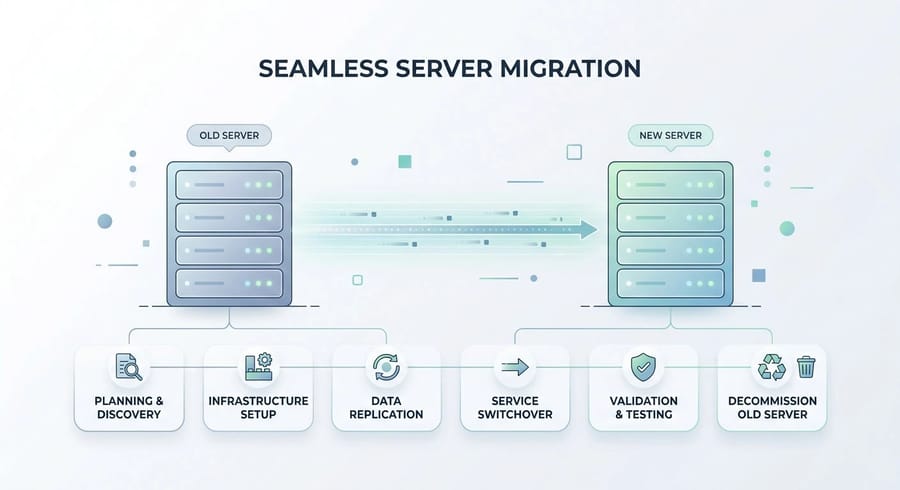
Migrating from an old environment to a new dedicated server is the most sensitive phase of the project. The goal is to achieve zero downtime. The migration process begins with the following steps:
- Preparation phase (48 hours before): Reduce the TTL value in DNS records to 300 seconds. This ensures that IP changes propagate quickly worldwide.
- Environment replication: Configure the new server with exactly the same OS versions and software packages, such as PHP 8.2 or MySQL 8.
- Initial data transfer: Use rsync to transfer website files and media. At this stage, the old site remains active and users will not notice any changes.
- Database migration (zero data loss): Use replication to keep the old and new databases synchronized, or temporarily put the site into maintenance mode for a few minutes and transfer the final database dump.
- DNS switch: Update the domain IP to the new server. Due to the low TTL, traffic will be redirected within about 5 minutes.
- Stabilization: Keep both servers running for up to 72 hours to ensure all DNS resolvers worldwide have been updated.
Now everything is ready to take full advantage of the power and exceptional benefits of a dedicated server.
Recommended specifications based on use case
Now that we have covered the main steps for choosing an ideal dedicated server, let's look at some recommended configurations for different use cases.
| Use Case | CPU (Cores) | RAM | Storage | Network |
| Game Server (Minecraft or gaming) | 4 to 8 high-frequency cores (strong single-core) | 8 to 16 GB | SSD or NVMe (low latency) | 1 to 10 Gbps, gaming DDoS protection |
| High-traffic website or e-commerce | 4 to 12 cores (scales with peak traffic) | 16 to 64 GB | NVMe RAID (high speed) | 10 Gbps (low latency), multiple IPs |
| Database or transactional workloads | 8 to 16 or more cores (high stability) | 32 to 128 GB or more (large cache) | NVMe or SSD RAID (high IOPS) | 10 Gbps, optional private link |
| AI or GPU workloads | 8 cores (strong CPU) plus multiple GPUs (for example NVIDIA A100 or RTX) | 64 to 256 GB | Large NVMe (for ML data storage) | 10 Gbps (for data transfer) |
| Backup or storage | 4 to 8 cores | 16 to 32 GB | Large HDDs or NVMe if I/O matters | 1 to 10 Gbps |
Keep in mind that these numbers are approximate and should be adjusted based on user volume, application requirements, and budget.
For online gaming, the priority is strong single-core performance and low-latency networking. For e-commerce and 24/7 workloads, you need higher CPU and RAM resources along with NVMe storage. For large databases, high RAM capacity and fast storage are essential. For AI workloads, specialized GPU servers are required with fast PCIe or NVLink access and proper cooling. If you're torn between operating systems, our comparison of Linux vs Windows dedicated servers can help you match the OS to your application stack.
Common mistakes and how to avoid them
Choosing incorrectly can lead to expensive re-migration costs. Here are some of the most common mistakes:
- Prioritizing price over quality: Cheap servers often use desktop-grade components instead of enterprise hardware, which leads to higher failure rates and weaker support.
- Ignoring IPMI or iKVM access: Without these tools, if your server fails at the boot level, you may have to wait hours for a data center ticket response. Always require self-service console access in your contract.
- Misjudging bandwidth capacity: Some providers advertise "unlimited but shared" traffic, which can suffer severe performance drops during peak usage. Always request a dedicated port.
- Forgetting physical security: While most focus on online attacks, physical data center security such as access control, fire suppression systems, and backup generators is equally critical for business continuity.
Paying attention to these factors helps you choose a dedicated server with sufficient resources, fair pricing, and high reliability. To see how top providers compare on these criteria, review our list of best dedicated server providers.
Decision flow chart and final checklist (selection guide)
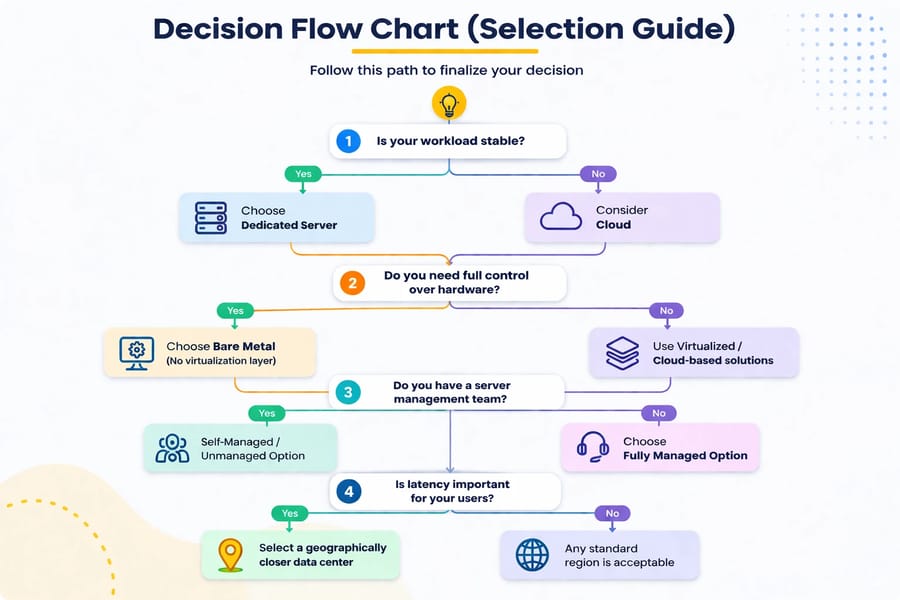
To finalize your decision, follow this path:
PUT Decision flow PICTURE HERE
Correctly answering these questions will definitely lead you to the right solution. Before committing, also consider how to choose the best OS for dedicated servers — the operating system affects everything from licensing costs to software compatibility.
Ready to Upgrade? Pick Your Dedicated Server Now
Ultimately, choosing a dedicated server should be based on your clear needs and priorities. If you are ready to purchase, you can now view our Dedicated Server Pricing and select the right service based on your requirements and geographic region. We offer dedicated servers in more than 30 countries worldwide to ensure the lowest possible latency. If you need a server deployed in minutes, our instant dedicated server lineup gets you from checkout to live in under 15 minutes. If you have a limited budget, do not worry, as we also provide Cheap Dedicated Servers with 24/7 support and reasonable specifications. For those ready to commit, buy a dedicated server and experience the true power of dedicated servers with 1GIBITS today.

Leave A Comment