
With increasing concerns over online privacy, surveillance, and geo-restrictions, many users are turning to tools like V2Ray for more control and anonymity. In this detailed V2Ray tutorial, we'll walk you through how to set up V2Ray server, explore its core benefits, compare it with other proxy technologies, and ensure you leave with a complete V2Ray install guide.
You want a proxy that's encrypted, hard to fingerprint, and running on a server you control. That's why people set up V2Ray. This guide walks through one proven setup on Ubuntu: VMess over WebSocket with TLS, sitting behind Nginx. After that, you'll test it, fix the usual errors, and keep it maintained.
First, a quick reality check. Many current deployments run Xray-core instead of the original V2Ray core. The config pattern below works on either one, and I'll point out where they differ. Want a simpler overview first? Check out our Guide to V2Ray Server to learn how V2Ray works in general use cases.
🚀 Introduction to V2Ray
What is V2Ray?
V2Ray is an open-source platform for building secure internet connections using advanced proxy protocols. It enables users to bypass censorship, hide their IP addresses, and encrypt internet traffic, offering V2Ray anonymous browsing capabilities. At its core, it supports protocols like VMess, VLESS, Shadowsocks, and more.
V2Ray is a modular proxy platform. It takes traffic in through "inbounds" (VMess, VLESS, SOCKS5, HTTP), carries it over a transport like TCP, WebSocket or gRPC, and sends it out through "outbounds." That flexibility is the reason it's popular for censorship resistance. With WebSocket plus TLS, your traffic looks a lot like ordinary HTTPS.
Now the naming confusion. The maintained V2Ray fork is v2fly/v2ray-core. Project X's Xray-core started as a fork of v2ray-core but has been developed separately for years, and its own docs say it shouldn't be treated as a fully compatible drop-in replacement. Xray is where newer features like VLESS with REALITY are being built.
Why Choose V2Ray for Anonymous Browsing?
Unlike basic VPNs or older proxy tools, V2Ray:
- Supports obfuscation techniques to disguise your traffic
- Offers granular routing control
- Is modular and extremely customizable
- Allows both client-side and server-side configuration for maximum privacy
This makes it one of the most powerful tools for achieving V2Ray anonymous browsing, especially in restrictive environments.
Overview of V2Ray Features and Architecture
V2Ray's architecture is made up of:
- Inbounds: Handle incoming traffic (like VMess or SOCKS)
- Outbounds: Define how traffic is sent out (e.g., to the open internet)
- Routing rules: Determine which outbound route to use
- Stream settings: Include TLS, WebSocket, and HTTP/2 options
It operates in a client-server model, where the server handles the actual proxy routing and the client connects to it with specific configurations.
V2Ray vs Shadowsocks and VPNs
| Feature | V2Ray | Shadowsocks | VPN |
| Protocol Support | VMess, VLESS, SOCKS5, etc. | SOCKS5 only | Proprietary (e.g., OpenVPN) |
| Obfuscation | Advanced (TLS/WebSocket) | Basic (simple obfuscation) | Varies by provider |
| Configurability | Very high | Moderate | Low to moderate |
| Server Hosting Required | Yes | Yes | No (often managed) |
| Anonymous Browsing | Yes | Yes | Depends on provider |
For the bigger picture, see our guide to V2Ray server and this breakdown of how V2Ray compares with VPNs and Shadowsocks. If you're still weighing V2Ray against more conventional privacy tools, our explainer on what a VPN is and the checklist for how to choose a VPN cover the fundamentals, while the guide on setting up a home VPN server walks through the self-hosted route if you'd rather run a traditional VPN. For a wider comparison of options, our roundup of the best self-hosted VPN servers covers OpenVPN, WireGuard, SoftEther, and Amnezia side by side. Looking to skip server setup? V2Ray Server for instant access.
V2Ray (v2fly) vs Xray-core at a glance
| Tool | Best for | Obfuscation | Setup effort |
| V2Ray (v2fly) | Flexible routing, VMess + WS + TLS | Good | Medium |
| Xray-core | Newer deployments, VLESS/REALITY | Very good | Medium–high |
| Shadowsocks | A simple, lightweight proxy | Moderate | Low |
| Traditional VPN | Tunneling the whole device | Low (easy to fingerprint) | Low |
📋 Prerequisites and DNS Preparation
Before diving into how to set up V2Ray server, ensure the following requirements are met:
- A VPS running Ubuntu 22.04/24.04 or Debian 12, with root or sudo access over SSH. 1 vCPU and 1 GB of RAM is enough for personal use.
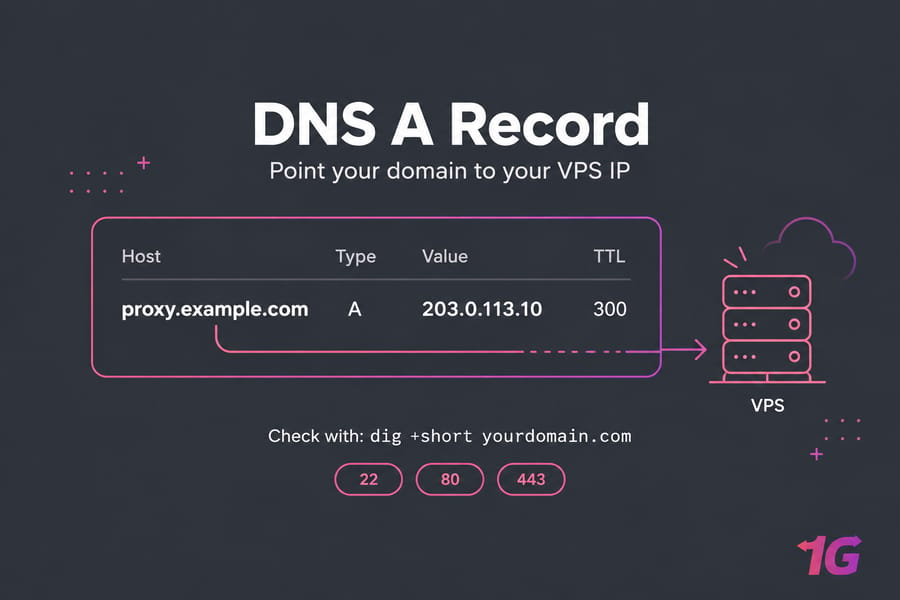
- A domain with an
Arecord pointing to your server's IP. Check it withdig +short yourdomain.combefore you go any further. - Open ports: 22 (SSH), 80 (certificate issuance) and 443 (TLS). Leave everything else closed.
- Basic Linux command-line knowledge — SSH client (PuTTY or Terminal) and a text editor (nano or vim).
This guide assumes you're using Ubuntu. If not, the steps are very similar across most Debian-based distributions.
🧭 Choose Your Deployment Method
- V2Ray core + VMess/WS/TLS: well documented, compatible with almost every client. This is what the guide uses.
- Xray core: the same pattern works, and you can move to VLESS or REALITY later.
- Docker: good if you rebuild servers often. Xray publishes an official image at
ghcr.io/xtls/xray-core.
🛠️ Step-by-Step: Setting Up a V2Ray Server on Ubuntu
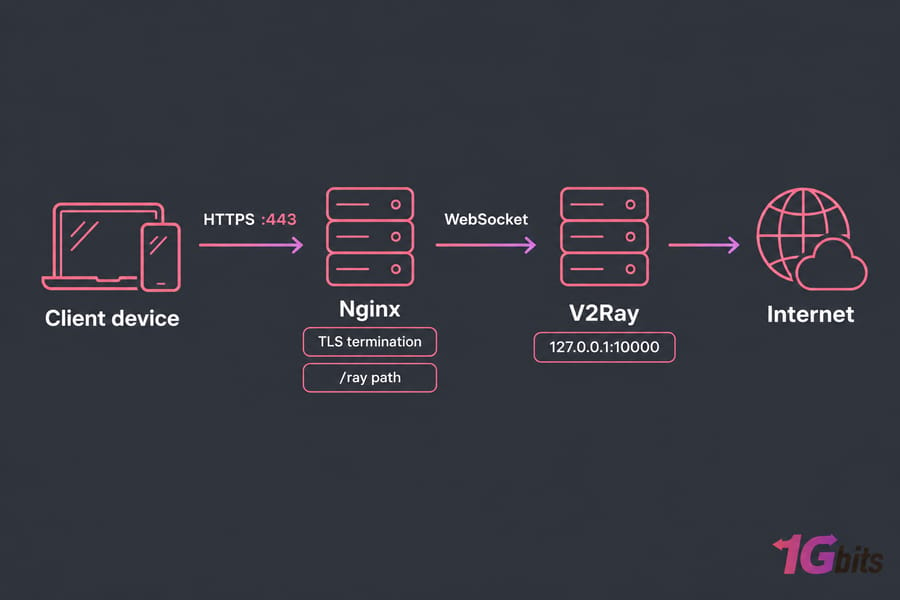
This guide follows a simplified and updated method to help you configure a secure server using VMess protocol, reverse proxy with Nginx, and TLS encryption for anonymity.
1. Update and set the firewall
sudo apt update && sudo apt upgrade -y
sudo apt install -y curl nginx certbot python3-certbot-nginx uuid-runtime
sudo ufw allow OpenSSH && sudo ufw allow 80,443/tcp && sudo ufw enable
This allows web and SSH traffic while keeping other ports secure.
2. Install the core
Don't use the old install.direct/go.sh script you'll still see in older tutorials. It's dead. Use the v2fly script from the fhs-install-v2ray repo (this is the maintained version of the V2Ray GitHub repo):
bash <(curl -L https://raw.githubusercontent.com/v2fly/fhs-install-v2ray/master/install-release.sh)Going with Xray instead? Run the official XTLS/Xray-install script. After that, swap v2ray for xray in the paths and service names below.
bash -c "$(curl -L https://github.com/XTLS/Xray-install/raw/main/install-release.sh)" @ installVerify installation with v2ray -version (or xray -version).
3. Generate a UUID
uuidgenCopy the result. The client needs this exact value.
4. Create the server config
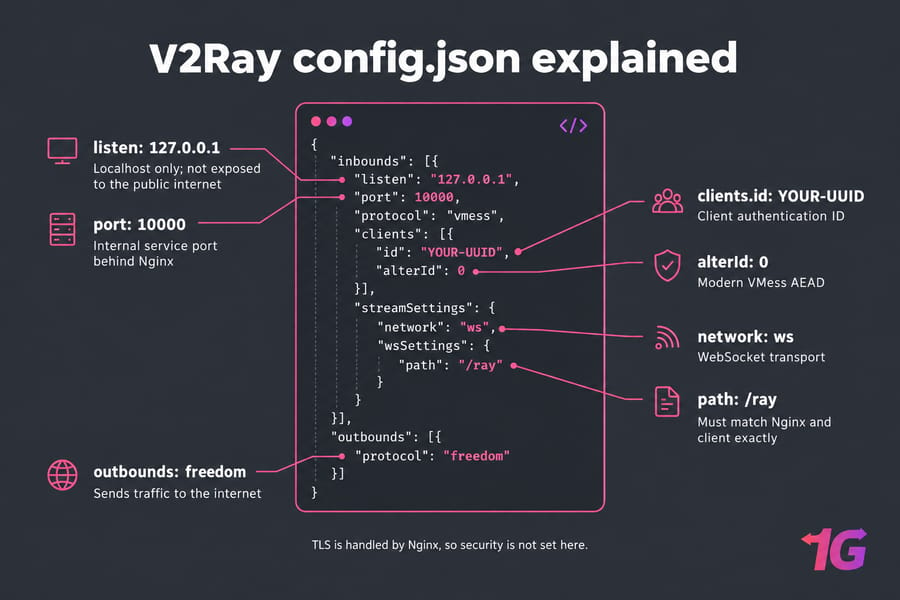
Open /usr/local/etc/v2ray/config.json and paste this:
{
  "log": { "loglevel": "warning" },
  "inbounds": [{
    "listen": "127.0.0.1",
    "port": 10000,
    "protocol": "vmess",
    "settings": { "clients": [{ "id": "YOUR-UUID", "alterId": 0 }] },
    "streamSettings": { "network": "ws", "wsSettings": { "path": "/ray" } }
  }],
  "outbounds": [{ "protocol": "freedom" }]
}
Restart V2Ray for the changes to take effect:
sudo systemctl restart v2ray5. Configure Nginx as a reverse proxy
Add this inside your site's server block (server_name yourdomain.com;):
location /ray {
    proxy_pass http://127.0.0.1:10000;
    proxy_http_version 1.1;
    proxy_set_header Upgrade $http_upgrade;
    proxy_set_header Connection "upgrade";
    proxy_set_header Host $host;
}
6. Issue a TLS certificate and start services
sudo certbot --nginx -d yourdomain.com
sudo systemctl enable --now v2ray
sudo systemctl reload nginx
Reload Nginx: sudo nginx -t && sudo systemctl reload nginx.
📖 The Config Explained
- inbounds: what V2Ray accepts. Setting
listen: 127.0.0.1keeps it off the public internet, so only Nginx can reach it. - clients.id: your UUID. It works like a password.
- alterId: 0: turns on modern VMess AEAD. Older non-zero values are deprecated.
- streamSettings.network / wsSettings.path: the WebSocket transport and path. The path has to match Nginx and the client exactly.
- security: not set here because Nginx handles TLS. The client still connects using TLS.
- outbounds → freedom: sends traffic straight to the internet. You can add
routinganddnsblocks later for geo rules or ad blocking.
💻 Client Setup by Platform
Your V2Ray server hosting is now live. On every client you enter the same values: address = your domain, port = 443, UUID, alterId 0, network = ws, path = /ray, TLS = on, SNI = your domain.
- Windows: v2rayN — the usual pick, supports VMess, VLESS, WebSocket and TLS.
- macOS: V2rayU or V2Box.
- Android: v2rayNG.
- iPhone/iPad: Shadowrocket or V2Box.
- Linux: the core itself running as a local SOCKS5 client, or a GUI like Nekoray.
Want to skip manual configuration? Buy V2Ray Server from 1Gbits with pre-configured settings and premium support. If you'd rather run a traditional VPN alongside V2Ray, a VPN-ready VPS gives you the same dedicated resources with OpenVPN or WireGuard pre-installed.
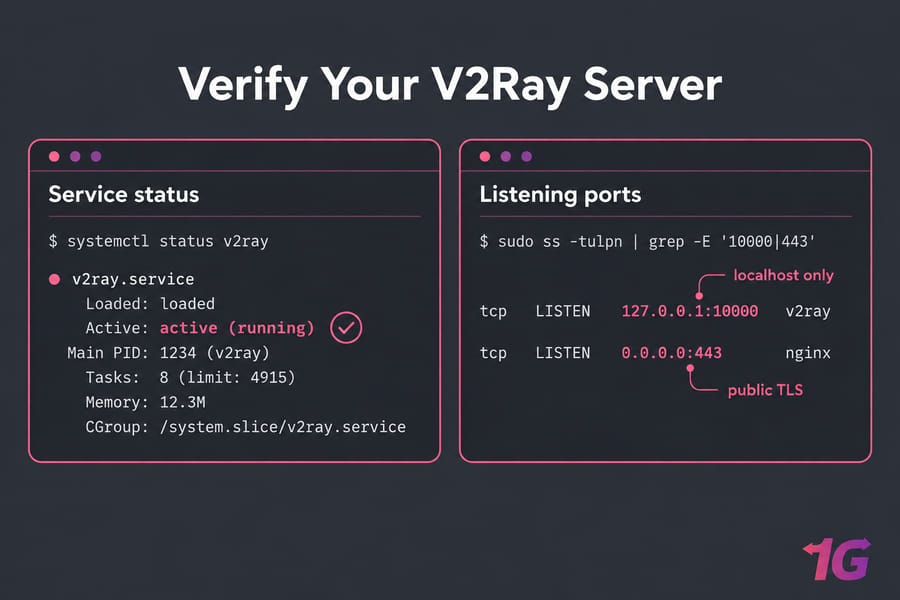
✅ How to Verify Your Server Is Working
systemctl status v2ray                          # should say active (running)
sudo ss -tulpn | grep -E '10000|443'            # V2Ray on localhost, Nginx on 443
curl -vI https://yourdomain.com 2>&1 | grep -i expire   # confirms the certificate
journalctl -u v2ray -n 50 --no-pager            # recent log lines
On the client machine, run curl --socks5-hostname 127.0.0.1:10808 https://ifconfig.me. It should print the VPS IP. (10808 is v2rayN's default local port; yours may be different.) Then run a DNS leak test in the browser at dnsleaktest.com, or check ipleak.net. If it shows your ISP's resolvers, turn on remote DNS in your client.
🧰 Common Errors and Fixes
| Symptom | Likely cause | Fix |
| Connection timeout | Port 443 blocked or DNS not resolving | Check UFW, your provider's firewall, and dig |
| TLS handshake failed | Expired certificate or SNI mismatch | Run certbot renew and set SNI to your domain |
| Invalid user | UUID mismatch or clock drift | Copy the UUID again and enable NTP (VMess fails if clocks are off by more than 90 seconds) |
| Connects, but no sites load | Wrong WS path or a 404 from Nginx | Make the path identical in all three places |
| No internet | DNS or routing error | Add DNS settings to config or use 1.1.1.1/8.8.8.8 |
In my experience, most "it connects but nothing loads" tickets come down to /ray on one side and /ray/ on the other. Check that before anything else. Refer to the V2Ray GitHub repo for additional troubleshooting documentation.
🔒 Security Best Practices for V2Ray Server Configuration
To ensure that your V2Ray server setup delivers true anonymity and resilience against surveillance or attacks, it's important to go beyond the basic configuration.
✅ Keep Software Updated
An outdated system or software stack is a primary vector for exploits. Regularly update the OS, V2Ray core, and dependencies like nginx, caddy, or acme.sh (for SSL). Use a cron job or system automation tool to apply security patches frequently.
When updating, back up config.json, run the install script again, test the config with v2ray test -config /usr/local/etc/v2ray/config.json, and then restart.
🔐 Use Strong UUIDs for Authentication
V2Ray uses UUIDs instead of traditional usernames and passwords. These 128-bit unique identifiers are far more secure and resistant to brute-force attacks. Give each user their own UUID, avoid reusing UUIDs across multiple clients, and rotate a UUID if you think it has leaked.
🔒 TLS/SSL via Reverse Proxy
Without encryption, your V2Ray traffic can still be inspected or blocked. Protect it using HTTPS: use Caddy or Nginx as a reverse proxy in front of V2Ray, and automatically issue and renew certificates using Let's Encrypt. This hides V2Ray traffic within normal TLS connections, masking it as HTTPS web browsing. Certbot sets up automatic renewal. Test it now and then with sudo certbot renew --dry-run.
🔥 Enable Firewall and Close Unused Ports
Limit exposure to reduce attack surfaces. On Ubuntu, use UFW: allow 22/tcp (SSH) and 443/tcp (HTTPS for V2Ray via TLS), enable UFW, and make sure to close default V2Ray ports if hidden behind a reverse proxy and deny all other inbound connections.
🌐 Limit Exposure & Monitor Activity
- Bind V2Ray only to localhost (127.0.0.1) if you're using a reverse proxy. This ensures only the proxy can communicate with it.
- Regularly review log files via
journalctl -u v2ray— check weekly for repeated auth failures. - Consider installing Fail2Ban or an intrusion detection system like Snort to watch for suspicious login attempts.
One more thing about the word "anonymous." V2Ray encrypts your traffic and hides it from your local network, but your VPS provider can still see where it goes. And whether you're allowed to use it at all depends on your country, ISP, workplace, school, or host's policy, so check those first.
⚖️ Advantages and Limitations of V2Ray
Before you decide to buy a V2Ray server or commit to a provider, it's crucial to weigh its strengths and weaknesses.
✅ Pros of Using V2Ray
- Highly Anonymous: V2Ray encrypts both data and metadata, and its traffic can be disguised to look like normal HTTPS, making detection significantly harder.
- Bypasses Firewalls and Censorship: Its support for obfuscation protocols like VMess and VLESS, combined with WebSocket + TLS, makes it ideal for penetrating firewalls in countries with strict internet regulations.
- Flexible Routing & Protocol Support: V2Ray supports multiple inbound/outbound protocols including SOCKS, HTTP, Shadowsocks, and VMess. You can define routing rules based on domain, IP, or region.
- Highly Customizable Configuration: Through a detailed JSON-based setup, users can fine-tune load balancing, multi-user access, geo-blocking, reverse proxying, and more.
- Multiple Clients & Platform Support: V2Ray clients are available on Windows, Linux, macOS, Android, iOS, and even routers.
❌ Cons of Using V2Ray
- Complex Setup: The JSON configuration is powerful but intimidating for beginners. Incorrect formatting or missing fields can break the service entirely.
- Requires a Hosting Environment: You must rent a VPS, which adds cost and introduces a dependency on external infrastructure. Maintenance is also your responsibility unless you use managed services.
- May Still Be Blocked in Extreme Cases: In regions like China and Iran, advanced firewalls can detect and throttle even well-hidden V2Ray traffic, especially if TLS SNI or packet fingerprints are mismatched.
- Resource Usage: Compared to simpler tools like Shadowsocks, V2Ray may consume slightly more CPU and memory due to encryption layers and multiplexing.
🎯 Conclusion
Got active (running) and your VPS IP from curl? Then you're done. From here you could add a routing block, or try Xray with VLESS/REALITY. If you'd rather not deal with updates, TLS renewals and troubleshooting yourself, you can get a V2Ray-ready VPS with setup handled for you.
Ready to experience private and unrestricted browsing? Explore our V2Ray servers and choose from flexible V2Ray subscription plans today. Whether you're looking for full control or just starting out, our best V2Ray server providers have you covered.

Leave A Comment