

If you're selling products, memberships, courses, or accepting donations on a WordPress site, choosing the best payment plugin for WordPress is one of the most important decisions you'll make. Cart abandonment, failed transactions, and slow checkouts directly hurt conversion rates; so your payment stack must be fast, secure, and trusted by customers. High-performing stores often pair these plugins with a WordPress VPS to ensure that the checkout process remains lag-free even during high traffic peaks.
This guide walks through what payment plugins do, the selection criteria (fees, security, global support, recurring billing), and deep reviews of the top 9 payment plugins for 2025. You'll also find a comparison table, step-by-step integration instructions (including How to integrate payment gateway in WordPress with WooCommerce), and expert tips for securing your financial transactions.
📊 Quick comparison table
| Plugin | Supported Methods | WooCommerce Integration | Recurring Billing | Free Version | Best For |
| Stripe (Stripe WP plugins) | Cards, Apple/Google Pay, Wallets | Yes | Yes | Free libs / paid addons | Best wordpress credit card payment plugin |
| PayPal Payments | PayPal, Cards | Yes | Yes | Free | Simple checkout, global reach |
| WP Simple Pay | Stripe-only (many methods) | Limited (works with forms) | Yes | Free (lite) | Best payment plugin for WordPress free |
| WooCommerce Payments | Cards, Wallets | Native | Yes | Free plugin | WooCommerce shops |
| Square Payments | Cards, in-person + online | Yes | Yes | Free | Physical + online stores |
| Authorize.net | Cards, eChecks | Yes | Yes | No | High-volume merchants |
| Braintree / PayPal | Cards, PayPal, Wallets | Yes | Yes | No | Multi-method / global needs |
| Mollie | Cards + local EU methods | Yes (Woo) | Yes | Free plugin | EU shops, multi-gateway |
| NowPayments (Crypto) | 300+ crypto | WooCommerce support | N/A (converts to fiat) | Free | Crypto-first sellers |
🔍 What Is a WordPress Payment Plugin?
A WordPress payment plugin connects your WordPress site to a payment gateway and/or processor so you can accept money from customers. This bridge ensures that sensitive financial data is handled securely without necessarily storing it on your own server, which is a key part of maintaining PCI compliance. Plugins differ in scope:
-
Gateway-only plugins: These connect your site to external services like Stripe, PayPal, or Mollie.
-
Processor + gateway (all-in-one) products: For example, WooPayments integrates Stripe-like processing directly into the WordPress admin panel.
-
Form-based payment plugins: Solutions like WPForms or WP Simple Pay allow you to accept payments through simple forms without needing a full eCommerce infrastructure.
-
Marketplace and multivendor plugins: Tools like WC Vendors manage complex vendor payouts and commissions.
-
Crypto gateways: Specialized plugins like NowPayments allow you to accept Bitcoin and other cryptocurrencies directly.
These plugins integrate differently: some are built for WooCommerce checkout, others for form builders (WPForms, Formidable). Your business model (store, donation, memberships, courses) guides which type you choose. For those running specialized services, such as hosting, using a VPS that accepts PayPal or other specific gateways can streamline the entire billing cycle.
🛠️ How to Choose the Best Payment Plugin for WordPress?
Choosing the right plugin requires weighing multiple factors. Below are the key criteria to evaluate to ensure you don't lose revenue to technical friction.
✅ Compatibility (WooCommerce, WPForms, Gravity Forms)
Check that the plugin supports your existing software stack. If you're using WooCommerce, prefer a plugin with native WooCommerce integration (WooCommerce Payments, Stripe Payment Plugin for WooCommerce). If you're using forms, ensure compatibility with WPForms, Formidable Forms, or Gravity Forms to avoid layout breaks.
✅ Supported Payment Methods (cards, PayPal, Stripe, Apple Pay, crypto)
Offering a variety of methods (credit cards + wallets + local options) increases conversions significantly. For EU stores, local methods like iDEAL and Bancontact are non-negotiable. For global stores, multicurrency support and the ability to accept credit cards globally are essential features.
✅ Transaction Fees & Pricing
Look beyond the initial plugin price. The processor's transaction fees and monthly gateway fees directly affect your profit margins. Free plugins may still charge higher gateway fees per transaction, while paid plugins often include advanced features like automated subscription management that save time and money in the long run.
✅ Security Features (PCI compliance, tokenization, fraud prevention)
Security is paramount. PCI compliance, tokenization (which ensures card data never hits your server), SCA (Strong Customer Authentication) support for European customers, and AI-driven fraud detection are must-haves for any modern business. To further protect your environment, you should always secure your server to prevent data leaks.
✅ Subscription & Recurring Billing Support
If you sell subscriptions, memberships, or SaaS products, ensure the plugin supports recurring billing, automated retries for failed payments (dunning), and customer-facing billing portals.
✅ Ease of Use & Setup
A smooth onboarding process and clear documentation reduce implementation time. Setup wizards and "Test Modes" (sandboxes) make it easier for developers to verify the flow before going live.
✅ Global Support & Currencies
If you sell internationally, you need a plugin that handles multiple currencies, localized payout settings, and dynamic checkout languages based on the user's location.
🏆 Best Payment Plugin for WordPress (Top 9 Picks for 2025)
Each of the following sections contains a short overview, key features, pros/cons, pricing, and the best use case for different business types.
1) Stripe: Best for Credit Card Payments (Stripe WordPress Plugin)

Stripe has become the de facto choice for accepting credit card payments online. A variety of WordPress plugins and official integrations bring Stripe's power to simple forms and complex WooCommerce stores alike.
Key features:
-
Accepts major cards, Apple Pay, Google Pay, and local methods via Stripe Checkout.
-
Industry-leading PCI compliance via secure tokenization.
-
Advanced fraud detection via Stripe Radar.
-
Native subscription & billing via Stripe Billing engine.
- Pros: Developer-friendly, excellent documentation, global support, advanced features (invoices, subscriptions).
- Cons: Settling/currency fees for international cards; may require developer help for deep customizations.
- Pricing: Typical card rate: 2.9% + $0.30 (varies by country & card type).
- Best for: Stores that need a robust credit card processor; a top entry for best wordpress credit card payment plugin.
2) PayPal Payments: Best for Simple Checkout

Ubiquitous and trusted by millions of buyers, PayPal reduces purchase friction; especially for international customers who may be hesitant to share card details with new sites.
- Key features: Express checkout, robust subscription support, comprehensive buyer protection.
- Pros: Wide recognition increases trust, simple setup, many merchants already have established accounts.
- Cons: Fees can be higher than competitors; users may be redirected to PayPal in some older flows.
- Best for: Sellers wanting fast trust & easy setup without complex configurations.
3) WP Simple Pay: Best Payment Plugin for WordPress Free

Overview: A Stripe-first plugin designed to accept one-time and recurring payments via simple forms, without a full eCommerce setup. WP Simple Pay is ideal for creators, tutors, and small businesses that don't need a heavy shopping cart.
- Key features: Quick Stripe connection, readymade payment templates, recurring payments, buy-now-pay-later options (Klarna/Afterpay).
- Pros: Extremely quick setup; wordpress payment plugin free lite version available; minimal overhead on site speed.
- Cons: Focused strictly on Stripe; does not support multi-gateway setups.
- Best for: Sites needing a lightweight Stripe-based solution; and for anyone searching Best payment plugin for WordPress free.
4) WooCommerce Payments: Best for WooCommerce Stores

Built by Automattic (the team behind WordPress), this plugin integrates payments directly into the WooCommerce admin; it is powered by Stripe technology but managed within your site.
- Key features: Native dashboard for refunds, disputes, and revenue tracking; integrates perfectly with WooCommerce Subscriptions.
- Pros: Deep integration, in-dashboard workflows, easy dispute handling without leaving WordPress.
- Cons: Availability is limited to specific countries; fees are based on transaction volume.
- Best for: Stores built on WooCommerce that want a seamless, unified admin experience.
5) Payment Plugins for Stripe WooCommerce: Best Stripe Add-On

Many dedicated Stripe plugins for WooCommerce (e.g., WebToffee, FunnelKit Stripe) offer optimized checkout experiences, such as one-click checkouts and advanced capture/refund features.
- Key features: Prebuilt optimized checkout pages, support for local payment methods, built-in SCA and subscription tools.
- Pros: High flexibility and specialized WooCommerce-specific features not found in the basic Stripe plugin.
- Cons: So many options exist—you must pick reputable developers and check their support record.
- Best for: WooCommerce stores prioritizing maximum conversion rates and Stripe-specific features.
6) Square Payments: Best for Physical Businesses
Square links in-person POS and online payments, making it the perfect choice for omnichannel sellers who have a physical storefront and a digital shop.
- Key features: Synchronized online and in-person payments, real-time inventory sync, direct POS integration.
- Pros: Simplifies bookkeeping for brick-and-mortar + online store combinations.
- Cons: International availability is currently more limited than Stripe or PayPal.
- Best for: Local retailers already using Square's POS who want integrated online payments.
7) Authorize.net: Best for High-Volume Card Processing
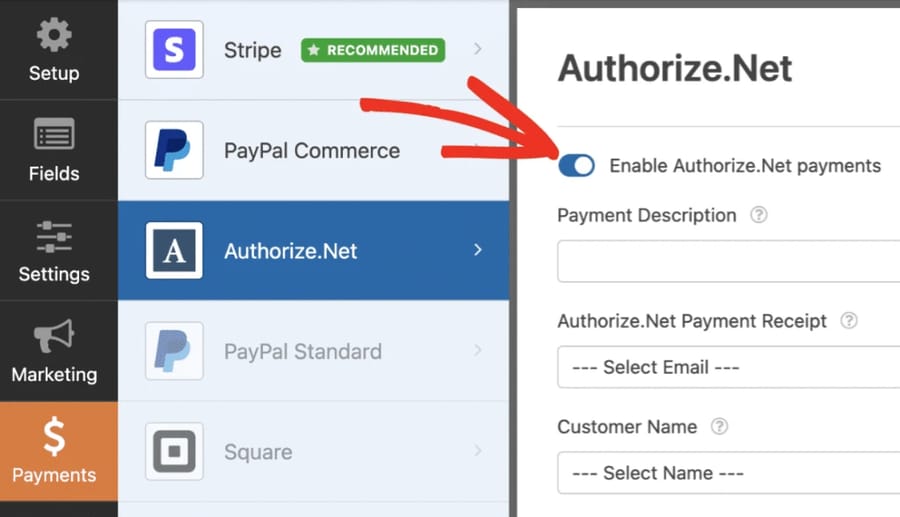
A long-time payment gateway favored by large merchants and enterprises for its reliability and scale.
- Key features: Highly reliable processing, virtual terminal for phone orders, eCheck support, and advanced security suites.
- Pros: Enterprise-grade features, strong 24/7 support options, and stability for large-scale operations.
- Cons: Requires a monthly gateway fee in addition to per-transaction costs; setup can be more complex for beginners.
- Best for: High-volume merchants and established businesses needing enterprise-grade reliability.
8) CryptoPay (NowPayments, etc.): Best Crypto-Friendly WordPress Payment Plugin

Accept crypto directly with plugins like NowPayments. These services allow you to accept over 300 different coins and often convert them to fiat currency automatically to avoid volatility. This is particularly popular for tech services; for instance, many users look for a VPS with Monero or other privacy coins.
- Key features: Massive coin support, automatic fiat payouts, and direct WooCommerce integration.
- Pros: Attracts tech-savvy and crypto-native buyers; significantly lower fees in some models.
- Cons: Price volatility management (unless auto-converted), complex regulatory landscape in some regions.
- Best for: Businesses that want to accept crypto payments alongside traditional fiat options.
9) Mollie: Best Multi-Gateway & EU-Friendly Payments
Mollie provides industry-leading support for EU local payment methods like iDEAL, Bancontact, and SEPA, integrating perfectly with WooCommerce.
- Key features: Seamless local payment method integration, transparent pricing models, centralized merchant dashboard.
- Pros: Excellent for European merchants who need to cater to local payment habits.
- Cons: Less global reach and fewer specialized features outside of the European market.
- Best for: EU-based stores and businesses primarily serving European customers.
⚖️ Free vs Paid WordPress Payment Plugins
WordPress Payment Plugin Free Options
Many top-tier plugins offer free versions (WP Simple Pay Lite, WooCommerce core, Stripe Payment Plugin for WooCommerce, Mollie plugin). These usually cover basic transactions and are often enough for small stores, personal blogs, or new sellers just testing the waters. Using a guide on how to create a website can help you integrate these free tools quickly.
Limitations of Free Payment Plugins
While attractive, free versions may lack critical business features:
-
Advanced subscription/dunning (retry) management.
-
Multi-gateway fallback (if one service goes down, the checkout breaks).
-
Advanced AI-driven fraud prevention tools.
-
Priority technical support when payment issues arise.
When Paid Plugins Are Worth It?
You should consider upgrading to a premium version when your business needs:
-
Advanced subscription logic (trial periods, setup fees, variable billing).
-
Multi-currency local payment support to expand into new markets.
-
High-level PCI security add-ons and deeper fraud detection layers.
-
Custom Developer APIs and Service Level Agreements (SLAs) for enterprise stability.
So do you have to pay for plugins on WordPress?
No; you don't strictly have to pay for the software itself on WordPress, but transaction fees with payment processors still apply regardless. Paid plugins simply add features and support that often justify their cost by increasing conversion rates.
💳 Best WordPress Credit Card Payment Plugins
When searching specifically for the best wordpress credit card payment plugin, the following are top-tier picks known for stability:
-
Stripe: Known for the highest success rates and lowest friction.
-
Authorize.net: The standard for high-security, high-volume card processing.
-
WooCommerce Payments: Simplest integration for WooCommerce users.
-
Square: Ideal for syncing physical card readers with your website.
🚀 Best Payment Gateway Plugin for WordPress (2025 Guide)
To summarize, the major gateways you should compare include:
-
Stripe — excellent developer tools and global card support.
-
PayPal — trusted global brand with buyer protection.
-
Square — the leader for unified POS + online commerce.
-
Authorize.net — the go-to enterprise-grade gateway.
-
Mollie — strong focus on EU/local payment methods.
-
NowPayments — the standard for cryptocurrency acceptance.
🔌 How to Integrate a Payment Gateway in WordPress
Integrating a payment gateway doesn't have to be daunting. Below are the most common integration routes.
🔹 With WooCommerce
-
Install WooCommerce: Go to Plugins → Add New → Search "WooCommerce" → Install & Activate.
-
Choose a gateway plugin: e.g., "Stripe Payment Plugin for WooCommerce" or "Mollie Payments for WooCommerce".
-
Install & Activate: Install your chosen gateway plugin and activate it.
-
Connect your account: In WooCommerce → Settings → Payments → Enable the gateway → click Setup/Manage → follow the OAuth/API key connection steps. Pro Tip: Always use Test Mode/Sandbox first.
-
Test transactions: Run several test purchases to ensure the flow works from cart to success page.
-
Configure webhooks: Services like Stripe require webhooks to update order statuses for subscriptions or delayed payments.
-
Go live: Switch to live API keys and run one real transaction with a small amount to confirm everything is perfect.
🔹 Without WooCommerce (forms, donation systems, invoices)
-
Use WPForms, Formidable, or WP Simple Pay for quick, standalone payment pages.
-
Install the form plugin, add payment fields, connect your Stripe/PayPal account, and embed the form via shortcode or Gutenberg block.
-
For nonprofits or fundraising, specialized plugins like WPCharitable or GiveWP are recommended.
💡 Common Mistakes to Avoid When Selecting Payment Plugins
-
Ignoring Conversion UX: Focusing only on low fees but choosing a plugin that redirects users too many times, causing cart abandonment.
-
Overlooking Security: Ignoring PCI compliance and SCA requirements, which can lead to legal issues or data breaches.
-
Currency Issues: Choosing a plugin that doesn't support the local currency of your primary target market.
-
Incompatibility: Not verifying if the plugin works with your current WordPress theme, hosting, or PHP version.
-
Neglect: Using outdated or unsupported plugins that create security vulnerabilities. Always secure your VPS environment to mitigate these risks.
🏁 Conclusion
Choosing the best payment plugin for WordPress comes down to matching features to your specific business needs. If you need the best wordpress credit card payment plugin, Stripe and its various WooCommerce/Forms addons are excellent. If you want a Best payment plugin for WordPress free to start with, WP Simple Pay (lite) or WooCommerce with its native gateway plugins are ideal starting points.
If you're ready to scale and want hosting that won't become a bottleneck for performance or security, consider hosting your WordPress store on a fast, managed environment. For reliable uptime, global data centers, and instant server setup, check out 1Gbits' WordPress VPS, perfect for stores that need speed, 24/7 support, and cost-effective scaling.

Leave A Comment