
![What Is Virtual Desktop Infrastructure? 🖥️ [VDI Explained]](
https://1gbits.com/cdn-cgi/image/width=827,quality=80,format=auto/https://s3.1gbits.com/blog/2026/02/what-is-virtual-desktop-infrastructure-vdi-1200xAuto.webp
"What Is Virtual Desktop Infrastructure? 🖥️ [VDI Explained]")
The implementation of virtual desktop infrastructure has become essential for businesses to create their information technology frameworks, but many executives still wonder about its definition and current significance. The term virtual desktop infrastructure VDI describes a centralized system that provides remote access to desktop environments through server-based infrastructure instead of using local desktop computers.
Users who need to access virtual desktops will find that they receive their desktop environments from a protected data center or cloud service. This model enables organizations to achieve better management capabilities while expanding their operations and protecting their systems from potential security threats.
The guide will explain virtual desktop infrastructure VDI through its definition and show its system components through architectural diagrams, while describing its benefits and drawbacks between virtual machines and comparable technologies.
💻 What Is Virtual Desktop Infrastructure?
Virtual desktop infrastructure functions as an IT system that enables users to access virtual desktop environments through centralized servers, which operate virtual desktop systems in data centers. Virtual desktop infrastructure (VDI) enables users to access their desktop environments through virtual machines that operate on a hypervisor-based virtualized system.
A virtual desktop enables users to access a desktop environment through a virtual machine. Virtual desktop infrastructure (VDI) functions as an entire system that includes servers, storage devices, networking components, connection brokers, and virtualization software to enable the creation, administration, and distribution of virtual desktops. If you need a foundational explanation before diving deeper, start with our guide on What is virtualization to understand the core technology powering VDI environments.
🖥️ What Is Virtual Desktop Infrastructure (VDI) and How It Works
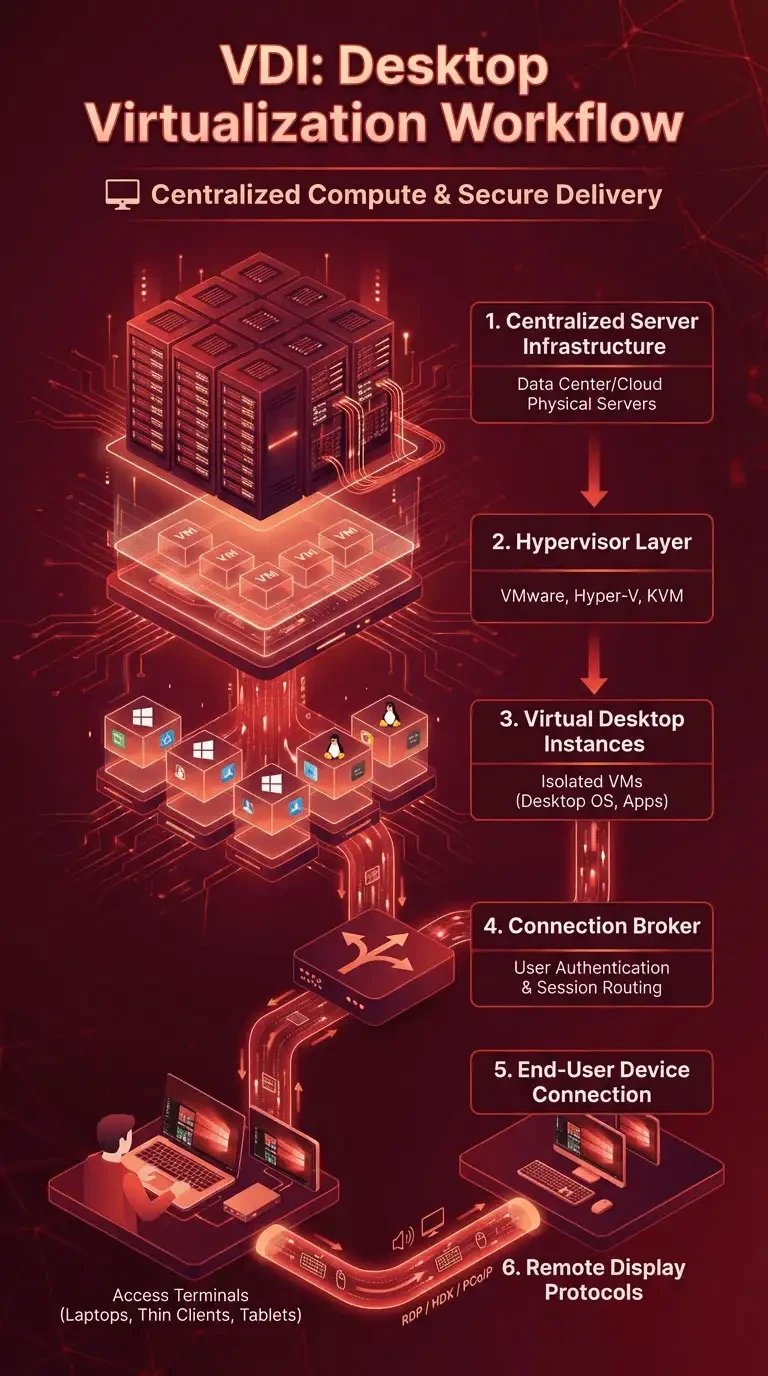
To clearly understand what is VDI and how it works, you need to look at the infrastructure behind the desktop experience. What is virtual desktop infrastructure and how it works comes down to centralized compute resources, virtualization software, and secure remote display protocols working together to deliver desktops from a data center to end users.
-
Centralized Server Infrastructure: Physical servers located in a data center (or cloud) host the computing power required to run multiple desktop operating systems simultaneously.
-
Hypervisor Layer: A hypervisor (such as VMware ESXi, Microsoft Hyper-V, or KVM) virtualizes the physical server hardware and creates isolated virtual machines (VMs) for each desktop instance.
-
Virtual Desktop Instances: Each user receives a dedicated or shared virtual machine containing a desktop OS (Windows or Linux), applications, and user configurations within the virtual desktop infrastructure (VDI) environment.
-
Connection Broker: This component authenticates users and routes them to the correct virtual desktop, balancing load and managing session assignments.
-
End-User Device Connection: Users connect through laptops, thin clients, tablets, or even web browsers, meaning local hardware mainly acts as an access terminal.
-
Remote Display Protocols (RDP / HDX / PCoIP): These protocols transmit keyboard, mouse, audio, and screen data between the user’s device and the hosted virtual desktop, ensuring responsive remote interaction.
To better understand how VDI compares with traditional remote desktop access methods, read our detailed guide on VDI vs. RDP and see which solution fits your infrastructure strategy.
🏗️ Virtual Desktop Infrastructure Architecture Explained
To fully understand virtual desktop infrastructure architecture, you need to examine the core components that make centralized desktop delivery possible. When organizations ask what are the 4 components of infrastructure in a VDI deployment, the answer typically centers around compute virtualization, connection management, storage, and endpoint access working together as a unified system.
|
Component |
Technical Role |
Function in VDI Environment |
|
Hypervisor |
Virtualization layer installed on physical servers |
Abstracts hardware resources (CPU, RAM, network) and creates isolated virtual machines that host desktop operating systems |
|
Connection Broker |
Session management and authentication engine |
Authenticates users, assigns them to the correct virtual desktop, balances load, and manages active sessions |
|
Virtual Machines (VMs) |
Desktop OS instances running on the hypervisor |
Deliver individual desktop environments (Windows/Linux), including applications and user profiles |
|
Storage System |
Centralized storage infrastructure (SAN, NAS, or NVMe-based arrays) |
Stores VM images, user data, snapshots, and application data with high availability and performance |
|
Endpoint Device |
User access device (laptop, thin client, tablet, browser) |
Connects to the hosted desktop using secure remote display protocols such as RDP, HDX, or PCoIP |
Core Components Table
If you want a broader perspective on how desktop virtualization fits into modern IT environments, explore our complete breakdown of Virtualization Types to understand where VDI stands among other models.
🧩 Types of VDI
Understanding the types of VDI is essential when asking what is virtual desktop infrastructure (VDI) environment and how it should be deployed in an organization. The two primary models, Persistent and Non-Persistent, determine how user data, desktop customization, and resource allocation are handled within the virtual desktop infrastructure architecture.
|
Feature |
Persistent VDI |
Non-Persistent VDI |
|
User Assignment |
Each user is assigned a dedicated virtual desktop |
Users connect to a pooled desktop that resets after logout |
|
Customization |
Full personalization allowed (apps, settings, files remain saved) |
Limited personalization; changes are discarded after the session ends |
|
Storage Requirement |
Higher storage consumption per user |
Lower storage footprint due to shared base image |
|
Management Complexity |
More complex to maintain individual images |
Easier centralized image management |
|
Use Case Fit |
Developers, designers, and power users need consistent environments |
Call centers, training labs, shift-based workforce |
|
Cost Efficiency |
Higher infrastructure cost |
More cost-effective at scale |
Choosing between these two models depends on performance expectations, storage design, and operational goals within your virtual desktop infrastructure (VDI) deployment.
🌍 What Is Virtual Desktop Infrastructure Used For?
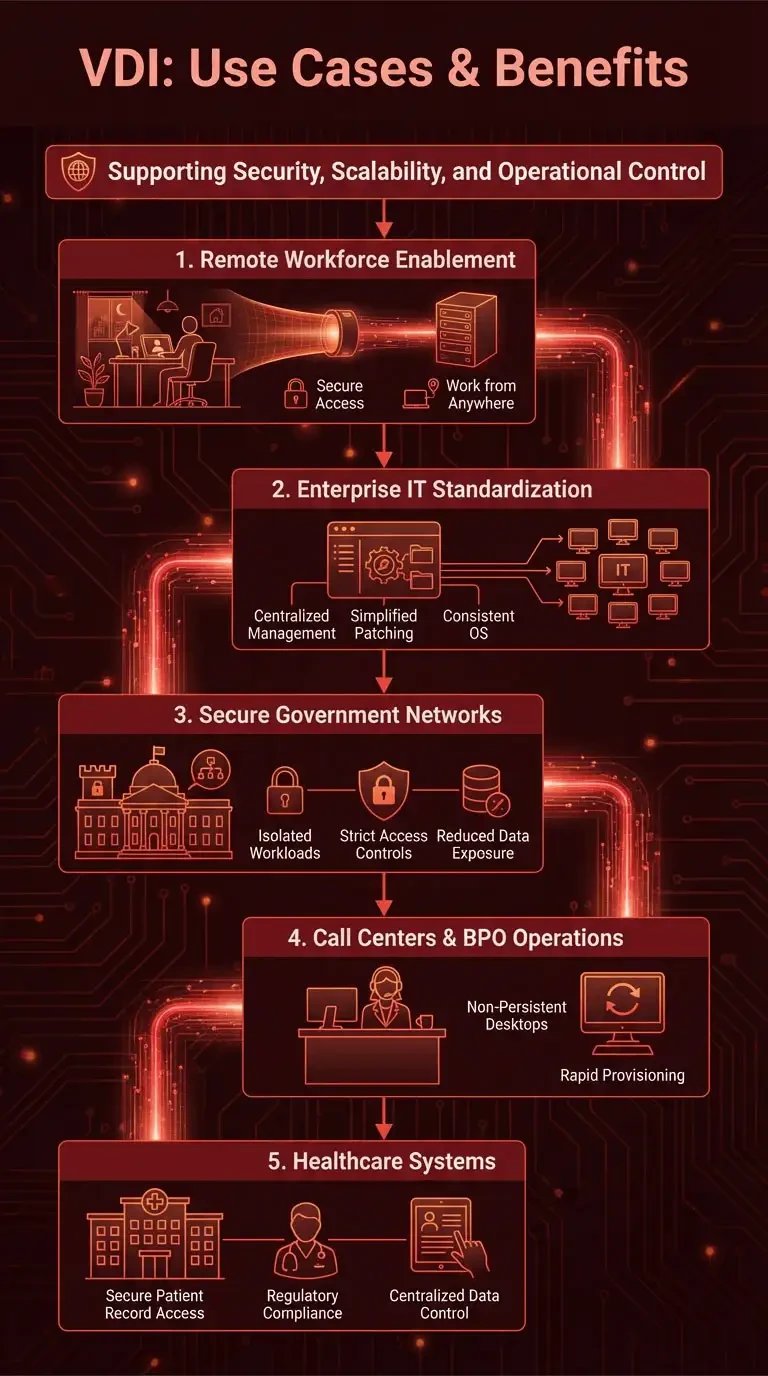
When organizations ask what is virtual desktop infrastructure used for, they are typically evaluating how centralized desktop delivery supports security, scalability, and operational control. A practical way to understand what is virtual desktop infrastructure example is to examine how different industries deploy VDI (virtual desktop) environments in real-world scenarios.
-
Remote Workforce Enablement: Companies use VDI to provide secure remote access to corporate desktops, allowing employees to work from home or abroad without exposing sensitive data to personal devices.
-
Enterprise IT Standardization: Large enterprises deploy virtual desktop infrastructure to centralize desktop management, simplify patching, and maintain consistent OS configurations across thousands of users.
-
Secure Government Networks: Government agencies use VDI environments to isolate classified workloads, enforce strict access controls, and reduce endpoint data exposure.
-
Call Centers and BPO Operations: High-turnover environments benefit from non-persistent VDI, where desktops reset after each shift, ensuring security and rapid provisioning.
-
Healthcare Systems: Hospitals deploy VDI to enable clinicians to securely access patient records from multiple terminals while maintaining regulatory compliance and centralized data control.
What is virtual desktop infrastructure (VDI) becomes most clear when viewed as a strategic solution for secure, scalable desktop delivery across distributed and security-sensitive environments.
⚖️ Virtual Desktop Infrastructure Advantages and Disadvantages
Before deploying VDI, organizations must carefully evaluate virtual desktop infrastructure advantages and disadvantages from both technical and financial perspectives. While VDI (virtual desktop) environments provide strong centralized control and flexibility, they also introduce infrastructure and performance considerations that must be properly designed.
|
Category |
Factor |
Explanation |
|
Advantages |
Centralized Management |
IT teams manage operating systems, patches, updates, and policies from a central data center rather than maintaining individual physical PCs. |
|
Advantages |
Security Control |
Data remains in the data center instead of on endpoint devices, reducing the risk of data leakage and supporting compliance requirements. |
|
Advantages |
Scalability |
New desktops can be provisioned quickly by deploying additional virtual machines without purchasing new user hardware. |
|
Advantages |
Device Independence |
Users can access their desktop from laptops, thin clients, tablets, or web browsers, since computing runs on centralized infrastructure. |
|
Disadvantages |
Infrastructure Cost |
High upfront investment in servers, storage, networking, and virtualization software is required for on-premise deployments. |
|
Disadvantages |
Latency Sensitivity |
User experience depends heavily on network performance and remote display protocol efficiency. |
|
Disadvantages |
Deployment Complexity |
Designing and optimizing a virtual desktop infrastructure architecture requires skilled IT teams and careful resource planning. |
Understanding virtual desktop infrastructure (VDI) involves recognizing its significant benefits.
🖥️ VDI vs VM (Virtual Machine)
Understanding the difference between VM and VDI is critical because these terms are often used interchangeably, even though they represent different layers of virtualization. A VM (Virtual Machine) is a single virtualized computer instance, while VDI is a full infrastructure designed to deliver and manage virtual desktops at scale.
|
Feature |
Virtual Machine (VM) |
Virtual Desktop Infrastructure (VDI) |
|
Definition |
A software-based virtual computer running on a hypervisor |
A centralized architecture that delivers virtual desktops to end users |
|
Purpose |
Runs operating systems and applications in isolation |
Manages, provisions, and delivers multiple desktop VMs to users |
|
Scope |
Single virtualized instance |
Entire infrastructure, including hypervisor, broker, storage, and networking |
|
User Access |
May or may not be user-facing |
Specifically designed for end-user desktop access |
|
Management Layer |
Managed individually or via a virtualization platform |
Managed through connection brokers and desktop management systems |
|
Use Case |
Server workloads, testing environments, and development |
Enterprise desktop delivery for the remote workforce and centralized IT |
The difference between VM and VDI is that a VM is the building block. In contrast, VDI is a structured ecosystem that orchestrates and delivers those virtual machines as full desktop environments.
🔍 VDI vs VDA (Virtual Desktop Agent)
The difference between VDA and VDI becomes clear when you examine their roles inside a virtual desktop ecosystem. VDI refers to the complete virtual desktop infrastructure architecture, while VDA (Virtual Desktop Agent) is a software component installed inside each virtual desktop that enables communication and session control.
-
VDI (Virtual Desktop Infrastructure): The full architectural framework that includes hypervisors, connection brokers, storage, networking, and management systems delivering desktops at scale.
-
VDA (Virtual Desktop Agent): A software agent installed within a virtual machine that allows the desktop OS to register with the connection broker and support remote display protocols.
-
Scope Difference: VDI operates at the infrastructure level; VDA operates at the individual desktop level.
-
Deployment Layer: VDI is deployed in data centers or cloud environments; VDA runs inside the guest operating system of a VM.
-
Operational Role: VDI provisions and manages desktops; VDA enables those desktops to function in remote sessions.
The difference between VDA and VDI is that VDI builds and manages the environment, while VDA activates and connects each desktop within that environment.
🧱 Is VDI Software or Hardware?
When discussing what is virtual desktop infrastructure (VDI) from a technical standpoint, it is important to recognize that VDI is not a single product. It is an architecture that depends on both enterprise-grade hardware infrastructure and virtualization software components.
-
Physical Servers: Provide compute resources (CPU and RAM) to host virtual desktop machines.
-
Storage Systems: Store desktop images, user profiles, and application data in centralized arrays or cloud storage.
-
Networking Equipment: Ensures low-latency, secure connectivity between endpoints and the data center.
-
Hypervisor Software: Virtualizes hardware resources and creates desktop virtual machines.
-
Connection Broker Software: Authenticates users and routes sessions to the appropriate desktop.
-
Management Platforms: Monitor performance, allocate resources, and maintain policy enforcement.
VDI is best described as a hybrid architectural model combining infrastructure hardware with virtualization and management software.
🚀 What Is Optimized Virtual Desktop Infrastructure (VDI)?
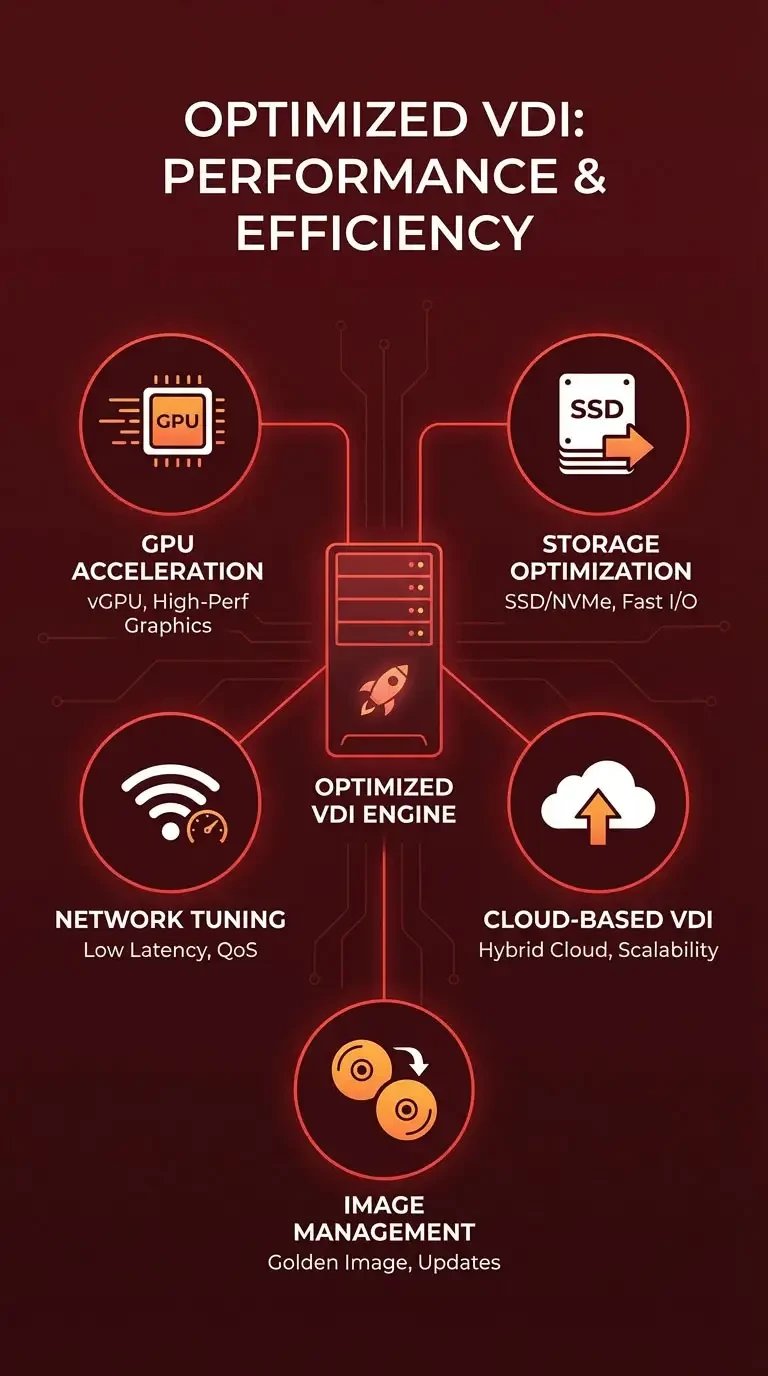
To answer what is optimized virtual desktop infrastructure VDI, you must look at how performance, scalability, and efficiency are enhanced beyond a basic deployment. Optimization focuses on improving graphics performance, reducing storage bottlenecks, minimizing latency, and leveraging cloud scalability within the virtual desktop infrastructure (VDI) environment.
-
GPU Acceleration (vGPU Technology): Offloads graphics processing to virtual GPUs, enabling high-performance workloads such as CAD, video editing, and 3D rendering.
-
Storage Optimization: Uses SSD/NVMe arrays, deduplication, and caching to reduce input/output bottlenecks and improve desktop responsiveness.
-
Network Tuning: Optimizes bandwidth allocation and latency through advanced remote display protocols and QoS configuration.
-
Cloud-Based VDI: Deploys desktops in public or hybrid cloud platforms to increase elasticity and reduce on-premise hardware requirements.
-
Image Management Optimization: Streamlines golden image updates to minimize maintenance complexity and downtime.
What is optimized virtual desktop infrastructure VDI comes down to engineering the environment for performance efficiency, scalability, and superior end-user experience rather than simply virtualizing desktops.
🏢 Virtual Desktop Infrastructure Vendors
When comparing virtual desktop infrastructure vendors, the key differences lie in deployment flexibility, ecosystem integration, and infrastructure control. Microsoft Azure Virtual Desktop, VMware Horizon, Citrix, and AWS WorkSpaces each deliver VDI (virtual desktop) capabilities across cloud, hybrid, or on-premise models with varying levels of customization and management depth.
A proper evaluation should remain neutral and focus on scalability, performance optimization, licensing structure, and operational complexity rather than marketing positioning.
🔐 Security in Virtual Desktop Infrastructure
Security is a core reason organizations invest in virtual desktop infrastructure architecture. Centralized patching and policy enforcement reduce configuration drift, while data isolation ensures sensitive information remains inside the data center instead of endpoint devices.
When aligned with zero-trust principles and identity-based access controls, VDI significantly lowers endpoint risk exposure and strengthens enterprise security posture.
🧾 Conclusion
Virtual desktop infrastructure (VDI) functions as a desktop delivery system that centralizes operations while providing scalable security features according to its definition. The architectural design of virtual desktop infrastructure enables organizations to manage their desktop environments at enterprise scale through its combination of hypervisors and connection brokers with storage optimization methods and zero-trust security frameworks.
The implementation of Virtual Desktop Infrastructure (VDI) becomes an essential architectural choice when organizations achieve optimal system design because it enhances their operational efficiency while improving data security and facilitating current remote workforce operations. For organizations planning an on-premise deployment, choosing the right hardware is critical. Explore 1 Gbps high-performance options and Buy Dedicated Server infrastructure optimized for enterprise VDI workloads.



![What Is Cold Data Storage? ❄️ [2026 Guide]](https://1gbits.com/cdn-cgi/image//https://s3.1gbits.com/blog/2026/02/what-is-cold-data-storage-750xAuto.webp "What Is Cold Data Storage? ❄️ [2026 Guide]")