
The website requires a comparison of its default nameservers with the hosting nameservers before choosing the final selection during the website creation process. Your domain selection determines three things which include site connection methods and email delivery systems and CDN integration and DNS system reliability.
Organizations need to know how to distinguish between DNS and nameservers while understanding when to use registrar default nameservers and when to use hosting provider nameservers to prevent downtime and email delivery problems and SEO complications. The guide presents technical information together with actual case studies and recommended methods to assist you in selecting a solution that will establish a dependable and effective online presence.
🖥️ What Are Nameservers?
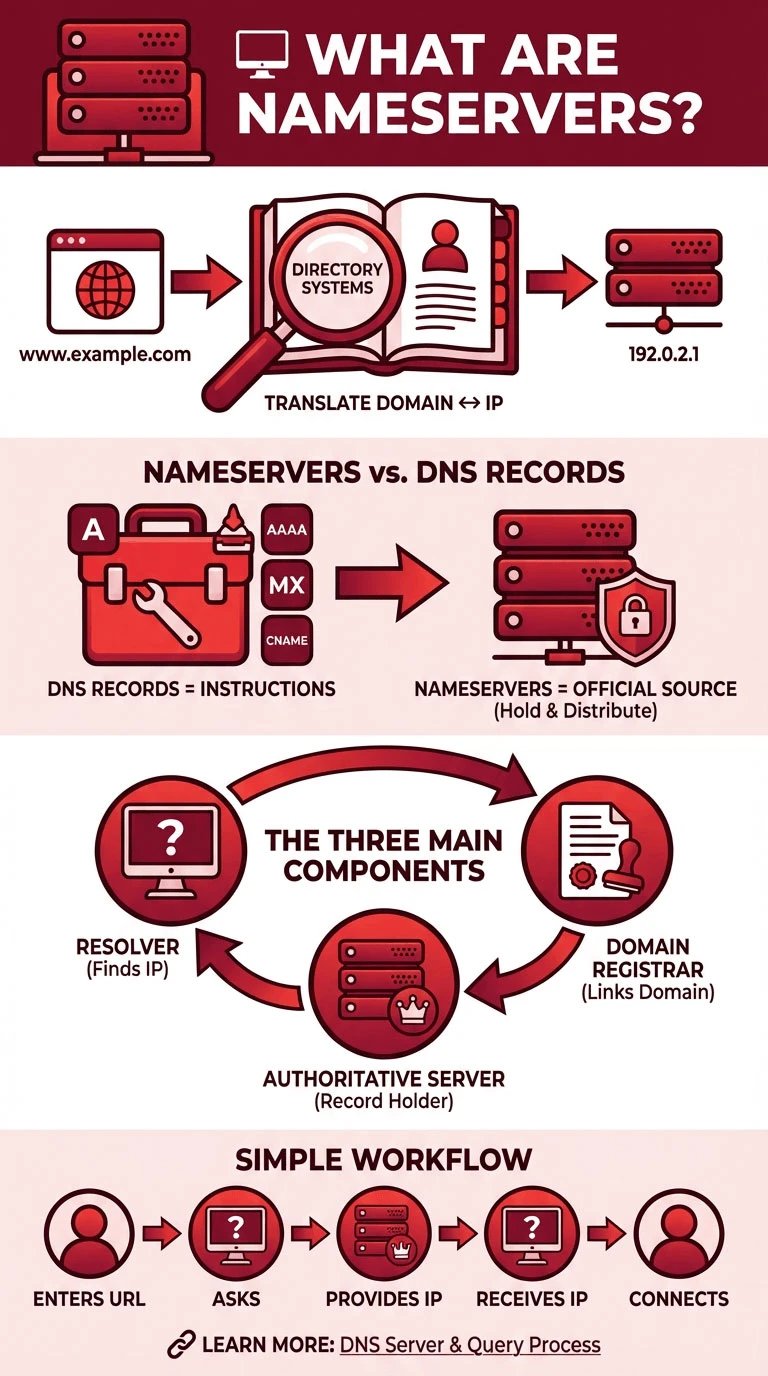
The Domain Name System (DNS) relies on nameservers which act as directory systems that translate domain names into their corresponding IP addresses. The DNS resolver uses authoritative nameservers to find the correct IP address when you enter a website URL into your browser which allows your device to connect with the appropriate server.
The distinction between nameservers and DNS records must be understood because DNS records define domain routing instructions through A records, AAAA records, MX records, and CNAME records while nameservers function as the official sources which hold and distribute these DNS records. The three main components of this system include resolvers that ISPs and public DNS services usually provide along with authoritative nameservers that registrars and hosting providers control and the domain registrar itself which together enable proper DNS query resolutions throughout the internet.
To better understand how resolvers and authoritative servers work together, it’s helpful to first review What is a DNS server and how DNS queries are processed step by step.
🗂️ What Are Default Nameservers?
Default nameservers are the DNS servers provided automatically by your domain registrar when you register a domain. They allow your domain to resolve without requiring any additional setup from a hosting provider.
-
Provided and managed by the domain registrar.
-
Ideal for simple websites or domains without complex hosting needs.
-
Useful when using external email providers or DNS-only services.
-
DNS records are maintained entirely by the registrar, including A, MX, and CNAME records.
-
No additional configuration is required for basic domain pointing.
Using default nameservers gives you a straightforward, registrar-managed DNS setup, which can reduce complexity but may limit advanced control over records compared to hosting-provider nameservers.
🛠️ What Are Hosting Nameservers?
Hosting nameservers are DNS servers provided and managed by your web hosting provider, rather than the domain registrar. They allow seamless integration between your domain and the hosting environment, enabling automatic management of DNS records through hosting control panels.
-
Managed by the hosting provider, ensuring DNS records match server configurations.
-
Integrated with control panels like cPanel, Plesk, or custom dashboards for easy management.
-
Automatically updates essential records (A, AAAA, MX, CNAME) when you create or move websites.
-
Ideal for shared, VPS, or dedicated hosting setups where the hosting provider handles both web and email routing.
-
Simplifies setup for beginners or those running a single-website environment.
Using hosting nameservers ensures that DNS settings remain synchronized with your hosting platform, reducing errors and simplifying domain pointing for both technical and non-technical users.
⚖️ Default Nameservers vs Hosting Nameservers
Choosing between default nameservers and hosting nameservers depends on your website’s complexity, email setup, and technical expertise. Comparing their features side by side makes it easier to understand the trade-offs and decide which option fits your needs.
|
Feature / Aspect |
Default Nameservers |
Hosting Nameservers |
|
Managed by |
Domain registrar |
Hosting provider |
|
DNS Record Control |
Manual setup in registrar panel |
Automatically synced with hosting control panel |
|
Ease of Use |
Basic, suitable for simple domains |
Beginner-friendly with hosting integration |
|
Best Use Cases |
External email, CDN-only, multi-host setups |
Shared, VPS, dedicated hosting, single-site setup |
|
Automatic Updates |
No automatic updates |
Automatically updates A, MX, CNAME records |
|
Technical Knowledge Required |
Moderate to high |
Low to moderate |
|
Downtime Risk During Migration |
Lower if only updating A/MX records |
Higher if switching entire NS |
|
Advanced DNS Management |
Fully customizable |
Limited to hosting provider capabilities |
Both default and hosting nameservers have their strengths and limitations, and selecting the right option ensures smoother website operation and minimal DNS issues.
🧩 Real-World Scenarios
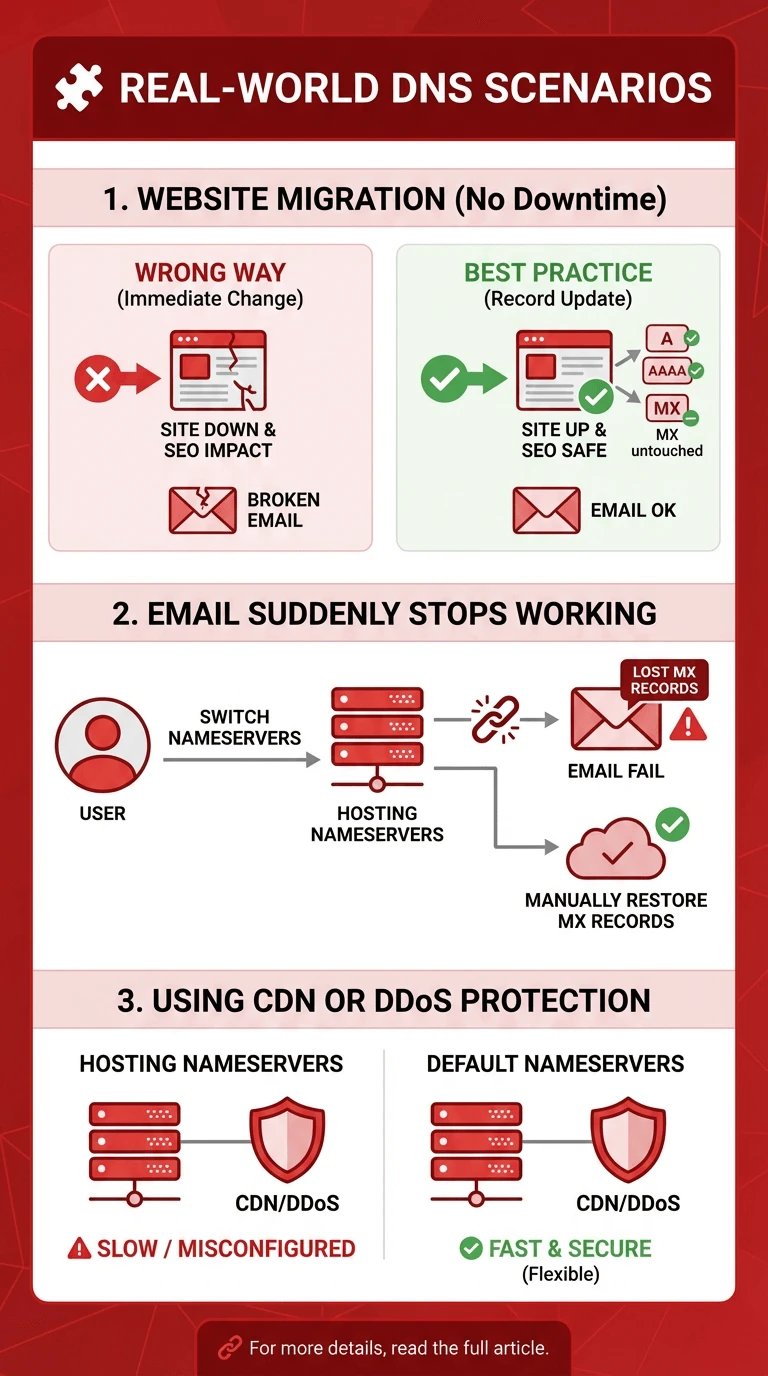
Understanding the practical consequences of choosing default nameservers versus hosting nameservers requires looking at real-world situations. Decisions made without considering DNS behavior can lead to website downtime, broken emails, or SEO setbacks. The scenarios below illustrate common mistakes and best practices that experienced system administrators encounter regularly.
Website Migration Without Downtime
When migrating a website to a new hosting provider, changing nameservers immediately can interrupt DNS resolution, leading to temporary website downtime. This also risks affecting SEO if search engines encounter unreachable pages or slow responses during propagation.
Email services tied to the old hosting provider can stop working if MX records are inadvertently replaced. A safer alternative is to update only the A and AAAA records pointing to the new server, keeping nameservers intact until DNS propagation completes.
Email Suddenly Stops Working
A common mistake is switching to hosting nameservers without checking existing email configurations. When hosting nameservers overwrite DNS records, MX records may be replaced, causing incoming emails to fail.
Many users experience this suddenly, with no warning, because the hosting provider automatically configures DNS for web traffic but doesn’t account for third-party email setups. Reviewing and manually restoring MX records before switching nameservers prevents this type of service disruption.
Using CDN or DDoS Protection
Websites using content delivery networks (CDNs) or DDoS protection services often perform better when pointed via default nameservers from DNS-only providers. Hosting nameservers may not support advanced CDN features or custom routing rules, causing delays or misconfigurations.
Default nameservers offer more flexibility for external services while maintaining reliable DNS resolution. Organizations with complex multi-host setups or high-traffic sites frequently prefer this approach to minimize latency and maximize security.
💡 When You Should Use Default Nameservers
Default nameservers are often the preferred choice when your website setup requires advanced flexibility or relies on external services. They provide centralized DNS control, which is crucial for multi-host architectures, CDNs, or third-party email systems.
|
Use Case / Scenario |
Why Default Nameservers Are Ideal |
|
External email providers |
Preserve MX records and avoid disruption when using third-party email services. |
|
CDN-first architectures |
Allows easy integration with CDNs and routing optimization. |
|
Multi-host or microservice setups |
Centralized DNS control simplifies complex, multi-server configurations. |
|
Advanced DNS management needs |
Provides full control over A, AAAA, CNAME, TXT, and SRV records. |
Many users who rely on registrar-managed DNS or third-party providers prefer using a Free Domain Name Server for greater control and flexibility without switching hosting environments.
🖥️ When Hosting Nameservers Are the Better Choice
Hosting nameservers are ideal when you want DNS management to be automatically aligned with your web hosting environment. They simplify setup and reduce technical overhead, making them suitable for users who don’t need advanced DNS customization.
-
Shared hosting users who rely on the provider to manage DNS for multiple clients.
-
Beginners or non-technical site owners seeking a simple, hassle-free setup.
-
Single-website setups where domain and hosting are managed together.
-
Faster initial setup and easier access to hosting support when DNS issues arise.
Using hosting nameservers ensures smooth integration with your hosting platform while minimizing configuration errors and support complexity.
🔍 DNS vs Nameservers
Many users confuse DNS and nameservers, which can lead to configuration mistakes or service interruptions. Understanding the technical distinction is essential for proper domain management and avoiding downtime.
-
DNS (Domain Name System): A system that translates human-readable domain names into IP addresses.
-
Nameservers: The authoritative servers that store DNS records and respond to queries from resolvers.
-
Analogy: DNS is like the address book, while nameservers are the librarians who provide the correct address when asked.
-
Confusing the two often leads to overwriting important records, causing website or email failures.
Grasping what is the difference between dns and nameservers helps prevent common mistakes and ensures your domain points to the right servers reliably.
🛠️ How to Point a Domain to Hosting
Pointing a domain to your hosting correctly is critical for website availability, email delivery, and SEO stability. There are two primary approaches: changing nameservers or updating DNS records only. Choosing the right method depends on your technical expertise, hosting setup, and whether you want to preserve existing services like email or CDN integration.
If you decide to change nameservers entirely, following a structured process like the one explained in How to Change DNS helps avoid common propagation and configuration issues.
Change Nameservers
Changing nameservers involves updating your domain at the registrar to point to the hosting provider’s authoritative DNS servers. This method automatically redirects all DNS records, simplifying the setup but carrying risks such as temporary website or email downtime during propagation.
It’s suitable for beginners or single-site setups but may overwrite existing configurations if you use third-party services.
Update DNS Records Only
Instead of switching nameservers, you can update only the A and AAAA records to point your domain to the hosting server while keeping other records intact. This preserves MX records for email and other critical configurations, reducing the risk of service interruptions. Additionally, careful TTL (Time to Live) management ensures smoother propagation and minimal downtime.
⏳ Propagation, Caching, and “It’s Not Working Yet”
DNS changes don’t take effect instantly; they must propagate across multiple servers worldwide. Understanding how caching works helps reduce unnecessary panic when your website or email doesn’t update immediately.
-
DNS Propagation: The process by which DNS changes spread across all recursive and authoritative servers globally.
-
Browser Cache: Local browsers may hold outdated DNS entries, causing delays in resolving the new IP.
-
ISP Cache: Internet Service Providers often cache DNS records, which can extend propagation times.
-
Authoritative NS: These are the final source of truth for DNS records and must be updated correctly.
-
From Disk Cache: Some systems store DNS lookups locally, which may show old results even after propagation.
Being aware of propagation and caching mechanisms ensures you can troubleshoot delays effectively and avoid unnecessary configuration changes.
🛡️ Security, Performance, and Reliability Considerations
Nameservers are critical not only for routing traffic but also for maintaining security, speed, and overall reliability. Choosing the right configuration can prevent downtime, DDoS attacks, and other operational issues.
-
Nameserver Redundancy: Use multiple authoritative nameservers to prevent single points of failure.
-
DNS-level DDoS Protection: Certain providers offer mitigation at the DNS layer to maintain availability.
-
Fast Public DNS ≠ Authoritative Nameservers: Public resolvers like 1.1.1.1 or 8.8.8.8 only query; they don’t store authoritative records.
-
Industry Standards: Nameservers and DNS operate under RFC 1034 and RFC 1035 specifications for consistent and reliable behavior.
Ensuring proper nameserver setup and understanding these considerations improves security, performance, and uptime for your domain and services.
Conclusion
Your website setup and technical knowledge and your service needs will determine which nameservers to use between default nameservers and hosting nameservers. The default nameservers allow advanced DNS management and CDN usage and multi-host system operation, while hosting nameservers enable simple setup and automatic record management for users who operate single sites.
For projects that require stability, flexibility, and full DNS control, choosing a reliable infrastructure matters, solutions like VPS Hosting from 1Gbits combine instant setup, global data centers, and 24/7 support to support both simple and advanced deployments.





![What Is Cold Data Storage? ❄️ [2026 Guide]](https://1gbits.com/cdn-cgi/image//https://s3.1gbits.com/blog/2026/02/what-is-cold-data-storage-750xAuto.webp "What Is Cold Data Storage? ❄️ [2026 Guide]")
![What Is Virtual Desktop Infrastructure? 🖥️ [VDI Explained]](https://1gbits.com/cdn-cgi/image//https://s3.1gbits.com/blog/2026/02/what-is-virtual-desktop-infrastructure-vdi-750xAuto.webp "What Is Virtual Desktop Infrastructure? 🖥️ [VDI Explained]")