
If you work in the world of DevOps, cloud architecture, or advanced software development, you’ve probably heard the names Docker and containerd many times. But are these two technologies actually competitors, or do they complement each other? Many developers believe Docker is simply an outdated tool that Kubernetes has replaced, while containerd is the new champion. In this Docker vs Containerd guide, we aim not only to explore their differences but also to understand why this layered architecture is essential for the cloud native ecosystem and how it helps you build more efficient and secure systems.
Overview of Docker
In fact, Docker stands out from regular tools because of its role as an entire containerization platform. The system is geared towards simplifying the steps of building, shipping, and running applications inside containers, the ultimate goal being to ensure a hassle-free and user-friendly experience.
How Docker Works?
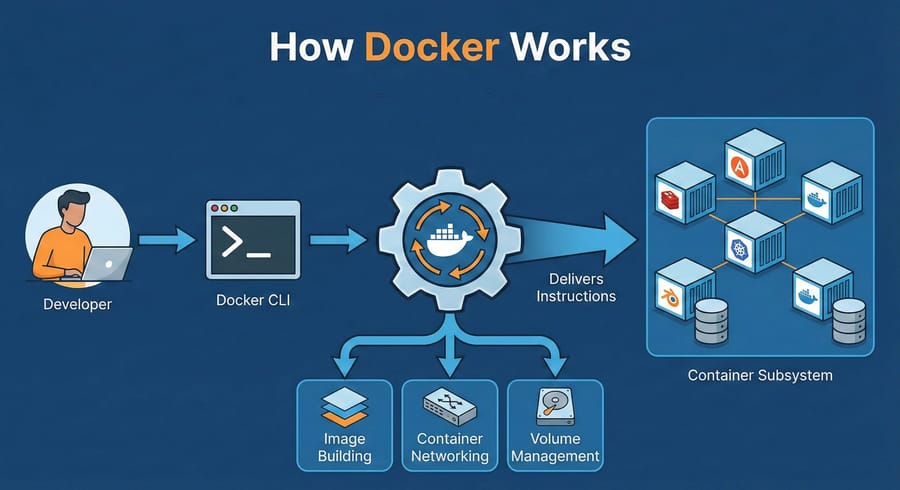
In the whole procedure, Docker is the main communication link which receives the developer's command and thereafter it deciphers and delivers the correct instructions to the container subsystem. We reach out to the Docker CLI with our commands like docker build and docker run to initiate this work process.
Besides managing the tasks of running containers, Docker also makes handling various other administrative jobs simpler, for instance, container networking, volume management, and image building. It is this comprehensiveness that makes Docker a very convenient and indispensable tool for programmers.
Docker also simplifies tasks like networking and volumes, and for orchestrating multiple containers, see What is Docker Swarm.
Docker Architecture
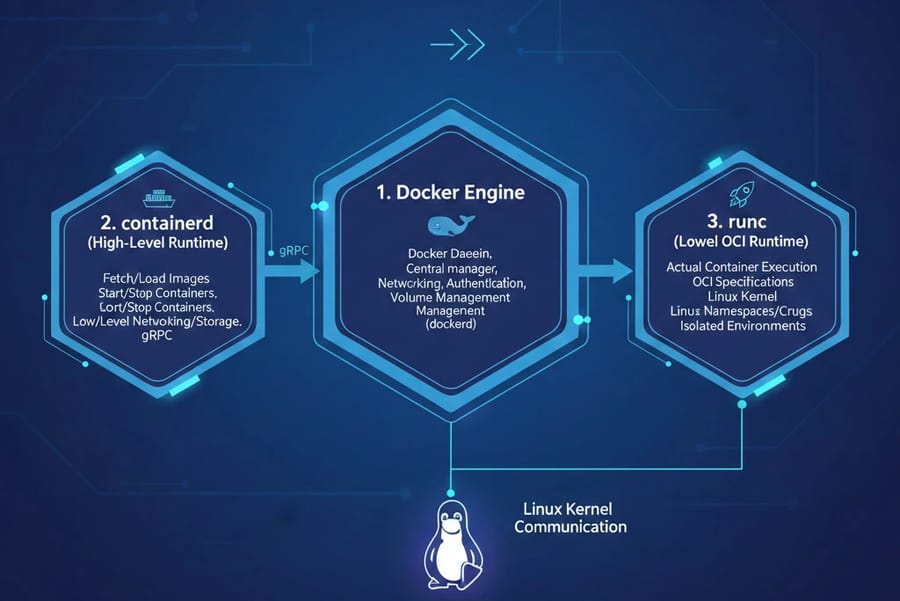
Docker is a modular set of components and not a single monolithic application,i.e., its architecture comprises the three different parts that manage the different layers of container execution.
1. Docker Engine
The Docker Daemon is the central manager that runs in the background and is the one that receives, interprets and executes your commands. It is also responsible for tasks such as networking, security, authentication and volume management. Basically, dockerd is the connector link that connects you with the lower-level execution layers.
2. containerd (High-Level Runtime)
For the actual execution of containers, Docker uses containerd. containerd is a fully-fledged service performing operations such as fetching and loading images, starting and stopping containers as well as handling low-level networking and storage. To execute these actions efficiently and independently, Docker Daemon communicates with containerd via gRPC.
If you're new to container fundamentals, you may also want to read our guide: What is a Docker Image.
3. runc (Low-Level OCI Runtime)
runc is the layer that sits at the very bottom of the stack and represents the actual container execution part. It is a small runtime that implements the Open Container Initiative (OCI) specifications and communicates directly with the Linux kernel. For the final step in the process,containerd hands over the execution to runc with which it uses Linux Namespaces and Cgroups to create isolated container environments.
To start using Docker hands-on, you can follow our step-by-step guide: How to Run Docker.
Overview of Containerd
While Docker is a full-featured platform, containerd is a high-level container infrastructure manager at the node level. Functionally, containerd serves as the “beating heart” of container execution. It focuses solely on managing the container lifecycle: pulling images from registries, unpacking them on disk, and running containers using runc.
How Containerd Works
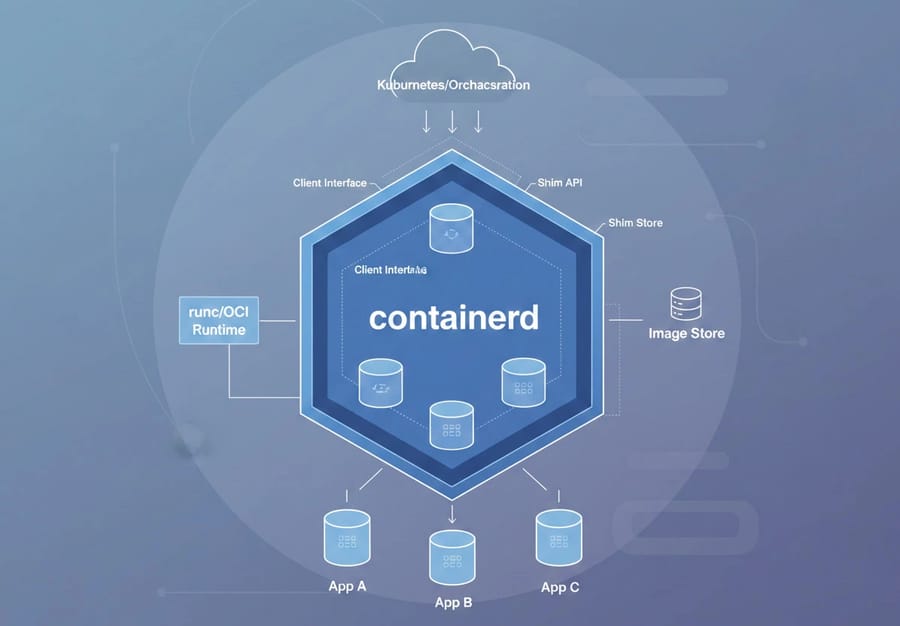
Because containerd has a smaller and more focused scope, it is considered a lightweight tool with minimal resource usage. This narrow focus is intentional and allows it to perform its core tasks efficiently, including:
- Lifecycle management: starting, stopping, and terminating container processes.
- Image transfer and storage: handling image pulls from registries and managing their low-level storage.
Unlike Docker, which offers many higher-level developer tools, containerd doesn’t include its own GUI or developer-friendly CLI. Interaction typically happens through tools like ctr or, in Kubernetes environments, crictl.
Containerd has close connections with Kubernetes, and basically, any modern distribution like AKS, EKS, and GKE is using it as the default runtime, so they directly communicate to kubelet via CRI. Besides, in the practical scenarios, containerd can be found extensively in CI/CD pipelines as well as on some low-resource devices such as IoT and edge systems because it has low overhead and high performance.
If you're exploring container fundamentals, especially understanding What Is a Docker Container, you may also find our guide helpful.
Feature Comparison: Docker vs Containerd
Here we compare the major differences between these two technologies from both technical and practical points of view. The aim of such a comparison is to help you decide which one would be more suitable in various scenarios.
|
Feature |
Docker |
Containerd |
|
Type of Tool |
Full container platform (Build + Run + Tools) |
Low-level container runtime (Core Runtime) |
|
Primary Purpose |
Simplifying container build, run, and management for developers |
Fast, stable, and efficient container execution for production and Kubernetes |
|
Architecture |
Includes Docker Engine, Docker CLI, containerd, and runc |
Includes core runtime with direct integration to runc |
|
Command-Line Interface (CLI) |
Yes – user-friendly docker CLI + Docker Compose |
No high-level CLI; only low-level tools like ctr and crictl |
|
CRI Support (Kubernetes) |
Not supported directly (dockershim removed) |
Full native CRI support – default runtime for Kubernetes |
|
Kubernetes Compatibility |
No longer recommended; only Docker-built images are usable |
Best choice for Kubernetes (v1.24+ and onward) |
|
Resource Consumption |
Heavier (idle RAM ~150MB) |
Much lighter (idle RAM ~45MB) |
|
Container Startup Speed |
Slower (~500ms) |
Faster (~280ms) |
|
Additional Tools |
Docker Compose, Docker Swarm, Docker Hub, BuildKit |
No high-level tools; runtime only |
|
Best Use Cases |
Local development, DevOps teams, testing environments |
Production workloads, Kubernetes clusters, large-scale systems |
|
Ease of Use |
Very easy and developer-friendly |
More complex; requires deeper technical knowledge |
|
Image Building Support |
Yes (BuildKit/buildx) |
No – requires external build tools |
|
Community Support |
Very large, developer-focused community |
Cloud Native–focused, enterprise-grade community |
|
Adoption in Large Companies |
Common in development & CI/CD workflows |
Standard runtime for major cloud providers (AWS, Google, Azure) |
Let's explore the main criteria a little deeper.
Architecture
Docker is basically a full platform that is made up of a runtime, build tools, a registry, a CLI, and a management daemon, hence, it is a wide and comprehensive solution. On the other hand, containerd is a minimal runtime whose main focus is core container execution and lifecycle management only. Because of this difference in architecture, Docker is less efficient while containerd is more lightweight and can serve as a stable base for other tools.
CLI Support
With Docker, you get a developer-friendly CLI, and with simple commands like docker ps or docker stop, managing containers is easy. In contrast, containerd does not provide a user-friendly CLI. If you work with it directly, you must use the ctr tool or depend on Kubernetes’ CRI interface. Because of this, containerd typically requires more familiarity with low-level commands than Docker.
Kubernetes Compatibility
Containerd can communicate with Kubernetes directly via CRI and is, therefore, considered the default runtime after the removal of dockershim in Kubernetes v1.24. This means that Kubelet can interact with containerd over gRPC sockets without any intermediaries. Docker Engine, on the other hand, is not CRI-compliant and was using the dockershim that has now been removed. Hence, contemporary Kubernetes clusters have to run containers with containerd or CRI-O.
Learn how container runtimes compare in Docker vs Kubernetes in our detailed guide.
Performance and Resource Usage
Research shows that containerd delivers noticeably faster container startup times thanks to its simpler architecture and the absence of Docker Daemon’s extra layers. Some benchmarks report containerd at 0.139 seconds compared to 0.534 seconds for dockerd.Other metrics reinforce this:
-
Resource Efficiency: Containerd uses memory and CPU more efficiently due to its lightweight, focused design
-
Economic Impact: Better resource usage means running more containers on the same hardware, which reduces cloud costs.
-
Networking: Containerd provides lower-overhead networking, while dockerd can show higher latency under heavy loads.
This level of efficiency is crucial for environments that need rapid deployment and large-scale orchestration.
Ecosystem and Community
Docker has a large community and ecosystem, with tools like Docker Compose, Docker Swarm, and Docker Hub that simplify development. Containerd, however, focuses on the core container layer and has a cloud-native–focused community. It’s backed by Docker and the CNCF and is widely used by major companies in Kubernetes clusters.
So, these two tools are not competitors. Instead, Docker is a complete platform that actually relies on the powerful containerd core under the hood.
When Should You Use Docker vs Containerd?
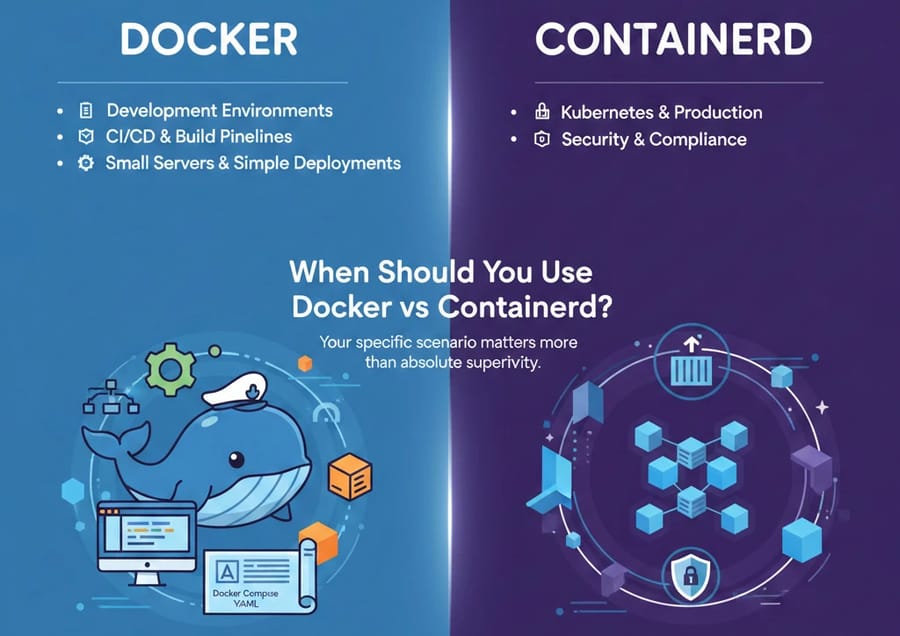
The choice between these two technologies depends more on your specific scenario than on the absolute superiority of one over the other. Understanding the purpose of each will help you make a better decision.
1. Development Environments → Docker
Docker offers a simple and integrated user experience, making it the best choice for development. It provides tools for building images, networking, and managing multi-container setups without relying on complex low-level tools. Docker Compose allows developers to define and run complete environments.
2. Kubernetes & Production → containerd
In large-scale Kubernetes clusters, containerd is more efficient because it eliminates the Docker Daemon, reducing CPU and RAM overhead. Containers start faster, and resource usage is optimized on each node. Direct use of the CRI protocol simplifies Kubernetes architecture and makes troubleshooting more transparent. Overall, containerd is ideal for production environments where performance and stability are critical.
3. Security & Compliance → containerd
containerd integrates easily with advanced security runtimes like Kata Containers and gVisor, enhancing isolation and enforcing stricter security layers. This is especially important for organizations handling sensitive data. Its CRI support allows fine-grained security configurations and uniform policy enforcement across the cluster. This flexibility makes containerd the preferred choice for secure and compliance-focused scenarios.
4. CI/CD & Build Pipelines → Docker
In CI/CD environments such as GitHub Actions, GitLab CI, or Jenkins, Docker has strong built-in support. All stages including image building, testing, security scanning, and deployment can be handled by a single tool. This eliminates the need for separate tools like Buildah or Kaniko and simplifies pipeline management. For teams not yet fully migrated to Kubernetes, Docker remains a standard and cost-effective solution.
5. Small Servers & Simple Deployments → Docker
For running a few services on one or two servers without Kubernetes, Docker provides an easy and low-complexity experience. Docker Compose makes managing multi-container setups as simple as editing a single YAML file. In contrast, using containerd requires specialized tools like crictl and CNI configuration, adding complexity. Therefore, Docker is the most natural and efficient choice for small environments.
If you're also comparing modern container workflows, check out our in-depth guide on Docker vs Podman.
Common Misconceptions About Docker and Containerd
The public discussion around the removal of Dockershim from Kubernetes in 2020 created many misunderstandings about Docker’s status. We need to clear up these misconceptions.
Myth 1: “Docker is deprecated and should no longer be used.”
Truth: This is a major misconception. Docker, as a developer tool and a complete platform for building and managing container images, is fully alive and actively maintained. What Kubernetes deprecated was the Dockershim layer, which allowed the Kubelet to communicate with the Docker Daemon. The goal was to simplify the architecture and remove an unnecessary intermediary layer in favor of direct communication with CRI-compatible runtimes like containerd.
Myth 2: “I need to rebuild my CI/CD pipelines and existing images.”
Truth: There is no need for rebuilding. The container images you create with docker build follow the Open Container Initiative (OCI) image format standards. Since containerd, CRI-O, and other modern runtimes also support the same OCI standard, any image built with Docker will run perfectly on containerd without any modification. Your CI/CD pipelines that rely on the Docker CLI to build images remain fully valid.
Myth 3: “Migrating to containerd will disrupt my Kubernetes deployments.”
Truth: This is only true if you are explicitly and knowingly relying on Docker Daemon–specific behaviors. For example, if your processes require mounting the Docker socket (/var/run/docker.sock) or depend on Docker’s custom logging drivers, you may need adjustments. But for 99% of standard workloads, switching the runtime from Dockershim to containerd happens smoothly with no disruption at all.
1Gbits Experts’ Recommendations
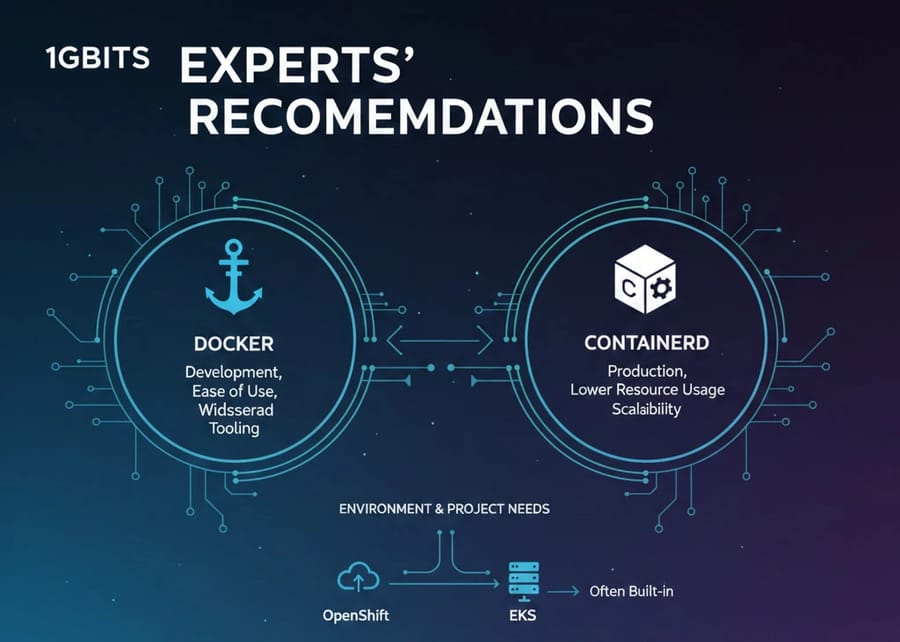
Overall, the environment and the needs of your project determine which tool is the better fit. Most experts suggest using Docker in development environments or whenever you need high speed and ease of use because it provides widespread tooling and advanced composition features.
However, for large production environments, especially on Kubernetes, it is better to rely on containerd. Thanks to its lower resource usage and native CRI support, it offers better performance and scalability (tutorialworks.com, wallarm.com).
And if you are using cluster management platforms like OpenShift or EKS, there is a good chance the service you are working with is already using containerd or CRI O behind the scenes.
To explore how Docker compares to other container technologies, take a look at our detailed guide on Docker vs LXC.
Pick the Right Tool and Build Smarter
We have reached the end of this article, and as you have seen, both tools play important roles in the container ecosystem. They are not competitors, but rather tools that each serve different purposes. For this reason, it is generally recommended to use containerd in large production environments or Kubernetes clusters, and to use Docker in development setups or single-server environments.
If you are looking for a cloud-ready platform to run Docker, our Docker VPS services at 1gbits offer an efficient option that allows you to set up your container-based virtual server without hassle and gives you the flexibility needed for easy container deployment and management.

Leave A Comment