How to Create a Subdomain for My Domain starts with understanding what a subdomain actually is, why it exists, and how it fits into real-world website and infrastructure setups. A subdomain is an extension of your main domain that allows you to separate content, services, or environments, such as blogs, apps, staging platforms, or servers, without registering a new domain. People create subdomains to improve organization, scale projects cleanly, isolate technical components, and manage performance or SEO more effectively.
This guide explains how to create a subdomain for your domain step by step, covering DNS-based methods, hosting panels like cPanel, providers such as Cloudflare and Google Domains, SEO considerations, common mistakes, and practical use cases so you can confidently set up a subdomain that works correctly in 2025.
👍 What Is a Subdomain?
A subdomain is a prefix added to your main domain name that creates a separate address under the same domain structure, such as blog.example.com or api.example.com, and it functions as an independent section of a website or service. From a technical perspective, subdomains function through DNS records that direct the subdomain to a specific IP address or service, enabling it to load different content, applications, or servers while remaining part of the main domain.
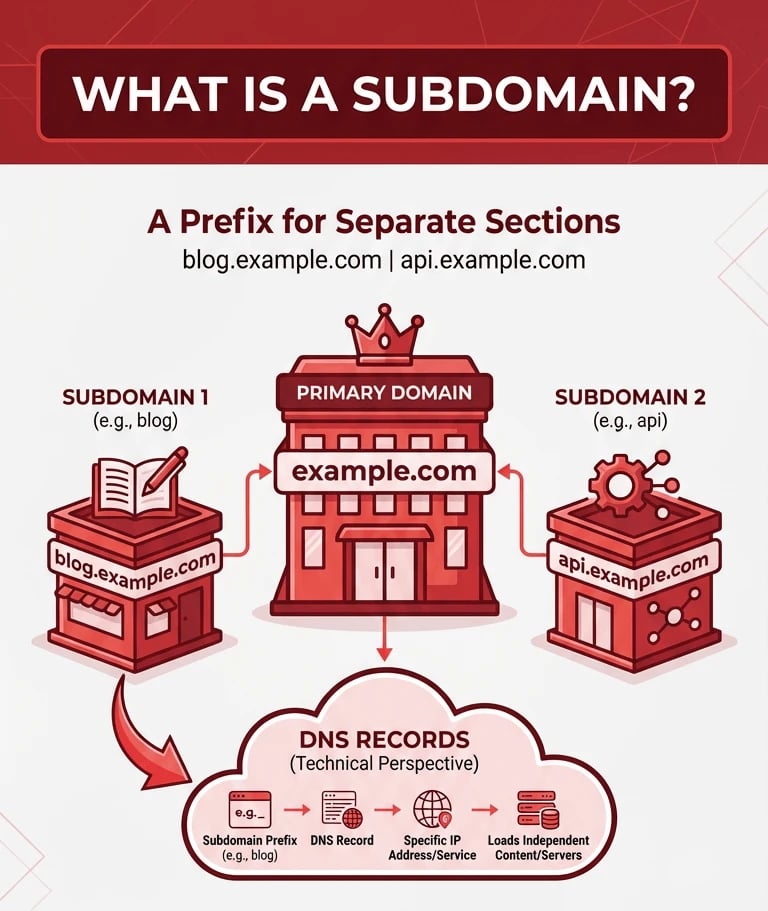
A clear domain and subdomain example helps visualize this relationship: example.com represents the primary domain, while shop.example.com, blog.example.com, or dev.example.com are subdomains that can each host distinct projects with their own hosting setup, configuration, and purpose.
🔍 Domain vs Subdomain
A domain represents the primary web address of a project, while a subdomain acts as an extension that separates specific content, services, or environments under that main address. Understanding the difference helps you decide how to structure websites, applications, and infrastructure more efficiently.
|
Feature |
Domain |
Subdomain |
|
URL structure |
example.com |
blog.example.com |
|
Purpose |
Main identity of a website or brand |
Dedicated section, service, or environment |
|
SEO behavior |
Acts as a primary property |
Treated as a separate entity by search engines |
|
Hosting flexibility |
Typically, one main hosting setup |
Can point to a different server or IP |
|
Use cases |
Company website, main platform |
Blog, app, API, staging, game server |
|
DNS configuration |
Root DNS records |
Separate DNS records under the same domain |
In practice, domains define ownership and branding, while subdomains provide structural flexibility, technical isolation, and scalability without requiring the registration of multiple domains.
🚀 Why Create a Subdomain?
Creating a subdomain allows you to organize projects, services, and environments under one domain while keeping them technically separated. This approach improves scalability, management, and flexibility across both simple websites and complex infrastructures.
-
Blogs: Use a blog subdomain such as blog.example.com to separate content publishing from the main website without affecting core functionality.
-
Apps: Host web applications, dashboards, or APIs on subdomains like app.example.com or api.example.com with independent hosting and configurations.
-
Stores: Run an eCommerce platform on shop.example.com to isolate payment systems, performance needs, and security rules.
-
Staging & testing: Create environments like staging.example.com or dev.example.com to test updates safely before pushing changes live.
-
Game servers (Minecraft example): Point a subdomain such as mc.example.com to a Minecraft server IP, making it easier for players to connect and remember the address.
Overall, subdomains provide a clean and professional way to expand digital projects while maintaining control, security, and long-term scalability.
🧭 How to Create a Subdomain for My Domain
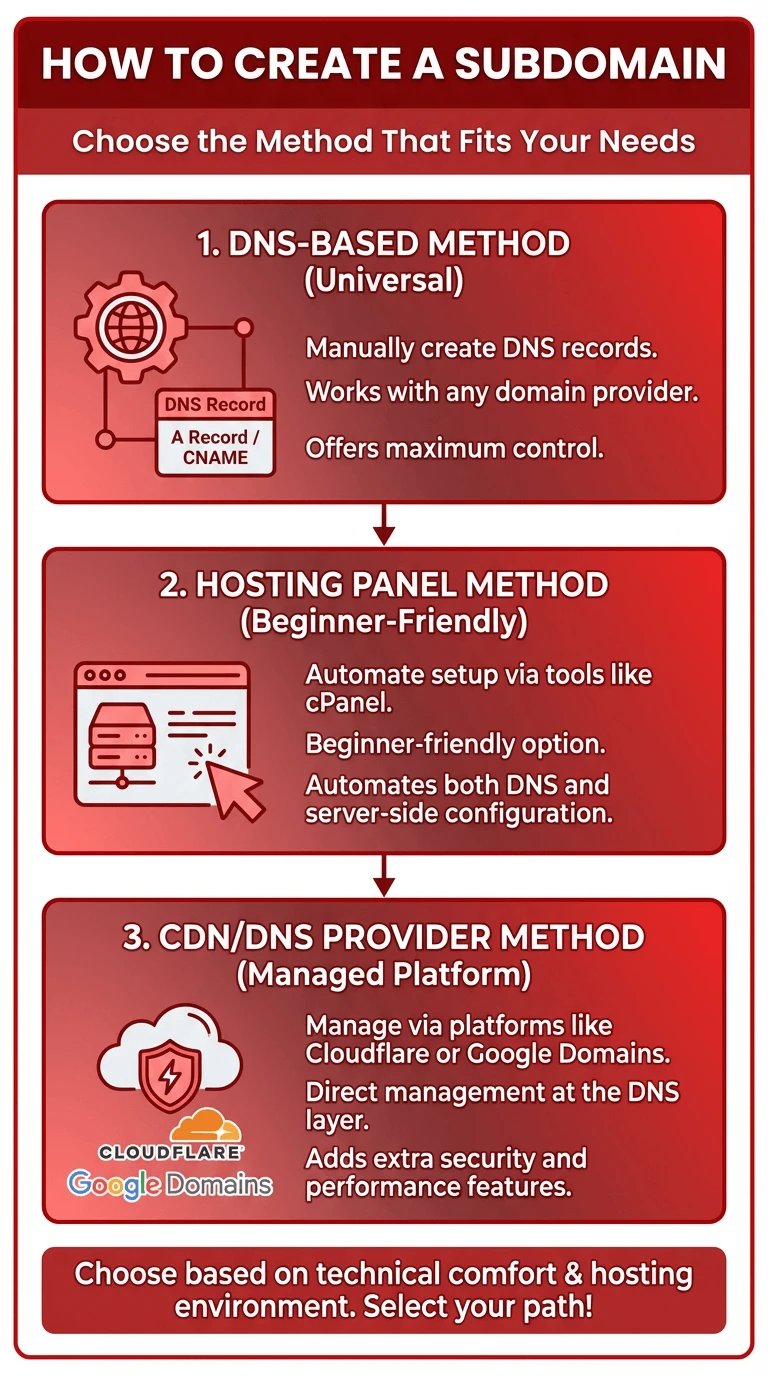
Creating a subdomain for your domain can be done in several ways, depending on where your DNS is managed and how your hosting is set up. Before diving into step-by-step instructions, it helps to understand the available methods and when each one makes sense.
-
DNS-based method (universal): Manually creating DNS records, such as A or CNAME, works with any domain provider and offers maximum control.
-
Hosting panel method: Tools like cPanel automate both DNS and server-side configuration, making this option beginner-friendly.
-
CDN / DNS provider method: Platforms like Cloudflare or Google Domains allow you to create and manage subdomains directly at the DNS layer with additional security and performance features.
This overview sets expectations so you can choose the method that matches your technical comfort level and hosting environment before moving forward.
🌐 How to Create a Subdomain in DNS
Setting up a subdomain in DNS is the most flexible and widely supported approach, regardless of your hosting provider. This method relies on creating DNS records that tell the internet where your subdomain should point.
-
Choose the record type: Use an A record to point the subdomain to an IP address or a CNAME to point it to another domain or hostname.
-
Define the subdomain name: Enter the prefix, such as blog, app, or dev, which forms addresses like blog.example.com.
-
Set the destination: Add the server IP address or target hostname, depending on your use case.
-
Adjust TTL if needed: Lower TTL values can speed up changes during setup or testing.
-
Save and wait for propagation: DNS changes can take anywhere from a few minutes to several hours to fully propagate.
Once the DNS record resolves correctly, your subdomain becomes accessible and ready to be connected to hosting, applications, or services.
🧩 Create Subdomain Using A Record
An A record points a subdomain directly to an IPv4 address, making it the most common method when you control the hosting server. This approach is ideal for VPS, dedicated servers, and game servers where the IP address is fixed and known. When you create a subdomain using an A record, the subdomain connects straight to the server without relying on another domain name.
🔗 Create Subdomain Using CNAME
A CNAME record links a subdomain to another hostname instead of an IP address, allowing it to follow changes automatically. This method is commonly used for services hosted on external platforms, CDNs, or cloud-based applications. Creating a subdomain using a CNAME simplifies management because updates happen at the target domain level rather than in your DNS settings.
🖥️ How to Create a Subdomain in cPanel
cPanel provides one of the simplest ways to create a subdomain for your domain because it combines DNS configuration and server setup in one interface. This method is especially popular on shared hosting and managed servers.
-
Step-by-step overview: Log in to cPanel, open the Subdomains section, enter the subdomain name, choose the parent domain, and click Create.
-
Document root explained: cPanel automatically assigns a document root, which is the folder where the subdomain’s files are stored, and this can be customized if needed.
-
When cPanel auto-creates DNS: In most hosting environments, cPanel automatically creates the required DNS records, so no manual DNS changes are necessary.
Because cPanel handles both DNS and file structure, it is often the fastest way to create a subdomain for beginners and small projects.
☁️ How to Create a Subdomain in Cloudflare
Creating a subdomain in Cloudflare is done entirely at the DNS level, which gives you more control over traffic routing and security. This approach is common for performance-focused websites and applications.
-
DNS-only vs proxied records: DNS-only records point directly to the server, while proxied records route traffic through Cloudflare’s CDN and security layer.
-
A vs CNAME in Cloudflare: Use an A record to point to a server IP or a CNAME to point the subdomain to another hostname.
-
Common Cloudflare mistakes: Using the wrong proxy mode, pointing to incorrect IPs, or forgetting SSL configuration often cause subdomains not to load correctly.
When set up correctly, Cloudflare-based subdomains offer strong performance, DDoS protection, and flexible traffic management.
🌐 How to Create a Subdomain in Google Domains
Subdomains in Google Domains are created by manually adding DNS records through the domain’s DNS settings. This method works well when Google Domains is the authoritative DNS provider.
-
DNS record setup: Add an A record or CNAME with the desired subdomain prefix pointing to the correct destination.
-
TTL considerations: Shorter TTL values help changes propagate faster during setup or testing phases.
-
When Google Domains manages DNS: DNS records only take effect if Google Domains is set as the active nameserver for the domain.
Once DNS propagation completes, the subdomain becomes reachable and ready to be connected to hosting or services.
🧬 Can You Create a Subdomain of a Subdomain?
You can create a subdomain of a subdomain, such as api.dev.example.com, by adding additional DNS records under the same root domain. This structure is useful for organizing complex environments like development, staging, and API layers under a clear hierarchy. However, deeper subdomain levels increase DNS complexity, SSL management effort, and long-term maintenance overhead.
🖧 Setting Up Hosting for a Subdomain
Hosting a subdomain depends on its purpose and resource requirements, ranging from simple content pages to high-traffic applications. Shared hosting suits lightweight subdomains, while VPS and dedicated servers provide better isolation, performance, and scalability for demanding workloads. This naturally connects subdomain usage to infrastructure choices, where high-performance VPS or dedicated hosting solutions from 1Gbits support growth without limitations.
📈 Are Subdomains Bad for SEO?
Search engines treat subdomains as separate entities, meaning they require their own optimization strategy rather than inheriting full authority from the main domain. Subdomains help SEO when a clear separation is needed for large sections like apps, documentation, or regional content, but they can hurt visibility if content is fragmented without proper linking. Following best practices such as consistent internal linking, clear purpose, and strategic use ensures subdomains support rather than weaken overall SEO performance.
🛠️ Common Subdomain Problems & Fixes
Subdomain issues usually come from DNS misconfiguration, timing expectations, or SSL mismatches rather than hosting failures. Knowing the most common problems makes troubleshooting faster and prevents unnecessary changes that can make the situation worse.
|
Problem |
What Causes It |
How to Fix It |
|
DNS not resolving |
Missing or incorrect DNS record, wrong nameservers |
Verify A or CNAME records and confirm the domain uses the correct authoritative nameservers |
|
SSL issues |
The SSL certificate does not cover the subdomain |
Issue or reconfigure an SSL certificate that explicitly includes the subdomain |
|
Wrong IP address |
Subdomain points to an outdated or incorrect server IP |
Update the DNS record to the current server IP and recheck routing |
|
Propagation delays |
DNS changes are not fully propagated across networks |
Wait up to 24 hours, clear local DNS cache, and test from multiple locations |
Most subdomain problems resolve cleanly once DNS accuracy, SSL coverage, and propagation timing are properly understood and verified.
Conlcusion
A subdomain is a good way to separate different parts of your website domain, organize content, and even technical environments without the need to purchase extra domains. Once you know the DNS records, hosting possibilities, and SEO drawbacks, you can weigh the pros and cons of a subdomain for your blog, app, staging environment, or server-based project. After determining your structure, the fast and reliable infrastructure becomes the main factor for your stability and performance, and that is when scalable VPS Hosting or Dedicated Servers like 1Gbits with instant setup, global data centers, and 24/7 expert support really come into play.
To fully understand how subdomains fit into your overall web structure, it helps to start from the fundamentals. Reviewing What Is a Domain Name, clarifies how domains, DNS, and subdomains work together before choosing the right hosting environment.





![What Is Cold Data Storage? ❄️ [2026 Guide]](https://1gbits.com/cdn-cgi/image//https://s3.1gbits.com/blog/2026/02/what-is-cold-data-storage-750xAuto.webp "What Is Cold Data Storage? ❄️ [2026 Guide]")
![What Is Virtual Desktop Infrastructure? 🖥️ [VDI Explained]](https://1gbits.com/cdn-cgi/image//https://s3.1gbits.com/blog/2026/02/what-is-virtual-desktop-infrastructure-vdi-750xAuto.webp "What Is Virtual Desktop Infrastructure? 🖥️ [VDI Explained]")