To show your business online and share your products or services with people, you need a unique address. This address is your domain, or your website’s “address” on the internet. When users type it into their browser, they go straight to your site. Simply put, a domain is a unique, easy-to-read name that stands in for a numerical IP address and helps people find your website. In this post from 1Gbits, we’ll explain domains in simple terms, break down their different parts, and show how they work and why they matter for the internet.
What Is a Domain Name?
Every website on the internet is hosted on a server that has a unique numerical address called an IP address (such as 192.0.2.1). Now imagine if you had to memorize a long string of numbers every time you wanted to visit Google or any other website. Using the internet would quickly turn into a nightmare.
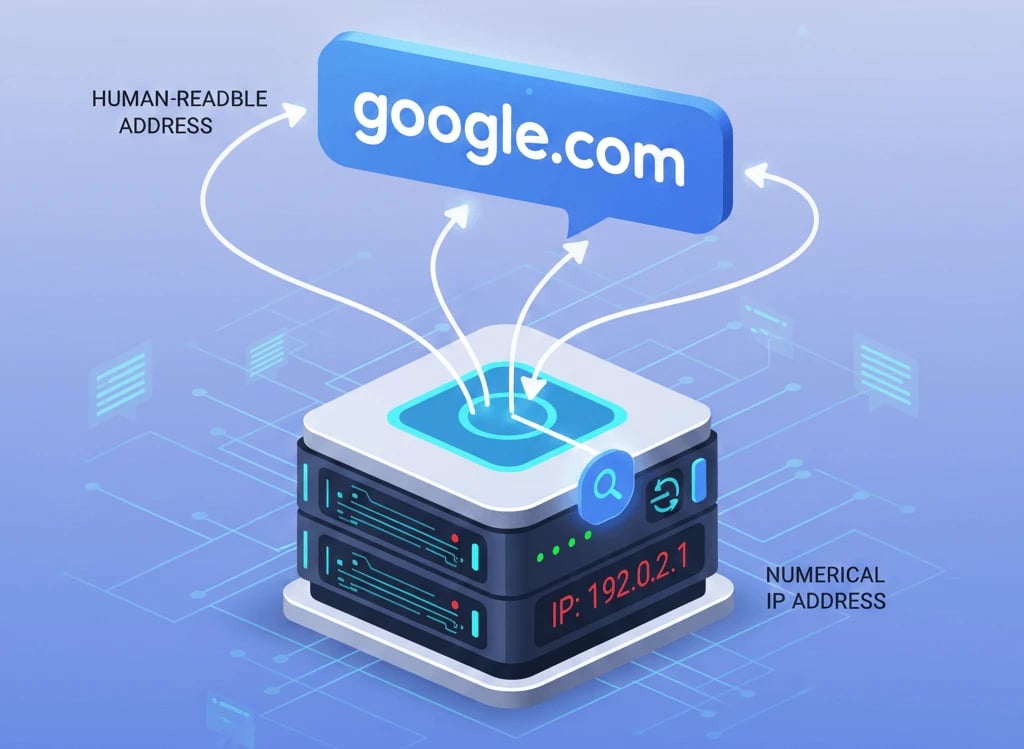
This is exactly why domain names were created. A domain name acts as a human-friendly, text-based layer placed on top of those complex numerical addresses. Simply put, a domain name is a placeholder for an IP address that the human brain can easily recognize and remember. When you type google.com, you are actually calling a friendly name that technical systems translate into its corresponding numerical IP address (such as 192.0.2.1).
Why Is a Domain Name Important?
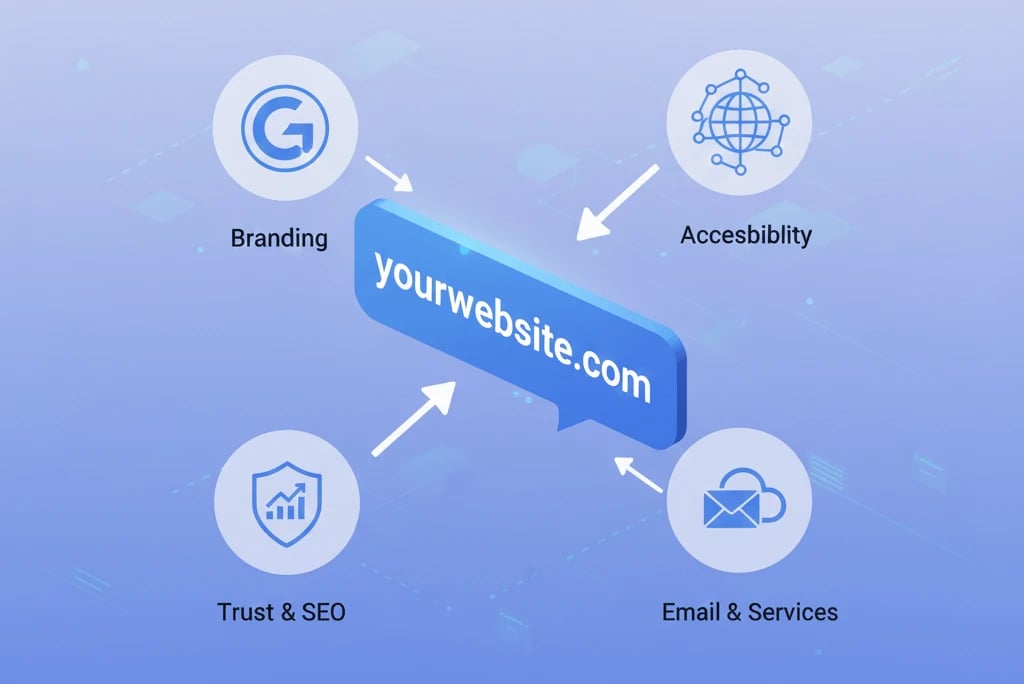
A domain name is the first point of contact between a user and your brand. The right domain builds trust, strengthens brand identity, and helps your website name stay in the audience’s mind. In addition, a simple and relevant domain makes it easier for users to access your website and plays an important role in digital marketing and your overall online credibility.
How Does a Domain Work?
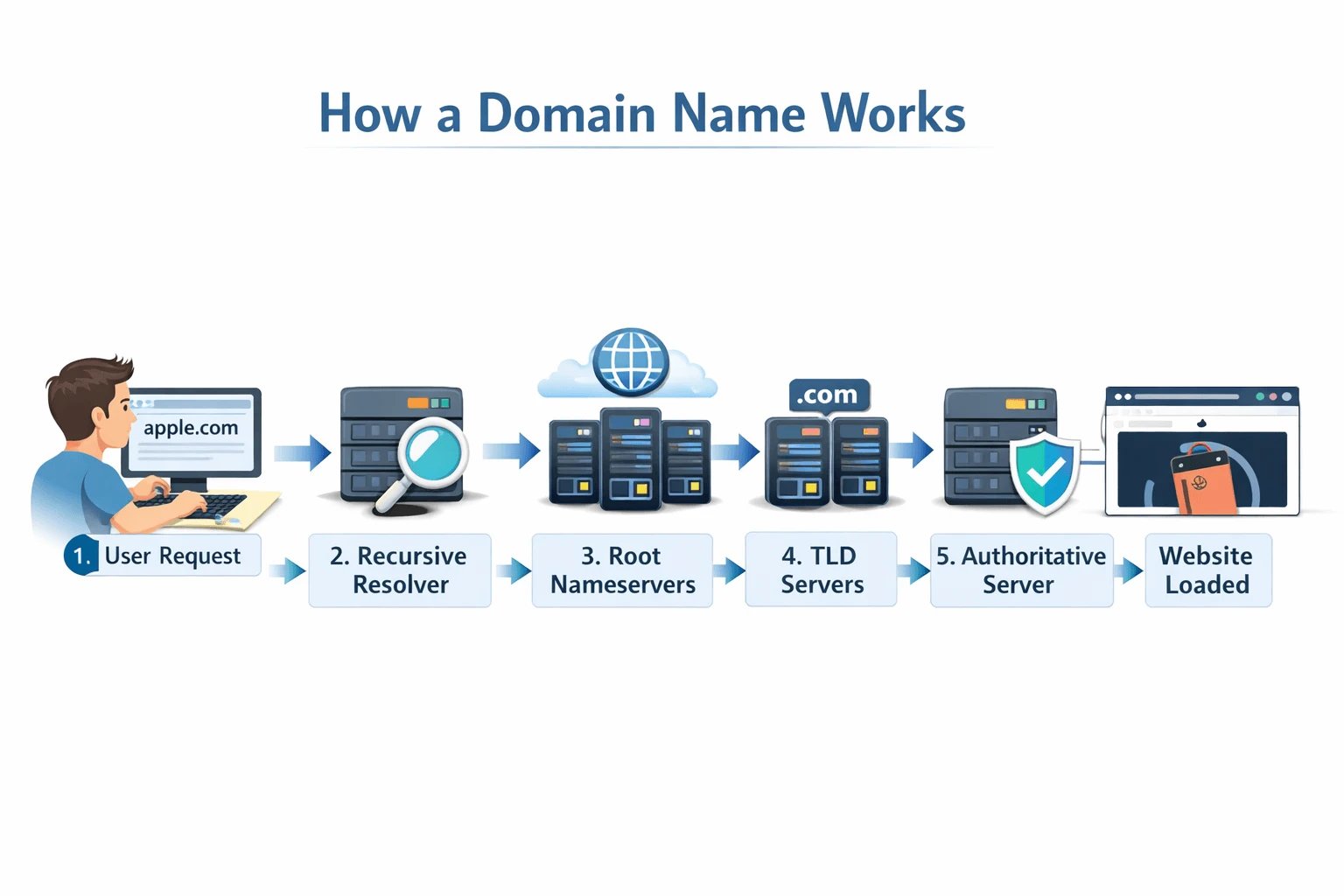
You might ask yourself, “When I type a website name, what actually happens that makes its content appear?” The process of finding a website’s address, known as DNS resolution, involves several key steps, which we’ll go through together:
-
User Request: You type apple.com into your browser. First, the browser checks its own cache. If it doesn’t find the address there, it sends a request to a recursive resolver, which is usually managed by your internet service provider.
-
Querying the Root Nameservers: The recursive resolver asks a root nameserver, “Do you know where apple.com is?” The root server doesn’t know the exact address, but it does know which servers are responsible for the .com extension and directs the resolver to them.
-
Contacting the TLD Servers: Next, the resolver queries the TLD servers (for example, those responsible for the .com extension). These servers hold the addresses of the authoritative nameservers for that specific domain.
-
Getting the Final Answer from the Authoritative Server: The authoritative server is the final stop. It holds the main IP address record of the website. It returns the numerical IP address (for example, 17.253.144.10) to the recursive resolver.
-
Loading the Website: The resolver sends the IP address back to your browser. Using this numerical address, the browser connects directly to Apple’s hosting server and requests the website files so you can see the page.
All of these steps happen in less than the blink of an eye. What’s interesting is that, to speed up this process, the results are cached at different stages, so the next time you visit the site, there’s no need to go through the entire process again.
If you want a deeper understanding of the systems behind this process and the role they play in domain resolution, take a moment to read our detailed guide on What is a DNS server.
Anatomy of a Domain Name: Its Building Blocks
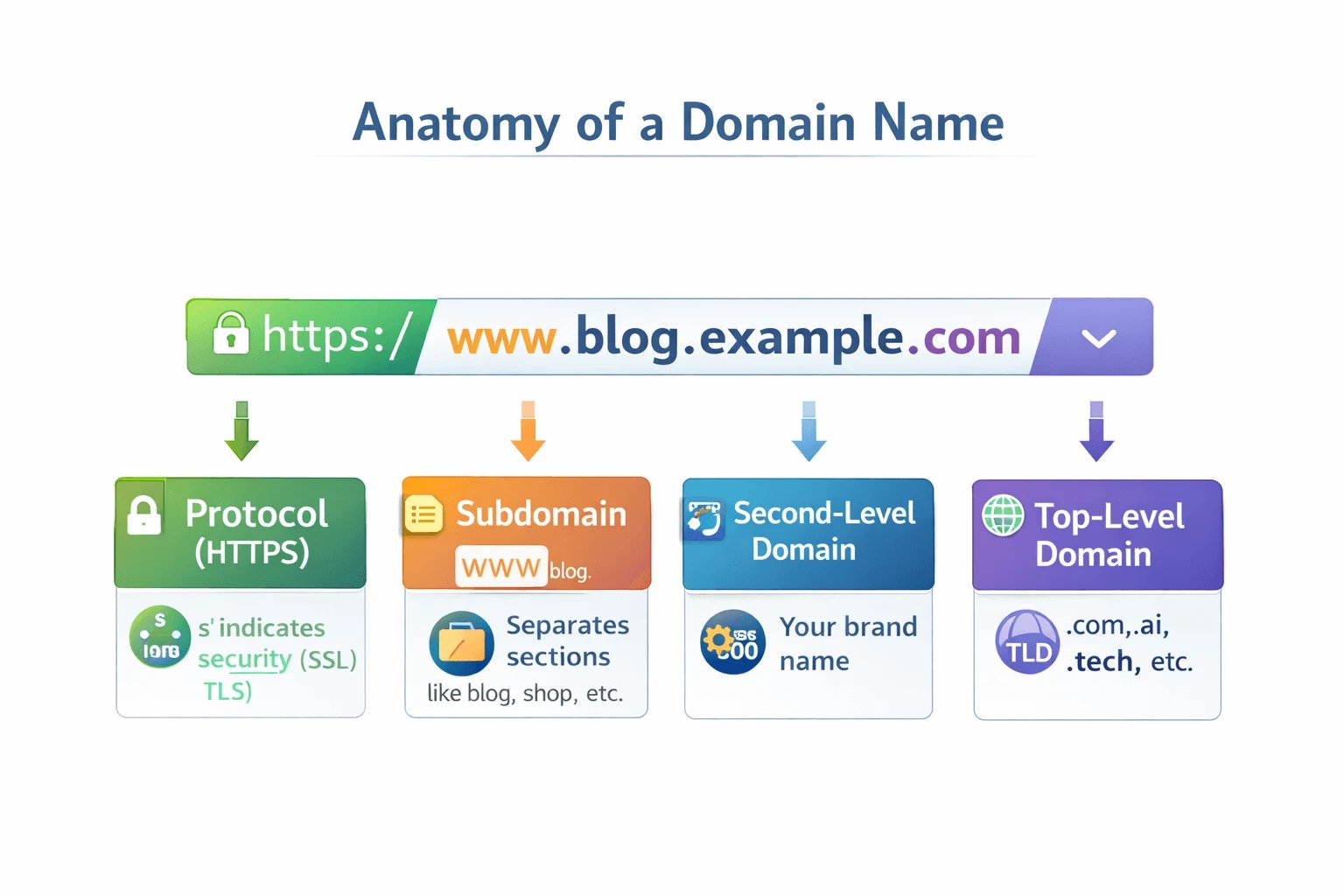
A domain name is made up of several parts, each with its own specific meaning. Let’s break down a sample address like https://www.blog.example.com together:
1. Top-Level Domain (TLD)
This is the final part of your domain name that comes after the last dot. The most well-known one is .com, but there are hundreds of other TLDs such as .ai or .tech. A TLD tells users and search engines what category, industry, or geographical location your website belongs to.
2. Second-Level Domain (SLD)
This part sits directly before the TLD and represents the beating heart of your brand. In google.com, the word google is the second-level domain. This is the name you creatively choose to stay in your audience’s mind. Its length can be up to 63 characters, but we always recommend keeping it short and concise.
3. Subdomain
A subdomain comes before the SLD and is used to separate different sections of a website. For example, if you have an online store alongside your blog, you can use shop.yoursite.com. Here, shop is the subdomain. Subdomains allow you to manage separate sections without purchasing new domains. Many websites use www, which is considered a default subdomain.
4. Protocol (HTTPS)
This part indicates your website’s security. The “s” at the end of http means that the data exchanged between you and the website is encrypted. Having this protocol is essential for building user trust and is also a critical requirement from Google.
Types of Domain Extensions: Which One Is Right for You?
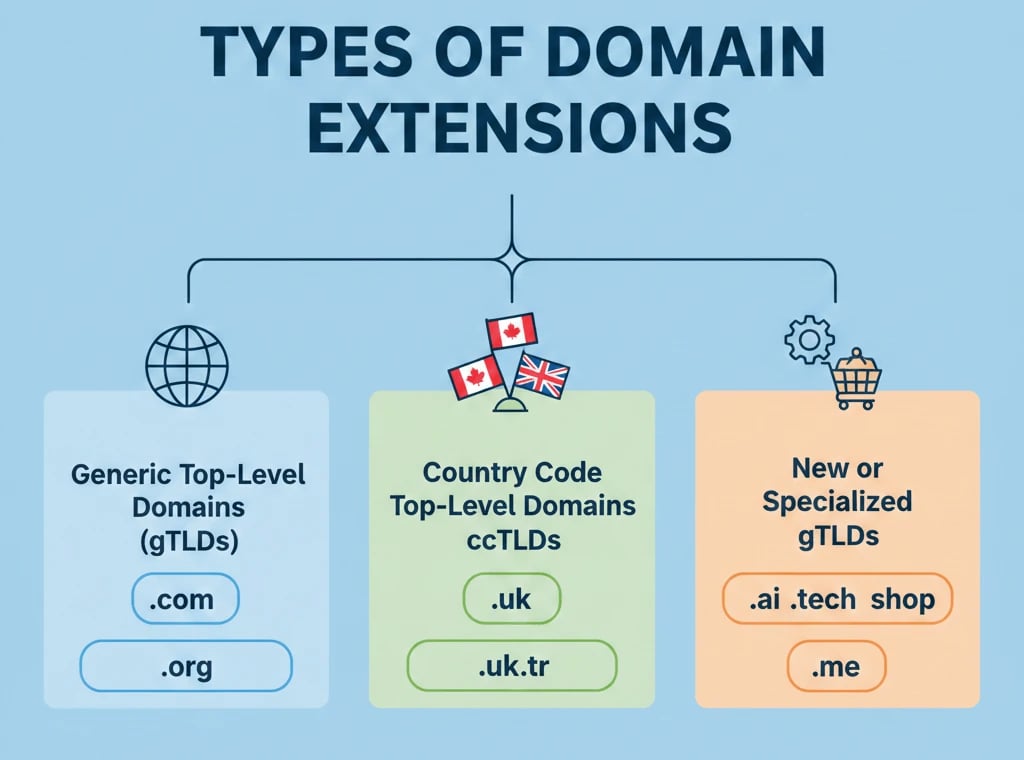
When you want to register a domain, you’re faced with a sea of extensions. Let’s look at the most important categories to make your choice easier:
1. Generic Top-Level Domains (gTLDs)
These are the most well-known domain extensions worldwide:
-
.com: The most popular extension in the world and suitable for almost any type of activity.
-
.net: Commonly used by infrastructure and networking companies.
-
.org: The best option for non-profit organizations and charities.
These extensions are a safe choice, especially if you have an international audience or want a widely accepted domain name.
2. Country Code Top-Level Domains (ccTLDs)
These extensions indicate a geographical location:
-
.ca: For Canada.
-
.tr: For Turkey.
-
.uk: For the United Kingdom.
If your customers are mainly located in one country, these extensions are both cost-effective and beneficial for your local SEO.
3. Specialized and New Domain Extensions (New gTLDs)
In recent years, many attractive extensions have been introduced that can strengthen your branding:
-
.ai: For artificial intelligence companies.
-
.tech: For technology startups.
-
.shop: For online stores.
-
.me: For personal websites and resumes.
When chosen wisely, these extensions can communicate your brand message faster and help your website stand out from competitors. To learn more about different types of TLDs, we recommend reading the PDF below.
Domain Name vs Hosting vs Website
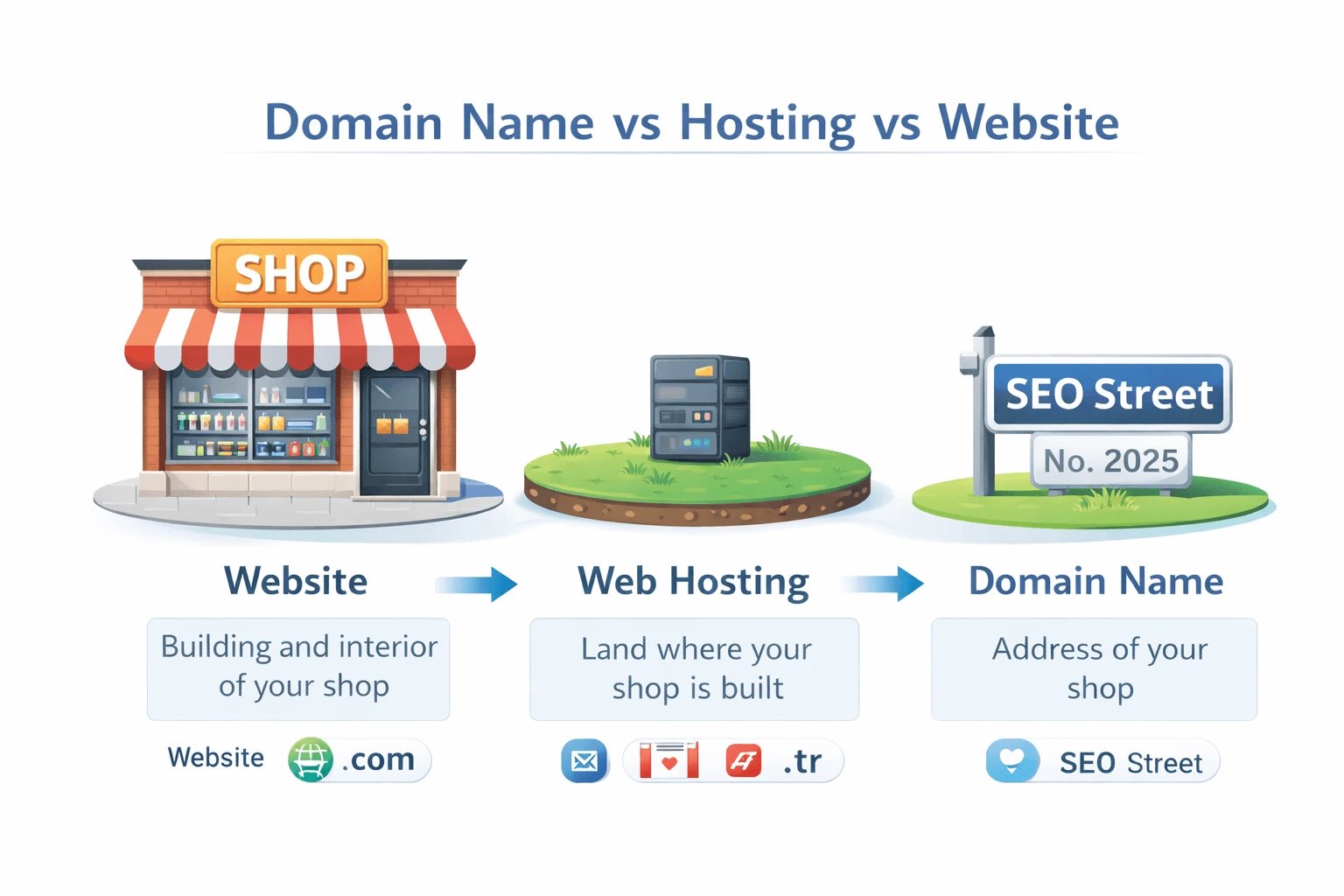
Many people who are new to the web often don’t clearly understand the difference between a domain name, hosting, and the website itself. Let’s explain this with an intuitive example:
-
Website
This is the actual building and interior of your shop. It includes all the code, images, text, and products that visitors see when they find your address and enter your site. -
Web Hosting
This is the land on which your shop is built. In the digital world, hosting is space on a server where your website files are stored. -
Domain Name
This is the address of your shop or home (for example, SEO Street, No. 2025). It’s the address you give others so they can find you.
Without an address (domain), no one can find your building. Without land (hosting), your building has nowhere to stand. And without the building (website), visitors are faced with an empty lot and an address with no destination. To operate online, you need all three.
|
Concept |
Real-World Analogy |
Role on the Internet |
|
Domain Name |
Postal address |
A textual identity and address that allows easy access for users |
|
IP Address |
GPS coordinates |
The exact numerical address of a server used for identification by machines |
|
Hosting |
Land and infrastructure |
Storage space for website files and code on a server |
|
Website |
Building and its contents |
A collection of pages and data that users view |
The table above provides a quick overview of the differences between these terms. If you’re ready to take the next step and put all three pieces together, this guide on How to host your website on the internet will walk you through the process step by step.
Winning Domain Name Selection Strategies
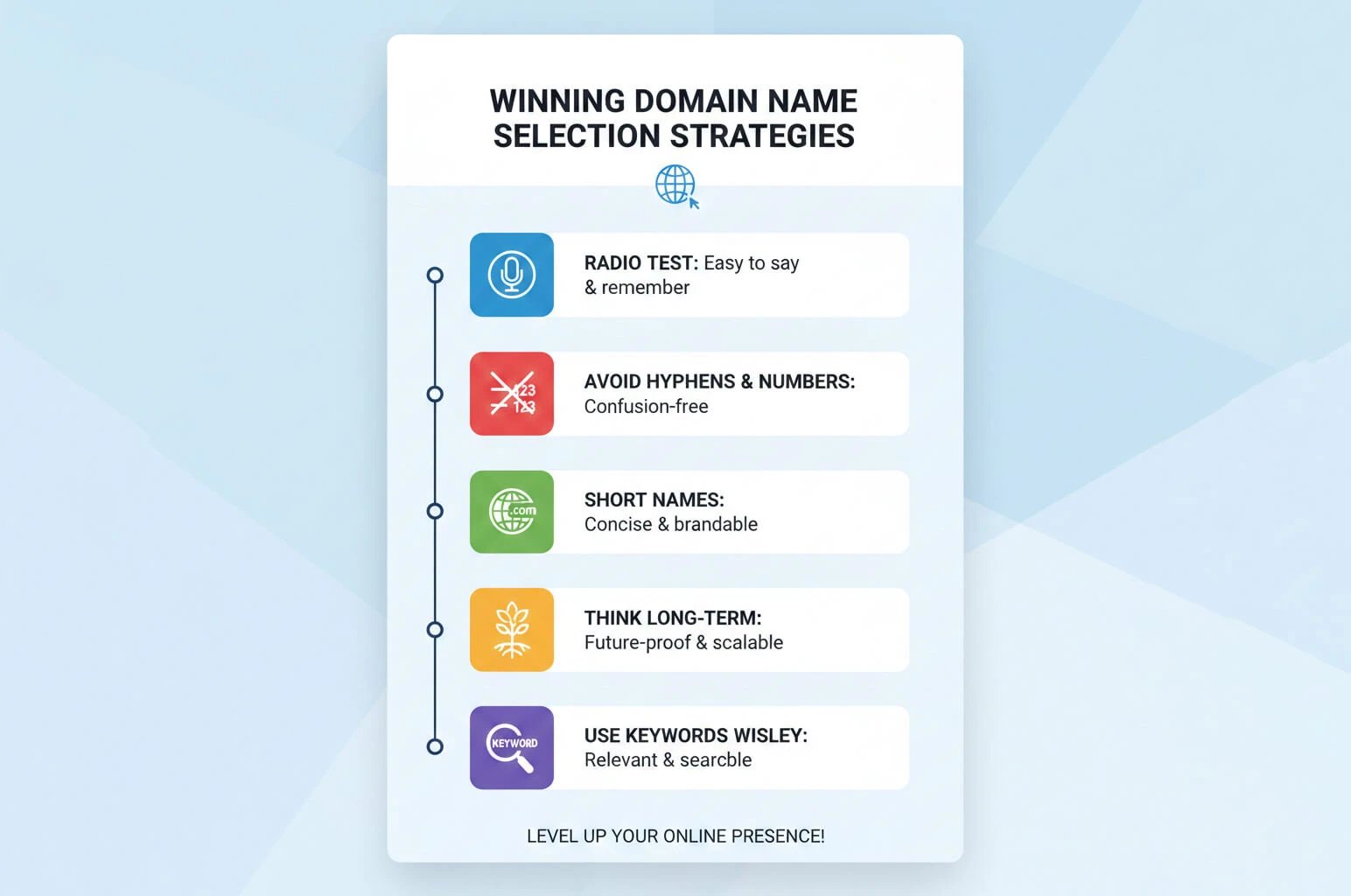
Choosing a domain name is a blend of art and science. Over years of experience, I’ve arrived at a golden checklist that can save you from costly mistakes:
-
Do the radio test: Imagine saying your domain name on the radio or in a podcast. Can the listener type it correctly without asking how it’s spelled? If the answer is no (for example, because of numbers or complicated words), forget that name.
-
Avoid hyphens and numbers: These are branding killers. People often forget where the hyphen goes or whether a number should be written as a word or a digit. On top of that, domains with numbers often give users a spammy impression.
-
Short equals powerful: Short names like apple or nike are not only easier to remember, but also faster to type on mobile devices. Try to keep your domain name under 15 characters.
-
Think long-term: If you’re only selling shoes right now, a name like perfect-shoes.com might seem fine. But if you plan to add clothing in a couple of years, that name could limit you. Choose a name that allows your business to grow.
-
Use keywords wisely: Including a keyword in your domain (such as bakingwithsam.com) can help with SEO and click-through rates, but avoid overdoing it (keyword stuffing), or your site may start to look unprofessional.
With these principles in mind, you’re now better prepared to move from theory to practice and take the next step in choosing a domain name that truly fits your brand and goals.
SEO and Domain Names: The Reality in 2025
Many old-school SEO specialists still believe that having an exact match keyword in a domain name (Exact Match Domain) works like magic. But in 2025, search engines have become much smarter. Google has clearly stated that a domain extension (such as .com vs .net) does not directly affect rankings.
That said, there are indirect effects you shouldn’t ignore:
-
Click-Through Rate (CTR): People tend to trust .com domains more, which makes them more likely to click on them in search results. Over time, this higher CTR can help improve your rankings.
-
Backlinks: Authoritative websites are more willing to link to a professional, well-branded domain than to one that looks spammy or low-quality.
-
Local SEO: If your business operates in a specific country, using a country-code domain (such as .ca or .co.uk) sends a strong signal to search engines to show your site to users in that region.
So while domain names may not directly control rankings, their impact on SEO is still very real and cannot be ignored.
Step-by-Step Guide to Registering a Domain
Now that you’re familiar with all the key concepts, let’s see how to take practical action. Registering a domain in 2025 is a fast process but requires careful attention.
-
Search and Check Availability: Use a reliable tool (such as Namecheap or Google Domains) to see if your chosen name is available.
-
Choose a Registrar: Pick a company with a strong reputation, transparent pricing, and support for two-factor authentication.
-
Complete Ownership Information: Enter your contact details carefully according to 2025 ICANN policies, and use an email address that you always have access to.
-
Enable Privacy Protection: This option hides your personal information (such as address and phone number) from public databases and protects you from spam.
-
Set Up DNS: After purchase, you need to connect your domain to your hosting. This is done by entering the "Name Servers" provided by your hosting service in your domain panel.
Choosing the right domain name and extension during registration is very important. Since popular domains (like .com or country-code domains) are limited, your preferred domain may already be taken. In that case, you might need to use a new or alternative extension or select a different name.
Domain Security: How to Protect Your Digital Asset
Your domain name is a crucial part of your credibility and digital assets. If someone steals your domain, they could potentially control all your emails and financial transactions. For maximum security, you should follow these standards:
-
Enable DNSSEC: This security layer adds digital signatures to your DNS records, ensuring that users connecting to your site reach your server and not a fake one (prevents DNS spoofing).
-
Encrypt with DoH and DoT: In 2025, standards like DNS over HTTPS (DoH) encrypt DNS queries. This prevents even ISPs from seeing which websites you visit, significantly enhancing user privacy.
-
Registry Lock: This is the highest level of domain security. When enabled, no changes can be made to your domain (even by registrar employees) without your written and multi-step approval.
By following these steps, you can safeguard your domain and ensure that your online presence remains secure and trustworthy.
Conclusion
As we’ve seen, a domain is essentially your website’s “human-friendly address,” like a shop sign in the physical world. Domains are designed for people, allowing us to use clear and understandable names instead of hard-to-remember IP addresses. The DNS system works alongside domains to translate these names into IP addresses, enabling browsers to locate websites. Finally, remember that the right domain can strengthen your brand identity and provide a positive user experience. We hope this guide helps you better understand different types of domains and how they work, so you can choose a domain in the future that supports the growth of your online project.




![What Is Cold Data Storage? ❄️ [2026 Guide]](https://1gbits.com/cdn-cgi/image//https://s3.1gbits.com/blog/2026/02/what-is-cold-data-storage-750xAuto.webp "What Is Cold Data Storage? ❄️ [2026 Guide]")
![What Is Virtual Desktop Infrastructure? 🖥️ [VDI Explained]](https://1gbits.com/cdn-cgi/image//https://s3.1gbits.com/blog/2026/02/what-is-virtual-desktop-infrastructure-vdi-750xAuto.webp "What Is Virtual Desktop Infrastructure? 🖥️ [VDI Explained]")