
Counter-Strike Server Hosting Built for Competitive Communities
Deploy a self-managed Counter-Strike server on high-frequency VPS infrastructure with NVMe storage, full root access, a virtual network connection with a defined port speed, and network-level DDoS mitigation.
Counter-Strike VPS Hosting Plans
Choose a VPS configuration for hosting a self-managed Counter-Strike server. 1Gbits provides an isolated virtual environment with allocated vCPU, RAM, NVMe storage, and a virtual network connection with a defined port speed.
Our plans run on high-frequency CPU infrastructure designed for strong per-core performance. You receive full root access to install and manage the server package, maps, plugins, configurations, and supporting services compatible with your selected Counter-Strike version.
No player-slot pricing or preinstalled game control panel is included. Resource requirements vary based on the selected version, player count, maps, plugins, logging, and other services running on the VPS. Choose a configuration with sufficient capacity for your intended workload and future expansion.
If your workload outgrows a VPS, you can compare larger virtual configurations or dedicated server options.
Game VPS1
Save 40 %$21.29/mo
Billed for 36 months
Normally $35.49
- CPU2 Core
- RAM4 GB DDR5
- Storage80 GB
- BandwidthUnlimited Europe & USA
- IP V41 Free
- IP V61 Free
Game VPS 2
Save 40 %$25.49/mo
Billed for 36 months
Normally $42.49
- CPU4 Core
- RAM6 GB DDR5
- Storage100 GB
- BandwidthUnlimited Europe
- IP V41 Free
- IP V61 Free
Game VPS 3
Save 40 %$34.19/mo
Billed for 36 months
Normally $56.99
- CPU4 Core
- RAM8 GB DDR5
- Storage100 GB
- BandwidthUnlimited Europe & USA
- IP V41 Free
- IP V61 Free
Game VPS 4
Save 40 %$50.99/mo
Billed for 36 months
Normally $84.99
- CPU6 Core
- RAM12 GB DDR5
- Storage120 GB
- BandwidthUnlimited Europe & USA
- IP V41 Free
- IP V61 Free
Game VPS 5
Save 40 %$68.09/mo
Billed for 36 months
Normally $113.49
- CPU6 Core
- RAM16 GB DDR5
- Storage140 GB
- BandwidthUnlimited Europe & USA
- IP V41 Free
- IP V61 Free
Game VPS 6
Save 40 %$136.19/mo
Billed for 36 months
Normally $226.99
- CPU8 Core
- RAM32 GB DDR5
- Storage160 GB
- BandwidthUnlimited Europe & USA
- IP V41 Free
- IP V61 Free
What Is a Counter-Strike VPS Server?
A Counter-Strike VPS is an unmanaged virtual private server that you configure to run your own game server. Unlike a traditional slot-based hosting service, the VPS gives you operating-system-level access instead of a restricted game management panel.
Using root access through SSH, you can install the appropriate dedicated server files, configure launch parameters, manage maps and plugins, and control the supporting Linux services. The exact installation process and compatible tools depend on the Counter-Strike version you choose to deploy.
This setup is suitable for community administrators, competitive teams, developers, and experienced users who want direct control over their server environment. It does not include a one-click game panel, automatic game configuration, or managed plugin installation.
Removing a preinstalled control panel reduces unnecessary software overhead, but the operating system, virtualization layer, and essential background services still consume part of the available resources. Network performance also depends on server location, player regions, internet service providers, congestion, server load, and mitigation events.
Supported Counter-Strike Server Versions
Deploy the Counter-Strike server version required by your community on a self-managed VPS. Installation files, launch parameters, plugins, ports, and resource requirements vary by version.
Counter-Strike 2
Deploy a Source 2 dedicated server using the installation files and launch configuration required for your intended game modes, maps, and community tools.
Source 2 Server
Counter-Strike: Global Offensive
Run a compatible CS:GO community server where the required server files, dependencies, plugins, and client compatibility remain available for the intended setup.
CS:GO Server
Counter-Strike 1.6 LP
Deploy a classic GoldSrc and HLDS-based server with direct access to configuration files, maps, plugins, and launch parameters.
GoldSrc / HLDS
Storage Planning for CS2
A basic CS2 dedicated server installation requires approximately 33 GB of storage. Allocating 60–80 GB is recommended when using workshop maps, plugins, logs, backups, and additional space for future updates.
33 GB Minimum
Version-Specific Port Configuration
Port 27015 is the common default game port, but the required TCP and UDP ports must be configured according to the selected server version, launch configuration, query services, RCON settings, and other Steam-related services.
TCP & UDP Configuration
Version-Specific Resource Sizing
CPU, RAM, and storage requirements depend on the selected Counter-Strike version, player count, maps, plugins, logging activity, and additional services running on the VPS.
Workload-Based Sizing
Counter-Strike Server Use Cases
A self-managed Counter-Strike VPS gives administrators direct control over server files, configurations, maps, plugins, and access rules. It is suitable for users who prefer flexible infrastructure over a restricted, slot-based game hosting panel.
Competitive Scrims and Private Matches
Create a private environment for team practice, scrims, qualifiers, or organized matches. You can manage passwords, server rules, map rotations, practice configurations, and administrative access directly from the VPS.
Deploying the server close to the main player region can help reduce physical distance, although actual latency still depends on each player's internet provider, routing conditions, and local connection quality.
Public Community Servers
Run a persistent community server with direct control over maps, access rules, moderation tools, logs, and server-side configurations. A properly sized VPS provides a flexible foundation that can be adjusted as player activity and server workloads change.
Practical capacity depends on the Counter-Strike version, player count, plugins, map complexity, CPU performance, memory allocation, and network conditions.
Custom Maps, Plugins, and Game Modes
Full root access allows you to install compatible community maps, plugins, administrative tools, and custom configurations without relying on a restricted hosting dashboard.
Plugin and modification compatibility depends on the selected Counter-Strike version and the current support status of each third-party project.
Practice and Training Servers
Create a persistent environment for tactical practice, aim training, utility testing, map review, and team coordination. Administrators can adjust round settings, restart scripts, player permissions, and other supported server variables.
Regional Deployment and Defined Network Capacity
Select a server location close to your primary player base and use an allocated virtual network connection with a defined port speed. Routing is optimized toward major consumer ISPs and player regions to support efficient data paths between players and the VPS.
Actual player latency, jitter, and packet loss may vary based on distance, internet provider routing, congestion, server load, and mitigation activity.
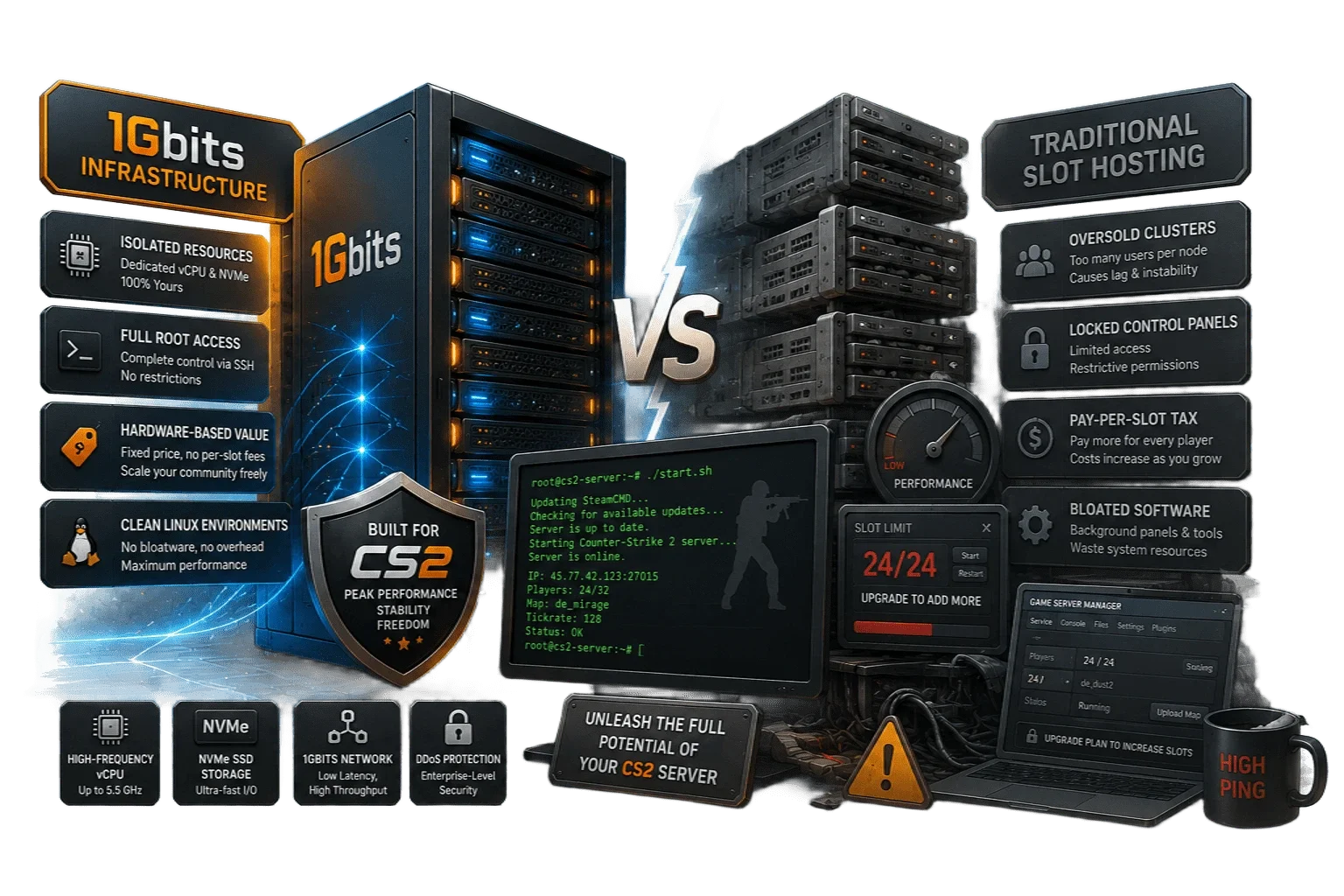
The Real Difference: 1Gbits Infrastructure vs. Traditional Slot Hosting
Traditional slot hosting and self-managed VPS hosting provide different levels of control. A slot-based provider usually handles the initial game installation and offers a simplified control panel. A VPS gives you operating-system-level access and places installation, configuration, security, and game management under your control.
Allocated VPS Resources vs. Slot-Based Environments
A VPS provides an isolated operating-system environment with allocated vCPU, RAM, and storage resources. The underlying physical CPU, storage platform, and network infrastructure may still be shared with other virtual servers depending on the selected plan.
Performance depends on the allocated resources, host infrastructure, current workload, server configuration, plugins, maps, and other processes running inside the VPS. Actual CPU and storage performance may vary according to the selected plan and current resource usage.
Complete Root Access vs. Restricted Control Panels
Slot-based game panels usually expose only selected settings and supported plugins. With a self-managed 1Gbits VPS, you receive root access through SSH and can manage the Linux environment directly.
This allows you to install the appropriate server files, adjust launch parameters, manage dependencies, configure services, and use compatible community tools without depending on a preconfigured game dashboard.
Resource-Based Pricing vs. Per-Slot Pricing
Instead of purchasing a fixed number of player slots, you select a VPS based on CPU, RAM, storage, and network capacity. You can configure the number of available player slots yourself, but the practical capacity of the server remains limited by the selected resources and actual workload.
As your server activity grows, you can move to a larger VPS configuration or a dedicated server when additional capacity or stronger isolation is required.
Lean Self-Managed Environment vs. Control Panel Overhead
A clean, unmanaged Linux environment does not include a preinstalled game management panel. Removing a control panel reduces unnecessary software overhead, but it does not make all hardware resources exclusive to the game server.
The operating system, virtualization layer, network services, monitoring processes, and other essential components continue to consume part of the available resources.
This approach requires command-line familiarity and direct server administration. In return, you receive greater control over the operating system, game files, configurations, services, and supported community tools.
Key Features of 1Gbits Counter-Strike Server Infrastructure
A Counter-Strike server requires a balance of CPU performance, memory, storage speed, network quality, and correct configuration. 1Gbits provides self-managed VPS infrastructure with direct control over server files, services, resource usage, and network settings.
Routing Designed for Player Regions
Our network infrastructure uses optimized routing toward major consumer ISPs and player regions. Selecting a data center close to your main player base can help reduce physical distance and unnecessary routing.
Actual latency, jitter, and packet loss still depend on player location, internet provider routing, congestion, server load, and local connection quality.
Full Root Access for Server Configuration
Receive full root access to a self-managed Linux environment. You can install compatible dedicated server files, manage dependencies, edit configurations, set launch parameters, and use supported maps, plugins, and administrative tools.
Network-Level DDoS Mitigation
DDoS protection helps detect and mitigate malicious traffic targeting the network or game server. Mitigation time and service impact may vary depending on the attack type, volume, protocol, source distribution, and affected route.
High-Frequency CPU Infrastructure and NVMe Storage
Counter-Strike server workloads benefit from CPU models designed for strong per-core performance. High-frequency CPU infrastructure can help process game logic, player activity, physics, plugins, and server-side calculations efficiently.
NVMe storage supports faster file access, map loading, log operations, updates, and server restarts. Exact performance depends on the selected plan and current workload.
Scalable VPS Resources
Start with a VPS configuration suited to your initial workload and move to a larger plan as player activity, plugins, maps, logging, or additional services increase resource usage.
Scaling infrastructure does not replace workload monitoring. CPU, RAM, storage, and network utilization should be reviewed when selecting or upgrading a plan.
24/7 Core Infrastructure Support
Infrastructure support is available for issues related to network connectivity, host hardware, power, and VPS accessibility. Game installation, server configuration, maps, plugins, scripts, operating-system administration, and player management remain the customer's responsibility.
FAQs
No. The service provides a clean, unmanaged VPS environment rather than a preinstalled game management panel. You receive root access and manage the operating system, server files, configurations, maps, plugins, and updates directly.
Removing a control panel reduces unnecessary software overhead, but the operating system, virtualization layer, essential services, and monitoring processes still consume part of the available resources.
1Gbits does not charge exclusively by player slot or enforce a hosting-panel slot limit. However, the practical number of players a server can handle depends on the selected Counter-Strike version, CPU performance, RAM, map, plugins, game mode, logging activity, network conditions, and other services running on the VPS.
Administrators should monitor actual resource usage and upgrade the server when the current configuration approaches its capacity.
No. Native game backup and automatic restore tools are not included with the unmanaged VPS service. Customers are responsible for protecting server configurations, maps, plugins, logs, databases, and other files.
You can configure your own backup scripts, cron jobs, remote storage, or another backup solution supported by the operating system.
Yes, you receive root access and can install compatible maps, plugins, frameworks, administrative tools, and custom configurations. Compatibility depends on the selected Counter-Strike version, operating system, server build, dependencies, and the current support status of each third-party project.
1Gbits uses network infrastructure with optimized routing toward major consumer ISPs and player regions. Choosing a data center close to the majority of your players can help reduce physical distance and unnecessary routing.
Actual ping, jitter, and packet loss cannot be guaranteed because they also depend on player location, local internet quality, ISP routing, congestion, server load, and network events outside the hosting provider's direct control.
Network-level DDoS protection helps detect and mitigate malicious traffic. Mitigation time and service impact may vary according to the attack volume, protocol, duration, source distribution, and affected route.
Some attacks may still cause temporary latency, packet loss, connection interruptions, or reduced availability.
VPS provisioning and Counter-Strike server installation are separate processes. After the VPS is provisioned and login credentials are issued, you must connect to the server and install the appropriate game server files yourself.
Provisioning time may vary depending on payment verification, location, operating-system deployment, available capacity, and order review. The Counter-Strike game server is not automatically installed or ready for players when the VPS is delivered.
Basic Linux, SSH, firewall, command-line, and dedicated server administration skills are recommended.
1Gbits Customer Reviews
The best proof of an elite gaming network is the word of the community. Want your feedback featured here? Head over to your client dashboard and leave us an honest review!
 Mari NJason L